BigTime IQ is time and expense tracking software from Chicago-based BigTime Software.
$20
User per Month
Clockify
Score 8.4 out of 10
Small Businesses (1-50 employees)
Clockify, from COING in Palo Alto, is a time tracker and employee timesheet software for teams of all sizes. Clockify lets users track how much time is spent working on tasks, as well as keep track of employee timesheets and billable hours, project completion, reports, and schedules.
$0
forever, unlimited everything
Harvest
Score 8.9 out of 10
N/A
Harvest is used to track time, gain insights from past projects, and get paid for work. Dedicated apps and integrations with popular tools like Asana and Slack allow Harvest to fit into a team’s workflow.
A selection of visual reports are offered to keep projects running smoothly and an organization's team supported. Harvest also helps to turn a team’s tracked time and expenses into professional nvoices and collect payment quickly with integrated online payments.
$13.75
per month per seat
Pricing
BigTime Software
Clockify
Harvest
Editions & Modules
Essentials
$20
User per Month
Advanced
$35
User per Month
Premier
$45
User per Month
Projector
$60
Clockify Free
$0
forever, unlimited everything
Clockify Plus
$9.99
per month, per workspace
Clockify Enterprise
$9.99
per month, per user, per workspace
Clockify Premium
$29.99
per month, per workspace
Clockify Server
Starts at 450
Harvest Pro
$13.75
per month per seat
Harvest Premium
$17.50
per month per seat
Offerings
Pricing Offerings
BigTime Software
Clockify
Harvest
Free Trial
Yes
Yes
Yes
Free/Freemium Version
No
Yes
Yes
Premium Consulting/Integration Services
Yes
Yes
No
Entry-level Setup Fee
Optional
Optional
No setup fee
Additional Details
—
Unlimited usage and number of users for free. Paid plans are solely for access to additional features. Self-hosting software on own servers available.
20% discount for annual billing on Pro and Premium plans.
Harvest is a bit more robust and offers additional related options such as invoicing (which Clockify does not have) though most people invoice through another system anyway.
I'd like to start by saying, I rarely give 10's on anything, almost always 9's, the main reason for my 10 rating is the support I've received from this team/company. BigTime Software has been well suited for our company b/c it's giving a window into the project budget and time frames to our Project Managers to proactively manage their projects and look for areas to improve and celebrate with support staff. I would say efficiency in time management. BigTime Software is not an accounting software and I love that about it. We were looking for a tool for staff to manage their projects and stay on budget and track time and generate invoices all in one place and we've found that with BigTime Software.
Clockify is an easy 10 over 10 recommendation for me. I would recommend this anyone especially if they're required to track their time and productivity while on the job. Office workers, tellers, bankers - any desk jobs really can very well use the awesome features of Clockify to the fullest extent. It is easy to use, very simple to set up, and doesn't require that much resource from your computer for up-keep
Harvest is ideally suited for a variety of scenarios, particularly in the realms of freelance or consulting work, where accurate hour tracking for billing is crucial. It excels in small to medium businesses managing team projects, allowing for effective resource allocation and time management across multiple concurrent projects. For budgeting and forecasting, Harvest provides valuable data, aiding in accurately estimating the duration and cost of future projects based on past data. It's also highly beneficial for remote or distributed teams, thanks to its cloud-based platform that facilitates seamless coordination. Additionally, its detailed reporting features enhance client transparency, fostering trust through clear communication of time spent on projects. However, Harvest may be less suitable for larger enterprises with complex integration needs or specialized industries requiring more niche features. Small startups or individuals on tight budgets might find the cost challenging, especially if they don't fully utilize all its features. Lastly, for those needing only basic time tracking, simpler or free tools might be more appropriate, making Harvest an unnecessary expenditure for basic needs.
Clockify records exact times on a per project basis when you click Start/Stop.
User interface is very easy. It is easy to add a project on the fly, change the times I just recorded if I forgot to click Stop for example. The interface is intuitive and gives me the flexibility I need.
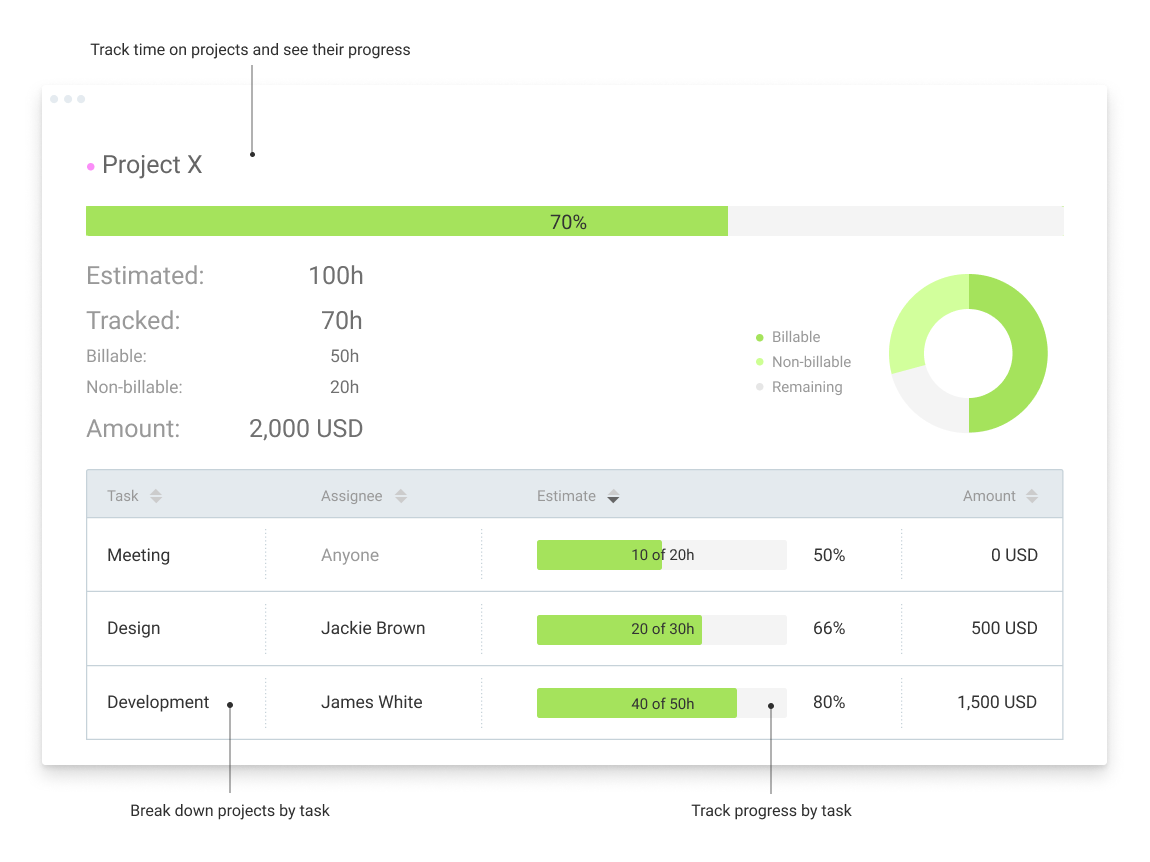
Reporting gives me everything I need from times, hours per project, billable or not, per client and any tags I've created. This provides enough flexibility for many different use cases.
Offers several options on using the tool, for example, you can use the app on your phone, the app for desktop, or simply have the website open.
The timer integrates with other platforms. For example, our team uses Asana as our project management tool. Now, in real-time, I can know which projects my team is working on and whether we're implementing good time management strategies to meet our goals.
The summary break downs are wonderful! You can view an individual's hours as well as project hours. There are even notifications you could receive when your team is getting close to reaching the allotted time for a client's project.
For some types of projects, we are unable to use BigTime's invoicing feature. It would be nice if we could further customize invoices to fit our needs. We still have to use Quickbooks to complete certain invoices.
Being able to create Purchase Orders in BigTime would be extremely useful to us. We currently use Quickbooks for this.
In general, manuals or how to use instructional videos are always welcome - just covering the very basic are very good to get everyone up and running.
Maybe work on your scalability - the main reason why we switched to a different provider is because the company was ramping up and the competitors have more features that come with not just time and productivity tracking.
I always like the classic blue and white pallets on the app but sometimes I just wish there's more option to customize how it looks just to give it a little more flavor.
I’m still trying to figure out how tasks best associate to a specific project. There’s a couple different places to edit that and I’m a little confused as to best practice.
Does not integrate into basecamp which is our project management system
I'm using the free version at the moment and loving it. What a great product, easy, responsive and has better up time than Yahoo Mail. :) What isn't there to like?
Overall most areas of the software are easy to use. I tend to spend a lot of time in analytics and reports. Those are not as user friendly, in my opinion, and could use some improvements. I think it just takes time to get familiar with where items are stored in the program and what changes affect what.
Very affordable, accessible and simple. For this very reason I would say, it culminates to Clockify being very beginner and start-up friendly. It is its strongest suit after all, and this is the main reason why I would recommend this to anyone. I am very thankful for me ex colleague who recommended this to me, we're no longer working together but I still hear that he's still using Clockify to this very day on his own business
Again, just a minor compatibility issues using with other platforms such as Basecamp, but it does do everything promised. The only downfall we have found is having to create a job in both platforms and then connecting them later vs being able to create a project once and having them automatically connect.
I have never had an issue logging in or it not being available. I use Clockify every work day during the week, frequently starting/stopping projects. I've had past experience with other systems that suddenly aren't usable for an hour and that is something I have never experienced with Clockify. They are doing something right on their backend. Nice job, Clockify folks
I already mentioned how it feels light across the wire. Pages load fast in the web browser. I have not tried the browser plug-in nor the mobile app. I give it a 9 instead of 10 as the desktop app seemed to hesitate when I clicked the start/stop of a project/task
The support is amazing! They are always available through the chat interface in the program. Each support person has fully answered my questions the first time. I have had a positive experience with each inquiry. It is very important to me that I am able to get instant access to help so that I can make the most of the software and all of its capabilities.
I dealt very little with customer support because Clockify is so easy to use. That being said, the few times I did, I got fast responses and any issues that I did have were solved in a very fast manner.
They're very responsive and do their best to answer whatever questions we've had. Sometimes, the question or request we've made is for a feature that doesn't yet exist, however in most cases those features have been built later and did eventually address our need.
I touched on this briefly, in another survey section, but my implementation manager, Kevin, was exceptional. The actual implementation process took 3 months, not 1 before I was comfortable rolling it out to staff. We also had to wait/schedule time and coordinate for our custom xml. invoice to be generated and in a place we felt comfortable sending it out to clients. In the end I was very satisfied, but during the first few months it was challenging.
I liked the client management, but it didn't do time tracking, billing or syncing with quickbooks. It was too robust for my needs. I tried it for the client management and thought I might use it along with bigtime, but it was too cumbersome and would involve too much double entry. And it didn't track time or bill which are necessary functions
Harvest is very similar to Clockify. The only difference is that Harvest also has an invoicing and billing system built into it. So if you're billing your clients based off of time directly, Harvest may be a better option as far as that goes. Of course, Harvest only has minimum billing increments of 6 or 10 minutes, there is no 10-minute option so that's something where Clockify has them beat. They are both very easy to use.
Harvest is significantly better than Jira. I think Jira's is not originally intended to be used as a time logging/management system, but we had been previously using it as that. It was much clunkier, and many employees had a difficult time using it as a user interface goes. Harvest is much more user friendly and has simplified the daily time-logging process for everyone in our office
The product is useful for faster billing and efficient timesheet logs. I do like the report features however there are many options and can be overwhelming for the user. It is most helpful to set up reports speaking to an agent to ensure the right fields are set, etc.
Because it feels light on the wire and runs so smoothly with great up-time. I have to assume that the same is true as it scales. I'm a single user so maybe I don't see if there are any scalability issues. With the way it seems architected to run so quickly across many platforms (desktop, mobile, web, browser plug-in), I have to think that it is using recent technology that provides scalability options
Before BigTime, we were using Excel to track everything, creating invoices, and run reports. Getting on BigTime has saved us tons of time and effort which equates to dollars saved on labor.
From a legal standpoint, BigTime has allowed us to be organized and prepared in the event we would need to present financial details to anyone.
The free plan really did everything we needed for the 6 months or so we used it. Without Clockify, we would have had to pay roughly $40+/month for a software tool.
When we upgraded to the paid version, it was still only $10/month and helped us be able to have minimum billing increments which is a huge monetary increase.