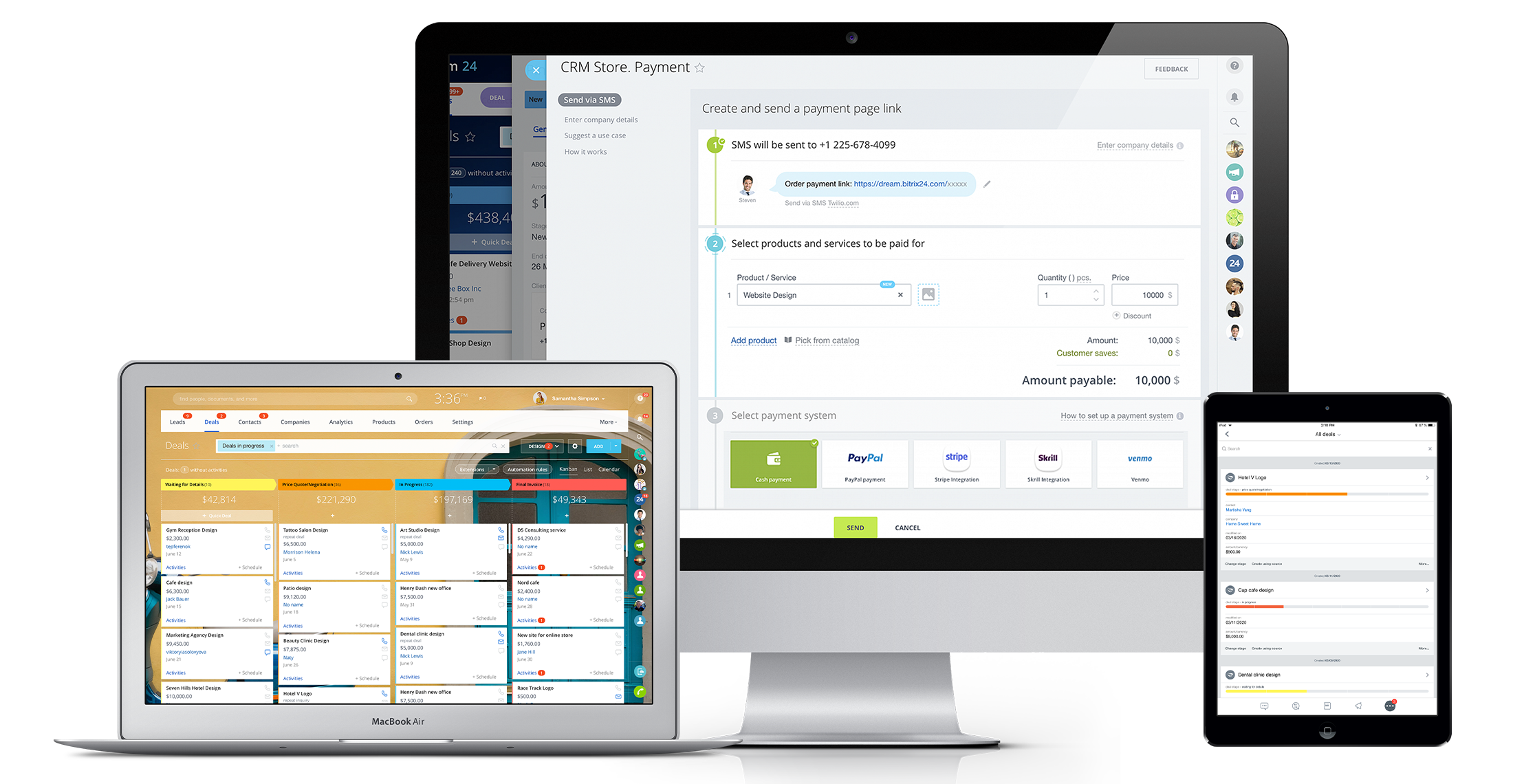
Bitrix24 is a local-hosted or cloud-based social intranet and project management platform that also contains core HR (HRMS) and CRM features. Bitrix24 also provides time management services and employee self-service.
$61
per month up to 5 users
Jobber
Score 8.6 out of 10
N/A
Jobber is field service management software from the company of the same name in Edmonton, Alberta.
We use Zoho for our own firm and Bitrix24 for our client's firm. Overall, the key differences noted, so far, are 1. the user interface for Bitrix24 is much more visual 2. It has much better privacy and access controls 3. Customer service is faster 4. the mobile app is easier …
In fact, I use both, but in different ways, monday to control the internal agenda, Bitrix for all other parts within the company, such as task control, chat with employees and with calendar also for control in two systems. Bitrix is more complete and has many more features, …
1CRM was not so smart tool and firstly it took us a very long time to understand the basic working of 1CRM that is why I admire the ease Bitrix24 has provided us that its interface is clean and all the features are visible and obvious. We don’t have to spend much of our time in …
These other CRMs are very modular and this implies that each module has an additional cost associated with it, unlike Bitrix24 that has all the tools in one with a single annual or monthly payment.
The plethora of features and also the beta ones like CRM Analytics, Sales center, and Online Store. I forgot you can also build an online store too. For the value, ease of use, features, this is one of the best to use. It's a time saver from changing from one app to another, …
Salesforce will appear to cost more "out of the box" but due to the way B24 operates, Salesfoce will cost you less and consume much less of your time to deploy
We went with Bitrix because it avoided the per seat cost of large sales teams. We discovered you get what you pay for. We wasted $800 given their no refund policy, but more importantly lost 3 months of quality sales management.
Bitrix24 has the most comprehensive software package, that can grow with the business. Its free package is the same as the paid package in terms of functionalities. Its Gantt chart capability allows all of the users to visually see the progress of the projects, in a way that …
Bitrix stacks up beautifully and goes beyond others in certain features. Just like any other software it has its own pros and cons but overall is an excellent software to work on if it can satisfy majority of your needs. Overall it can do very well with just a few minor …
I've attempted various task administration/joint effort apparatuses including Asana, Basecamp, Wrike, Wunderlist, Zoho, Salesforce, and so on. I can't address the client support of Bitrix, as I haven't reached them. Up until now, the framework has been genuinely dependable. The …
Bitrix24 is less expensive but less flexible and less tailor made. It doesn’t allow Active Directory synchronization which is a must have for us. It has a worse user experience. Building workflows is complex.
Bitrix24 has a very wide functionality, compared to competitors. But the technical program is crude. It is very unstable work. Therefore, our company currently uses AmoCRM.
The choice of the B24 was prompted by the fact that in 2012 the company had a box version, but without the CMR. The license was expired, the version was no longer supported by B24. In the stages, the company's directorate drove the employees into tasks for B24, but with …
Bitrix24 is more complete in terms of features and suits better as a communication tool to work as an internal social network. It lets you test or use the product for free (not just for a small period of time).This trial is limited to 12 users (enough to get a good perception …
Bitrix24 is very well suited to our oranization as per our busineess function. We need something which partly does CRM function, share function, chat, meetings. In all, we found Bitrix24 better and cheaper than Sharepoint. Sharepoint is very good but it has his own way [of …
I felt Jobber is easier to use than yardbook. The Jobber App is huge and so easy to use in the field. Yardbook doesn’t offer an app for IOS as of this date.
Jobber is a one stop for all program and a lot easier in usage. It is a lot more streamlined and everything is way more transparent for both the clients and employees. Time tracking is also very accurate and gps is also tracked which makes it very nice. Client also has the …
More expensive than Jobber and more complicated. Pretty much does the same tasks. I canceled after 2 days of Housecall Pro and continued using Jobber. Jobber makes my life simple and I need that while running a busy cleaning company.
Square only allows for scheduling to one person. And my team couldn’t see their schedules. As a cleaning company, I need to let cleaners know what their pay is without them seeing what I’m charging. That’s game changer about Kobber.
We looked at Housecall Pro, Fieldroutes, and Skedulo. Jobber seemed like a better fit and came highly recommended by someone who has another property management company.
(FieldEdge) Jobber has a much better mobile app that is intuitive and easily used. Also, the process flows better its natural progression, it is much simpler (the competition was adding and adding features) and serves all the needs with its simplicity, it is much neater in the …
Bitrix24 is a unified platform with all features in one place. It has a smooth deployment and implementation process. The software boosts teams' productivity and ensures flawless collaboration. Pricing of the software is incredibly affordable. It is highly customizable and a scalable CRM solution.
The cost of Jobber is not suitable for a startup - even our company size is hard pressed to squeeze in other areas of business to afford the cost. Zenmaid or other maid-forward services may be better suited since Jobber seems to focus it's offerings on one-off as opposed to recurring services like ours. For business who do in-person estimates like ours, the streamlined estimate feature which causes increased conversion rates makes it worth the cost - as we anecdotally gain more business this way. However, if we switch to an online booking / instant booking model as opposed to in-person estimates, we may not require this feature. Zenmaid has a "gamified" residential booking page that was extremely high converting for us - we received sometimes 30+ inquiries per day due to the ease of use - MANY more completed inquiries than we receive now - but they didn't have a quoting and deposit collection tool - so here we are. If we used their instant booking feature we would have stayed due to the scheduling tool, gap finder, prevention of double booking employees, and cleaning service focus, as well as significantly reduced pricing.
The recurring job feature was key to our decision in selecting Jobber. There's a lot of flexibility in how you schedule recurring work. I especially like that you can select the frequency (weekly, monthly) coupled with either a specific date or day of the week/month.
Client email reminders help our clients know when we're coming and provide an important point of contact. Customizing the email was easy.
Client overview. It's extremely helpful to be able to view a client's record and see the upcoming visits along with the completed work.
It's user interface can use some work. Although it doesn't take as long as some other software to learn, there is still a bit of a learning curve when it comes to day to day usage.
Bitrix offers a lot of features. It would be nice to have those features laid out in an easier-to-read layout, versus the long list at the side of the page.
It's mobile app functionality is quite limited. It can be difficult to work with other team members, solely off of their mobile app.
When I open Jobber for daily use, we frequently need to clear advertisements - specifically regarding referring Jobber to others. If it were related to product updates, it may be more relevant, but consistent referral promotions or online web-events are not what I want to clear when I just want to get to work in my expensive crm software
Reports are frustratingly bulky and inconsistently formatted - the report generator doesn't include all reports, most notably missing is timesheets. An extra step to view the list of available reports was recently added after additions to paid, optional service offerings were placed higher on the menu, requiring scrolling to reach the reports.
A web developer was hired by us to streamline some of our necessary reports into a calculation / report upload tool. Further changes were made to the actual reports on Jobber's end that were (very minorly helpful for us and not worth the cost or the effort put into the upgrade that I could tell, in the fact that) we have to pay the developer to rework our calculation tool due to simple changes in the order of the columns
Scheduling - we were optimistic about the beta schedule but the absence of dispatch view is a glaring gap. Additional page realestate is used in the beta mode that makes less of the schedule visible. Changes were made to "complete" job's next steps that add work for us.
It has become the central nervous system of the business and has constantly proven to be of value. We are not just renewing but might even upgrade to advanced Bitrix24 plans and will be adding more user licenses in the next 3 months. Bitrix24 has a sharper learning curve initially. However once it is surpassed, it opens doors to a range of creative deployment strategies
This application is a complete scam and way over priced for what you are getting. They are filled full of false advertising and false statements regarding integrations. They claim to integrate with quickbooks and they DO NOT. This software accomplished nothing but making our day to day lives more difficult and wasted months of our time attempting to build out.
Jobber is an easy-to-use and friendly software designed for efficiency. Its interface is well-organized, ensuring that each section is intuitive and accessible. Users can navigate smoothly through tasks, making project management simpler. Overall, Jobber enhances productivity and streamlines operations, making it a valuable tool for various projects.
I can't recall any instance of unplanned outages over the past 1 year of use. Likewise for application errors. However note that, advanced users will have a learning curve
It comes with a lot of features for managing customers relation for making a dynamic marketing strategy. Sharing and attaching any type of file makes our work much easier for our portfolio. I personally don’t like its customer service that needs to be vigilant and should know the way they should treat their clients
There is hardly an app that covers it all while staying simple and wrapping up the process. From the filing of the request, everything goes smoothly following a natural progression. Reports are insightful, give you an instant overview and easy to understand. In addition, you can easily track any information from those on clients to expense tracking.
Overall the training was very comprehensive. The trainer did provider necessary additional reading materials as well. However the general approach at Bitrix24 is to divert users to self-help documentation and videos. It is recommended that atleast 1-2 personnel in the organization be "Bitrix24 experts" so that lower phases of training requirements are covered internally itself. Also the best part about Bitrix24 is that not all users need to go very deep while using it. We have multiple counsellors who started using it on day 2 without any major hiccups
The plethora of features and also the beta ones like CRM Analytics, Sales center, and Online Store. I forgot you can also build an online store too. For the value, ease of use, features, this is one of the best to use. It's a time saver from changing from one app to another, just use one. It is a one-stop CRM. If you are a startup you can begin with this and then slowly get on a paying option. The free offers a lot too. This platform can grow with your business and help save time too.
More expensive than Jobber and more complicated. Pretty much does the same tasks. I canceled after 2 days of HouseCall Pro and continued using Jobber. Jobber makes my life simple and I need that while running a busy cleaning company
The scalability and reliability is almost 9.5/10 to be honest. We istarted with Bitrix24 for just 2 functions and now have expanded its usage to 2 more. In terms of users, every full-time employee (FTE) now uses Bitrix24 without fail. We are also working on giving limited/partial access to external service providers
Bitrix24's comprehensive communication and collaboration features have a positive impact on businesses by streamlining workflows, enhancing team coordination, and boosting productivity. By offering a centralized platform for project management and communication, Bitrix24 helps teams save time, minimize inefficiencies, and make well-informed decisions. This improved efficiency and collaboration result in better project outcomes, quicker time-to-market, and increased customer satisfaction, all of which contribute to a positive return on investment (ROI).
Negative Impact:
Despite the range of features and benefits, Bitrix24's complexity and learning curve can present challenges for new users. The initial investment of time and effort required for onboarding and becoming familiar with the platform may temporarily impact productivity. Additionally, if organizations do not fully leverage all the available features or if Bitrix24 doesn't align well with their specific business processes, it may result in a negative impact on the return on investment (ROI).