Overview
ProductRatingMost Used ByProduct SummaryStarting Price
Blender
Score 9.2 out of 10
N/A
Blender is a free and open source 3D creation suite available in under the GNU General Public License. It supports the entirety of the 3D pipeline—modeling, rigging, animation, simulation, rendering, compositing and motion tracking, video editing and 2D animation pipeline. Blender Cloud is a related service accessible via subscription, and is a training and content platform providing access to expertise from the Blender Institute for advancing one's use of Blender.
$11.50
per month
KeyShot
Score 8.4 out of 10
N/A
Luxion, headquartered in California, offers KeyShot, a 3D rendering software.
$995
Markup Hero
Score 9.0 out of 10
Small Businesses (1-50 employees)
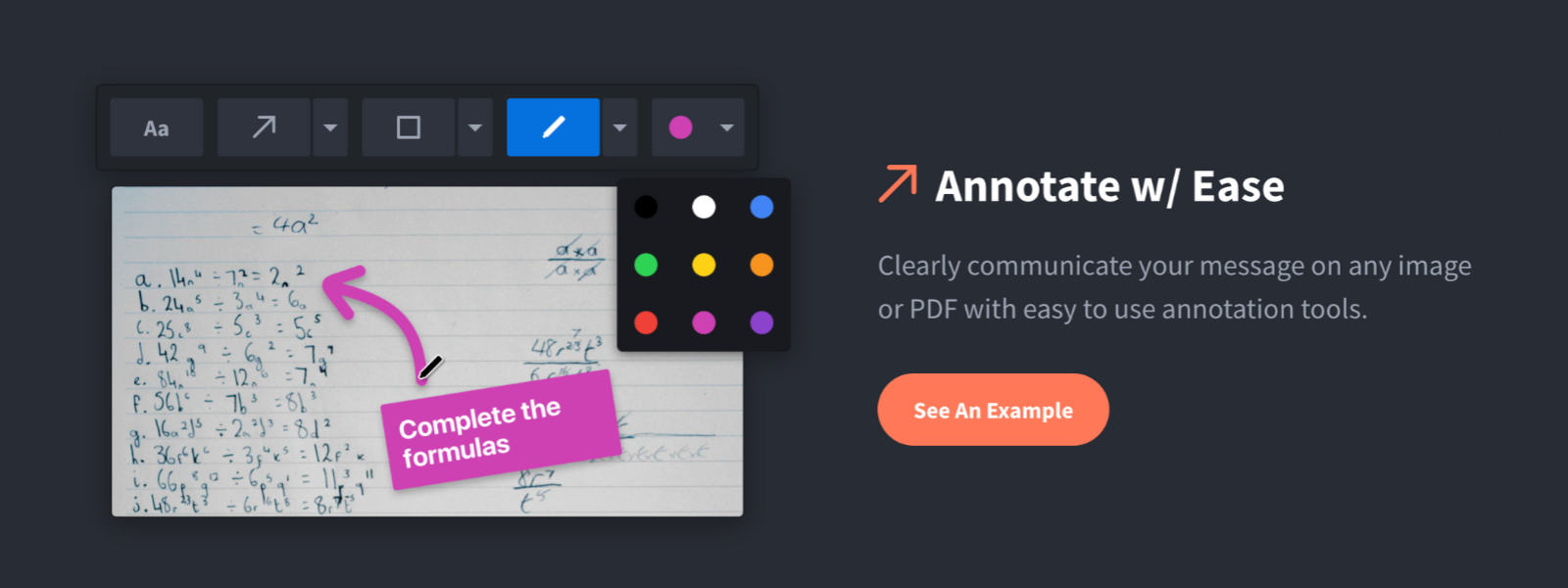
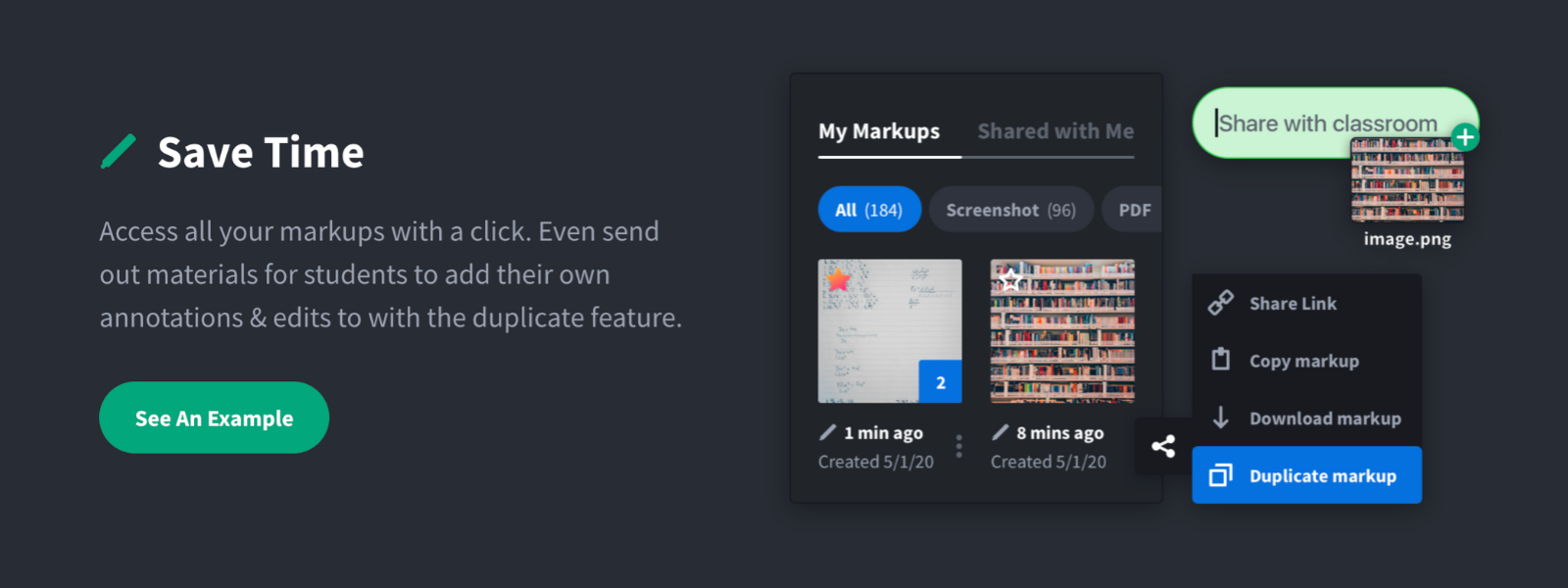
Screenshot, Annotate & Share Markup Hero is an annotation and screenshot tool designed to allow users to capture ideas, communicate clearly, and save time. Features Include: Screenshots Desktop app for Mac, Windows & Linux Works on any device including mobile Chrome extension Annotate screenshots, PDF's, images and URL's Always editable - annotations do not flatten permanently Arrow, text, rectangle, oval,…
$5
all features, unlimited markups, unlimited storage, unlimited bandwidth
Pricing
BlenderKeyShotMarkup Hero
Editions & Modules
Blender Cloud Membership
$11.50
per month
KeyShot 10 HD
$995.00
KeyShot 10 Pro
$1,995.00
KeyShot 10 Floating
$2,995.00
KeyShot 10 Enterprise
$3,995.00
Superhero
$5/month
all features, unlimited markups, unlimited storage, unlimited bandwidth
Hero
FREE
10 markups per month, 3 days editing history
Offerings
Pricing Offerings
BlenderKeyShotMarkup Hero
Free Trial
NoNoYes
Free/Freemium Version
YesNoYes
Premium Consulting/Integration Services
NoNoNo
Entry-level Setup FeeNo setup feeNo setup feeNo setup fee
Additional Details
More Pricing Information
Community Pulse
BlenderKeyShotMarkup Hero
Considered Multiple Products
Blender
Chose Blender
Blender is just as good as Cinema 4D. One huge advantage Blender has is that its free and you don't have to worry about upgrades or license upgrades when wanting to download or purchase the latest version
KeyShot
Chose KeyShot
KeyShot is easier to use and select materials.
Markup Hero

No answer on this topic

Best Alternatives
BlenderKeyShotMarkup Hero
Small Businesses
Onshape
Onshape
Score 8.3 out of 10
CorelDRAW Graphics Suite
Score 7.3 out of 10
Sendspark
Sendspark
Score 10.0 out of 10
Medium-sized Companies
Onshape
Onshape
Score 8.3 out of 10
GIMP
GIMP
Score 8.2 out of 10
Snagit
Snagit
Score 9.6 out of 10
Enterprises
Navisworks
Navisworks
Score 9.3 out of 10
CorelDRAW Graphics Suite
Score 7.3 out of 10
Snagit
Snagit
Score 9.6 out of 10
All AlternativesView all alternativesView all alternativesView all alternatives
User Ratings
BlenderKeyShotMarkup Hero
Likelihood to Recommend
9.8
(25 ratings)
9.0
(3 ratings)
9.6
(2 ratings)
Usability
8.5
(2 ratings)
-
(0 ratings)
-
(0 ratings)
Support Rating
-
(0 ratings)
9.0
(1 ratings)
-
(0 ratings)
User Testimonials
BlenderKeyShotMarkup Hero
Likelihood to Recommend
Open Source
Blender is an excellent tool for everything from simple to complex 3D animations, the creation of 3D images, etc. It performs excellently in all of these areas. In the realm of 3D modelling, animation and rendering, there is very little that Blender is not suited for.
Read full review
Luxion
KeyShot can do some really amazing things as far as product renderings. You can turn simple 3D models into realistic images in a very short amount of time. I wish there were a way to manipulate the geometry once imported into KeyShot. The software allows this user to move geometry but not change its shape or form.
Read full review
Markup Hero
For us, it's sending real estate setup sheets with multiple properties and lots of comments and feedback. It's great for quick feedback and shares. If I need to make a custom graphic tho its not quite powerful enough as Photoshop or other tools. The former is about 90% of my use cases, the latter only 10% so it's still worth it. But I can see they are adding more and more design oriented features so I suspect I won't need Photoshop much longer.
Read full review
Pros
Open Source
  • Creating complex polygonal geometries is very easy in Blender.
  • Edit Mode and Sculpt Mode helps in creating non uniform surfaces for objects like rocks, surfaces, terrains etc.
  • Blender can use various external plugins to make it work in more smoother way. For example to import any 3d object one can use sketchfab plugin and easily import the free assets from web after logging in.
  • Blender has a better rendering engine known as Cycles, it is far more better than any other stock rendering engine which can generate realistic lightning, shadows and reflections.
  • The animations can easily be generated with blender animation toolbar and also it incorporate any other animations made in any other software.
  • The bone generation and its behavior of animations can be achieved easily in blender.
Read full review
Luxion
  • Keyshot has a simple and intuitive interface that makes it easy to use for quick renderings.
  • Through Keyshot's viewport, you can see real-time changes when replacing or adding textures to a 3D model.
  • The new Keyshot 8 comes with volumetric features such as fog that can add depth to your image making process without having to manually do it later in another program.
Read full review
Markup Hero
  • Quickly adding annotations
  • Sharing links to screenshots or marked up PDFs
  • Always editable and accessible from any device
Read full review
Cons
Open Source
  • It's really a hard question, but it could be: a game engine. Older versions used to have it; I would use it to simulate machines game-like.
  • I'm struggling to find another one; maybe the fact that it is so powerful and has so many features that learning it can be daunting; better documentation WITH examples and/or a map of Blender capabilities would help to know where you are in terms of knowledge and the planning the roadmap to where you want to go.
  • Precision modeling. Coming from CAD and using Blender as part of my design workflow, I'd love to be able to model inside Blender as I model with CAD tools. At this moment, it's simply impossible.
Read full review
Luxion
  • Floating licensing install is troublesome
Read full review
Markup Hero
  • Teams is basic right now; looking forward to more permissions and team folders
  • Love the insert image, but would like to be able to make my own library of images
  • Needs rotate when uploading from my iPhone - they're sideways right now
Read full review
Usability
Open Source
Because while it's a pretty good piece of software, the default built-in commands, the interface layout, and certain functions aren't as logical in their way of being arranged and executed. This, of course, doesn't diminish its use or effectiveness in your field of work, but it is quite awkward at first. A big advantage is that Blender lets you customize the interface however you want as well as keyboard shortcuts and several general program parameters.
Read full review
Luxion
No answers on this topic
Markup Hero
No answers on this topic
Support Rating
Open Source
No answers on this topic
Luxion
Honestly, I've only needed customer support a couple of times. One time was a question about licensing which their customer service explained very well and offered just the help I was looking for
Read full review
Markup Hero
No answers on this topic
Alternatives Considered
Open Source
We've only used the consumer (non-pro) version of SketchUp, which we love, but is very limited in features and output capabilities compared to Blender. While Blender's learning curve is MUCH steeper than SketchUp, it feels like truly complete, professional design software.
Read full review
Luxion
Keyshot is simpler and more intuitive compared to Octane. That being said, Octane is far less expensive and can take advantage of a GPU making it more versatile.
Read full review
Markup Hero
Markup Hero stands out because it is truly web based and supports PDFs (among a host of other file types). The annotation tools are significantly smoother and always editable. I don't know of any other products that provide a web experience that allows for edits at anytime. Plus the team is clearly working hard to iterate the product and regularly delivering new features.
Read full review
Return on Investment
Open Source
  • As it is a beginner-friendly software with increasing demand in the animation sector again, it positively impacts the business.
  • Except in some specific cases, no one will use Blender on their own at a professional level.
  • When I was a beginner, it took me a lot of time to learn, consequently designing the creation. But if we want to learn to master Blender, we can do it. As long as we have time and a lot of willpower, since, we repeat, it is not a simple program and hides thousands of tools and possibilities.
Read full review
Luxion
  • Faster approval times from client
  • Impressive website work vs editing photos
Read full review
Markup Hero
  • Productivity - Save at least 30 mins per day per employee
  • Organization - No more hunting through emails finding content I sent to someone
  • Communication - My clients better understand our suggested properties when I add annotations.
Read full review
ScreenShots

Markup Hero Screenshots

Screenshot of Annotate and markup just about anything from almost anywhere.Screenshot of Always editable, saved in your history, set permissions and share with a click.Screenshot of Keep track with tags and never lose a past markup.Screenshot of Upload images, PDF's, website URL's, Google Docs and annotate away!Screenshot of Tons of annotation tools like arrows, text, blur, crop, highlight and more.Screenshot of Super simple user interface that you'll love coming back to again and again.