Overview
ProductRatingMost Used ByProduct SummaryStarting Price
Canvas
Score 8.6 out of 10
N/A
Instructure is an educational software company based in Sandy, Utah. It is the developer of the Canvas learning management system, which is a comprehensive software package that competes with such systems as Blackboard Learning System, SumTotal and Saba.N/A
EZ Texting
Score 9.1 out of 10
N/A
EZ Texting provides businesses and organizations with a text marketing solution, including features and integrations to keep conversations going. The solution can be used by businesses to connect with their audiences. It can be used to send promotions, promote a new product, build brand awareness, or drive traffic to websites or storefronts. EZ Texting Key Features EZ Texting's features are designed to enhance the effectiveness of text marketing…
$25
per month
Pricing
CanvasEZ Texting
Editions & Modules
No answers on this topic
Launch
Starting at $25
per month
Boost
Starting at $75
per month
Scale
Starting at $125
per month
Enterprise
Starting at $3,000
per month
Offerings
Pricing Offerings
CanvasEZ Texting
Free Trial
YesYes
Free/Freemium Version
YesNo
Premium Consulting/Integration Services
NoNo
Entry-level Setup FeeNo setup feeNo setup fee
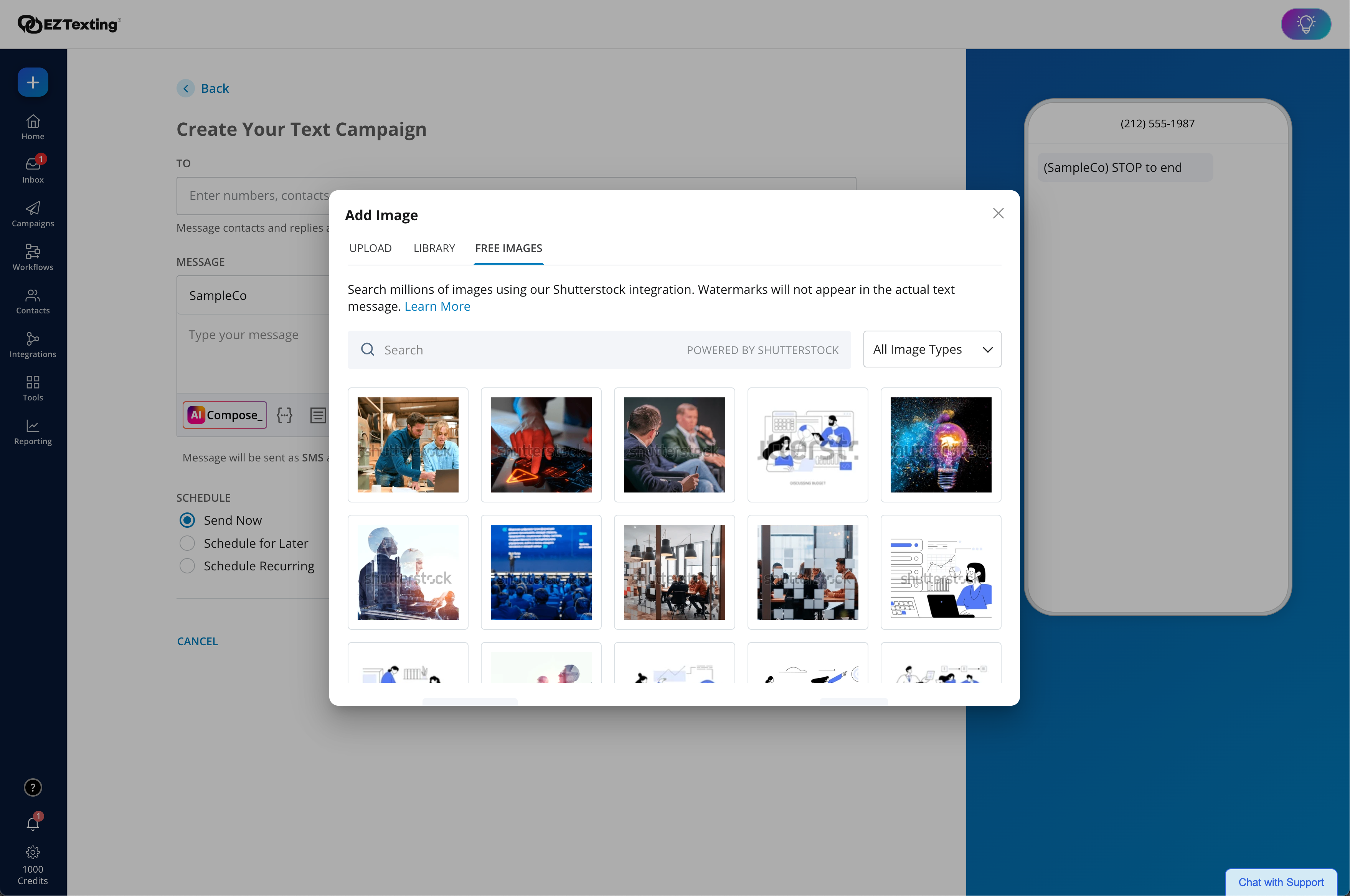
Additional DetailsMust contact vendor for pricing information.LAUNCH PLAN: Recommended for up to 500 contacts. Local EZ Textable Number. Max Speed: up to 500/day. Cost Per Msg:$0.030. Delivery Rate: 95% Includes 500 free msg/mo or 6k annually. BOOST PLAN: Recommended for 501-2,000 contacts. Local EZ High-Volume Number. Max Speed: up to 2,000/day. Cost Per Msg: $0.025. Delivery Rate: 95% Includes 500 free msg/mo or 6k annually. SCALE PLAN: Recommended for 2,000-50,000 contacts. Local EZ High-Volume, High-Speed Number. Max Speed: up to 50,000/day. Cost Per Msg: $0.020. Delivery Rate: 95%. Includes 500 free msg/mo or 6k annually. ENTERPRISE PLAN: Recommended for 50,000+ contacts. This Plan offers. Dedicated Short Codes. Max Speed: up to 1 MM/day. Cost Per Msg: $0.010. Delivery Rate: 99%. Includes 200k msg/mo. Pricing information for EZ Texting is supplied by the software provider or retrieved from publicly accessible pricing materials. Final cost negotiations to purchase EZ Texting must be conducted with the seller. Included in All Plans: Unlimited Incoming Messages, Contacts, & Keywords. New Features: Realize ROI faster with AI Compose & Team Inbox with AI Reply. Live Support Chat: Monday-Friday 8am-8pm ET and Saturday-Sunday 9am-5pm ET. Growth Tools: QR Codes, Keywords & Signup Forms. MMS Edge: Enhanced Image Library + Editor powered by Shutterstock. CRM-Lite: Upload, Management, Groups & Personalization.
More Pricing Information
Community Pulse
CanvasEZ Texting
Features
CanvasEZ Texting
Learning Management
Comparison of Learning Management features of Product A and Product B
Canvas
9.8
41 Ratings
18% above category average
EZ Texting
-
Ratings
Course authoring9.941 Ratings00 Ratings
Course catalog or library9.838 Ratings00 Ratings
Player/Portal9.832 Ratings00 Ratings
Learning content9.834 Ratings00 Ratings
Mobile friendly9.940 Ratings00 Ratings
Progress tracking & certifications9.837 Ratings00 Ratings
Assignments9.941 Ratings00 Ratings
Compliance management9.832 Ratings00 Ratings
Learning administration9.836 Ratings00 Ratings
Learning reporting & analytics9.838 Ratings00 Ratings
Social learning9.833 Ratings00 Ratings
Gamification9.52 Ratings00 Ratings
Single Sign On (SSO) Enabled Learning9.82 Ratings00 Ratings
Best Alternatives
CanvasEZ Texting
Small Businesses
iSpring LMS
iSpring LMS
Score 9.5 out of 10
OneSignal
OneSignal
Score 8.0 out of 10
Medium-sized Companies
Schoology Learning
Schoology Learning
Score 8.0 out of 10
Flurry Analytics (discontinued)
Score 9.0 out of 10
Enterprises
Schoology Learning
Schoology Learning
Score 8.0 out of 10
Flurry Analytics (discontinued)
Score 9.0 out of 10
All AlternativesView all alternativesView all alternatives
User Ratings
CanvasEZ Texting
Likelihood to Recommend
9.4
(83 ratings)
9.0
(278 ratings)
Likelihood to Renew
9.3
(5 ratings)
10.0
(12 ratings)
Usability
10.0
(9 ratings)
9.1
(116 ratings)
Availability
-
(0 ratings)
9.9
(3 ratings)
Performance
-
(0 ratings)
9.0
(3 ratings)
Support Rating
9.0
(11 ratings)
9.6
(112 ratings)
In-Person Training
10.0
(1 ratings)
-
(0 ratings)
Online Training
8.0
(1 ratings)
-
(0 ratings)
Implementation Rating
8.5
(2 ratings)
7.0
(5 ratings)
Configurability
-
(0 ratings)
8.0
(3 ratings)
Contract Terms and Pricing Model
-
(0 ratings)
9.0
(2 ratings)
Ease of integration
-
(0 ratings)
8.0
(5 ratings)
Product Scalability
8.0
(1 ratings)
8.9
(3 ratings)
Professional Services
-
(0 ratings)
8.1
(2 ratings)
Vendor post-sale
-
(0 ratings)
9.0
(3 ratings)
Vendor pre-sale
-
(0 ratings)
8.1
(3 ratings)
User Testimonials
CanvasEZ Texting
Likelihood to Recommend
Instructure
It is really well suited for school situations like knowing what [assignments] need to be done when, getting feedback, getting points, finding the slides that the teacher used for explaining an [assignment] or theory. I think It would be less suited in business situations because it's [primarily] made to be a [one-way] communication tool for schools. Businesses need more control on individual levels I think[.]
Read full review
CallFire
EZ Texting would be well suited for a small business that doesn't have the man power to be able to contact all of the leads they have coming in or who struggles to maintain communication with current clients at times. It would not be appropriate for a business who is looking to send phishing texts out to a large group of people.
Read full review
Pros
Instructure
  • Creativity options for teachers to create a virtual space that still has fun graphics and accessibility options.
  • Canvas has versatility in viewing options for assignment due dates such as the calendar built in feature as well as the dashboard options to display upcoming and due assignments.
  • Allowing teachers to create community with each other and collaborate in each-other's space.
  • Discussion platforms within classrooms for students to communicate with each-other and with their teachers.
  • Easy messaging portal within each virtual classroom.
Read full review
CallFire
  • I appreciate the detailed delivery reports.
  • The support team’s quick responses are appreciated.
  • The automation feature is incredibly handy for instantly messaging leads right after they sign up.
  • The onboarding process is straightforward.
  • Genuine customer inquiries show up in the inbox, organizing important messages in one place.
  • You can avoid the email spam folder by using ez texting!
  • Opt-outs resolve themselves.
Read full review
Cons
Instructure
  • Their integration with Big Blue Button was a bust for distance learning. Would be great to see them collaborate with Zoom or Google Meets.
  • Their "feature request" process is slow and cumbersome at times because it relies on user "up votes" to get ideas addressed by the developers.
  • They seem to have a lot of turn-over with their staff. We get a new Customer Success Manager far more frequently than with other vendors.
Read full review
CallFire
  • Drafts don't save well, seemed like I kept having to redo the same text because a draft wouldn't save.
  • I want to be able to click and update users quickly, but there were too many steps to add/remove people from lists.
  • The app didn't work if I used google SSO - i couldn't ever get signed in.
Read full review
Likelihood to Renew
Instructure
The other LMS tools have fallen behind. One reason is they are not able to update their systems, features, toolsets in a timely manner. While other LMS providers release bug fixes and new features several times a year, schools struggle to install and implement them in a timely manner. It is not uncommon for a school to take 6 months to a year to fully install and implement new releases on other LMS platforms. With Canvas, those features are released every 3 weeks, and there is nothing for a school to do other than choose to turn them on once released. This has allowed Instructure to innovate faster, and get new features and tools to customers quicker. Other factors include great pricing, customer support, and the innovative way in which LTI is implemented in the tool.
Read full review
CallFire
We're excited about EZ Texting and what it does for us. We want to get more into automation with campaigns dealing directly with web sales so a more robust solution will likely leave EZ Texting as our event activation partner and only be used during select times of the year.
Read full review
Usability
Instructure
The functions in Canvas are well integrated and consistent across the application, and mostly intuitive. Overall navigation and setup is streamlined through integrated features and navigation. The feedback we've gotten from our program participants is that it is easy to learn to use. It also integrates well with third party software like Google Docs and Blackboard Collaborate web conferencing software
Read full review
CallFire
EZ Text was very easy to set up and very intuitive. It does not take long at all to add your contact lists or to set up templates. It takes a second to get used to when it comes to sending mass group texts, but all in all, it does what we need to do and was easy to implement. We were able to do it ourselves.
Read full review
Reliability and Availability
Instructure
No answers on this topic
CallFire
We have never needed to use the system and it be unavailable. They seem to schedule their server maintenance perfectly (at least for us!).
Read full review
Performance
Instructure
No answers on this topic
CallFire
It works pretty well but sometimes things don't work the way you would assume, IE marking messages as read is not as intuitive
Read full review
Support Rating
Instructure
I do not personally use Canvas support since we have a central office that helps us. However, our central office always has the answers we need and are always able to solve our issues - so I would assume that get great support from the Canvas team on their end. They also offer great training, which uses materials directly from Canvas
Read full review
CallFire
EZ Texting "gets it"! When I have had something I needed customer service to help me with, they returned my emails and calls promptly. I have a smaller business and they came through as if I was a huge corporate entity. They really care about all sizes of customers!
Read full review
In-Person Training
Instructure
The training sessions were broken down into several days as well as different levels depending upon the knowledge of the user
Read full review
CallFire
No answers on this topic
Online Training
Instructure
The online tutorials and videos are very clear and addressed the issues/questions that I had about using the system.
Read full review
CallFire
No answers on this topic
Implementation Rating
Instructure
Once you purchase and sign the contract there is nothing to install or hardware to buy. You can almost immediately start using it and have courses up and going within weeks. We signed in December and had pilot courses online ready to go for the start of school in January
Read full review
CallFire
The most important aspect of implementation was selecting a valuable keyword. When we first started using EZ Texting, we were able to grab a simple, easy word to use to connect people to our texts. That proved invaluable in our marketing and selling people on using the service. If we didn't have a good word, I would imagine it wouldn't have been as successful.
Read full review
Alternatives Considered
Instructure
Canvas is more secure, has a cleaner design, and has more features. For the features, they have in common canvas still stacks up against [Smart school] by going for the extra mile. Besidfor e that, [the] canvas looks a lot more [professional] than [Smart school]. I didn't make the decision myself to get canvas instead of [Smart school] but I'm happy they did.
Read full review
CallFire
We chose EZ Texting over enterprise solutions because of it's ease of set up, ease of use, and low barrier to entry. We had discussions with other companies, and it seemed very complicated and would require a lot of set up on our end. We don't have a dedicated IT or marketing team. We are a small business. So those barriers were just too complicated and we decided to go with an easier solution.
Read full review
Contract Terms and Pricing Model
Instructure
No answers on this topic
CallFire
We have been grandfathered into our old package, but I wish there were better package options offered now.
Read full review
Scalability
Instructure
No answers on this topic
CallFire
We haven't really utilized it for this purpose but it does seem like there are a lot of great options you can utilize.
Read full review
Professional Services
Instructure
No answers on this topic
CallFire
easy access
Read full review
Return on Investment
Instructure
  • Canvas has helped us provide a more robust online component to our courses.
  • Canvas has helped us better adapt to a rapidly changing educational landscape.
  • Canvas has reduced the time that we have to spend training faculty on how to use our learning management system.
Read full review
CallFire
  • Customers, as well as potential customers, do not seem to have any issue, providing their phone numbers for text messages as opposed to receiving countless emails.
  • Upselling items has improved considerably due to our ability to notify customers of new products and specials that we are offering in the store.
Read full review
ScreenShots

EZ Texting Screenshots

Screenshot of EZ Texting Dashboard: View recent activity, upcoming campaigns, and access AI Assistant.Screenshot of Enhanced Image Library + Editor: Our enhanced Shutterstock integration helps you unlock and edit 450+ million free images and 20k design templates, giving you the license to create more scroll-stopping texts.Screenshot of AI Compose: Create engaging messages instantly with emojis, helpful templates, easy editing, multilingual translations, and more.Screenshot of Workflows: Effortlessly send texts triggered by actions and events to boost engagement and drive conversions. With a drag & drop editor, technical expertise or code is never required.Screenshot of Quickly create engaging texts with built-in tools, including AI Compose, to add personalization, trackable URLs, media, and more! Stay compliant with EZ Texting's SafeSTOP® feature.Screenshot of Reporting Made Easy: Get delivery confirmations, check on bounce rates and view opted-outs.