Intermapper is a network monitoring and mapping software for hybrid environments. Intermapper provides real-time performance alerts and bandwidth monitoring with cross-platform functionality.
N/A
SolarWinds Engineer's Toolset
Score 7.9 out of 10
N/A
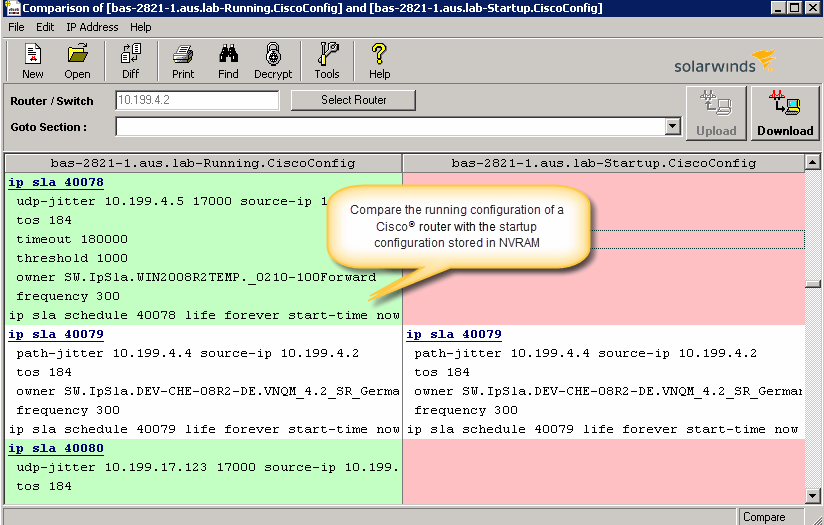
SolarWinds® Engineer’s Toolset (ETS) helps users monitor and troubleshoot a network with over 60 tools for network management. ETS allows users to monitor and receive alerts in real time on network availability and health, and perform network diagnostics for faster troubleshooting and resolution of complex
network issues. With ETS users can deploy an array of network discovery tools including Port Scanner, Switch Port Mapper or advanced Subnet Calculator, manage Cisco®
devices with specialized…
$1,585
Per Instance
Pricing
Cisco Wireless LAN Controllers
Intermapper
SolarWinds Engineer's Toolset
Editions & Modules
No answers on this topic
No answers on this topic
One Time Price
$1,585
Per Instance
Offerings
Pricing Offerings
Cisco Wireless LAN Controllers
Intermapper
SolarWinds Engineer's Toolset
Free Trial
No
Yes
Yes
Free/Freemium Version
No
Yes
No
Premium Consulting/Integration Services
No
Yes
No
Entry-level Setup Fee
No setup fee
Optional
No setup fee
Additional Details
—
Intermapper pricing is based on number of devices monitored. Intermapper is free for 5 devices or less. Subscription pricing starts at $303 for 25 devices. Device-based pricing starts at $765 for 25 devices.
These were extremely difficult to initially configure and get online. Once they were online we had no real issues with them. Cisco deployment has been much easier as well as having a much deeper configuration available. We also like the quick deployments we are able to do with …
I believe that Cisco Wireless LAN Controllers are well suited for the enterprise environment for medium sized to very large companies. While there are smaller WLC appliances for smaller sized businesses, a case can be made for simpler or more cost effective wireless licensing solutions (e.g. Cisco Meraki). Cisco Wireless LAN Controllers are extremely well suited for dense deployments like stadiums, arenas, hospitals, theaters, and large offices because of their ability to support a large number of APs with a very diverse technology feature set.
Intermapper is a light weight, quick and easy to use monitoring application. It will get you up and monitoring key infrastructure devices with a simple management interface and effective alert system that doesn't generate a lot of noise. It provides mobile device access through a web interface and is relatively inexpensive.
I have found the toolset especially useful for scanning subnets to discover devices, and for setting up temporary real-time monitors when we are troubleshooting or setting up new connections. The most useful aspect has been the ability to apply the tools to help troubleshoot and pinpoint intermittent issues. More general tools like Orion often do not have the granularity to detect issues like intermittent packet loss which are especially impactful to applications like Voice. The toolset gives us another level of capability to dig into issues.
The best thing about Intermapper is that it is map-based. You start by building your map, which is done completely automatically. I've used many different monitoring software packages, Solarwinds, Nagios, Opmanager, and it is a royal PITA to create live maps with those.
Another great feature is that it shows you, visually, the bandwidth utilization of your network by using "ants" and color codes. Incredibly useful.
Alarms are very easy to setup, again much easier than the packages mentioned above.
Configuring wireless settings is very confusing because various settings are scattered all over the interface in different tabs
Lots of settings use Cisco's technical verbiage rather than common phrasing, so it's confusing what a lot of settings will do and requires researching the meaning before modifying the setting
The interface could be easier to use to do simple tasks such as reboot an access point
The unifying component that is intended to be the initial interface to the tools seems clunky. I prefer to start the tools individually rather than using it.
The port scanner could use some improvements to make it easier to use.
Although it is a very good product, support is easy and can manage by Level 1 support persons and downtime is too much less but still there is a cost factor matters which is consider by each organization. Furthermore, organizations also compare with other competitors so it is hard to pursue and defend the high prices.
As I said before, the only thing we miss in our old model is the fact that the management interface never received an improvement in design. It has the same look and feels since it was launched. It's not that it's hard to use. It's just the case of could be modernized.
Downtime fear is the first fear which IT persons look and want to eliminate as much as they can but eventually you have to face it as nothing is perfect. Cisco Wireless Lan controller are feasible to use and easy to manage and other than this their issue reported are pretty low so you can get the best up time. now it also depends on scenario as well as environment.
Cisco Wireless Lan controller are feasible to use and easy to manage and other than this their issue reported are pretty low so you get the better uptime. if your get the uptime then it means its a stable product in your environment. Product performance also depends on the product management and Cisco Wireless Lan controller management is easy so you can get the great output.
As usual, the support from Cisco's TAC (Technical Assistance Center) is lacking. Granted, they always get the job done, but the amount of lead time on a non-emergency is enough to make you just handle it yourself. The good news is that if you ask for Cisco's assistance and forget about it, they'll jump on by the time you've forgotten where you were in troubleshooting it and have it fixed for you.
The product works well and is very easy to maintain. As such, we haven't had many occasions to use support. When we have called them they were easy to contact and responsive to our questions. We have had the product for years and it may have been a year or better since the last time we contacted them.
Originally, when we deployed our first controller it was on a very limited basis. We only deployed it to our administration building and our High School. It was pretty straight forward. Because this was new to us we leaned heavily on our Cisco partner to assist us. With our last upgrade, we upgraded the controllers, added redundancy and expanded the building count along with new SSID's and restrictions. It went much easier, but again, we did rely on Cisco TAC and our partner to clarify and assist as needed. Having already been familiar with the product help tremendously.
The Aironet access points are used for employee WiFi access, and they integrate well with Meraki. They would offer a separate guest network, too, but the decision was made to physically separate the guest network, so even if a bad actor would gain access to the ethernet port of the AP, they'd still not see any company traffic.
Intermapper is a cross between WhatsUp Gold and Nagios. WhatsUp Gold being for a less technical end-user and Nagios doing more than just SNMP scans and up down monitoring.
I haven't compared any tools similar to SolarWinds Engineer's Toolset. This might be because I'm pretty biased when it comes to monitoring, and reporting solutions. I've found that SolarWinds provides the biggest bang for the buck in my opinion. I'm sure there are other solutions on the market that compete, but I haven't tried any of them because I've been very satisfied with SolarWinds.
Cisco is a brand name and people trust on it. if any one thing about the networking then Cisco is among those brand which is count as trusted brand and people rely on it. Also it support is good so people can use it. Cisco Wireless Lan controller are easy to use and manage so it requires less effort.
We have had our [Cisco Wireless LAN Controller] 5508s for a very long time now and although they are getting dated, they have earned us our money's worth with consistency, stability, and ease of use. Users have minimal wireless complaints and when they do seldom are they WLC-related.
Downtime costs money. Every minute we can get ahead of an outage is time that a plant is not sitting there waiting. We don't need to wait for a call from a plant, we know they are down immediately and we can begin troubleshooting.