Clear Analytics vs. Jaspersoft Community Edition vs. OpenText Magellan

Overview
ProductRatingMost Used ByProduct SummaryStarting Price
Clear Analytics
Score 8.8 out of 10
Enterprise companies (1,001+ employees)
Clear Analytics is a business intelligence solution that enables non technical end users to perform analytics by leveraging existing knowledge of Excel coupled with a built in query builder. Some key features include: Dynamic Data Refresh, Data Share and In-Excel Collaboration.
$29
Per Seat per Month
Jaspersoft Community Edition
Score 7.0 out of 10
N/A
Jaspersoft Community Edition is a free product that offers embeddable pixel-perfect reports for Java apps and small workgroups.N/A
OpenText Magellan
Score 9.0 out of 10
N/A
OpenText Magellan Analytics Suite leverages a comprehensive set of data analytics software to identify patterns, relationships and trends through data visualizations and interactive dashboards.N/A
Pricing
Clear AnalyticsJaspersoft Community EditionOpenText Magellan
Editions & Modules
Personal
$29
Per Seat per Month
Team
$165
upto 10 Seat per Month
Department
$265
upto 25 Seat per month
Organization
$565
Upto 100 per seat per month
No answers on this topic
Offerings
Pricing Offerings
Clear AnalyticsJaspersoft Community EditionOpenText Magellan
Free Trial
YesNoNo
Free/Freemium Version
NoYesNo
Premium Consulting/Integration Services
NoNoNo
Entry-level Setup Fee$800 Initial OnBoardingNo setup feeNo setup fee
Additional DetailsCertain Enterprise level features can be made available to Small Business edition at additional cost. Such services include Scheduler and OLAP connectivity. Custom adapters can also be created to connect to SaaS services.
More Pricing Information
Community Pulse
Clear AnalyticsJaspersoft Community EditionOpenText Magellan
Considered Multiple Products
Clear Analytics
Chose Clear Analytics
I personally have not used other tools like this but Clear Analytics is a great one.
Chose Clear Analytics
Tableau something we use in previous with other clients. Heavy tool to use and customization is bit challenging. Also it's setup is bit complex when compare to Clear Analytics
Chose Clear Analytics
Clear Analytics provides a better organization of data that it gathers from different sources that can be utilized for various reporting purposes. Clear Analytics has better integration with different internal ERPs and needs lesser customization as such. Overall it's one of the …
Chose Clear Analytics
There are other great tools that are out there but Clear Analytics is reasonable for our business and provides a lot of features that we specifically needed.
Chose Clear Analytics
We didn’t choose this software because we found it didn’t adjust to what we really needed to do as a small business.
Jaspersoft Community Edition
Chose Jaspersoft Community Edition
FoxPro is a deprecated product and can no longer be downloaded or purchased. While it was a great report development tool, it is no longer a viable solution. While we do use Business Objects in very specific and limited implementations and for specific users, we find that …
Chose Jaspersoft Community Edition
My company has some cooperation with TIBCO, so they want to push Jaspersoft.
Chose Jaspersoft Community Edition
I cannot fairly answer this questions and I have not used other reporting tools. Other reporting tools seem to look like they are great via sales pitches and video previews etc. At end of the day, they struggle with the same issues that Jasper faces. Or they might have solved …
Chose Jaspersoft Community Edition
I do not have solid knowledge on other products to compare them with Jaspersoft
Chose Jaspersoft Community Edition
Our initial selection was based on the understanding of this product to be able to match up against other enterprise BI tools. However, the difficulty with the reseller and the technical issues with the RBAC make this an easy choice to eliminate against other products.
Chose Jaspersoft Community Edition
Pentaho and Cognos have been used and evaluated. Jaspersoft is similar to Pentaho, but has better support forums to answer questions. Cognos is slightly more intuitive, but at a higher licensing cost.
Chose Jaspersoft Community Edition
Cost and ease of use. We ultimately decided to use Jaspersoft because we didn't need to do anything complicated. At the time we were looking into Microsoft Business Intelligence. While we saw Microsoft BI having actual better reporting and tools, we choose to use Jaspersoft …
Chose Jaspersoft Community Edition
Spotfire - Better support. More intuitive. Works with our databases.
Tableau - great support. Very simple and intuitive. Works with our databases!
Infor ION - Really expensive. Works well with their products. A lot of work with other products.
Chose Jaspersoft Community Edition
At the moment of evaluation, it looked like Jasper would be able to cope with our data model. This was achieved with product customization. Visualizations are largely the same.
Chose Jaspersoft Community Edition
TIBCO Jaspersoft was chosen because it fitted our software cloud architecture the best and at a reasonable cost. The rest didn't tick all the boxes at the time or were far too expensive. However, the likes of Power BI seem to be a contender now.
Chose Jaspersoft Community Edition
We have explored other reporting tools like IBM Cognos, Tableau, SQL Reporting, and Qlik along with TIBCO Spotfire (in-memory). FInally looking at all options, features, degree of flexibility, and then license cost, we decided to go with TIBCO Jaspersoft.

The expressions and …
Chose Jaspersoft Community Edition
[TIBCO Jaspersoft is] Quicker, clearer and allows for more professional looking reports.
Chose Jaspersoft Community Edition
Usage of a JRS report is vastly superior to xls usage.
Chose Jaspersoft Community Edition
In the past we have used Cognos. Jaspersoft was a better fit for us at this time.
Chose Jaspersoft Community Edition
Tableau and Qlikview reporting probably have better end-user experiences but can't be easily embedded in a Web app. Microsoft BI suite needs nearly a full stack of the latest versions of SQL Server, Excel and Sharepoint which an ISV can't assume its customers have. Other …
Chose Jaspersoft Community Edition
We are using both of them. Elasticsearch is still in early stage and very expensive.
Chose Jaspersoft Community Edition
Tableau was way, way more expensive and wasn't able to be embedded and white labeled, so we didn't go with them. I think Tableau is stronger on the visualization and predictive side... but overall... if you can't afford them, who cares?
Chose Jaspersoft Community Edition
Crystal reports is very expensive and does not integrate well with java based servers. Jasper also provides community edition, if we every want to downgrade the use, we always have the option of eliminating the server and using the reports as they are. Jasper also give you the …
Chose Jaspersoft Community Edition
SSRS: seems to be more performant at this point but we're still trying to figure it out
Chose Jaspersoft Community Edition
They each of them have their own strengths and weaknesses. We selected TIBCO for its pixel perfect reporting.
Chose Jaspersoft Community Edition
Jasper seemed to be a little behind in features and usability, but had better pricing.
Chose Jaspersoft Community Edition
Of course, there are challenges in the evolution of Jasper and it may take some time to become a stable product. With Jasper 6.4 the stability is improvised a lot compared to previous versions(5.5). But I would recommend Jasper to any team for the following reasons.
OpenText Magellan
Chose OpenText Magellan
There is multiple software available in the market to do the reporting and text analytics. Generally, analysts prefer using Python or R. Or we try to use any API available. This software can fulfill almost 80% of those needs without writing the codes. It has the integration …
Chose OpenText Magellan
OpenText Magellan can produce reports that are much more elaborate than PowerBI, which is ideal for users that just need to see a report. On the other hand, PowerBI seems to be better at allowing users to interact with data.
Chose OpenText Magellan
It is vastly superior to these in many ways, for complex reporting it is a much more sophisticated solution. Visualizations are very good. Javascript extensibility is very powerful, others don't support this or as well. Pentaho and MS are both OLAP oriented. Pentaho is moving …
Chose OpenText Magellan
Actuate has been in the industry a while and the open source community make going with Actuate's BIRT a stable decision. Changing report engines can be expensive, so going with a company with a good reputation helps long-term.
Chose OpenText Magellan
I've used JReports and Actuate is very similar but seems to have a lot more customization features for the end user of BIRT reports.
Chose OpenText Magellan
Actuate has a HUGE number of features that can tie nicely into almost any ERP but it takes some time to learn and the development community was relatively small compared to the Crystal Reports alternative. Crystal was far easier to learn and had a massive support base. Probably …
Chose OpenText Magellan
We looked at a few other competitor's products but based on value for features chose Actuate for its total cost of ownership.
Features
Clear AnalyticsJaspersoft Community EditionOpenText Magellan
BI Standard Reporting
Comparison of BI Standard Reporting features of Product A and Product B
Clear Analytics
9.0
Ratings
10% above category average
Jaspersoft Community Edition
9.3
Ratings
13% above category average
OpenText Magellan
7.0
Ratings
16% below category average
Pixel Perfect reports9.00 Ratings9.00 Ratings00 Ratings
Customizable dashboards9.10 Ratings9.00 Ratings7.00 Ratings
Report Formatting Templates8.70 Ratings10.00 Ratings7.00 Ratings
Ad-hoc Reporting
Comparison of Ad-hoc Reporting features of Product A and Product B
Clear Analytics
8.9
Ratings
10% above category average
Jaspersoft Community Edition
9.3
Ratings
15% above category average
OpenText Magellan
8.3
Ratings
3% above category average
Drill-down analysis9.20 Ratings9.00 Ratings8.00 Ratings
Formatting capabilities8.70 Ratings10.00 Ratings8.00 Ratings
Report sharing and collaboration8.90 Ratings9.00 Ratings8.00 Ratings
Integration with R or other statistical packages00 Ratings9.00 Ratings9.00 Ratings
Report Output and Scheduling
Comparison of Report Output and Scheduling features of Product A and Product B
Clear Analytics
9.0
Ratings
10% above category average
Jaspersoft Community Edition
9.4
Ratings
14% above category average
OpenText Magellan
8.3
Ratings
2% above category average
Publish to Web9.00 Ratings10.00 Ratings8.00 Ratings
Publish to PDF9.10 Ratings9.00 Ratings8.00 Ratings
Report Versioning8.90 Ratings9.00 Ratings9.00 Ratings
Report Delivery Scheduling8.80 Ratings10.00 Ratings8.00 Ratings
Delivery to Remote Servers00 Ratings9.00 Ratings00 Ratings
Data Discovery and Visualization
Comparison of Data Discovery and Visualization features of Product A and Product B
Clear Analytics
9.0
Ratings
12% above category average
Jaspersoft Community Edition
9.3
Ratings
15% above category average
OpenText Magellan
8.0
Ratings
0% above category average
Pre-built visualization formats (heatmaps, scatter plots etc.)8.90 Ratings9.00 Ratings9.00 Ratings
Location Analytics / Geographic Visualization9.10 Ratings10.00 Ratings00 Ratings
Predictive Analytics00 Ratings9.00 Ratings7.00 Ratings
Access Control and Security
Comparison of Access Control and Security features of Product A and Product B
Clear Analytics
9.3
Ratings
9% above category average
Jaspersoft Community Edition
9.3
Ratings
9% above category average
OpenText Magellan
9.0
Ratings
6% above category average
Multi-User Support (named login)9.40 Ratings9.00 Ratings00 Ratings
Role-Based Security Model9.00 Ratings10.00 Ratings9.00 Ratings
Multiple Access Permission Levels (Create, Read, Delete)9.40 Ratings9.00 Ratings9.00 Ratings
Single Sign-On (SSO)00 Ratings9.00 Ratings9.00 Ratings
Mobile Capabilities
Comparison of Mobile Capabilities features of Product A and Product B
Clear Analytics
8.6
Ratings
10% above category average
Jaspersoft Community Edition
9.3
Ratings
18% above category average
OpenText Magellan
7.0
Ratings
10% below category average
Mobile Application8.50 Ratings9.00 Ratings00 Ratings
Dashboard / Report / Visualization Interactivity on Mobile8.70 Ratings9.00 Ratings7.00 Ratings
Responsive Design for Web Access00 Ratings10.00 Ratings7.00 Ratings
Application Program Interfaces (APIs) / Embedding
Comparison of Application Program Interfaces (APIs) / Embedding features of Product A and Product B
Clear Analytics
-
Ratings
Jaspersoft Community Edition
9.5
Ratings
21% above category average
OpenText Magellan
6.2
Ratings
22% below category average
REST API00 Ratings10.00 Ratings5.00 Ratings
Javascript API00 Ratings9.00 Ratings9.00 Ratings
iFrames00 Ratings10.00 Ratings00 Ratings
Java API00 Ratings9.00 Ratings5.00 Ratings
Themeable User Interface (UI)00 Ratings10.00 Ratings7.00 Ratings
Customizable Platform (Open Source)00 Ratings9.00 Ratings5.00 Ratings
Best Alternatives
Clear AnalyticsJaspersoft Community EditionOpenText Magellan
Small Businesses
Yellowfin
Yellowfin
Score 8.6 out of 10
Yellowfin
Yellowfin
Score 8.6 out of 10
Yellowfin
Yellowfin
Score 8.6 out of 10
Medium-sized Companies
Reveal
Reveal
Score 10.0 out of 10
Reveal
Reveal
Score 10.0 out of 10
Reveal
Reveal
Score 10.0 out of 10
Enterprises
Kyvos Semantic Layer
Score 9.5 out of 10
Kyvos Semantic Layer
Score 9.5 out of 10
Kyvos Semantic Layer
Score 9.5 out of 10
All AlternativesView all alternativesView all alternativesView all alternatives
User Ratings
Clear AnalyticsJaspersoft Community EditionOpenText Magellan
Likelihood to Recommend
9.0
(0 ratings)
10.0
(0 ratings)
9.0
(0 ratings)
Likelihood to Renew
-
(0 ratings)
5.8
(0 ratings)
3.9
(0 ratings)
Usability
9.1
(0 ratings)
9.0
(0 ratings)
9.0
(0 ratings)
Support Rating
9.5
(0 ratings)
10.0
(0 ratings)
9.0
(0 ratings)
Online Training
-
(0 ratings)
4.0
(0 ratings)
-
(0 ratings)
Implementation Rating
-
(0 ratings)
6.1
(0 ratings)
-
(0 ratings)
User Testimonials
Clear AnalyticsJaspersoft Community EditionOpenText Magellan
Likelihood to Recommend
Clear Analytics has almost all the features which are mostly required by the organizations for their data analytics and transformation activities. Clear Analytics is built on the support of a parallel query engine which makes it handle large volume requests and also provides optimized results. However, every solution has some limitations, Clear Analytics lacks advanced features such as Predictive Analytics which is a very demanding feature in the market as most organizations are adopting AI/ML automation for their businesses. Also, it needs to add a lot of advanced visualizations so that the user has the choice of selection. Overall a good solution to be recommended.
Read full review
TIBCO Jaspersoft Community Edition is very powerful platform that has enhanced smooth running of workflows across our organization. The system operation has greatly created positive development infrastructure in our company due to excellent planning from the data analytics. The cost running this product is low as compared to similar software and easy to learn how it works. It provides comprehensive reports that affect each department and offers solution to most challenges affecting our systems.
Read full review
It depends on extensibility, set-up, access & style. Actuate performs fairly well, but has performance issues because it sits on top of eclipse, which sits on top of Java. Extensibility usually comes at that price. Set-up is fairly straightforward and it can be secured.
Read full review
Pros
  • Integrates directly with Power BI and Excel
  • Helps wrangle, filter and visualize data
  • Presentation of large data in a summarized manner
Read full review
  • Custom design reports in Jaspersoft Studio. There is a lot of flexibility to customize reports. You can create easy reports in a quick time frame or complex report in a bit more time.
  • The company does not need a 100% developer to develop reports. Someone with some level of developer experience could use Jasper Studio
  • Jasper also provides a stand-alone web server to deploy your reports. This opens up a lot of Jaspersoft Studio files.
  • There is a lot of time and effort put into the software. Years of input that improved all levels of the applications. Jasperstudio, Jasperserver, a manual, the community, etc.
  • Flexibility is awesome, you can do almost anything. Having well-rounded REST API or you can use the Java Studio.
  • There is a lot out of the box functionality. Scheduler, stand-alone reports, report output formats, logging settings, customization of GUI to a degree, permissions, roles, and user setup Studio, etc.
Read full review
  • Ability to connect to different kinds of sources, including web services, and customize those queries to the extend needed
  • Provide tools to customize the look & feel of the reports as much as needed, even being able to choose different appearances for different outputs
  • Allowing scripting in the reports extends the functionality available
  • Allowing to embed reports without further licensing and maintaining all the functionality
Read full review
Cons
  • For Charts and Graphs , getting the Power Point Deck would be helpful. As of now we use the data from Excel Reports
Read full review
  • Repository interface is a flat structure. Folder or other structure would be best for numerous reports for several different departments.
  • Should come fully equipped with all available properties for High Charts
  • Better user guides that includes more information about configurations for styles, conditions, etc. that aren't covered in the guide.
Read full review
  • Report rendering can take a long time for large reports (250,000+ pages) - we run these in batch over night
  • The deployment of production code from development to test to production enviroments can be complex due to the number of components that must compile
Read full review
Likelihood to Renew
No answers on this topic
Even though there are challenges with Architecture, sizing and other areas with Jaspersoft provided that Jaspersoft comes up with the right set of innovation, performance, scalability, and documentation in future it will be great expansion (win-win) situation for the clients and as well as Jaspersoft.
Read full review
I am no longer working for the company that was using Actuate but I believe they would continue to use it because the stitching costs would be to high. It would require a complete rewrite of the reports and the never version of Actuate (BIRT) even required an almost complete report rewrite
Read full review
Usability
I have really enjoyed working with Clear Analytics. This platform has contributed to increased production and reliable data control processes. It has flexible user interface that can be operated by any organization member. Reports are shared on simple and transparent way in the dashboard for easy access. Data analytics from all departments have created manageable working environment that have increased production.
Read full review
The overall performance of this platform has been excellent. It is easy to work with the user interface. Creation of digital content and publishing on our social media platforms during marketing has been easy. Running our applications and upgrading our system to meet international standards has been successful. The user dashboard displays reports and performance of all departments effectively.
Read full review
It is quite intuitive to use. It is fit specifically for doing sentiment, emotion, and intention analysis as well as text classification and text summarization. I would have given 10 if it is fit for the purpose of doing image processing and analysis as well. There is a huge market to analyze video and image data.
Read full review
Support Rating
Clear Analytics has very good team members in Consulting as well as in Customer Support. The support agents are capable of providing the required resolution of your queries in a timeline provides. They have a clear understanding of the product and its features, and they are friendly in nature. However, for some advanced or level 2/3-based queries, they required some more time to respond, which is ok.
Read full review
We have only had a couple of tickets to be open while using Jaspersoft. Each time we have a very prompte responses that would meet our expectations. We always felt that our issues were being address in a timely manner
Read full review
Always there on the front and backend for us and the client.
Read full review
Online Training
No answers on this topic
While the training was somewhat beneficial, a lot of what was taught to us was what we managed to figure out in the weeks prior. It did provide some useful tips and reference material, but overall something more tailored to our requirements would've been better.
Read full review
No answers on this topic
Implementation Rating
No answers on this topic
New releases can be very buggy, also lacking when it comes to standard time zones and formats that are outside the US. As a company we never feel comfortable implementing a new release for at least 3-6 months due to errors that are found
Read full review
No answers on this topic
Alternatives Considered
We didn’t choose this software because we found it didn’t adjust to what we really needed to do as a small business.
Read full review
Crystal reports is very expensive and does not integrate well with java based servers. Jasper also provides community edition, if we every want to downgrade the use, we always have the option of eliminating the server and using the reports as they are. Jasper also give you the opportunity to build BI on case by base basis including Dashboards.
Read full review
It is vastly superior to these in many ways, for complex reporting it is a much more sophisticated solution. Visualizations are very good. Javascript extensibility is very powerful, others don't support this or as well. Pentaho and MS are both OLAP oriented. Pentaho is moving more toward big data, which was not our primary focus. Others are stuck in the Crystal Reports Band metaphor.
Read full review
Return on Investment
  • Super useful to get started immediately
  • Didn't have to rely on migrating data
  • Easy to add members
  • Easy to learn and build charts
Read full review
  • Jaspersoft Community Edition has not had any significant impact on our ROI as we have purchased the commercial edition of the product.
  • The only impact on ROI is that when we bring on new developers, he or she can begin work using the community edition while awaiting the installation of the commercial edition.
Read full review
  • Actuate can handle 50 to 60 sub reports inside a report very well.
  • Dynamically creating the datasource, chart, graph, reports are the main advantages. We can do any level of drilling, and can create a performance matrix dashboard efficiently.
Read full review
ScreenShots

Clear Analytics Screenshots

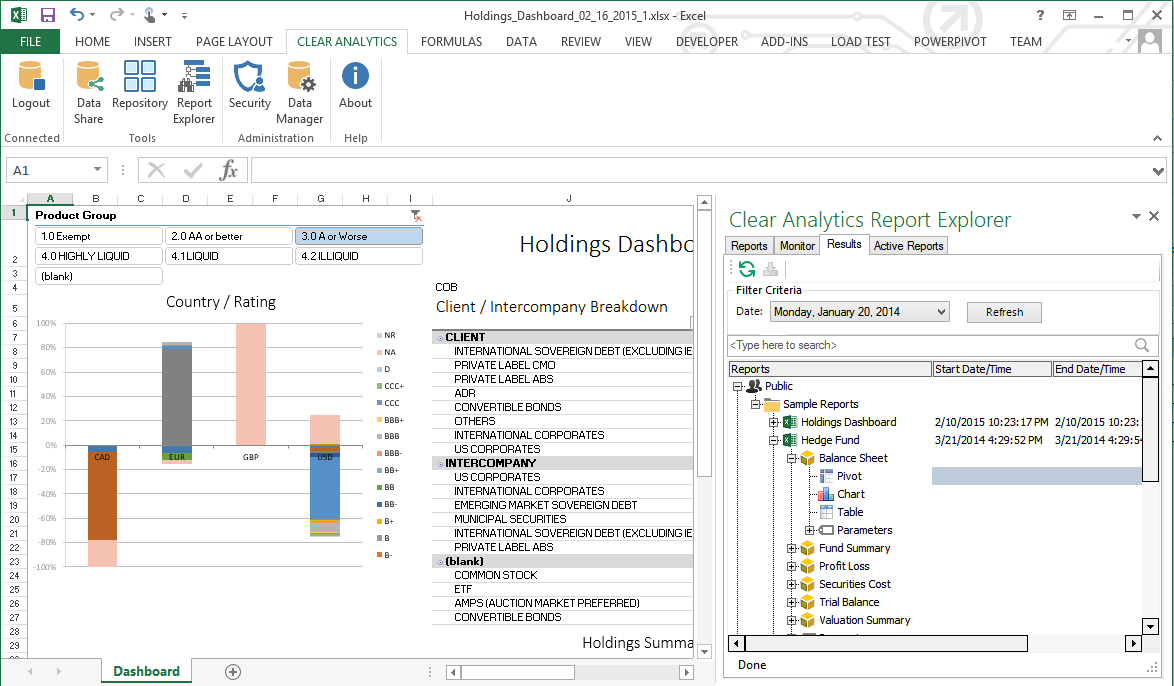
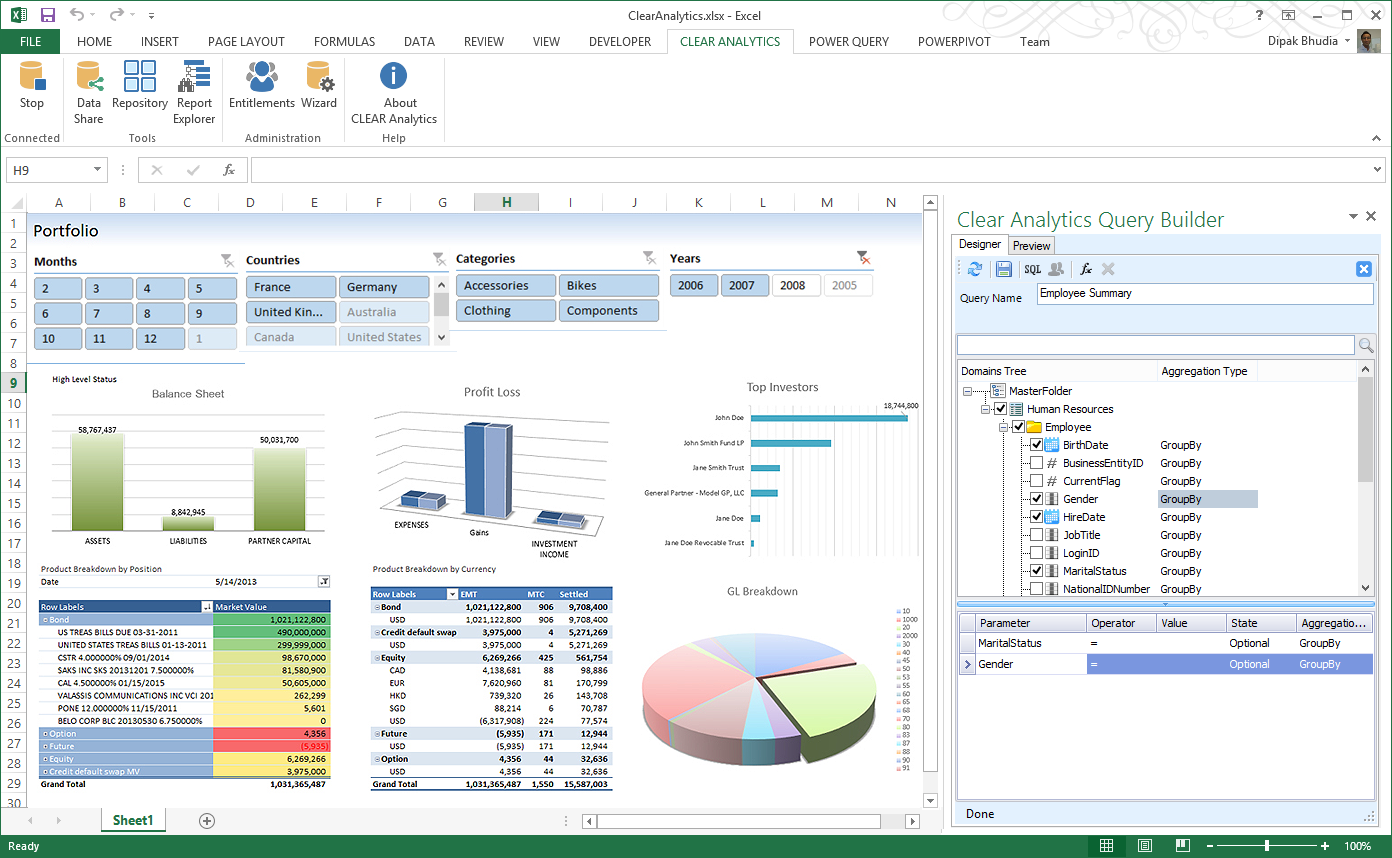
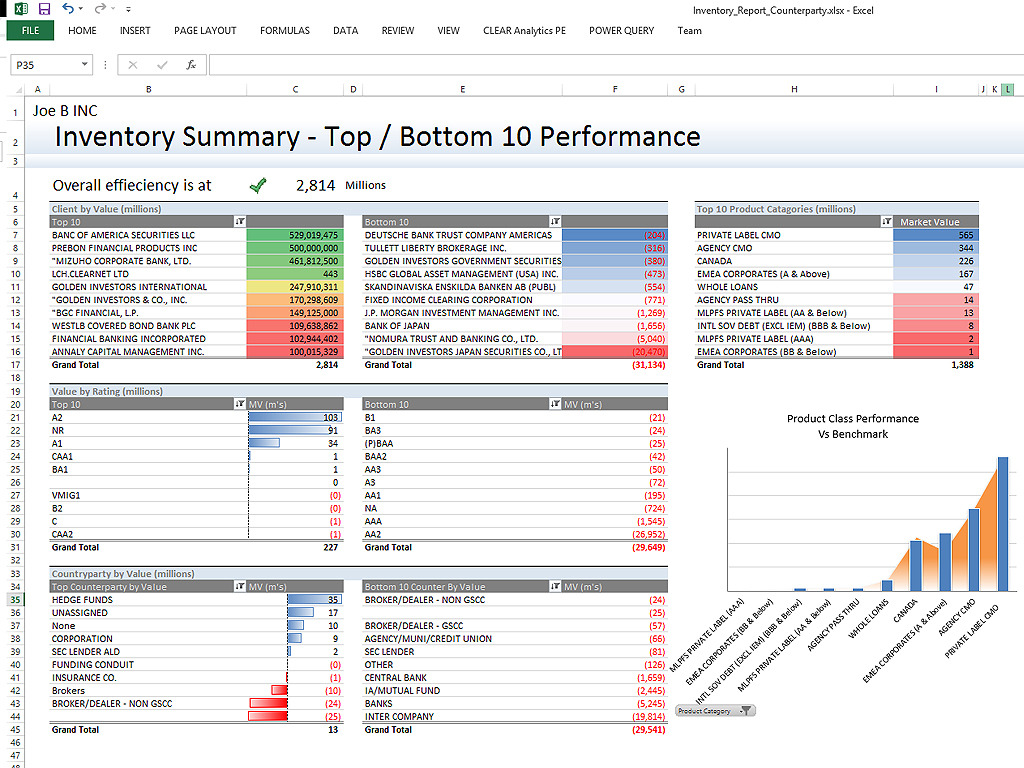
Screenshot of Clear Analytics integrated Excel panel essentially transforms standalone Excel into an enterprise strength, fully auditable, collaborative and centralized business intelligence platform.Screenshot of Users have the ability to dynamically query systems and render that data in any way they like.  No more waiting on IT to create reports.Screenshot of Your firms existing knowledge of Excel enables the firm to be product from day 1. Use the skills already present in your organization and don't pay for outside reporting consultants to create reports for you.Screenshot of Leverage the integration capability of Microsoft's Power BI to extend the reach of your data to web and mobile devices.Screenshot of Leverage all of Excels capabilities, from it's slicers to miniature spark-line charts to create incredibly informative and responsive dashboards.

OpenText Magellan Screenshots

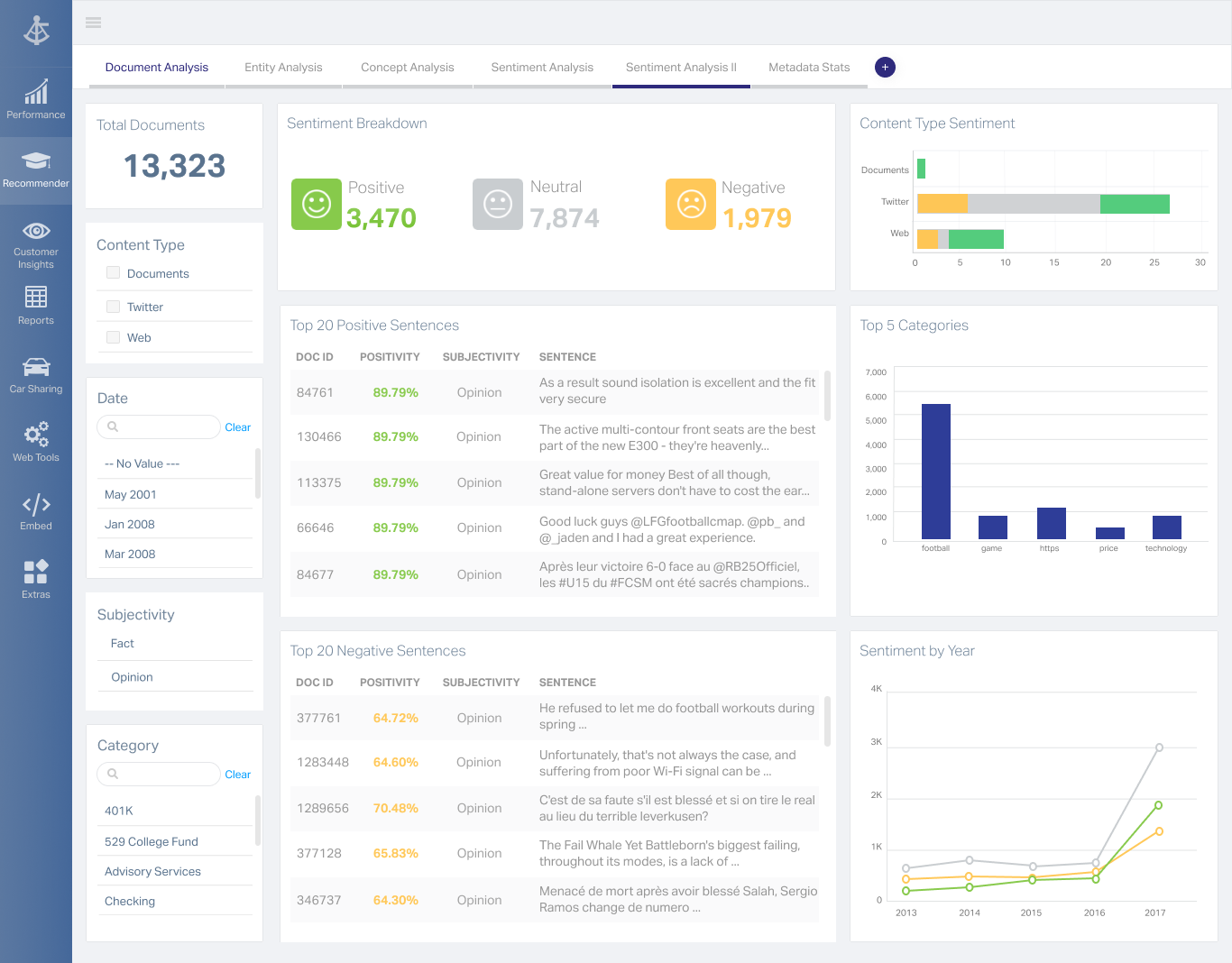
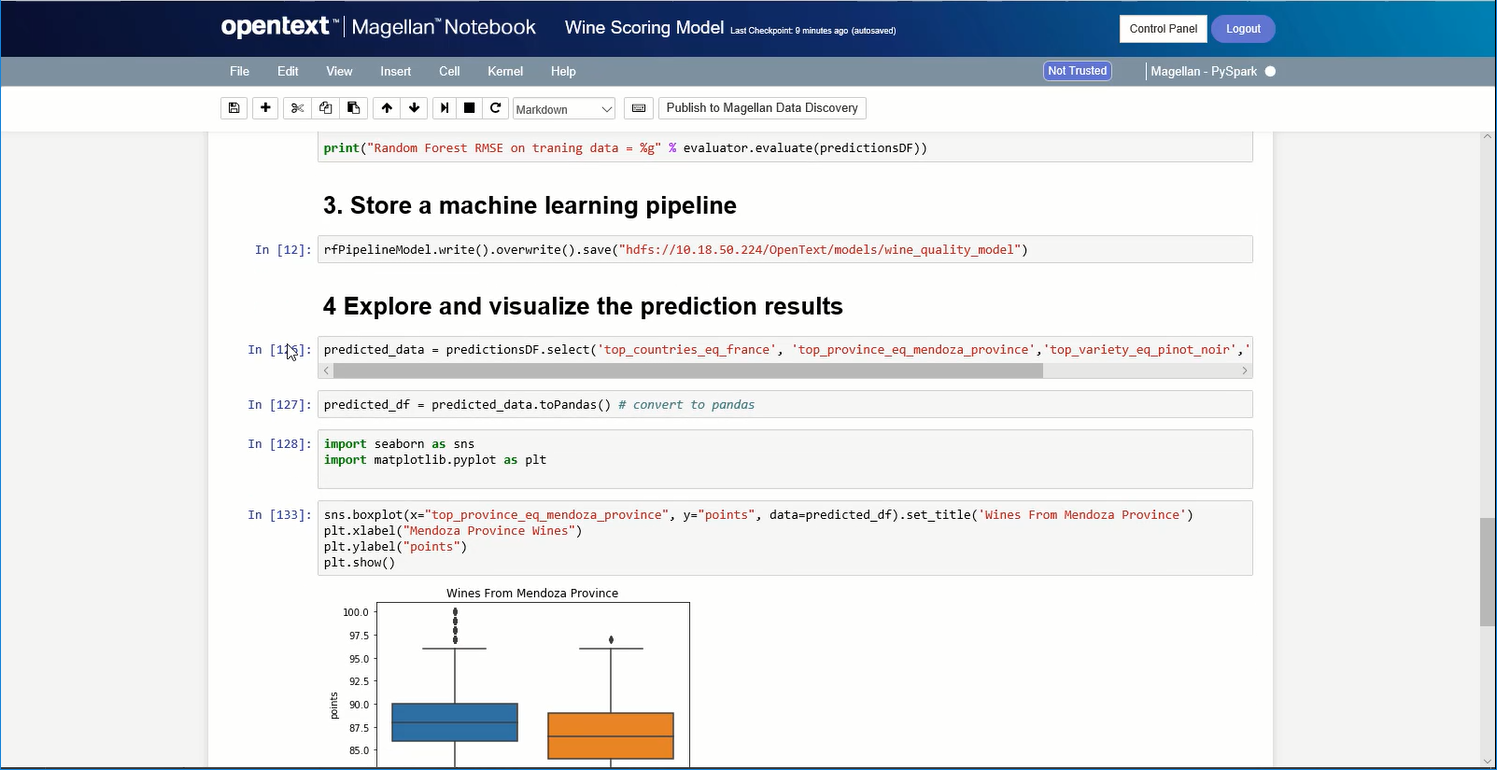
Screenshot of A Magellan BI & Reporting dashboard that an individual can interact with and personalize to their needs, such as changing chart types or computations.Screenshot of Magellan Data Discovery provides a Smart User Interface, designed to equip new users and users seeking a more streamlined set of features for insightsScreenshot of Magellan Data Discovery provides an Advanced User Interface that allows data analytics pros to leverage its breadth of sophisticated capabilities for insightsScreenshot of Magellan Text Mining insights can be displayed within easy-to-use dashboards.Screenshot of Data scientists can create visualizations within the Magellan Notebook and see it dynamically update as they write changes to it.