Overview
ProductRatingMost Used ByProduct SummaryStarting Price
ClickUp
Score 8.6 out of 10
Small Businesses (1-50 employees)
ClickUp is a productivity platform that brings together work apps, data, and workflows. Also presented as a Converged AI Workspace, ClickUp eliminates work sprawl to provide context and a single place for humans and agents to work together. The platform currently boasts over 20 million users worldwide.
$0
per month per seat
Quire
Score 8.2 out of 10
N/A
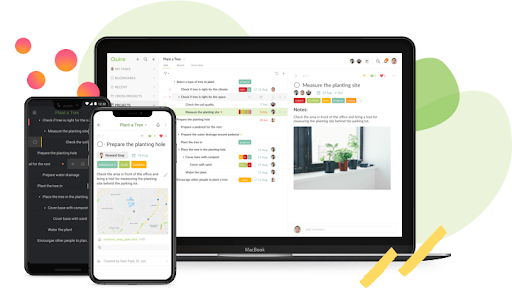
Quire is a visual collaboration platform that enables task and project management. It allows users to visualize their workflows and improves real-time collaboration.
$10.95
per month per user
Trimble ProjectSight
Score 9.6 out of 10
N/A
Trimble ProjectSight, replacing the former Prolog, is a construction project management software solution for contractors and other AEC firms, providing a complete system of record for managing project information, from the field to the back office. Designed by construction professionals for construction professionals, ProjectSight is built for project managers accountable for construction costs, scope and schedules, and for project teams responsible for the successful delivery of projects.…N/A
Pricing
ClickUpQuireTrimble ProjectSight
Editions & Modules
Unlimited
$10
per month per user
Business
$19
per month per user
Enterprise
Custom
Professional
$10.95
per month per user
Premium
$18.95
per month per user
Enterprise
$24.95
per month per user
No answers on this topic
Offerings
Pricing Offerings
ClickUpQuireTrimble ProjectSight
Free Trial
YesYesNo
Free/Freemium Version
YesYesNo
Premium Consulting/Integration Services
YesYesYes
Entry-level Setup FeeNo setup feeNo setup feeNo setup fee
Additional DetailsDiscount available for annual billing.
More Pricing Information
Community Pulse
ClickUpQuireTrimble ProjectSight
Considered Multiple Products
ClickUp
Chose ClickUp
I selected ClickUp over all of these due to the extensive functionality available. Most would do this well of that well, but nothing would fully cover all I was seeking to do in one platform, or if it did, would be missing something, such as custom fields or sub-tasks or …
Quire

No answer on this topic

Trimble ProjectSight

No answer on this topic

Features
ClickUpQuireTrimble ProjectSight
Project Management
Comparison of Project Management features of Product A and Product B
ClickUp
8.3
717 Ratings
7% above category average
Quire
8.4
2 Ratings
8% above category average
Trimble ProjectSight
-
Ratings
Task Management9.3717 Ratings6.02 Ratings00 Ratings
Resource Management8.4567 Ratings00 Ratings00 Ratings
Gantt Charts8.0520 Ratings10.01 Ratings00 Ratings
Scheduling8.5595 Ratings10.01 Ratings00 Ratings
Workflow Automation8.2568 Ratings00 Ratings00 Ratings
Team Collaboration9.2685 Ratings10.01 Ratings00 Ratings
Support for Agile Methodology8.6480 Ratings00 Ratings00 Ratings
Support for Waterfall Methodology8.5401 Ratings00 Ratings00 Ratings
Document Management7.9617 Ratings00 Ratings00 Ratings
Email integration7.6501 Ratings00 Ratings00 Ratings
Mobile Access7.3575 Ratings6.01 Ratings00 Ratings
Timesheet Tracking8.1479 Ratings00 Ratings00 Ratings
Professional Services Automation
Comparison of Professional Services Automation features of Product A and Product B
ClickUp
7.7
367 Ratings
1% below category average
Quire
-
Ratings
Trimble ProjectSight
-
Ratings
Project & financial reporting7.7367 Ratings00 Ratings00 Ratings
Reporting & Analytics
Comparison of Reporting & Analytics features of Product A and Product B
ClickUp
-
Ratings
Quire
-
Ratings
Trimble ProjectSight
10.0
1 Ratings
26% above category average
Dashboards00 Ratings00 Ratings10.01 Ratings
Construction Project & Field Management
Comparison of Construction Project & Field Management features of Product A and Product B
ClickUp
-
Ratings
Quire
-
Ratings
Trimble ProjectSight
5.0
3 Ratings
39% below category average
Plan distribution & viewing00 Ratings00 Ratings6.13 Ratings
Plan markups & sharing00 Ratings00 Ratings6.13 Ratings
Issue tracking & punchlists00 Ratings00 Ratings6.13 Ratings
Photo documentation00 Ratings00 Ratings6.13 Ratings
Jobsite reports00 Ratings00 Ratings4.02 Ratings
Document sharing00 Ratings00 Ratings3.02 Ratings
RFI tools00 Ratings00 Ratings5.63 Ratings
Collaboration & approvals00 Ratings00 Ratings2.03 Ratings
As-built drawings00 Ratings00 Ratings6.01 Ratings
Mobile app00 Ratings00 Ratings4.01 Ratings
Submittal design and management00 Ratings00 Ratings6.12 Ratings
Checklists00 Ratings00 Ratings9.01 Ratings
Change orders00 Ratings00 Ratings1.01 Ratings
Estimating
Comparison of Estimating features of Product A and Product B
ClickUp
-
Ratings
Quire
-
Ratings
Trimble ProjectSight
2.0
1 Ratings
116% below category average
Cost databases00 Ratings00 Ratings2.01 Ratings
Cost calculator00 Ratings00 Ratings2.01 Ratings
Best Alternatives
ClickUpQuireTrimble ProjectSight
Small Businesses
Stackby
Stackby
Score 8.9 out of 10
Stackby
Stackby
Score 8.9 out of 10
FollowUp CRM
FollowUp CRM
Score 2.1 out of 10
Medium-sized Companies
InEight
InEight
Score 8.4 out of 10
InEight
InEight
Score 8.4 out of 10
InEight
InEight
Score 8.4 out of 10
Enterprises
InEight
InEight
Score 8.4 out of 10
InEight
InEight
Score 8.4 out of 10
InEight
InEight
Score 8.4 out of 10
All AlternativesView all alternativesView all alternativesView all alternatives
User Ratings
ClickUpQuireTrimble ProjectSight
Likelihood to Recommend
8.8
(678 ratings)
10.0
(3 ratings)
5.5
(3 ratings)
Likelihood to Renew
8.0
(33 ratings)
-
(0 ratings)
-
(0 ratings)
Usability
8.1
(30 ratings)
-
(0 ratings)
-
(0 ratings)
Availability
9.5
(6 ratings)
-
(0 ratings)
-
(0 ratings)
Performance
8.0
(5 ratings)
-
(0 ratings)
-
(0 ratings)
Support Rating
9.3
(46 ratings)
10.0
(1 ratings)
-
(0 ratings)
Online Training
10.0
(2 ratings)
-
(0 ratings)
-
(0 ratings)
Implementation Rating
7.9
(7 ratings)
-
(0 ratings)
-
(0 ratings)
Configurability
8.0
(2 ratings)
-
(0 ratings)
-
(0 ratings)
Contract Terms and Pricing Model
5.0
(1 ratings)
-
(0 ratings)
-
(0 ratings)
Ease of integration
7.0
(2 ratings)
-
(0 ratings)
-
(0 ratings)
Product Scalability
8.9
(6 ratings)
-
(0 ratings)
-
(0 ratings)
Professional Services
5.0
(1 ratings)
-
(0 ratings)
-
(0 ratings)
Vendor post-sale
5.0
(2 ratings)
-
(0 ratings)
-
(0 ratings)
Vendor pre-sale
5.0
(2 ratings)
-
(0 ratings)
-
(0 ratings)
User Testimonials
ClickUpQuireTrimble ProjectSight
Likelihood to Recommend
ClickUp
ClickUp is well suited to organize projects and communicate internally with teams members and externally with clients or vendors. If you need to track emails, any emails responded to from an email sent within ClickUp is automatically tracked within the task where it originated. It also works great for storing document files within projects and tasks and tracking multiple versions of documents created or copied within ClickUp
Read full review
Potix Corporation
Quire is useful for tracking daily to-do's or keeping track of a project. It's not as clean as some other software (such as Nuclino, for example) and can get a little messy when creating a Workspace. It was difficult for me to know what was private and what was visible to my collaborators
Read full review
Trimble Viewpoint
I would probably recommend Trimble ProjectSight (Prolog) over Procore, as it is an easier user interface and typically avoids any problems with the users. I would say that it does take some getting used to, but once you are used to it it is pretty easy to use. This would be good for a residential home in construction.
Read full review
Pros
ClickUp
  • Customization is huge for us! We do not have the aspects of standard project management, so having the ability to customize basically everything in ClickUp is amazing.
  • An outstanding free version of the software! We are a small nonprofit organization that cannot afford the robust levels of other software, so having access to SO MUCH for free is incredible.
  • The layout and organization of tasks, Spaces, folders, etc. is perfect. I love how I can see which task all of my subtasks belong to on my dashboard. And the option to change colors and icons for everything also really appeals to my obsessive brain.
Read full review
Potix Corporation
  • Kanban boards that makes it easier to look at my tasks.
  • Categories that help me organize my tasks into To-Do, In Progress and Completed.
Read full review
Trimble Viewpoint
  • Change orders: great way to send and document official communications to subs and clients.
  • Drawings: always good to have drawings and info readily available.
Read full review
Cons
ClickUp
  • I would like to see when scheduling a task for someone, their available hours, as I am scheduling instead of having to go back to the workload view
  • I'd like easier UX and understanding of what all of the different levels of folders, lists, tasks, can do and what they should be used for
  • Notifications can be cleaned up
Read full review
Potix Corporation
  • The Workspaces are not intuitive.
  • No ability to set reminders for tasks.
  • More could be done with priority levels (instead of just arrows).
Read full review
Trimble Viewpoint
  • speed. Some items take a bit long to bring up.
  • more direct use for individual specifications
Read full review
Likelihood to Renew
ClickUp
It has been a game-changer in terms of project tracking, as animation is a demanding product that requires multiple layers of analysis, revisions, tracking, scheduling, etc. ClickUp simplifies many approvals as anyone can easily add items, and you can tag the people who need to look at them.
Read full review
Potix Corporation
No answers on this topic
Trimble Viewpoint
No answers on this topic
Usability
ClickUp
Because for me, working with teams, ClickUp has provided a service that we longed for. Something that is non-complicated and easy to maneuver. We understand the learning curve can be steep, but we are willing to give the software a chance because it is everything we hoped it would be. However, leadership found the project works for our organization at this time. Moreover, we can customize to our needs.
Read full review
Potix Corporation
No answers on this topic
Trimble Viewpoint
No answers on this topic
Reliability and Availability
ClickUp
For over a year ClickUp was unavailable to us just twice for a couple of hours. I would say for a system this big and working globally that was a minor issue. They managed to fix all the issues within a couple hours and then it was back up and running perfectly fine.
Read full review
Potix Corporation
No answers on this topic
Trimble Viewpoint
No answers on this topic
Performance
ClickUp
The speed of ClickUp is average to be honest. This is one of the biggest flaws of the system, sometimes it's also lagging a little bit but we also have a lot of documents, lists etc. on our workspace. However, with the next version of ClickUp I've seen they are planning to increase the speed by almost 500%, probably by changing the technology, so I am more than looking forward to it.
Read full review
Potix Corporation
No answers on this topic
Trimble Viewpoint
No answers on this topic
Support Rating
ClickUp
I started using ClickUp when it was what most would consider a baby company. There were the occasional bugs that made working in ClickUp a little bit of a headache, but the support feature allowed me to chat with a real persona and communicate my issues. I would always get prompt support and someone willing to really help me, not just point me to FAQ pages. Not feeling like a number really makes a difference.
Read full review
Potix Corporation
Friendly and prompt support. No issues.
Read full review
Trimble Viewpoint
No answers on this topic
Online Training
ClickUp
There are multiple guides on literally all of the functions you can find within the system, therefore it's easy to learn anything you'd really like to use, starting from project and people management, down to Gantts, mind maps, time tracking, inviting Clients as guests to work with you on the projects and so much more.
Read full review
Potix Corporation
No answers on this topic
Trimble Viewpoint
No answers on this topic
Implementation Rating
ClickUp
Start small. Don’t try to build the most elaborate plans first. Resist the urge to get into Gantt charts if no one is used to them. Just get work written, add dates and assignees, and start getting used to it. If you did not use a work management tool before, you need to be gracious with yourself about the fact that you likely do not have the muscle memory for working this way yet. But you will get there.
And leverage people who know it if possible. Look for ClickUp experts and vendors. They can really supercharge your effectiveness at building the tool out and speed up the process.
Read full review
Potix Corporation
No answers on this topic
Trimble Viewpoint
No answers on this topic
Alternatives Considered
ClickUp
I used Salesforce at my last job and would recommend ClickUp if utilizing the product for more than just sales. My last company tried using Salesforce for a number of other actions, such as department project tracking, client documentation, and outbound communication which did not work well. ClickUp is far better at managing multiple levels of organization within a company.
Read full review
Potix Corporation
Quire comes close to Nuclino, but Nuclino wins with its ability to create "cards" and organize a little more neatly.
Read full review
Trimble Viewpoint
I have only used Procore otherwise, and from what I remember Procore does not have as many features in terms of keeping track of CD documents, and organizing RFI's like Trimble does. I think overall Trimble ProjectSight (Prolog) is a better product, and if it was up to me I would pick Trimble ProjectSight (Prolog) over Procore.
Read full review
Scalability
ClickUp
Scaling with ClickUp is superb. If you create a workflow best suited for your organization then it's all about creating new accounts and teaching the new employees the workflow you're using. It's that simple. There is no black magic when it comes to Clickup.
Read full review
Potix Corporation
No answers on this topic
Trimble Viewpoint
No answers on this topic
Return on Investment
ClickUp
  • Reduced walk-up work and miscommunications
  • We have been able to actually document time spent doing specific tasks, when before we were just guessing
  • We have been able to implement a rating system for projects that allows us to prioritize work more effectively
Read full review
Potix Corporation
  • There has been a lot of time saved
  • Overall clarity
Read full review
Trimble Viewpoint
  • Positive: kept jobs running smoothly, awesome tool to track and oversee projects
  • Negative: not much really, good tool, just very in-depth with information that is needed to fill in documentation
Read full review
ScreenShots

ClickUp Screenshots

Screenshot of Screenshot of Screenshot of Screenshot of Screenshot of

Quire Screenshots

Screenshot of Quire workspace overviewScreenshot of device syncScreenshot of Quire project view