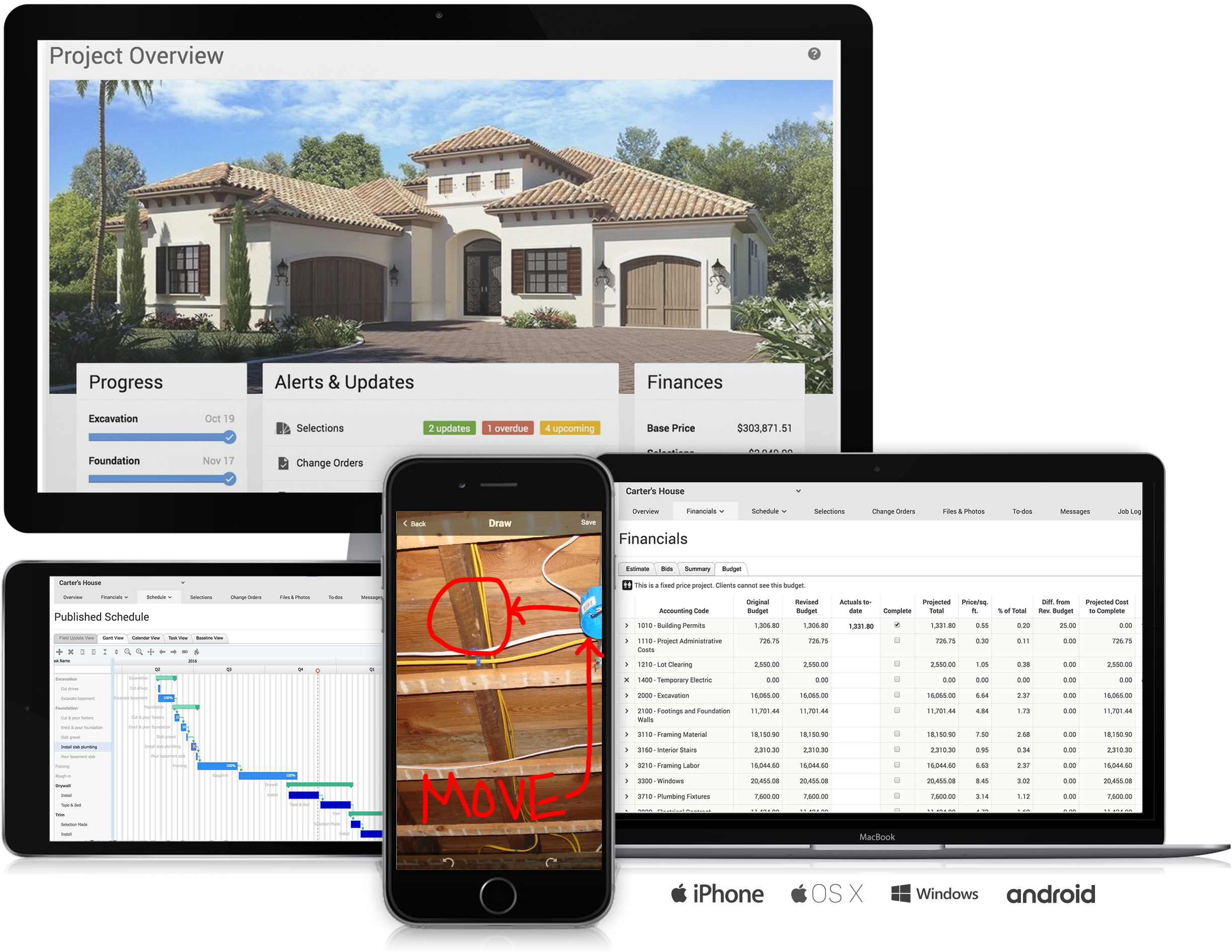
CoConstruct, from Buildertrend since the November 2021 acquisition, is a custom builder & remodeler software. It allows users to enter data once and have that information flow through the estimate, specs, selections, bids, proposals, change orders, and budgets, including to and from QuickBooks. In addition, CoConstruct includes scheduling and 3-way communication between builder, client, and trade partners. Everything is captured via email and texting. Login isn't required for…
$49
per month
Contractor Foreman
Score8.6 out of 10
N/A
Contractor Foreman is an online construction management software for contractors and boasts users among contractors in more than 75 countries.
$588
per year
Pricing
CoConstruct
Contractor Foreman
Editions & Modules
Ramp
$49
per month
Plus 5
$299
per month
Plus 10
$399
per month
Plus 15
$499
per month
Basic
$588
per year
Standard
$948
per year
Plus
$1,497
per year
Pro
$1,990
per year
Unlimited
$2,988
per year
Offerings
Pricing Offerings
CoConstruct
Contractor Foreman
Free Trial
No
Yes
Free/Freemium Version
No
No
Premium Consulting/Integration Services
No
No
Entry-level Setup Fee
No setup fee
No setup fee
Additional Details
CoConstruct pricing is based on active job sites that have client access online, which means it is adaptable to builders & remodelers businesses. This means that there are an unlimited amount of projects available for estimates and proposals, so that customers only pay when they win a contract. Also built into the pricing are a myriad of services: a dedicated implementation coach, free estimate & scheduling templates based on industry best practices from successful builders and the NAHB, unlimited storage and users, software branded with the customer's logo, unlimited amount of warranty projects, and unlimited phone & email support. The vendor offers a money-back guarantee that is good for the first 90 days of service.
Plans are based on features and licenses needed. Plus, Pro, and Unlimited plans include a 100-day money back guarantee.
Project Manager at McAneny Builders LLC (Construction, 11-50 employees)
Chose Contractor Foreman
They are very similar except CoConstruct allows for more selections of a customer. This is more for a company who doesn’t deal with interior designers as often who control the specs of the job. Most everything else was able to be done. I like the estimates sections and …
A de minimis incentive was given to thank the reviewer for their time. The incentive was not used to bias or drive a particular response, nor was the incentive contingent on a positive endorsement. More Info
A de minimis incentive was given to thank the reviewer for their time. The incentive was not used to bias or drive a particular response, nor was the incentive contingent on a positive endorsement. More Info
Project Coordinator at Vulcan Construction (Construction, 1-10 employees)
Chose Contractor Foreman
Contractor Foreman is committed to not only update their software consistently, but they also are committed to adding new features as their clients request them. If there is a feature that they do not have, there probably is a plan to implement it in the near future. Our …
A de minimis incentive was given to thank the reviewer for their time. The incentive was not used to bias or drive a particular response, nor was the incentive contingent on a positive endorsement. More Info
Verified User
Chose Contractor Foreman
Contractor Foreman has Far better pricing. Contractor Foreman also offered a pricing guarantee (i am not sure of that is still the case). There are a few features that the top tier subscriptions of the others offer that Contractor Foreman is lacking: specifically a "selections" …
A de minimis incentive was given to thank the reviewer for their time. The incentive was not used to bias or drive a particular response, nor was the incentive contingent on a positive endorsement. More Info
Owner in Manufacturing at Better Yet Home (Construction, 1-10 employees)
Chose Contractor Foreman
I've used Buildertrend and Conconstruct near daily for a little over 10 years. They were both pretty solid. But the price kept going up without much value being added to the software. As they grew, they didn't upgrade with the growth, so the sites became slower.
A de minimis incentive was given to thank the reviewer for their time. The incentive was not used to bias or drive a particular response, nor was the incentive contingent on a positive endorsement. More Info
Having the ability to completely manage a project from start to finish with one app is super helpful. The time reporting feature (when it works correctly) is a nice added bonus as it allows employees to switch from one task to another on the same project or to another project and task with ease, aiding in the accounting process of the total project. This was helpful for running analytics to see where we were spending too much time on certain tasks, thus allowing us to assess any training needs.
A de minimis incentive was given to thank the reviewer for their time. The incentive was not used to bias or drive a particular response, nor was the incentive contingent on a positive endorsement. More Info
As the name suggests, Contractor Foreman is GREAT for general contractors. However, being a consultant, I feel as though if upper management within the company I serve were more tech-savvy, they could accomplish much of the same tasks on other platforms that could give more advanced metrics. I also feel that the platform may feel outdated on purpose to ensure that those general contractors who aren't as tech savvy can understand the platform more.
A de minimis incentive was given to thank the reviewer for their time. The incentive was not used to bias or drive a particular response, nor was the incentive contingent on a positive endorsement. More Info
The integration of all aspects needed to run a remodeling company efficiently: project scheduling and management, financial planning and customer service. Since it’s an all-in-one suite and cloud-based, it enables our team to keep track of all our projects in real-time. Communication breakdown is the last thing we want, so being on the same page is not only desirable but makes for the best possible relationship with our clients.
Product education - We like how CoConstruct helps new users and get them to start using the tool right away. The dashboard resource materials are incredibly useful. We don’t have to spend a lot of time training new hires on the system and onboarding new clients.
A de minimis incentive was given to thank the reviewer for their time. The incentive was not used to bias or drive a particular response, nor was the incentive contingent on a positive endorsement. More Info
Internal Communication - CoConstruct lacks the ability to tag-team members for internal communication using @mentions or any other means. This has been crippling for us and forced us to use alternative software for communicating among our team members.
Pipeline Management - CoConstruct's lead-tracking system feels clunky and hard to navigate and doesn't provide a pipeline view that's easy to navigate. We have moved our Pipeline Management outside of CoConstruct to make it easier for our sales team to track leads.
CRM - CoConstruct doesn't offer anything for customer follow-up after projects are completed. This, in addition to the lack of an effective pipeline system, has led to our decision to use Hubspot as our CRM. Moving projects into CoConstruct for Design and back our after Production.
A de minimis incentive was given to thank the reviewer for their time. The incentive was not used to bias or drive a particular response, nor was the incentive contingent on a positive endorsement. More Info
Timecards in rural areas are really difficult to handle. I know CF just released an offline timecard beta, which is a step in the right direction, but it would be nice to have offline data in the app and to have all timecards be offline until clockout, when they try to sync back to the server. The current beta doesn't work for us because it creates multiple timecards when the guys are in and out of signal.
We have compiled so much information on CF it would be counterproductive to move to another software. We have also sold a lot of clients on the client portal feature. It is crucial for our communication between customers. The only reason we wouldn't renew the service is if somewhere offered the exact same service but at a lower cost
A de minimis incentive was given to thank the reviewer for their time. The incentive was not used to bias or drive a particular response, nor was the incentive contingent on a positive endorsement. More Info
Overall, Contractor Foreman is a great product, and I’m sure we’ve only scratched the surface of everything it has to offer. It can be a little quirky at times, occasionally displaying a 'Bad Gateway' message, but we haven’t experienced any timeout issues in the past few months. As we continue to use it, I’m confident we’ll uncover even more ways to streamline our workflow
A de minimis incentive was given to thank the reviewer for their time. The incentive was not used to bias or drive a particular response, nor was the incentive contingent on a positive endorsement. More Info
A de minimis incentive was given to thank the reviewer for their time. The incentive was not used to bias or drive a particular response, nor was the incentive contingent on a positive endorsement. More Info
Many times we had issues that turned out to be errors and bugs. At first, we would be told forcefully that there were no bugs, then we would document them, and we would get an acknowledgement but no apology for essentially either gaslighting us or being ignorant of their system
A de minimis incentive was given to thank the reviewer for their time. The incentive was not used to bias or drive a particular response, nor was the incentive contingent on a positive endorsement. More Info
The support staff is brilliant; they don't operate on Australian time, so you can't just dial up support when you need it. The response times are quick, and the staff is knowledgeable. They are also well versed in most of the differences between buildings in the US and the building in Australasia. Despite their funny accents and strange use of the English language, we get by just fine!
A de minimis incentive was given to thank the reviewer for their time. The incentive was not used to bias or drive a particular response, nor was the incentive contingent on a positive endorsement. More Info
Absolutely top notch! They were always there to help and immediately. Very happy with the communication they provided and the knowledge they had of their product. I would venture to say that they are one of the best in terms of support in their space.
A de minimis incentive was given to thank the reviewer for their time. The incentive was not used to bias or drive a particular response, nor was the incentive contingent on a positive endorsement. More Info
A de minimis incentive was given to thank the reviewer for their time. The incentive was not used to bias or drive a particular response, nor was the incentive contingent on a positive endorsement. More Info
Products like Procore and PlanGrid are geared towards projects with huge projects teams, multiple stakeholders and dozens of subcontractors. CoConstruct can be used for projects big and small (value) and also with small project teams or large projects teams. For small partial renovation or addition projects CoConstruct is a good more cost effective option.
A de minimis incentive was given to thank the reviewer for their time. The incentive was not used to bias or drive a particular response, nor was the incentive contingent on a positive endorsement. More Info
Contractor Foreman’s pricing is much more cost-effective for small to mid-sized construction businesses, making it a better fit for my company’s budget. It offers an intuitive interface with pre-built construction templates, minimizing setup time and making it easier at least for my team to adopt and start using. The platform’s focus on project tracking, financial management, and nice integrations that makes it highly efficient for tracking project progress, staying on budget, and managing subcontractors/bills. These factors combined made it the ideal choice for meeting my company's specific needs efficiently and cost-effectively.
A de minimis incentive was given to thank the reviewer for their time. The incentive was not used to bias or drive a particular response, nor was the incentive contingent on a positive endorsement. More Info
A de minimis incentive was given to thank the reviewer for their time. The incentive was not used to bias or drive a particular response, nor was the incentive contingent on a positive endorsement. More Info
A de minimis incentive was given to thank the reviewer for their time. The incentive was not used to bias or drive a particular response, nor was the incentive contingent on a positive endorsement. More Info
Prior to using Contractor Foreman we had to wait until the end to capture all change orders in one summary. Now, with the client portal, we can capture in real time and the client has visibility.
We have been trying to reduce administration time in tracking field expenses and with Contractor Foreman our field crew can uplaod reciepts and track expenses right from their mobile phones.
Punchlist - the punch list and To Do features are so robust we have drastically improved getting punchlists and small tasks completed in single trips without the wasted time and travel of multiple trips due to missed/forgotten items.
A de minimis incentive was given to thank the reviewer for their time. The incentive was not used to bias or drive a particular response, nor was the incentive contingent on a positive endorsement. More Info