Copper is a customer relationship management (CRM) built as an integration into Google Apps.
$12
per month per user
Wingmate Simple CRM
Score6 out of 10
Small Businesses (1-50 employees)
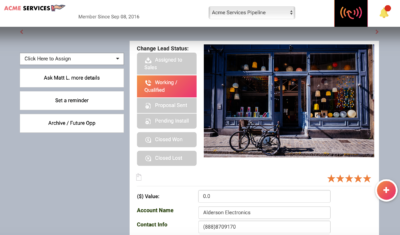
Wingmate engages field staff, on the go, to generate new sales, improve service & communicate in real-time. The solution is comprised of a Mobile App for staff on the move to capture/report intel and send it back to a team at the office. Its Simple CRM - management dashboard (Web-based CRM) enables two-way communication & tracking between both sales staff and teams in the field.
If you need to track contract expiration dates of your clients or your prospects that you're trying to sell - Copper is your tool. If you want to track specific products, solutions, vendors, etc. Copper can do it. I use it to track many brands of IT products and services with the use of custom fields to track which prospects/clients have any number of these items. Rather than taking notes, I can select the product from a drop down list that I created VERY EASILY within Copper.
Wingmate has engaged the field staff, by showing them, the mechanisms that suit the customers, from the communications processes, the contact controls methods, and other CRM tools. Further, the customer mapping and profiling have been enhanced by Wingmate, with advanced analytical options. The lead generation and relationship molding have been enhanced by Wingmate, making the company more solid and preferred.
A de minimis incentive was given to thank the reviewer for their time. The incentive was not used to bias or drive a particular response, nor was the incentive contingent on a positive endorsement. More Info
Allows for contacts to be synced and organized directly from Gmail.
Gives a flexible style and customizable settings to match our company's specific needs.
Does a great job of helping us keep track of projects. We easily created a customized "Status" field with several status options that help us update the many phases of our project.
A de minimis incentive was given to thank the reviewer for their time. The incentive was not used to bias or drive a particular response, nor was the incentive contingent on a positive endorsement. More Info
A de minimis incentive was given to thank the reviewer for their time. The incentive was not used to bias or drive a particular response, nor was the incentive contingent on a positive endorsement. More Info
Window change: for mobile - when you tap on a card from a pipeline it takes you to the lead’s basic info. I wish it would immediately just open all activities so I can quick see notes
I usually use Copper on the go. When you open the Copper app, it immediately opens a collab window. I wish it had some sort of easy dashboard….plus a notes area. I open Copper on mobile to quickly search for someone’s name or to take quick notes from a sales meeting
A de minimis incentive was given to thank the reviewer for their time. The incentive was not used to bias or drive a particular response, nor was the incentive contingent on a positive endorsement. More Info
A de minimis incentive was given to thank the reviewer for their time. The incentive was not used to bias or drive a particular response, nor was the incentive contingent on a positive endorsement. More Info
Copper is simple to use and it's simple to figure out the additional functionality you may need or want to use. There are a lot of support articles and the support itself is great. But it's also fairly simple to figure out on your own. It integrates easily with Google Workspace as well.
A de minimis incentive was given to thank the reviewer for their time. The incentive was not used to bias or drive a particular response, nor was the incentive contingent on a positive endorsement. More Info
Wingmate has simple usability procedures, for instance, the communications options, the customer mapping options, and others. Further, Wingmate creates proper orientation processes, which are sustainable and they make all users more equipped. Lastly, Wingmate is less technical, more outstanding, and the customer support have knowledgeable facts regarding the tool, and they share with customers.
A de minimis incentive was given to thank the reviewer for their time. The incentive was not used to bias or drive a particular response, nor was the incentive contingent on a positive endorsement. More Info
There have been a few times when I contacted the "help desk" or "support team" and they just told me to watch a video or join a seminar to learn what I am looking to do. I would have expected someone to take a few minutes and literally walk me through the steps one by one until either I figured it out or accomplished the goal of my request.
The support is very good. They are willing to work on updates and continuous improvements. Support service is prompt and efficient from the software team. They help in training and make Wingmate always easy to use. Even if we use it educationally and not professionally, they are always ready for suggestions to improve the performance of the software at an educational level.
A de minimis incentive was given to thank the reviewer for their time. The incentive was not used to bias or drive a particular response, nor was the incentive contingent on a positive endorsement. More Info
We selected Copper over these other CRMs mainly because of its ability to integrate with Google Workspace. Members of our team have used Salesforce in the past and found it to be a nightmare to work with/on. Candidly, Copper doesn't fill all of our needs so we supplement that with the use of Asana.
A de minimis incentive was given to thank the reviewer for their time. The incentive was not used to bias or drive a particular response, nor was the incentive contingent on a positive endorsement. More Info
Wingmate was used because the system was mostly used by sales/new business people rather than marketing people. Other products, such as HubSpot, [are] better suited for marketers but for simple lead management, pipeline management, and reporting to the wider team, Wingmate was used and that was a good choice based on needs.
A de minimis incentive was given to thank the reviewer for their time. The incentive was not used to bias or drive a particular response, nor was the incentive contingent on a positive endorsement. More Info
A de minimis incentive was given to thank the reviewer for their time. The incentive was not used to bias or drive a particular response, nor was the incentive contingent on a positive endorsement. More Info
A de minimis incentive was given to thank the reviewer for their time. The incentive was not used to bias or drive a particular response, nor was the incentive contingent on a positive endorsement. More Info