Dataloader.io vs. Informatica Intelligent Data Management Cloud vs. MuleSoft Anypoint Platform

Overview
ProductRatingMost Used ByProduct SummaryStarting Price
Dataloader.io
Score 10.0 out of 10
N/A
Dataloader.io delivers a cloud based solution to import and export information from Salesforce.
$99
per month
Informatica Intelligent Data Management Cloud
Score 7.0 out of 10
N/A
The Informatica® Intelligent Data Management Cloud™ (IDMC) is designed to help businesses efficiently handle the complex challenges of dispersed and fragmented data to innovate with their data on virtually any platform, any cloud, multi-cloud and multi-hybrid.N/A
Anypoint Platform
Score 7.9 out of 10
N/A
The Anypoint Platform developed by MuleSoft and acquired by Salesforce in early 2018 is designed to connect apps, data, and devices anywhere, on-premises or in the cloud. This platform was built to offer out-of-the-box connectors as well as tools that architects and developers can adopt quickly to design, build and manage the entire lifecycle of their APIs, applications, and products.N/A
Pricing
Dataloader.ioInformatica Intelligent Data Management CloudMuleSoft Anypoint Platform
Editions & Modules
Professional
$99.00
per month
Enterprise
$299.00
per month
No answers on this topic
Offerings
Pricing Offerings
Dataloader.ioInformatica Intelligent Data Management CloudAnypoint Platform
Free Trial
NoNoYes
Free/Freemium Version
NoNoYes
Premium Consulting/Integration Services
NoNoNo
Entry-level Setup FeeNo setup feeNo setup feeNo setup fee
Additional Details
More Pricing Information
Community Pulse
Dataloader.ioInformatica Intelligent Data Management CloudMuleSoft Anypoint Platform
Considered Multiple Products
Dataloader.io
Chose Dataloader.io
Dataloader.io is the first tool I've used to bulk load/export to and from Salesforce, and I would have to be persuaded to use another product.
Informatica Intelligent Data Management Cloud
Chose Informatica Intelligent Data Management Cloud
We were originally given Informatica Cloud as a bundled piece of software with the Salesforce implementation company we signed up for so we didn't do a lot of detailed searching for competitors. Since then we have seen it go against Mulesoft Anypoint and Zapier. Both were good, …
Chose Informatica Intelligent Data Management Cloud
Informatica Cloud (IC) and Dataloader are similar products, and we actually use both. IC is a much better tool for automating and standardizing data imports, but Dataloader is much better suited for ad-hoc data imports.
Anypoint Platform
Chose MuleSoft Anypoint Platform
Dell Boomi is kind of similar in drag and drop implementation. However, it doesn't have as many connectors (shapes in Dell Boomi). Moreover, it also doesn't have deployment stuff on its own.

Informatica is way behind Dell Boomi and Anypoint Platform, but users are still using it …
Chose MuleSoft Anypoint Platform
We believe Anypoint Platform is best in breed and has features that match nearly any other iPaaS offering. It also allows for accomplishing much more challenging and complex integrations due to the ability to connect to nearly any system, use custom connectors, and embed …
Chose MuleSoft Anypoint Platform
The main problem with this software is the different connector type that is used for different protocols except for a different SAP connector. There is only one connector called SAP. It will be great if there will have a different connectors like idoc, RFC, proxy, etc.
Features
Dataloader.ioInformatica Intelligent Data Management CloudMuleSoft Anypoint Platform
Cloud Data Integration
Comparison of Cloud Data Integration features of Product A and Product B
Dataloader.io
-
Ratings
Informatica Intelligent Data Management Cloud
-
Ratings
MuleSoft Anypoint Platform
6.9
12 Ratings
15% below category average
Pre-built connectors00 Ratings00 Ratings7.612 Ratings
Connector modification00 Ratings00 Ratings7.312 Ratings
Support for real-time and batch integration00 Ratings00 Ratings6.912 Ratings
Data quality services00 Ratings00 Ratings6.012 Ratings
Data security features00 Ratings00 Ratings6.612 Ratings
Monitoring console00 Ratings00 Ratings7.312 Ratings
Best Alternatives
Dataloader.ioInformatica Intelligent Data Management CloudMuleSoft Anypoint Platform
Small Businesses

No answers on this topic

Skyvia
Skyvia
Score 10.0 out of 10
Make
Make
Score 9.3 out of 10
Medium-sized Companies
IBM InfoSphere Information Server
Score 8.0 out of 10
IBM InfoSphere Information Server
Score 8.0 out of 10
IBM App Connect
IBM App Connect
Score 9.2 out of 10
Enterprises
IBM InfoSphere Information Server
Score 8.0 out of 10
IBM InfoSphere Information Server
Score 8.0 out of 10
IBM App Connect
IBM App Connect
Score 9.2 out of 10
All AlternativesView all alternativesView all alternativesView all alternatives
User Ratings
Dataloader.ioInformatica Intelligent Data Management CloudMuleSoft Anypoint Platform
Likelihood to Recommend
10.0
(26 ratings)
8.3
(13 ratings)
7.9
(24 ratings)
Likelihood to Renew
8.9
(5 ratings)
9.0
(1 ratings)
9.0
(1 ratings)
Usability
8.5
(10 ratings)
-
(0 ratings)
7.4
(4 ratings)
Performance
8.0
(1 ratings)
-
(0 ratings)
-
(0 ratings)
Support Rating
7.6
(8 ratings)
8.0
(3 ratings)
6.8
(4 ratings)
User Testimonials
Dataloader.ioInformatica Intelligent Data Management CloudMuleSoft Anypoint Platform
Likelihood to Recommend
Salesforce
Replacing data. If we've put something in a category or a bucket that is no longer named that anymore because we've evolved with the times and we want to rebrand everything, it makes it way easier to do a quick import with the new terms.
Read full review
Informatica
Informatica Cloud is a great tool for use when data must be formatted consistently. Once configured, it is very robust and reliable. It is also well-suited for an organization without a robust IT staff to maintain a full server infrastructure. It offers a cost-effective approach to high-quality data integration for even the largest organizations. Organizations without staff experienced in data analytics may find it challenging to take advantage of the more complex results of this tool.
Read full review
Salesforce
MuleSoft Anypoint Platform is best tool in the market for developing APIs with complex structures communicating with various different types of applications including web applications as well as legacy applications. Also applications including database connectivity for fetching and updating data in the DB tables. I cant think of any scenario which MuleSoft Anypoint Platform could not be used for developing the integrations.
Read full review
Pros
Salesforce
  • Extracting Salesforce attachments in original file format! I do not know of a tool that can do this better, or more efficiently! This is a huge benefit to companies that would like to extract attachments from Salesforce for tasks like data migrations.
  • Cross-object data extract within one file. You can pull data from related objects as long as there is a populated lookup from the object you are extracting, to another object (Child or Parent).
  • UI is simple and requires very little to no training. Given the acquisition of Mulesoft by Salesforce, I would not be surprised if DataLoader.IO is rolled out as the new global data loading tool for Salesforce.
Read full review
Informatica
  • Once the secure connection is established it’s quite easy to operate and create new jobs. The controls are simple, and we appreciate the fact there are not a lot of complex fine-tunings required. Navigation is also easy, and we enjoy the ability to open multiple tabs in the browser to work on multiple projects.
  • The monitoring functionality works well to help track the progress of the jobs, again, without too much complication. In a fast dev environment, speed is essential and we quickly seeing the status/progress of jobs as well as any errors if the jobs fail helps us maintain speed.
  • The web interface is a lot easier to interact with than the client/on-prem version. Putting much of the heavy lifting of interacting with the tool onto the shoulders of the browser makes it easier to keep multiple sessions open and get in/out quickly without having to VPN into the office.
Read full review
Salesforce
  • API Manager provides easy API Policy Governance. You do not have to manage multiple platforms for managing the policies.
  • Supports hybrid Mule EBS environments. You can configure both CouldHub-based and on-premise-based API using Mulesoft API manager in a similar manner.
  • It's very easy to implement API proxy.
  • User friendly UI.
  • Single platform to manage all.
Read full review
Cons
Salesforce
  • At the moment, I can't find a way to rename jobs. This would be useful to organize what was previously created hastily by techs in a rush.
  • A preview of the job, especially upserts, would take a great deal of stress away from some of us (especially those who are not so confident in their ETL practice).
  • A native vlookup equivalent may be a welcome addition.
Read full review
Informatica
  • The User Interface can be a bit difficult to get in initial stages.
  • Error messages are hard to understand which sometimes takes a lot of time for the resolution
  • Cannot Implement complex SQL queries which should be fixed in future release.
Read full review
Salesforce
  • Has more features than what we really need so we're paying for more than we use. Sort of like paying for an Abrams tank when all we really need is a Toyota Corolla.
  • Not a value product, tends to be expensive.
  • Takes a while for developers to learn to use Mulesoft Anypoint.
Read full review
Likelihood to Renew
Salesforce
It is easy to use and doesn't require a security token, so I enjoy using it. It also doesn't require any download or installation, which is sometimes a blocker to gettingthings done if the company has limits. also, the dataloader.io is easy for other people to pick up, so others can have visibility into the data jobs that have occurred
Read full review
Informatica
No answers on this topic
Salesforce
No answers on this topic
Usability
Salesforce
Dataloader definitely skews towards a more technical userbase. Users should be adept at manipulating data in spreadsheets and decipher JSON formatted error messaging. Additionally, there is a good amount of time need to set up the environment to map to the pertinent fields we are trying to adjust. While I would not recommend the typical account manager to use Dataloader, a typical operations manager should have no issue.
Read full review
Informatica
No answers on this topic
Salesforce
There’s a lot of learning curve at the beginning when it comes to building the code and everything. In terms of usability, I’d say once you get used to it, it’s fine — but it’s not very easy during the initial stages.
Read full review
Performance
Salesforce
Dataloader is made for updating, inserting, and deleting of contacts. For these operations this tool is excellent.
Read full review
Informatica
No answers on this topic
Salesforce
No answers on this topic
Support Rating
Salesforce
The utility itself is very self-explanatory and has enough information to guide you through the process. It has an intuitive experience for those familiar with data loading/exporting utilities. Outside of this, they have a Zendesk help center to log support requests and provide documentation to help guide you troubleshoot any issues that may be occurring.
Read full review
Informatica
I've never had trouble getting into contact with Informatica's support for technical help. I give it a nine because it does pretty well for mid to enterprise-scale workflows.
Read full review
Salesforce
Anypoint Platform support is very responsive. There is also a huge knowledge base and an active online forum where answers to most questions can be found. When needed support engages the engineering group so adequate solutions or workarounds are always provided.
Read full review
Alternatives Considered
Salesforce
I have used salesforce inspector also for operations like import and export of data from custom objects but it doesn't work well when you have data in huge numbers. Instead of using Salesforce Inspector, one should go for Dataloader.io if the number of records is huge to be dealt with.
Read full review
Informatica
First, the wizard is easy to use making the learning curve for simple ETL tasks nice. Second, since Informatica is mature there are a good variety of connectors available. Finally, we have driven some fairly complex ETL solutions using only the cloud.
Read full review
Salesforce
Once we have moved all of our system integration APIs to the MuleSoft Anypoint Platform, we will need to communicate with a wide variety of external systems. All of our business and service logic is stored in the aforementioned core systems. Anypoint Platform (and all of our APIs) makes it easy to connect to various other platforms. In order to link to these many other systems, connectors and/or components are utilized, and they are simple to configure and integrate.
Read full review
Return on Investment
Salesforce
  • HUGE time saving. When we need to clean or review data, we used to have to do it line by line. This can do the work within excel and make cleanup/management an afternoons work as opposed to a week.
  • Rollback what you did/change/deleted is relatively simple if you remember to back up the data you are manipulating.
Read full review
Informatica
  • Cut costs on the number of staff we need for data import.
  • Cut costs for automation that can be done for data that no longer has to be manually imported.
  • We've saved countless dollars by eliminating duplicates in our system with this tool.
Read full review
Salesforce
  • Mulesoft can be used to provide an integration platform to a large number of systems like Salesforce, ODBC, JDBC, SAP, Mongo DB, etc.
  • An excellent option to develop microservices and real-time integrations.
  • Not as robust in handling large data volumes, Informatica is better in that respect.
Read full review
ScreenShots

Anypoint Platform Screenshots

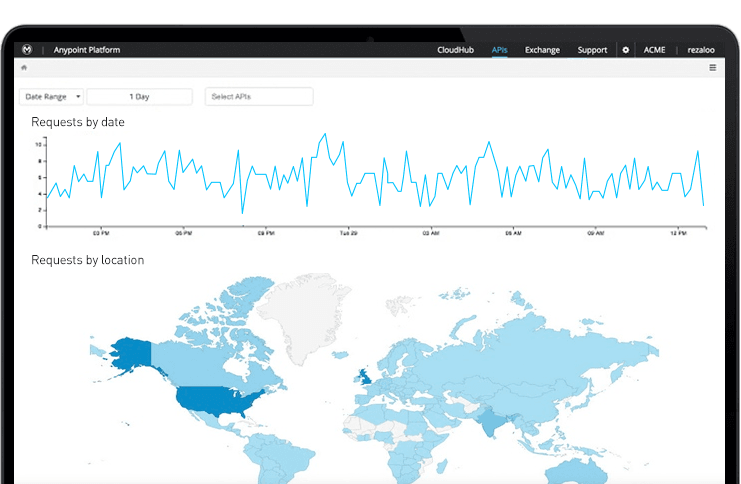
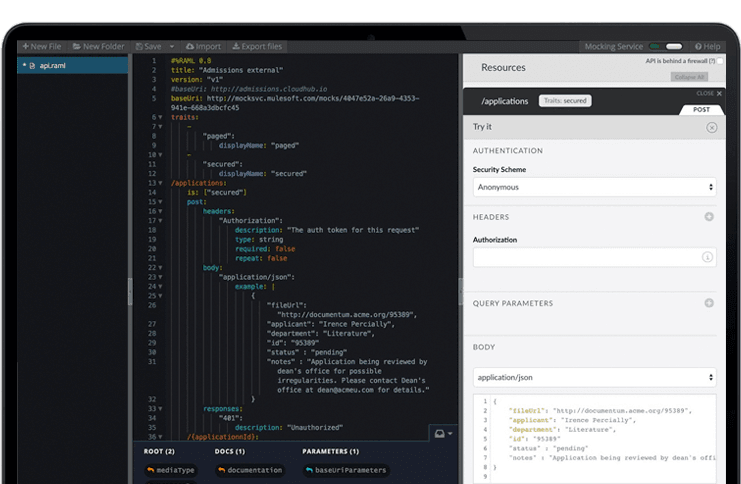
Screenshot of Connect any endpoints using out-of-the-box connectors, dynamic connectivity to API specifications, or by building reusable connectors with Anypoint DevKit™.Screenshot of A reporting suite that provides a real-time view of API consumption trends and operational performance. Analytics provides insight into how your API is being used and informs forward-looking design decisions.Screenshot of A platform to engage with API developers and drive adoption. Share documentation, examples and manage developer access from a single platform.