Autotask PSA is designed as a complete IT Business Management Platform for MSPs, now from Datto (resulting from the Autotask merger with Datto in 2017).
N/A
Planview ChangePoint
Score 7.0 out of 10
N/A
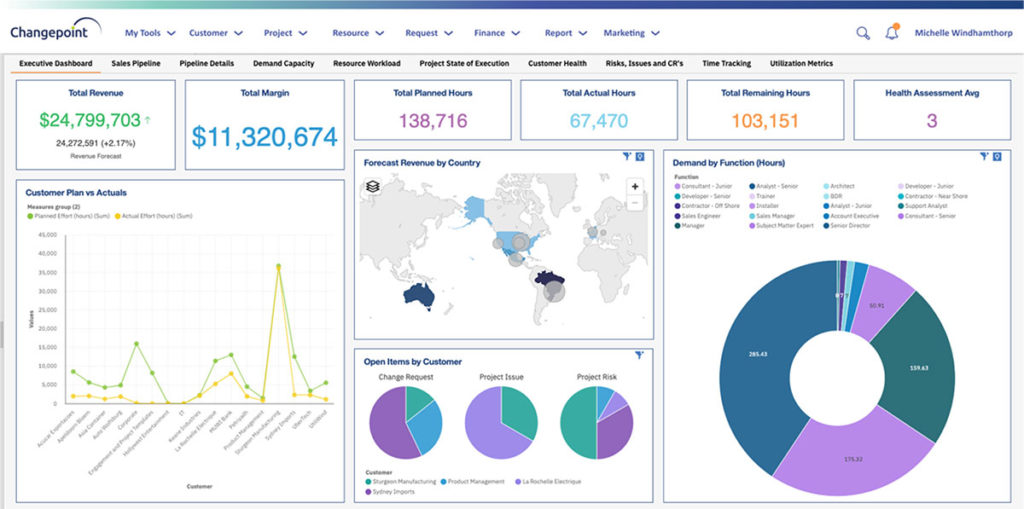
Planview Changepoint is a platform that marries professional services automation (PSA), project portfolio management (PPM) and business analytics to provide managers broad operational visibility and control over their strategic business portfolios.
N/A
TOPdesk
Score 8.4 out of 10
Mid-Size Companies (51-1,000 employees)
TOPdesk is the flagship highly-modular cloud-based or installed ITSM service desk and asset management solution from the Dutch company of the same name, for enterprise companies.
$76
per month Per agent
Pricing
Datto Autotask PSA
Planview ChangePoint
TOPdesk
Editions & Modules
No answers on this topic
No answers on this topic
Essential
$76
per month Per agent
Engaged
$109
per month Per agent
Excellent
$155
per month Per agent
Offerings
Pricing Offerings
Autotask PSA
Planview ChangePoint
TOPdesk
Free Trial
No
No
Yes
Free/Freemium Version
No
No
No
Premium Consulting/Integration Services
No
No
Yes
Entry-level Setup Fee
No setup fee
No setup fee
Optional
Additional Details
—
—
The TOPdesk license model:
- Modular: Organizations purchase only the modules needed
- Saas or On premise
- Supports unlimited number of assets.
- Service agents based.
- Discount available for annual pricing.
In my opinion, Datto Autotask is exceptionally complicated to set up, manage, and use on a daily basis. I would think the target market for this product would be someone managing a team of 20 - 50 people, possibly more. In my experience, for it to run properly you will need to dedicate at least half an FTE to running this product in an organization of that size per month. I would not recommend it for companies with less than 10 people or for companies that value quick communication with their clients. I would not recommend it for companies using Datto's RMM product. The integration exists, but it is clearly a bolt-on. They were not developed together and they are slow to talk to each other. Frequently you cannot add details from RMM sessions into the PSA without manually copying the ticket number, and if the ticket is more than a week old, then you can't even find it with the ticket number.
Changepoint is basic and would, therefore, work for businesses with uncomplicated requests, pretty straightforward workflows and willingness to work with an unsightly solution. It is basic, from the UI to the search option and the way the information is captured, which can be frustrating and counter-intuitive at times. It is relatively robust (i.e. I have been using it for almost 2 years and have not seen it crash once) but it does log me out when the system has been inactive for about 30 minutes - and I am only notified about being logged out upon clicking the Submit button, meaning many a line of text have been typed more than once!
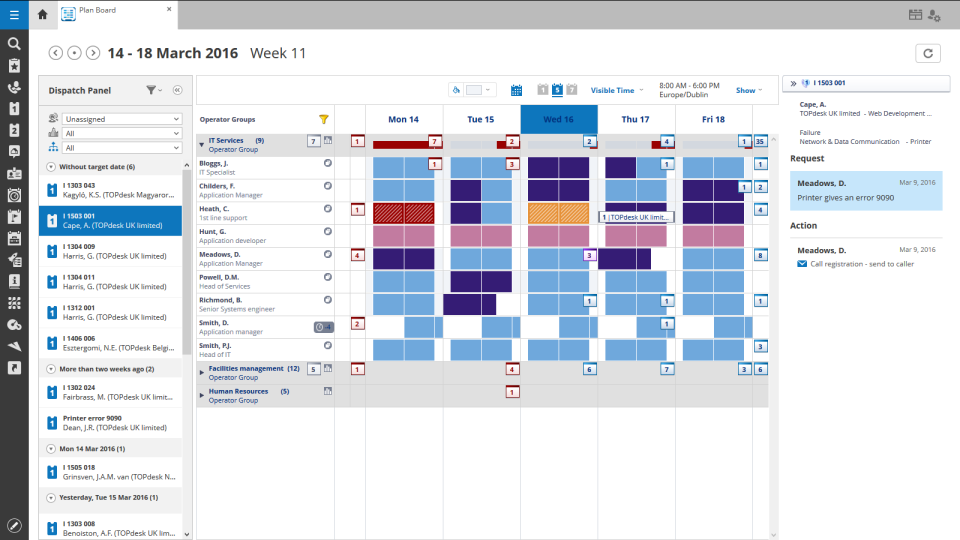
We had a smaller team of 6-7 people and for us it was perfect. It was very easy for us to book time per ticket and keep track of what we were spending the most of our time on. Escalating tickets was easy because of the prebuilt emails and message saving features. The typical features are all there of course such as incident, project management, etc. TOPdesk is highly customizable and we felt like we always had a good oversight of the KPI's, time management and customer satisfaction ratings. Our management liked the reporting features, the customizable dashboard and the data visualization. In my personal experience, TOPdesk also had the best search feature, and with the tags we were also very easily able to find the tickets we needed.
The graphical calculations on time spent on requests, how long they were open for, who worked on a ticket last.
Grouping by priority so you can determine easier what needs to be addressed sooner rather then later. This also helps if Account Management has conversations a technician is not aware of so they can prioritize efficiently.
The email updates that are sent out to the technicians so they are aware of upcoming or stale tickets.
Changepoint has significant reporting capabilities, though of course, the data that comes out is only as good as the data that goes in. I enjoy being able to use the standard reports to understand exactly how much a project has cost us and to compare it to how much we are charging. This allows us to more accurately set our prices. Though we have not used the report designer capability, I understand that custom reports can be designed with relative ease.
Changepoint has a versioning capability for changes made to user profiles in the system manager, which I find particularly helpful. As a non-power user, it is valuable to be able to see what changes I have made to various profiles so that I can troubleshoot a problem down the line.
Changepoint has significant functionality well beyond the features that we are currently using, and for this reason, I think it is affordable and a good deal. Particularly if your organization is interested in dedicating the time and resources into using all of the features around project planning, resource allocation, etc., the price is well worth the value.
We use Changepoint to manage the IS organization. I would like to see more advancement in order to do benefits management.
I would like to see a capability where a project manager can build a very detailed work breakdown structure, but only require project resources to charge time and provide a task status at a higher level.
Sometimes the decision to renew boils down to an old adage "if it isn't broken don't fix it". Previous to moving to Changepoint, it was obvious that we needed a better project management tool. Projects we completed on time but the time zone difference between the teams and several iterations of back and forth caused a number of communication issues with projects. The difference is night and day.
It just works, has some continuous development and an easy-to-use interface, which is important especially because not all our colleagues are technical experts (or in other words, "capable of more than switching on and off the computer"). We use a large range of functions and therefore it would be really hard to replace TOPdesk in our company.
Datto Autotask PSA is a full featured product that can do almost anything you need. There is a significant learning curve to get started which requires several hours spent in product training. Additionally, several hours / days are needed to get clients imported, contracts configured, and integrations implemented. Once the setup and user training is complete, the product is very functional, but it's imperative to not get overwhelmed when starting out.
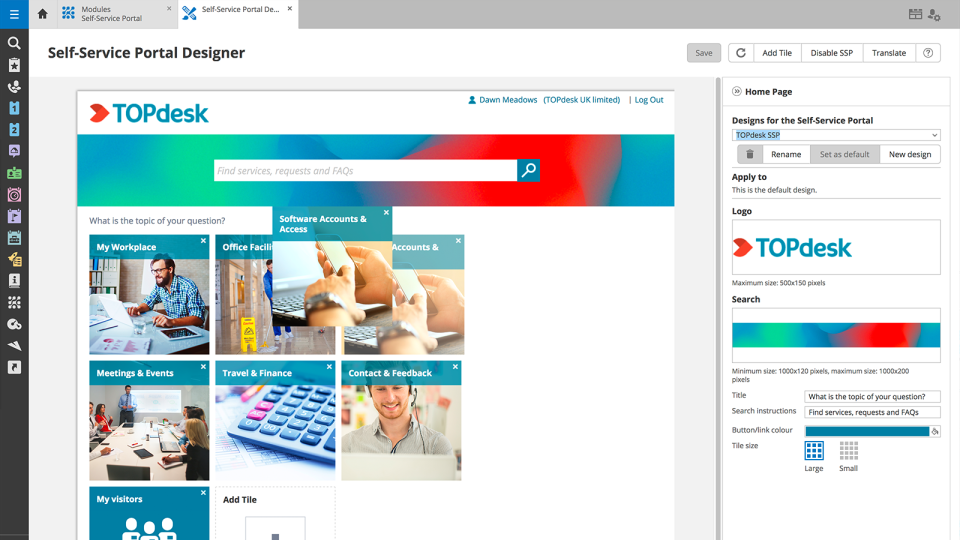
In short, we've been able to remove many pain points, automate multiple things, and empowered the end-user by being able to manage more items via the Self Service Portal. We've been able to do more than we were able to do with our previous ITSM platform. The TOPdesk development team added some things recently that will allow us to make some other things more efficient.
Like I said somewhere else in this review: the helpdesk of TOPdesk is top of the bill! In the Netherlands, that is. I can not plea for the helpdesks in other countries, but I guess the TOPdesk organization will make sure the quality of the helpdesk is the same in every country.
Although being a SAAS solution, TOPdesk performs pretty fast. One can imagine that any SAAS solution is slow or has hiccups, but we have not experienced such with TOPdesk. Pages load quickly, logging in goes smoothly. We have made reports on premise in the past - that always took some time, as you might expect with such complex tasks. It seems that in the SAAS solution TOPdesk somehow has managed to make it even faster!
Most if not nearly all questions are answered within the same or a few days. The helpdesk is very knowledgable about their product and are always willing to help. The only downside is that for more difficult questions it can take a while due to the experts being further removed from the helpdesk. But they are always willing to answer questions, even if they are not directly related to a problem with the service.
We had Topdesk in-house here training staff for almost a month (2-3 hour meetings 3x a week.) It was invaluable and we were able to take that training and share with the rest of our IT staff. Once implemented we were able to fly from there. The challenges we found were in how to get started. Once started the knowledge base offered from Topdesk has been invaluable.
Online training documentation is easy to access and consume. There is no real challenges with finding information on how to use the product and some really helpful knowledge base items that show us how valuable these options are in our own implementation of it. The online training we've used has been self driven
It was a challenge to port over years of the same thing and we ended up keeping old ideas in Topdesk that we will eventually weed out as time passes and we learn how users view categories and flows of tickets. Planning is key but bear in mind that just because you used to do it this way doesn't mean you still have to
The portion of Autotask that we've used other companies for prior to using Autotask is the Endpoint Management. The Autotask Endpoint Management (AEM) portal integrates perfectly with their PSA/CRM tools. It's alerting features are much better than the above software as there aren't a bunch of superfluous and unneeded alerts. Instead, it only alerts for things that you specify that you want. Alerts aside, for the PSA/CRM, I don't have much to compare it to as Autotask was the first PSA we tried. It's hard to imagine a PSA having more features or doing a better job than Autotask.
Planview Changepoint helps us to understand our key customers enabling us to capitalize on every financial opportunity and helps us to forecast demand against the capacities required for new opportunities, and also it automates and monitors contractual terms and conditions. It gives us visibility into our employees' skills and helps to optimize resource allocation.
Spiceworks is an easier-to-use Help Desk solution but it lacks all other features that Topdesk has. Freshdesk was just too much for our environment. It was cost-prohibitive for our intended use. TOPdesk fit our org size and budget better than the others.
TOPdesk is very flexible and scalable. Every department in you organization can you the software. Perhaps some persons need some training, but that can be provided by TOPdesk ot some keyusers.
Employee efficiency has decreased significantly within our Project MAnagement team. The main causes are lack of logical steps/not user-friendly and the slowness of the entire program.
Changepoint PSA has greatly improved being able to track budgets for all projects. Before this software, budgets were done manually by hand and cross-referenced with Accounting. Now, we can pull a report out of the system, as long as all parties entered their time and data correctly.