Deacom ERP vs. Microsoft Dynamics GP

Overview
ProductRatingMost Used ByProduct SummaryStarting Price
Deacom ERP
Score 7.6 out of 10
N/A
Deacom, an ECI Software Solution, is an ERP platform with a wide range of capabilities designed for growing batch and process manufacturers. It helps to reduce the burden caused by multi-system complexities and avoid the manual workarounds that plague traditional ERP implementations by having all of required functionality in a single platform.N/A
Microsoft Dynamics GP
Score 5.4 out of 10
N/A
Microsoft Dynamics GP is an ERP software with accounting capabilities. It includes various packs for customizability and features tailored to specific industries’ needs. GP is offered as a perpetual license or subscription.N/A
Pricing
Deacom ERPMicrosoft Dynamics GP
Editions & Modules
No answers on this topic
Offerings
Pricing Offerings
Deacom ERPMicrosoft Dynamics GP
Free Trial
NoNo
Free/Freemium Version
NoNo
Premium Consulting/Integration Services
NoNo
Entry-level Setup FeeNo setup feeNo setup fee
Additional Details
More Pricing Information
Community Pulse
Deacom ERPMicrosoft Dynamics GP
Considered Both Products
Deacom ERP
Chose Deacom ERP
Deacom ERP is much faster to respond to bulk sales order processing, large numbers of EDI transactions and query response time. Deacom ERP support is vastly better, and the team is very helpful.
Chose Deacom ERP
More economic and simple to use.
Microsoft Dynamics GP
Chose Microsoft Dynamics GP
Microsoft Dynamics GP is obviously superior to the other platforms I’ve used simply in its robustness and GAAP compliance features, but with far less usability and even in someways less usable reporting.
Chose Microsoft Dynamics GP
Business Central wasn't out then. Nav, the predecessor, was out, but its user interface was dated until 2009, when the role-tailored client came out; it was much better afterwards. If your company has manufacturing, then Business Central is the way to go. It's unfortunate that …
Chose Microsoft Dynamics GP
It is more powerful in features and ease of use as Microsoft GP provides an intuitive user interface leading to quicker adoption.
Chose Microsoft Dynamics GP
Xero is easier to use, closer to Quickbooks. Most of the background GL is automated, where as in GP it is not.
Chose Microsoft Dynamics GP
Due to the size of our company Microsoft Dynamics GP works better for us than Quickbooks because of the reporting capabilities. However, the NetSuite demo proved to be much more user-friendly with more reporting capabilities.
Chose Microsoft Dynamics GP
Because GP doesn't do CRM we have looked at D365 Customer Engagement for our field service, and F&O as a replacement. Vaporware, no direct upgrade path, and if you want to continue with GP for your back office and just use Field Service it's an insanely complex integration …
Chose Microsoft Dynamics GP
Quickbooks, SAP, and Netsuite. We are a small-sized business so Dynamics GP is better for our business.
Chose Microsoft Dynamics GP
There are more features and products overall in the Microsoft package at a better price point. Overall, Salesforce has a much sleeker and more user-friendly design.
Chose Microsoft Dynamics GP
We moved from Epicor Eagle N Series to Dynamics GP as an accounting solution for our new POS system. I believe Dynamics GP has more options to create and present financial statements for a large company with many regions and districts. However, because of the weakness of our …
Chose Microsoft Dynamics GP
They both accomplish the same thing, I think Oracle was what I first learned and thus making the change to Microsoft Dynamics GP just took a little bit of time to learn the technology. After you get the hang of it, it becomes much easier and I taught my coworkers how to use it.
Chose Microsoft Dynamics GP
I did not pick Dynamics over Salesforce, my company was using it and eventually switched over to Salesforce. I would say that Dynamics is user-friendly and the interface is quite easy to understand. I really like the reporting capabilities as well. Once again, the aesthetic …
Chose Microsoft Dynamics GP
GP is more robust than QuickBooks bar none.
Chose Microsoft Dynamics GP
At the time of purchase, Microsoft Dynamics GP seemed more appropriate and more in sync with the needs of our company. The software was more responsive, user-friendly and it allowed for more flexibility with the way it was intended to be used. We were also promised better …
Chose Microsoft Dynamics GP
My recollection of Quickbooks pro isn't great, and it was over 10 years ago. Obviously many things have changed in that time frame, so any comparison would likely not be relevant.
Chose Microsoft Dynamics GP
The only product with have shopped was Sage Intacct. It is somewhat unfair to compare the two solutions, because Sage Intacct is a cloud-based solution. That said, Intacct appears to advertise better reporting/business intelligence capabilities. MS Dynamics GP should be aware …
Chose Microsoft Dynamics GP
Microsoft Dynamics GP is one of the best ERP's for a medium or small business in the market today. When we were looking for the right software, it had already a connection developed with our 3rd party logistics system, so the decision was pretty easy since the logistic / supply …
Chose Microsoft Dynamics GP
Dynamics GP is much more flexible and enterprise-oriented than Quickbooks Pro or similar software. It can support many more users and scenarios. However it requires more dedicated infrastructure (such as servers and databases) and more dedicated IT resources to maintain and …
Chose Microsoft Dynamics GP
I love Dayforce for payroll. It has been configured to meet all our needs, is user-friendly and the customer support is fantastic. We originally moved from MDGP payroll to Ceridian Insync payroll due to the issues we had. We upgraded to Dayforce and are very happy with the …
Chose Microsoft Dynamics GP
Learning GP with so many resources from the GP community has been easy. Someone always has the answer or suggestions to point me in the right direction. I've had very few instances where the systems caused an error that required research in order to fix the glitch.
Chose Microsoft Dynamics GP
We looked at several general ledger software packages. We had excellent customer service and implementation guidance through a third party. Having a knowledgeable consultant is critical to a successful implementation.
Chose Microsoft Dynamics GP
Quickbooks Pro and GP are not on the same playing field. GP is a full account system adhering to GAAP, while QuickBooks is designed for the small business market. While starting out with QuickBooks is easy, if you plan to grow, you will soon outgrow it.
Chose Microsoft Dynamics GP
Microsoft Dynamics is a good, easy to use product for entities that do not have advanced manufacturing.
If I were to go into a distribution or service type business I would highly recommend it.
If I were to go into an advanced manufacturing environment I would not consider GP.
Chose Microsoft Dynamics GP
More user friendly in certain areas and much more cost effective to manage and support
Chose Microsoft Dynamics GP
TechSoup had great privcing, I had experince with GP in previous companys and there are a lot of staff accountants who have relevant experience.
Features
Deacom ERPMicrosoft Dynamics GP
Customization
Comparison of Customization features of Product A and Product B
Deacom ERP
6.8
Ratings
10% below category average
Microsoft Dynamics GP
4.3
Ratings
56% below category average
API for custom integration6.80 Ratings2.50 Ratings
Plug-ins00 Ratings6.00 Ratings
Security
Comparison of Security features of Product A and Product B
Deacom ERP
7.7
Ratings
9% below category average
Microsoft Dynamics GP
6.9
Ratings
18% below category average
Single sign-on capability8.20 Ratings5.70 Ratings
Role-based user permissions7.30 Ratings8.20 Ratings
Reporting & Analytics
Comparison of Reporting & Analytics features of Product A and Product B
Deacom ERP
6.4
Ratings
15% below category average
Microsoft Dynamics GP
5.3
Ratings
39% below category average
Dashboards5.50 Ratings3.40 Ratings
Standard reports6.90 Ratings6.20 Ratings
Custom reports6.80 Ratings6.40 Ratings
General Ledger and Configurable Accounting
Comparison of General Ledger and Configurable Accounting features of Product A and Product B
Deacom ERP
7.2
Ratings
7% below category average
Microsoft Dynamics GP
5.0
Ratings
42% below category average
Accounts payable7.30 Ratings6.30 Ratings
Accounts receivable6.90 Ratings5.80 Ratings
Global Financial Support8.20 Ratings6.00 Ratings
Primary and Secondary Ledgers7.00 Ratings4.70 Ratings
Journals and Reconciliations7.00 Ratings4.60 Ratings
Configurable Accounting7.10 Ratings3.70 Ratings
Standardized Processes6.90 Ratings6.20 Ratings
Cash management00 Ratings6.30 Ratings
Bank reconciliation00 Ratings5.60 Ratings
Expense management00 Ratings4.40 Ratings
Time tracking00 Ratings8.00 Ratings
Fixed asset management00 Ratings4.40 Ratings
Multi-currency support00 Ratings2.70 Ratings
Multi-division support00 Ratings3.00 Ratings
Regulations compliance00 Ratings3.20 Ratings
Electronic tax filing00 Ratings9.00 Ratings
Self-service portal00 Ratings7.00 Ratings
Intercompany Accounting00 Ratings3.70 Ratings
Localizations00 Ratings4.50 Ratings
Enterprise Accounting00 Ratings2.70 Ratings
Centralized Rules Framework00 Ratings3.50 Ratings
Inventory Management
Comparison of Inventory Management features of Product A and Product B
Deacom ERP
7.4
Ratings
8% below category average
Microsoft Dynamics GP
4.3
Ratings
52% below category average
Inventory tracking7.30 Ratings5.80 Ratings
Automatic reordering7.00 Ratings1.00 Ratings
Location management7.80 Ratings4.00 Ratings
Manufacturing module00 Ratings3.90 Ratings
Order Management
Comparison of Order Management features of Product A and Product B
Deacom ERP
6.6
Ratings
18% below category average
Microsoft Dynamics GP
3.6
Ratings
70% below category average
Pricing6.60 Ratings3.60 Ratings
Order entry7.20 Ratings3.60 Ratings
Credit card processing6.00 Ratings1.00 Ratings
Cost of goods sold6.70 Ratings5.10 Ratings
Order Orchestration00 Ratings5.10 Ratings
End-to-end order visibility00 Ratings3.50 Ratings
Order exception Resolution00 Ratings3.40 Ratings
Subledger and Financial Process
Comparison of Subledger and Financial Process features of Product A and Product B
Deacom ERP
6.9
Ratings
9% below category average
Microsoft Dynamics GP
-
Ratings
Billing Management7.30 Ratings00 Ratings
Cash and Asset Management7.20 Ratings00 Ratings
Travel & Expense Management6.20 Ratings00 Ratings
Budgetary Control & Encumbrance Accounting6.20 Ratings00 Ratings
Period Close7.50 Ratings00 Ratings
Procurement
Comparison of Procurement features of Product A and Product B
Deacom ERP
6.6
Ratings
7% below category average
Microsoft Dynamics GP
-
Ratings
Contract Repository7.70 Ratings00 Ratings
Requisitions-to-Purchase Orders Integrated6.00 Ratings00 Ratings
Supplier Management6.20 Ratings00 Ratings
Manufacturing
Comparison of Manufacturing features of Product A and Product B
Deacom ERP
6.4
Ratings
15% below category average
Microsoft Dynamics GP
-
Ratings
Production Process Design6.20 Ratings00 Ratings
Production Management6.20 Ratings00 Ratings
Configuration Management6.20 Ratings00 Ratings
Work Execution6.60 Ratings00 Ratings
Manufacturing Costs6.80 Ratings00 Ratings
Supply Chain
Comparison of Supply Chain features of Product A and Product B
Deacom ERP
6.0
Ratings
19% below category average
Microsoft Dynamics GP
-
Ratings
Forecasting5.80 Ratings00 Ratings
Inventory Planning6.00 Ratings00 Ratings
Performance Monitoring6.20 Ratings00 Ratings
Product Lifecycle Management
Comparison of Product Lifecycle Management features of Product A and Product B
Deacom ERP
7.8
Ratings
6% above category average
Microsoft Dynamics GP
-
Ratings
Product Master Data Management7.80 Ratings00 Ratings
Payroll Management
Comparison of Payroll Management features of Product A and Product B
Deacom ERP
-
Ratings
Microsoft Dynamics GP
6.4
Ratings
17% below category average
Pay calculation00 Ratings6.20 Ratings
Benefit plan administration00 Ratings5.80 Ratings
Direct deposit files00 Ratings7.50 Ratings
Salary revision and increment management00 Ratings6.50 Ratings
Reimbursement management00 Ratings6.00 Ratings
Best Alternatives
Deacom ERPMicrosoft Dynamics GP
Small Businesses
Zoho One
Zoho One
Score 9.2 out of 10
QuickBooks Self-Employed (discontinued)
Score 4.9 out of 10
Medium-sized Companies
Infor VISUAL
Infor VISUAL
Score 7.3 out of 10
Zoho Books
Zoho Books
Score 9.0 out of 10
Enterprises
24SevenOffice
24SevenOffice
Score 9.0 out of 10
SAP Cloud ERP
SAP Cloud ERP
Score 8.6 out of 10
All AlternativesView all alternativesView all alternatives
User Ratings
Deacom ERPMicrosoft Dynamics GP
Likelihood to Recommend
7.3
(0 ratings)
4.0
(0 ratings)
Likelihood to Renew
-
(0 ratings)
9.9
(0 ratings)
Usability
7.3
(0 ratings)
5.4
(0 ratings)
Availability
-
(0 ratings)
10.0
(0 ratings)
Performance
-
(0 ratings)
7.0
(0 ratings)
Support Rating
-
(0 ratings)
7.0
(0 ratings)
Implementation Rating
-
(0 ratings)
8.2
(0 ratings)
Product Scalability
-
(0 ratings)
9.1
(0 ratings)
User Testimonials
Deacom ERPMicrosoft Dynamics GP
Likelihood to Recommend
Good for the price and basic functionality but sometimes calculations inside the application are not handled smoothly. For us, we have no problems for our Lb customers but our Gallon/Kg customers usually have issues have unit conversion issues.
Read full review
Microsoft Dynamics GP is well-suited for our environment, as we pay a diverse group of employees, including on-the-road drivers, shop employees (some in other locations), and office employees. It easily tracks time off, taxes, pay, etc. The reporting allows us to verify with our drivers how they are paid each week, whether it be through mileage or stop-offs.
Read full review
Pros
  • The lot tracking capability
  • Being able to have the Accounting software to look up the GL information
  • Creation and customization of the ERP system that we need for our business
Read full review
  • User friendly interface
  • Able to be extended into multiple areas of your business
  • One feature we have been using for a few years is EFT for payables - it has significantly reduced the time spent paying vendors and reduced our check printing and mailing costs. It is very easy to setup and use.
Read full review
Cons
  • MRP - it is rather difficult to understand
  • Quality Control - it is not possible to effectively note/track hold reasons and drive action
Read full review
  • Supply chain management is adequate but not exceptional, and there are challenges tying the product to a website front end. These features are present and work fine in many environments but are often lacking for customers who need more robust systems.
  • Reporting tools often require consulting expertise or an internal business analyst to develop. Many smaller companies don't have this skill set, so it can be costly to upgrade to GP from a smaller packages like QuickBooks.
  • Some features that are available in competing products are still not present in GP, such as full copy-paste functionality and more intelligent workflow/batch processing functions.
Read full review
Likelihood to Renew
No answers on this topic
Due the economic challenges that Puerto Rico is having, the company has had to merge some companies in order to be more efficient. It has been easy in GP to process those merges, even thought we had to spend days to accomplish that the process was smooth and accurate. In addition we were able to streamline the purchasing and sales process and the organization is confident to keep renewing GP for the future versions.
Read full review
Usability
With proper training it is very easy to use as long as you don't try to customize it to fit your old processes
Read full review
Menus are generally quite difficult to navigate, user-friendliness is lacking, platform can at times be unstable (crashes, etc), reports tha would seem to report one thing do not actually return that data. Usability is probably the biggest weakness of Microsoft Dynamics GP.
Read full review
Support Rating
No answers on this topic
The rating is directed to the thrid party serive provider that we use. I do not now how good the Microsoft direct support is.
Read full review
Implementation Rating
No answers on this topic
Basically the challenge with this implementation was the Business Portal, too many errors and even the aplication is up and running the users are still having issues. We will start planning the migraton to GP 2015 soon.
Read full review
Alternatives Considered
Deacom ERP is much faster to respond to bulk sales order processing, large numbers of EDI transactions and query response time. Deacom ERP support is vastly better, and the team is very helpful.
Read full review
Because GP doesn't do CRM we have looked at D365 Customer Engagement for our field service, and F&O as a replacement. Vaporware, no direct upgrade path, and if you want to continue with GP for your back office and just use Field Service it's an insanely complex integration import/export. D365 F&O is a huge implementation cost, and without a direct migration path every bit of data has to be custom imported. There really is no straightforward way to stack up GP against these programs currently. Again, the future of GP is in some doubt.
Read full review
Scalability
No answers on this topic
The functionality that GP and related ISV solutions offer and the ease of integration of GP to other systems makes it an extremely scalable solution
Read full review
Return on Investment
  • Provide a central resource for viewing and manage all orders, jobs and running reports.
  • Slow down system performance by big report users.
Read full review
  • We have never missed a payroll using Great Plains. We have the ability to fix any issues that come up quickly.
  • It streamlines our departments that handle money into one unified system. This gives accounting and finance the overall picture in one system.
  • With Integration Manager we have to worry less about taking time to hand key transactions. This cuts down on entry time and increase efficiency for our clerks.
Read full review
ScreenShots

Deacom ERP Screenshots

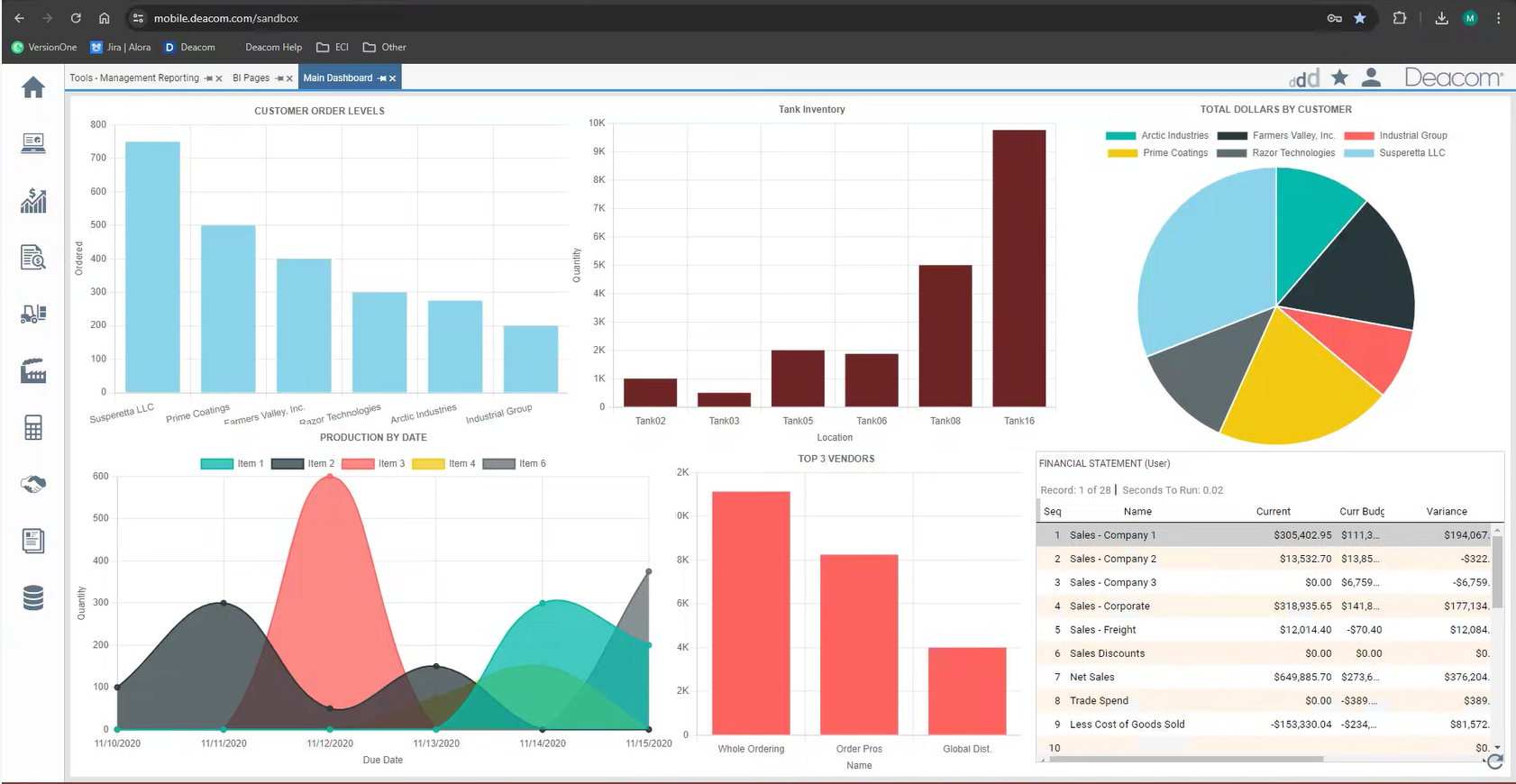
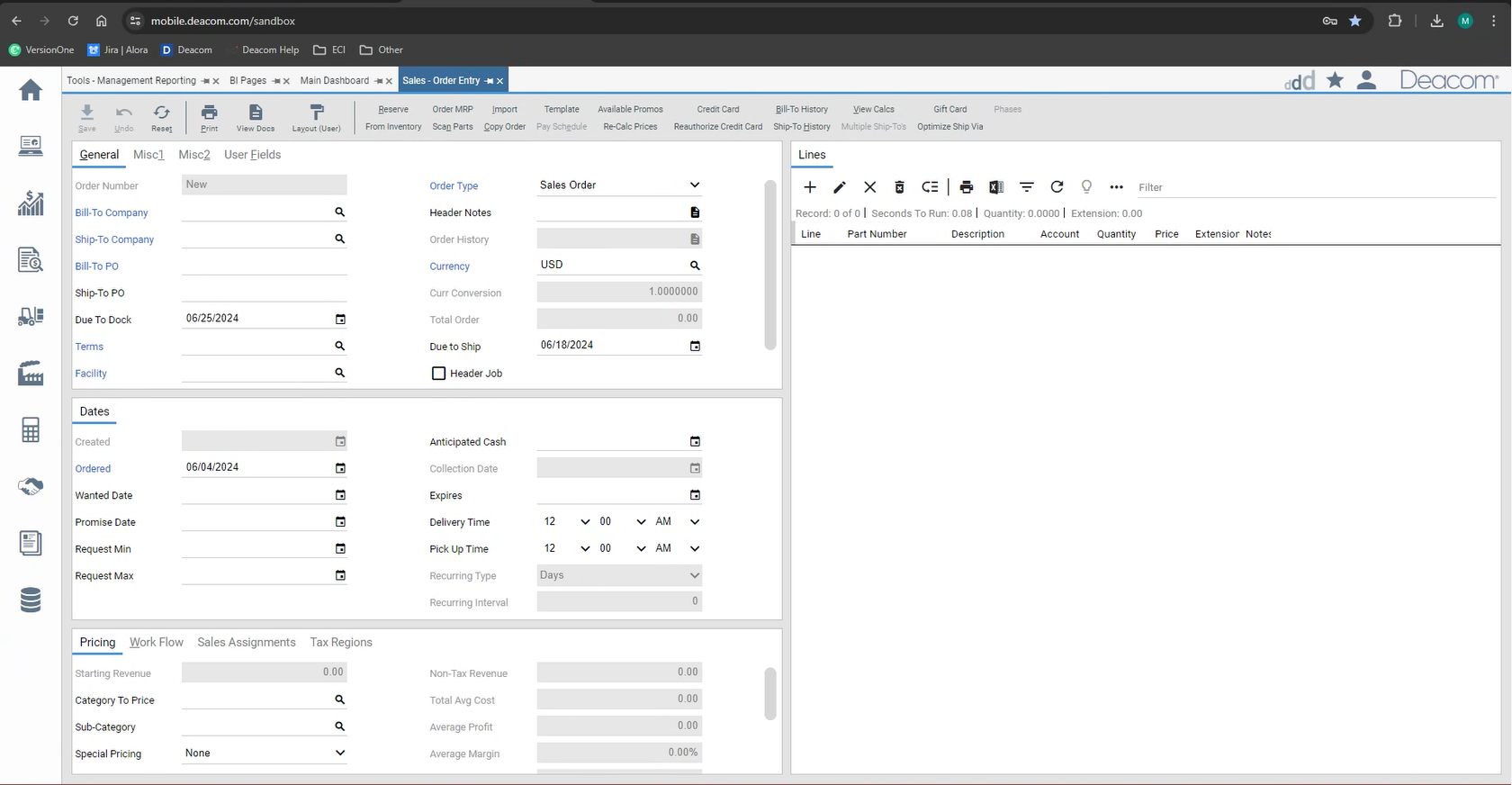
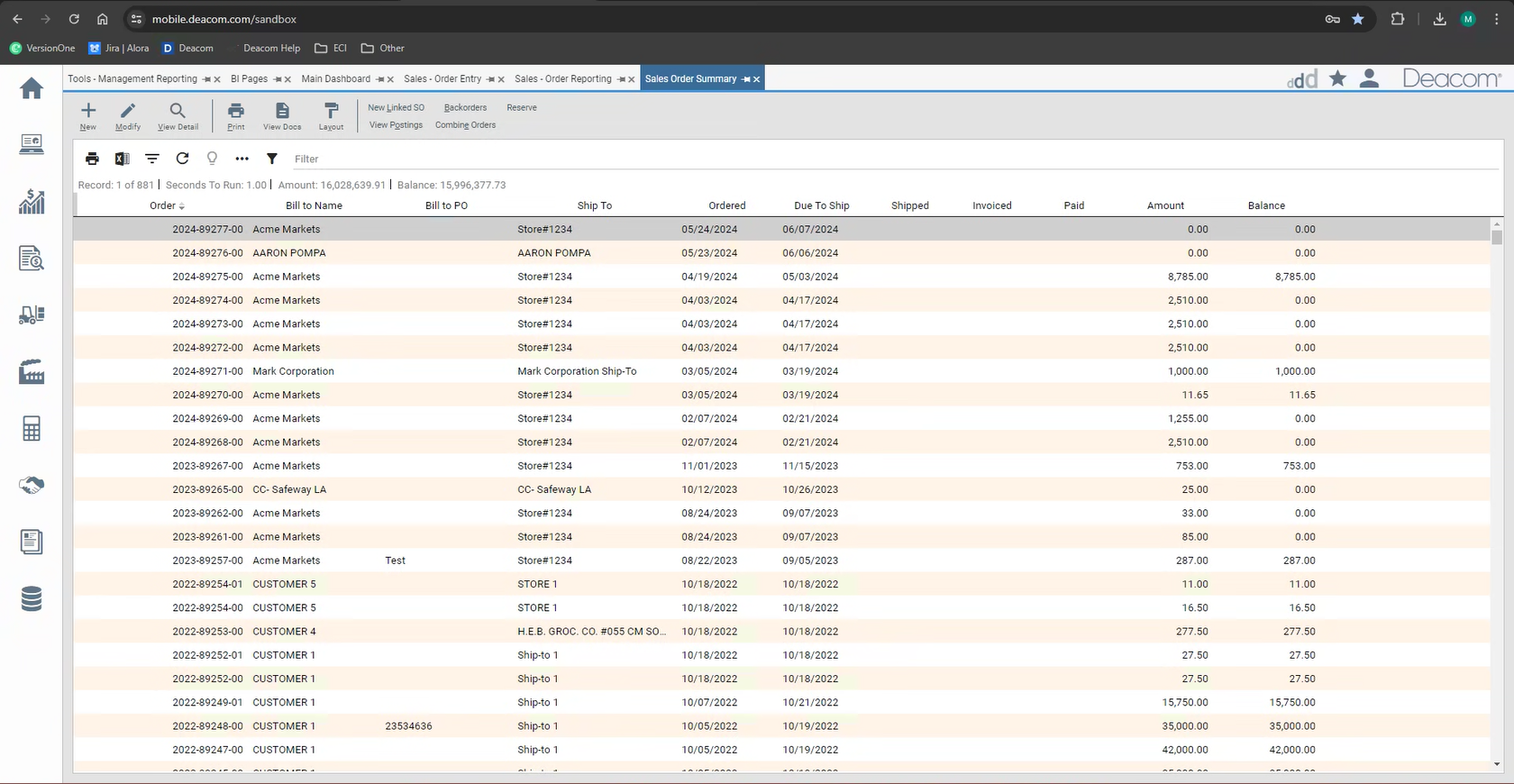
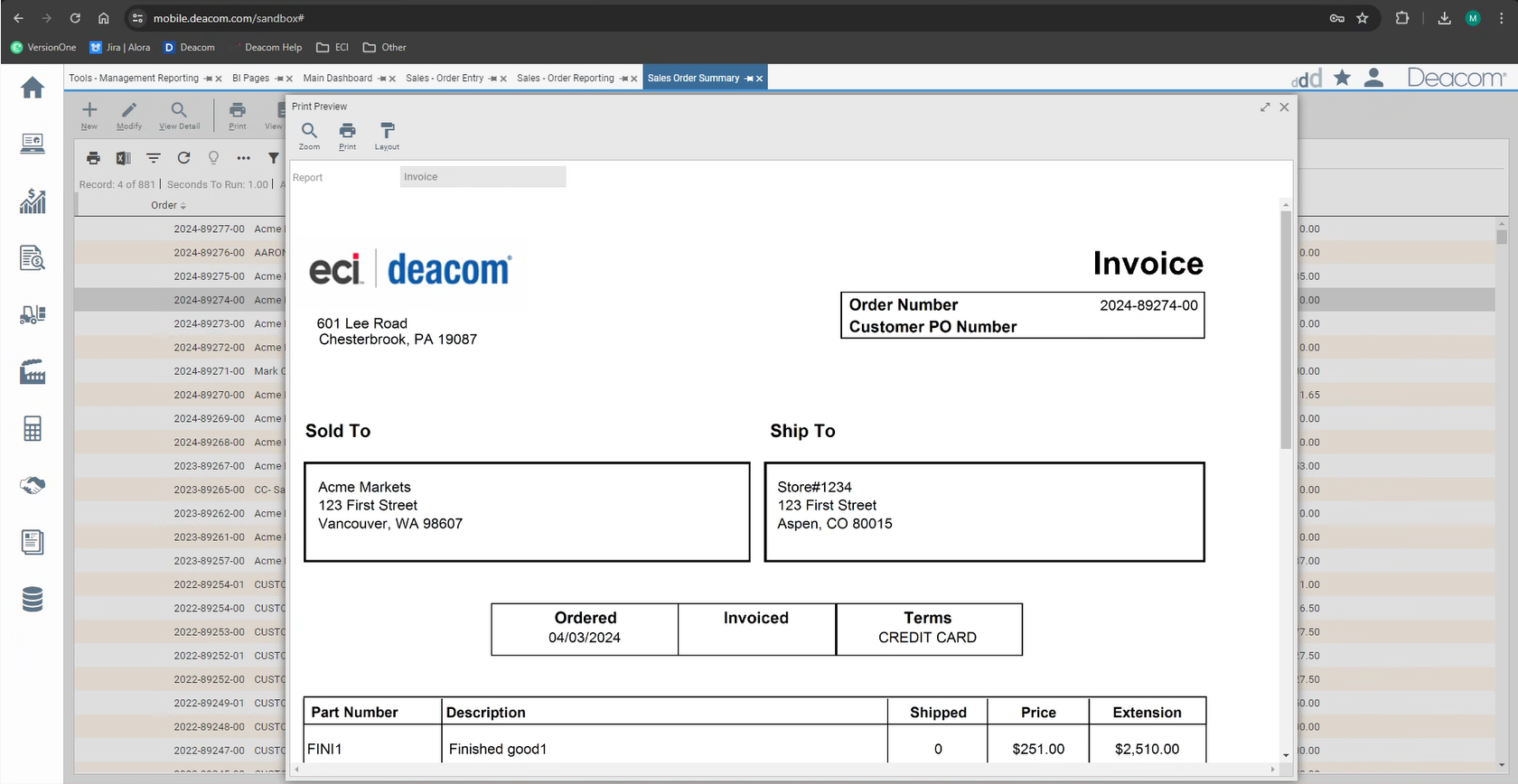
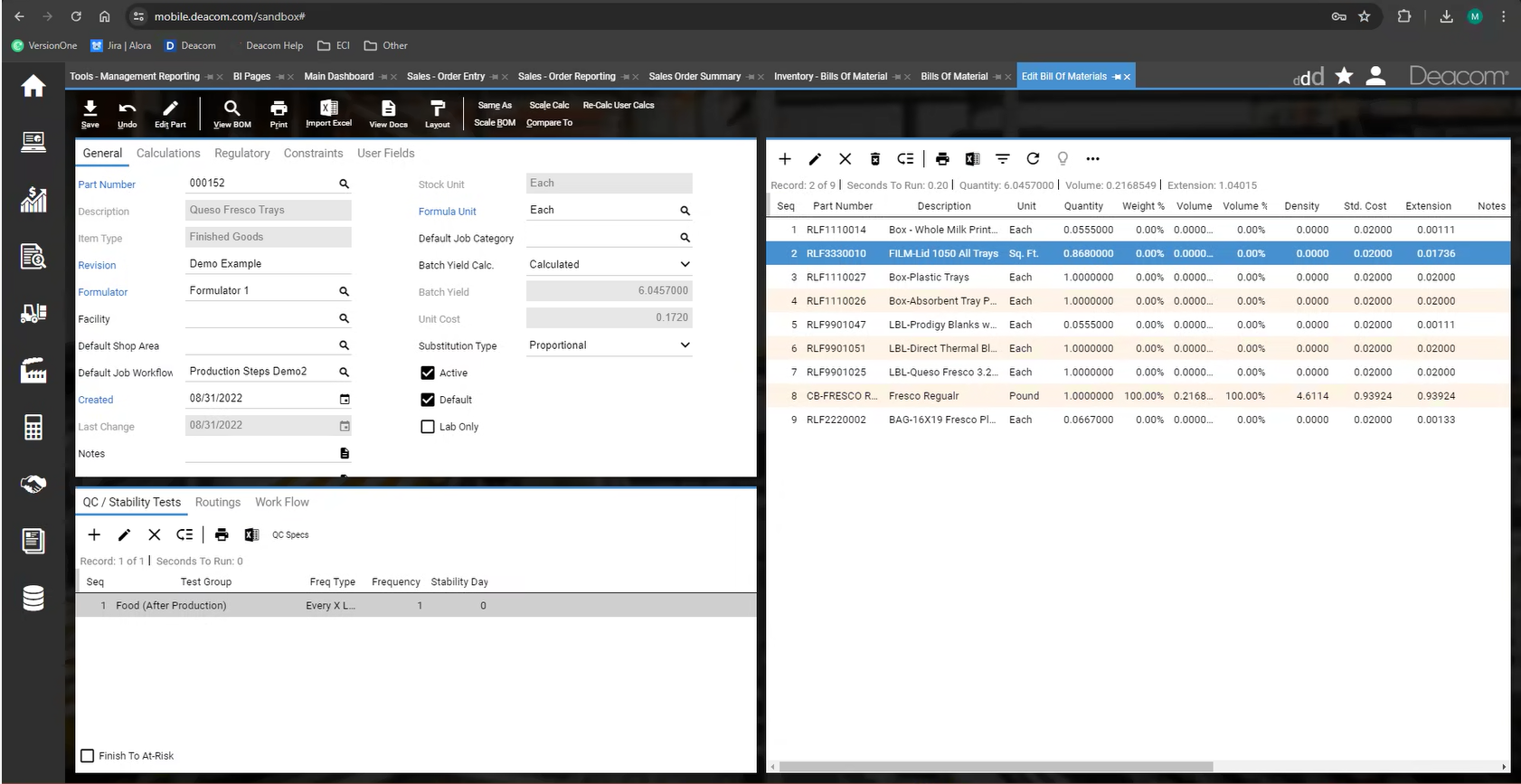
Screenshot of Deacom's customizable dashboards. These interactive dashboards visually represent key metrics and performance indicators. Users can monitor production efficiency, inventory levels, sales trends, and other aspects of process manufacturing operations.  The ability to customize these dashboards ensures important information is readily available.Screenshot of Deacom's Sales Order's interface for adding and managing order items with product details, applying pricing, discounts, and shipping specifics. Real-time inventory visibility ensures order fulfillment, while credit check integration streamlines customer verification. Order tracking and communication tools promote customer interaction, empowering process manufacturers to streamline order processing, optimize inventory allocation, and enhance customer satisfaction.Screenshot of Deacom's Management Reporting feature, used to generate in-depth reports and drill down into critical data points encompassing financial performance and production output to inventory levels and sales trends.  Management Reporting facilitates a deeper understanding of process manufacturing operations, enabling users to identify areas for improvement, optimize resource allocation, and make data-driven decisions for long-term success.Screenshot of Deacom's interface for creating essential business documents. Users can generate purchase orders, sales orders, and other critical documents.Screenshot of Deacom's interface for navigating complex functionalities, used for generating reports, creating purchase orders, or monitoring real-time data on customizable dashboards.  Deacom offers a choice of light and dark themes, and the interface can be tailored to optimize viewing comfort.