DemandTools vs. Syskit Point

Overview
ProductRatingMost Used ByProduct SummaryStarting Price
DemandTools
Score 9.8 out of 10
N/A
DemandTools for AppExchange is a data quality toolset for Salesforce.com CRM centric customers. The product comprises 11 individual modules to control, standardize, verify, deduplicate, import and manipulate Salesforce and/or Force.com data.N/A
Syskit Point
Score 9.0 out of 10
N/A
SysKit Point is a Automated Office 365 Governance and Security tool, from SysKit in Zagreb. It is designed to enable users to get a full overview of an Office 365 environment and ownership across Microsoft Teams, SharePoint Online, Office 365 Groups, and OneDrive in a central web interface. With it, the vendor says users can create easy-to-read security reports and proactively manage users and access.
$1
per month
Pricing
DemandToolsSyskit Point
Editions & Modules
No answers on this topic
Offerings
Pricing Offerings
DemandToolsSyskit Point
Free Trial
YesYes
Free/Freemium Version
NoNo
Premium Consulting/Integration Services
NoNo
Entry-level Setup FeeNo setup feeNo setup fee
Additional Details
More Pricing Information
Community Pulse
DemandToolsSyskit Point
Best Alternatives
DemandToolsSyskit Point
Small Businesses
Dataloader.io
Dataloader.io
Score 10.0 out of 10
Egnyte
Egnyte
Score 9.5 out of 10
Medium-sized Companies
IBM InfoSphere Information Server
Score 8.0 out of 10
IBM InfoSphere Information Server
Score 8.0 out of 10
Enterprises
IBM InfoSphere Information Server
Score 8.0 out of 10
IBM InfoSphere Information Server
Score 8.0 out of 10
All AlternativesView all alternativesView all alternatives
User Ratings
DemandToolsSyskit Point
Likelihood to Recommend
8.7
(117 ratings)
-
(0 ratings)
Likelihood to Renew
9.9
(16 ratings)
-
(0 ratings)
Usability
7.8
(6 ratings)
-
(0 ratings)
Availability
9.8
(2 ratings)
-
(0 ratings)
Performance
8.5
(3 ratings)
-
(0 ratings)
Support Rating
9.0
(5 ratings)
-
(0 ratings)
Online Training
8.5
(2 ratings)
-
(0 ratings)
Implementation Rating
6.9
(6 ratings)
-
(0 ratings)
Configurability
7.5
(2 ratings)
-
(0 ratings)
Ease of integration
9.0
(1 ratings)
-
(0 ratings)
Product Scalability
8.5
(2 ratings)
-
(0 ratings)
Vendor post-sale
9.0
(1 ratings)
-
(0 ratings)
Vendor pre-sale
9.0
(1 ratings)
-
(0 ratings)
User Testimonials
DemandToolsSyskit Point
Likelihood to Recommend
Validity
DemandTools is perfect for any system that constantly adds new records to its database. For example, in higher education, we are constantly purchasing search names from various vendors and DemandTools allows us to make sure we are not doubling up on the same records. It saves us money in the long run as we are not mailing out multiple copies of our brochures to the same person.
Read full review
Syskit
No answers on this topic
Pros
Validity
  • PowerGrid can review and make the updates simultaneously.
  • Single Table Dedupe makes merg[ing] the records easy and can make updates at the same time.
  • BulkBackup [is] just one click, majority data got updated.
  • Scenarios save a lot of time for similar working load.
Read full review
Syskit
No answers on this topic
Cons
Validity
  • I wish I could make changes to my existing scenarios using save rather than having to create a whole new scenario. Maybe you can, I just haven't been able to.
  • Some features aren't user intuitive and it takes a while to learn.
Read full review
Syskit
No answers on this topic
Likelihood to Renew
Validity
It's a great product. The only thing that holds us back is it was frustrating working with their sales team. We also don't like that when Validity purchased DemandTools they immediately started charging us quite a bit while it had been free for non-profit users when CRMFusion owned it. They also don't let you buy it for just 1 or 2 seats, you have to pay, I believe, in batches of 100 seats.
Read full review
Syskit
No answers on this topic
Usability
Validity
Allows for control in uploading lists, saved processes for checking duplicate records.

Allows for backup files and quick reverts if something goes wrong.

Extends reporting when Salesforce.com cannot support specific pieces of info being put together in a report.

Automated processes for set and forget hygiene tasks
Read full review
Syskit
No answers on this topic
Reliability and Availability
Validity
There has not been a time since I started 9 months ago that I've encountered any kind of downtime.
Read full review
Syskit
No answers on this topic
Performance
Validity
DemandTools is a bit clunky and slow at times
Read full review
Syskit
No answers on this topic
Support Rating
Validity
Support can be slow so do not expect quick turn for urgent issues.
Help for specific queries not not there. Product tech support is offered. It would be great if query support, even if paid, was offered
The training webinars help with the basics but not much if you need advanced functionality.
Read full review
Syskit
No answers on this topic
Online Training
Validity
The trainings are free live webinars that give you a solid base for getting started with the program. The only weakness is they don't have any advanced classes.
Read full review
Syskit
No answers on this topic
Implementation Rating
Validity
I had just started using Salesforce about 3 months before I did the implementation myself, and it was easy to do just following their step-by-step instructions.
Read full review
Syskit
No answers on this topic
Alternatives Considered
Validity
Though RingLead has much more to offer in terms of automation (and it is in Salesforce rather than a separate program), DemandTools still has our heart. DemandTools is very cost-friendly and we were able to increase the value of DemandTools by programming in additional saved scenarios. I decreased admin time in the DemandTools suite by approximately 25% after implementing saved scenarios for every reoccurring update or list upload.
Read full review
Syskit
No answers on this topic
Scalability
Validity
It's done everything we've needed it to do.
Read full review
Syskit
No answers on this topic
Return on Investment
Validity
  • It is a tremendous time saver. It does things Salesforce doesn't even have the capability to do. Tasks that would take hours to manually complete.
  • We can process a tremendous amount of data daily through one person, vs. weeks for the data to be cleaned, reviewed, routed and input.
  • Saves on headcount by allowing a dedicated user to set up batches and jobs for other teams to ensure their data integrity.
  • The return on investment isn't easily quantifiable but it is FELT in our department.
Read full review
Syskit
No answers on this topic
ScreenShots

DemandTools Screenshots

Screenshot of DemandTools Home ScreenScreenshot of Modify FormulaScreenshot of Data Quality Automation

Syskit Point Screenshots

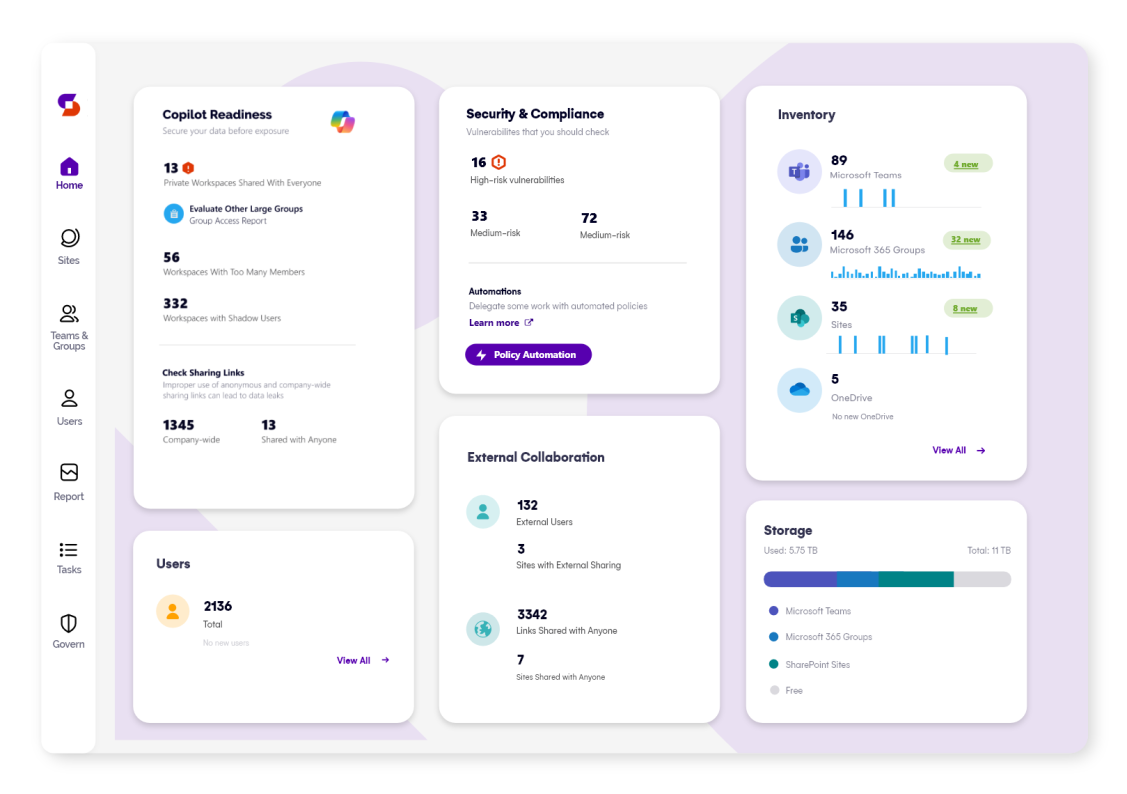
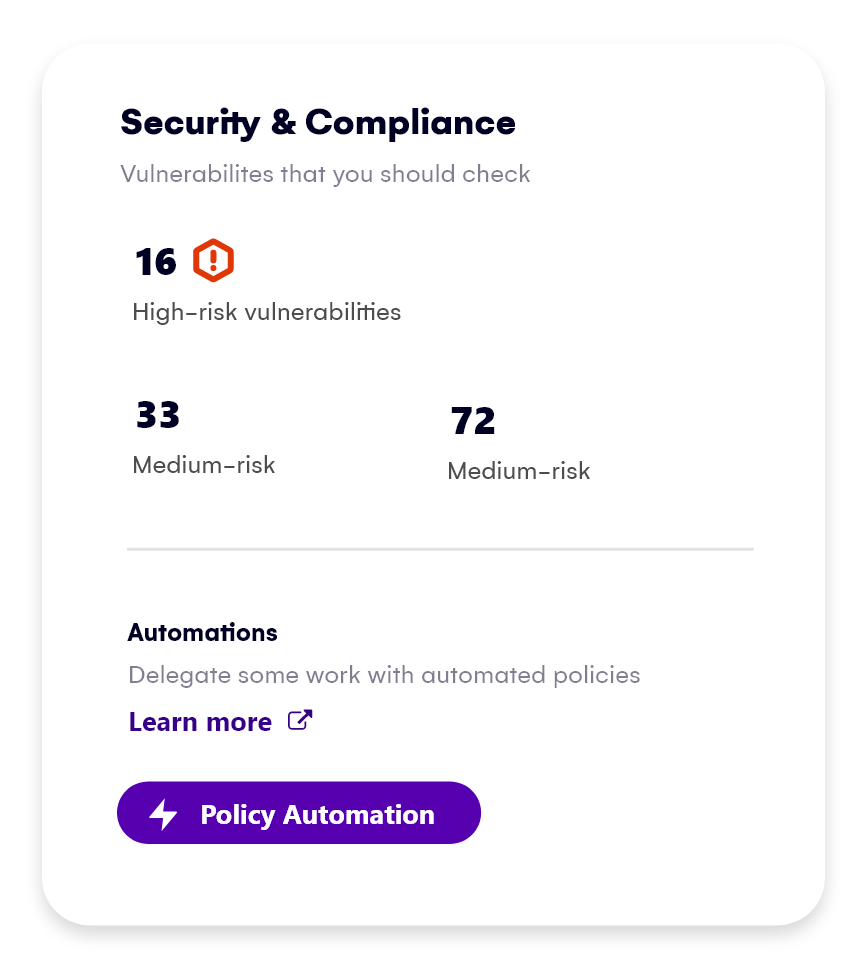
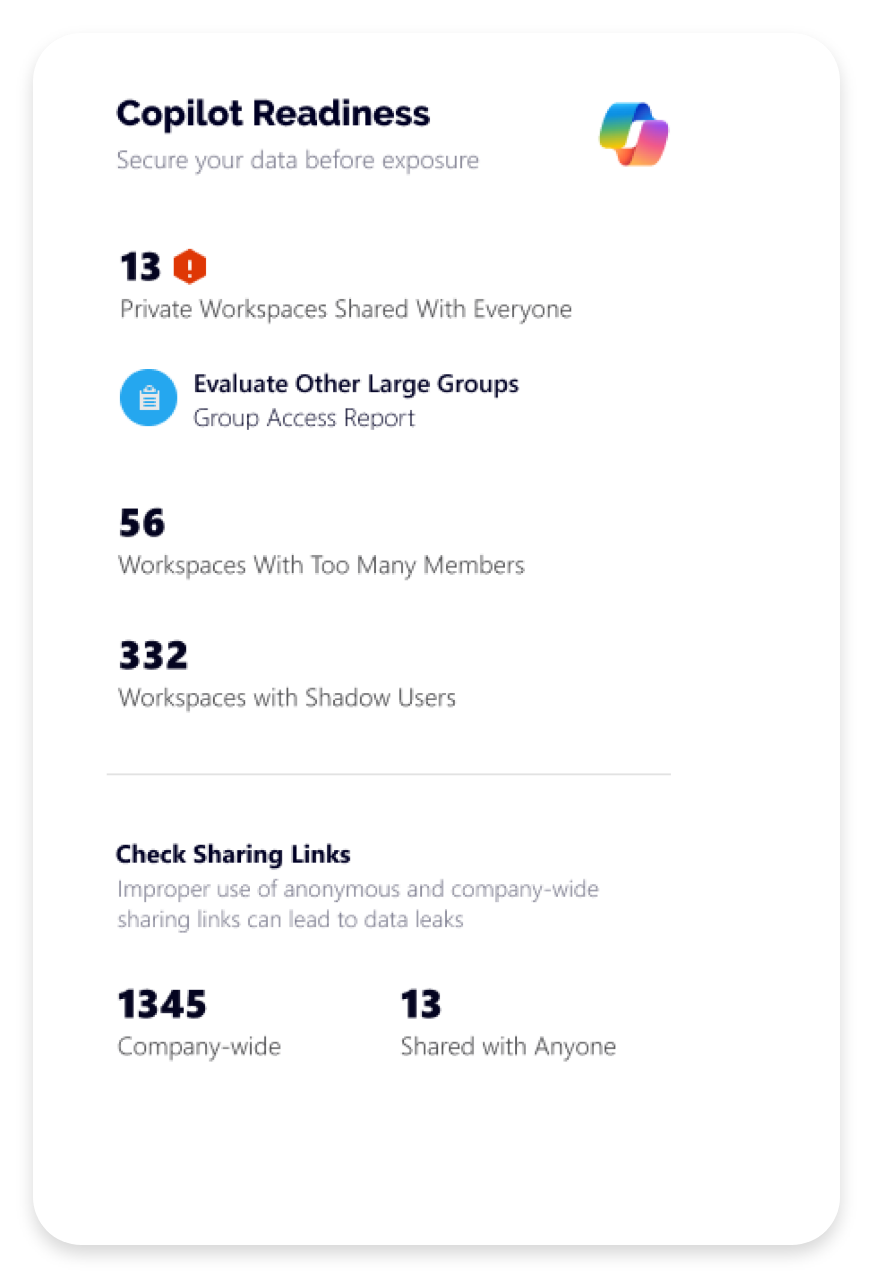
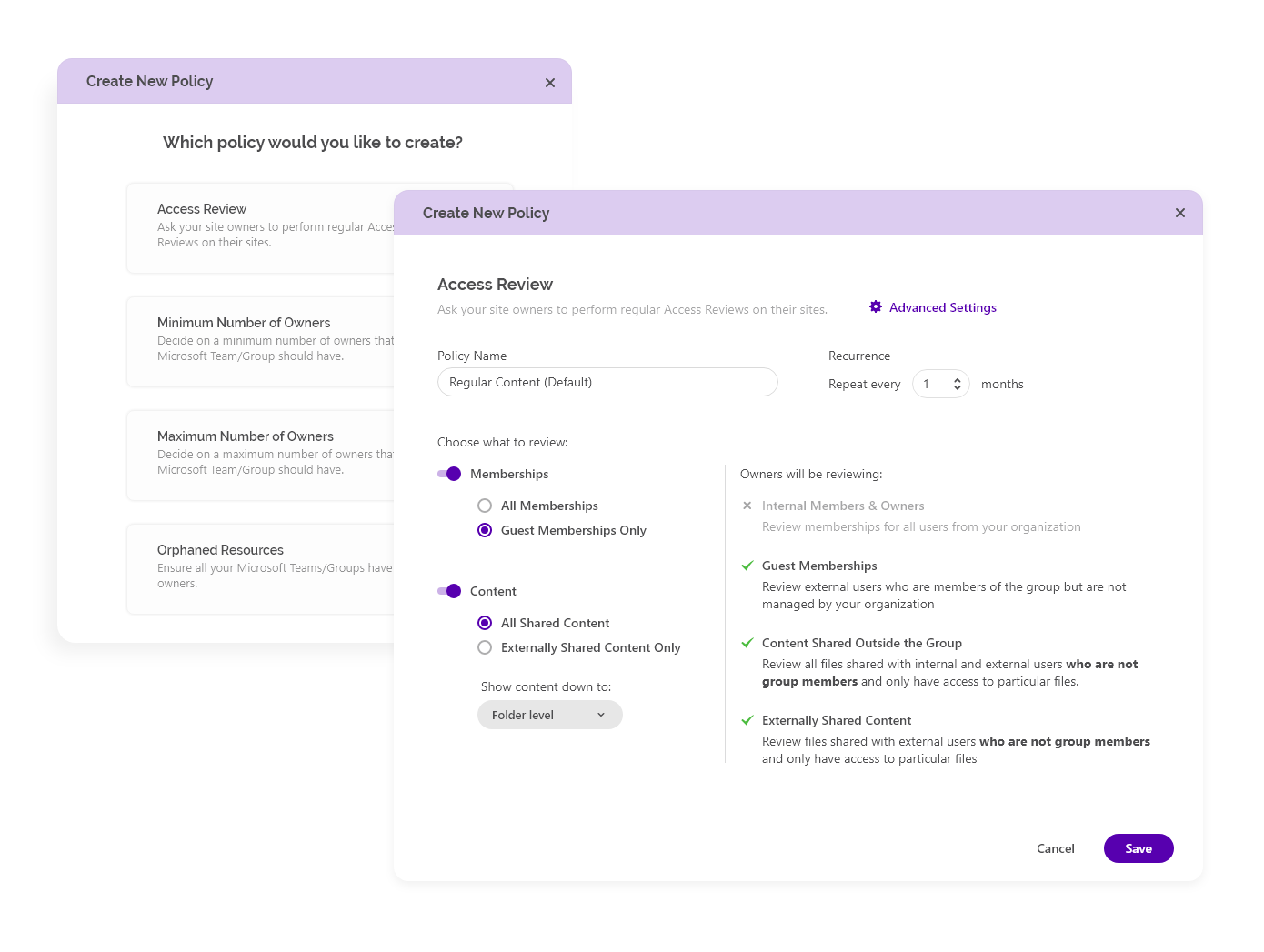
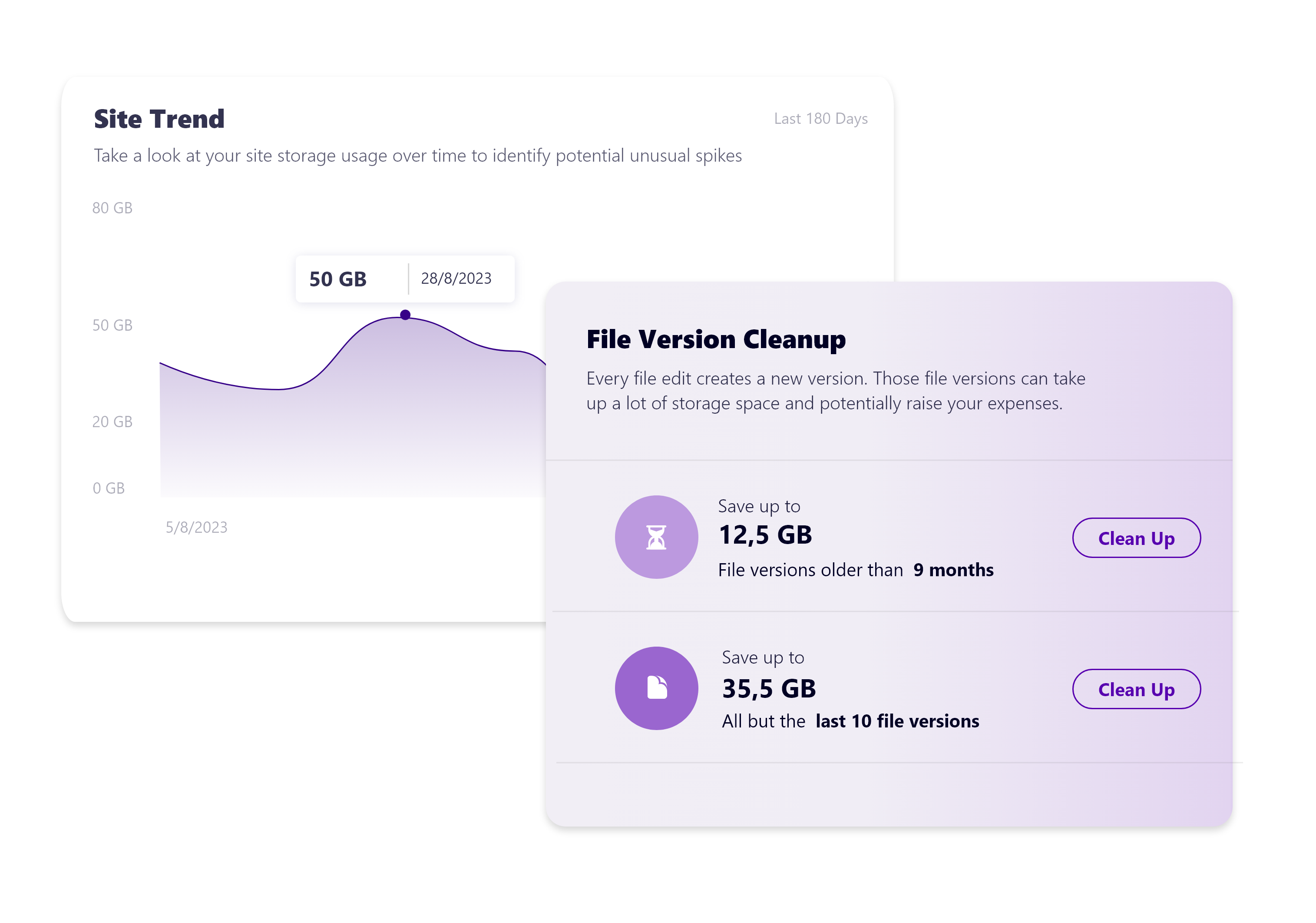
Screenshot of Syskit Point’s dashboard, which offers a centralized view of yoan ur entire Microsoft 365 environment. This offers visibility across Microsoft Teams, SharePoint, OneDrive, Microsoft 365 Groups, and Power Platform. Viewers can quickly identify who has access to what, monitor external sharing, and spot potential risks before they become issues. With real-time insights, detailed reports, and automated governance workflows, the Syskit Point dashboard helps stay in control, simplify management, and protect sensitive data.Screenshot of Syskit Point’s Security & Compliance Dashboard, which provides a centralized view of permissions, user activity, and external sharing across a Microsoft 365 environment. Users can monitor who has access to sensitive data, enforce policies, and take immediate action to prevent unauthorized access or data leaks. With built-in compliance and security checks, the dashboard helps to ensure regulatory alignment and quickly mitigate potential risks.Screenshot of how Syskit Point helps prepare a Microsoft 365 environment for Copilot by ensuring only secure, relevant data is accessible. It identifies oversharing risks, enforces access controls, and provides visibility into sharing activity, so Copilot delivers accurate, trustworthy outputs without exposing sensitive information. With proactive permission reviews and workspace lifecycle management, Syskit Point ensures data is clean, compliant, and Copilot-ready.Screenshot of how Syskit Point simplifies Microsoft 365 governance with automated access reviews and workspace lifecycle management. It empowers resource owners to regularly review access, manage permissions, and keep workspaces secure and well-organized. With policy-based automation, storage optimization, and clear ownership responsibilities, Syskit Point helps prevent oversharing, reduce unnecessary access, and ease the governance burden on IT teams.Screenshot of how Syskit Point provides clear visibility into SharePoint storage usage, helping resource owners track storage trends, identify oversized workspaces, and spot unnecessary file versions. With built-in cleanup options and customizable policies, owners can remove outdated or redundant data, optimize storage, and prevent capacity issues. This proactive approach supports cost savings, improves workspace organization, and helps maintain a healthy Microsoft 365 environment.