Overview
ProductRatingMost Used ByProduct SummaryStarting Price
Eclipse
Score 8.2 out of 10
N/A
Eclipse is a free and open source integrated development environment (IDE).N/A
Posit
Score 10.0 out of 10
N/A
Posit, formerly RStudio, is a modular data science platform, combining open source and commercial products.N/A
PyCharm
Score 9.2 out of 10
N/A
PyCharm is an extensive Integrated Development Environment (IDE) for Python developers. Its arsenal includes intelligent code completion, error detection, and rapid problem-solving features, all of which aim to bolster efficiency. The product supports programmers in composing orderly and maintainable code by offering PEP8 checks, testing assistance, intelligent refactorings, and inspections. Moreover, it caters to web development frameworks like Django and Flask by providing framework…
$9.90
per month per user
Pricing
EclipsePositPyCharm
Editions & Modules
No answers on this topic
For Individuals
$99
per year per user
All Products Pack for Organizations
$249
per year per user
All Products Pack for Individuals
$289
per year per user
For Organizations
$779
per year per user
Offerings
Pricing Offerings
EclipsePositPyCharm
Free Trial
NoYesYes
Free/Freemium Version
NoYesNo
Premium Consulting/Integration Services
NoNoNo
Entry-level Setup FeeNo setup feeOptionalNo setup fee
Additional Details
More Pricing Information
Community Pulse
EclipsePositPyCharm
Considered Multiple Products
Eclipse
Chose Eclipse
I have used PyCharm for projects that were implemented in Python and I have also used IDEs like notepad++ which are more generic in nature. The reason that I choose Eclipse is mostly because it is Java specific unlike PyCharm which is Python specific. Using Eclipse or not using …
Chose Eclipse
For no license, Eclipse is a very good start. IntelliJ has much greater support and tools for many things like connecting to all kinds of databases and SaaS platform such as Salesforce. Code refactoring is also very cool on IntelliJ compared to Eclipse. For Python and Django …
Chose Eclipse
1. Eclipse is easy to use.
2. when you are new to building something you can go for Eclipse as it provides a clean UI.
3. Provide support to connect with other tools and technology.
Chose Eclipse
As previously said, Eclipse is one of the most complete and useful tools for Java development. And as a plus, it's open-source and free, so you won't beat that price-quality relation. When starting with Java projects, you won't fail with Eclipse. But, if you are getting into …
Chose Eclipse
Eclipse is the best IDE on the market for Java development. It has great error and warning handling, and many integrations with useful tools - debugger, sonarqube (static code analysis), Maven / Gradle / Ant, Tomcat / Wildfly / JBoss (web servers). The best part of eclipse is …
Chose Eclipse
I used IDEA prior to using Eclipse. I loved how easy I can debug in both, but the debugging feature in IDEA is just way more polished then Eclipse. Other than that, Eclipse was easy to setup and start with.
Posit
Chose Posit
Comparing RStudio to PyCharm is basically comparing R to Python, since if it is only comparing the IDEs in R, there are almost no competitors that have the same level of ability as RStudio. However, there is a trend of shifting from R to Python and PyCharm would be very strong.
Chose Posit
I used to use PyCharm for python, I did not try any other software for R.
Chose Posit
PyCharm does not provide the same functionalities as described above. However, is more suitable when working on large-scale projects due to its great file organizing system.
Chose Posit
I used PyCharm for another project with Python. Both RStudio and PyCharm are free, so cost is not an issue.
I've worked with RStudio for much longer, so I am used to it's interface. I haven't worked with Python as much, but I think they now have that feature I mentioned before …
Chose Posit
Far better integrated and easy to use. The only full-blown Python IDE is PyCharm, and it is a monolith. I used Spyder instead. I was very happy when RStudio added Python support so I can ditch Jupyter Notebooks, which really isn't an IDE but is more like RMarkdown, a small …
Chose Posit
I used them to run Python codes, so that not really comparable here. I will describe my experience around it. I feel that Jupyter Notebook is the closest product to RMarkdown file, as it allows users to run line by line and share outcomes underneath. PyCharm and Visual Studio …
Chose Posit
I like the simplicity of Rstudio, and besides the obvious point that PyCharm is an IDE for python, I find Rstudio much more intuitive. Plotting is better, Rstudio is much easier to customize, and PyCharm tends to take a long time to load. However, I have not experienced as much …
Chose Posit
We have considered other editors for R, but no other editor is as feature rich as RStudio. Since RStudio makes an open-source version of their products available, we were able to increase adoption within the organization with zero risk and zero cost and buy into the commercial …
Chose Posit
RStudio stacks up pretty well against its competition. For me, it is really up to personal preference and what you are used to when deciding between the competitions. I like that Python packages have the most external resources, so it's easier to troubleshoot. But RStudio does …
Chose Posit
For R and Python users, it’s one of the best tool available for developing, testing and deploying products.

Cost-wise, it's a bigger bang for the buck than other platforms that were evaluated.
Chose Posit
RStudio is the only R-friendly IDE. None of the IDEs, even though they offer R-plugins, are as intuitive as RStudio.
Chose Posit
In the space of data science tools, code is king. It enables use of standard version control systems like git, access to a wealth of expertise via StackOverflow and others, is commonly used in modern education programs, and more. Other solutions in this space are built on …
Chose Posit
For R programming, it's the de-facto because it's designed specifically for it, but other language support is getting stronger.
Chose Posit
RStudio Server Pro + RStudio Connect allows greater flexibility and lower cost compared with Cloudera DSW: With RStudio Team licensing we can have multiple installations of RStudio Server on different servers, allowing us to have separate resources for different teams inside …
Chose Posit
RStudio gives a more integrated R experience compared to Jupyter. RStudio is the ideal tool for running R interactively.
Chose Posit
We needed a product very, very flexible, from a company we trusted and which shared the same vision of data science: not plug & play stuff like (almost) all other product.
Cost of course is a great plus because we have been able to get our sponsor buying it in a very short time …
Chose Posit
While many of these are great, RStudio is the best for R work. There is also native support in the IDE for combining other languages, like Python, into workflows easily so work across languages can be handled in one location.
Chose Posit
Because RStudio is more specifically focused on facilitating programming in R, whereas these other IDEs focus either on more general programming frameworks or a different language, it is the best choice for most of our analysis. Computational biology relies heavily on the …
Chose Posit
As we have R Language expertise in-house RStudio was the best option for us.
Chose Posit
Rstudio itself is very close to PyCharm but due to the R language and the package building system. What is more, object-oriented programming is more widely adopted in python rather than R, and deep learning packages are more available in python. The language is losing …
Chose Posit
We have only used RStudio to do any coding or scripts in R. Among other IDE's it was decided to use RStudio since it had the best documentation and an active community that pushes out pretty frequent updates. Cost of the platform and for training was also a consideration and …
Chose Posit
As for now, RStudio has no significant competitors on the market. As I have mentioned before, to date, it is the best possible option to take, if you wish to use R programming language with IDE, because it is the most powerful one.
PyCharm
Chose PyCharm
I needed a Python dedicated solution Pycharm is the best suited, giving no hassle in setting up and providing an off the shelf solution for python development. Using Eclipse is cumbersome, some additional plugins must be installed and configured
Chose PyCharm
Eclipse is one of the commonly used alternative IDEs for Python programming language. It's a matter of preference whether to choose PyCharm or Eclipse. However, there is also an IDE called Spyder which is, for example, distributed along with the Anaconda Environment. It enables …
Chose PyCharm
Eclipse was a bit boggy compared to using PyCharm. Eclipse has way more features for product and we wanted something more tuned for Python programming. We never turned back once we started using PyCharm.
Chose PyCharm
PyCharm is the best IDE for python development. PyCharm offers various features: source code completion, support for unit testing, integration with Docker/GitLab/Git, ability to manage and configure virtual environments, auto-indentation, and re-factoring code with ease. …
Chose PyCharm
What differentiates PyCharm from other products is that it is built for a particular language (Python) and works great while doing it, without losing efficiency with the rest of languages. It's simple, easy to use, fast and efficient, what else could you need?
Chose PyCharm
Simply one of the best IDE's of our time. It has a lot of features, a big user base, and a professional developer team behind it. It simply surpasses most of its competitors, as there are not too many Python-specialized IDEs anyway.
Chose PyCharm
There are many other good editors are there in market but PyCharm has great support for Python and Python frameworks because its designed for Python.
Chose PyCharm
PyCharm is the best tool to switch between different projects. One can connect to various technologies at a time. Package and plugin installation is easy. Dark and light mode helps in working according to the mood. One can extend it to IntelliJ, depending on the need for custom …
Chose PyCharm
PyCharm has a dark theme which is cool and more helpful tips while coding. It has more powerful navigation in XML and code.
Chose PyCharm
PyCharm is the only Python IDE I've used - all my prior experience was with text editors like Sublime, Notepad++, Atom, etc. The only other IDE I've used is RStudio, which has been fairly limited to small, individual projects. PyCharm's capabilities, stability, …
Chose PyCharm
Best user experience. While the JavaVM is a heavy hit on resources, it is worth it because of the sheer amount of functionality.
Community/Free/Educational version easily available.
Excellent Git support.
Features
EclipsePositPyCharm
Platform Connectivity
Comparison of Platform Connectivity features of Product A and Product B
Eclipse
-
Ratings
Posit
9.3
27 Ratings
11% above category average
PyCharm
-
Ratings
Connect to Multiple Data Sources00 Ratings8.026 Ratings00 Ratings
Extend Existing Data Sources00 Ratings9.927 Ratings00 Ratings
Automatic Data Format Detection00 Ratings9.926 Ratings00 Ratings
Data Exploration
Comparison of Data Exploration features of Product A and Product B
Eclipse
-
Ratings
Posit
9.0
27 Ratings
6% above category average
PyCharm
-
Ratings
Visualization00 Ratings8.027 Ratings00 Ratings
Interactive Data Analysis00 Ratings10.024 Ratings00 Ratings
Data Preparation
Comparison of Data Preparation features of Product A and Product B
Eclipse
-
Ratings
Posit
10.0
26 Ratings
20% above category average
PyCharm
-
Ratings
Interactive Data Cleaning and Enrichment00 Ratings10.024 Ratings00 Ratings
Data Transformations00 Ratings10.026 Ratings00 Ratings
Platform Data Modeling
Comparison of Platform Data Modeling features of Product A and Product B
Eclipse
-
Ratings
Posit
10.0
22 Ratings
17% above category average
PyCharm
-
Ratings
Multiple Model Development Languages and Tools00 Ratings10.022 Ratings00 Ratings
Single platform for multiple model development00 Ratings10.022 Ratings00 Ratings
Self-Service Model Delivery00 Ratings10.019 Ratings00 Ratings
Model Deployment
Comparison of Model Deployment features of Product A and Product B
Eclipse
-
Ratings
Posit
9.9
18 Ratings
15% above category average
PyCharm
-
Ratings
Flexible Model Publishing Options00 Ratings10.018 Ratings00 Ratings
Security, Governance, and Cost Controls00 Ratings9.915 Ratings00 Ratings
Best Alternatives
EclipsePositPyCharm
Small Businesses
Visual Studio
Visual Studio
Score 8.8 out of 10
Jupyter Notebook
Jupyter Notebook
Score 8.5 out of 10
IntelliJ IDEA
IntelliJ IDEA
Score 9.3 out of 10
Medium-sized Companies
Visual Studio
Visual Studio
Score 8.8 out of 10
Mathematica
Mathematica
Score 7.0 out of 10
IntelliJ IDEA
IntelliJ IDEA
Score 9.3 out of 10
Enterprises
Visual Studio
Visual Studio
Score 8.8 out of 10
Dataiku
Dataiku
Score 8.5 out of 10
IntelliJ IDEA
IntelliJ IDEA
Score 9.3 out of 10
All AlternativesView all alternativesView all alternativesView all alternatives
User Ratings
EclipsePositPyCharm
Likelihood to Recommend
7.8
(73 ratings)
10.0
(123 ratings)
9.2
(42 ratings)
Likelihood to Renew
9.0
(1 ratings)
9.7
(17 ratings)
10.0
(2 ratings)
Usability
9.0
(2 ratings)
8.0
(4 ratings)
9.3
(4 ratings)
Availability
-
(0 ratings)
9.4
(3 ratings)
-
(0 ratings)
Support Rating
6.8
(19 ratings)
8.9
(9 ratings)
8.3
(13 ratings)
Implementation Rating
-
(0 ratings)
9.3
(4 ratings)
-
(0 ratings)
Configurability
-
(0 ratings)
10.0
(1 ratings)
-
(0 ratings)
Product Scalability
-
(0 ratings)
8.2
(3 ratings)
-
(0 ratings)
User Testimonials
EclipsePositPyCharm
Likelihood to Recommend
Open Source
I think that if someone asked me for an IDE for Java programming, I would definitely recommend Eclipse as is one of the most complete solutions for this language out there. If the main programming language of that person is not Java, I don't think Eclipse would suit his needs[.]
Read full review
Posit (formerly RStudio)
In my humble opinion, if you are working on something related to Statistics, RStudio is your go-to tool. But if you are looking for something in Machine Learning, look out for Python. The beauty is that there are packages now by which you can write Python/SQL in R. Cross-platform functionality like such makes RStudio way ahead of its competition. A couple of chinks in RStudio armor are very small and can be considered as nagging just for the sake of argument. Other than completely based on programming language, I couldn't find significant drawbacks to using RStudio. It is one of the best free software available in the market at present.
Read full review
JetBrains
PyCharm is well suited to developing and deploying Python applications in the cloud using Kubernetes or serverless pipelines. The integration with GitLab is great; merges and rebates are easily done and help the developer move quickly. The search engine that allows you to search inside your code is also great. It is less appropriate for other languages.
Read full review
Pros
Open Source
  • Eclipse organizes imports well and does a good job presenting different programming languages.
  • Eclipse auto formats source code allowing customization and increased readability.
  • Eclipse reports errors automatically to users rather than logging it to the console.
  • Eclipse has coding shortcuts and auto-correction features allowing faster software development.
Read full review
Posit (formerly RStudio)
  • The support is incredibly professional and helpful, and they often go out of their way to help me when something doesn't work.
  • The one-click publishing from RStudio Connect is absolutely amazing, and I really like the way that it deploys your exact package versions, because otherwise, you can get in a terrible mess.
  • Python doesn't feel quite as native as R at the moment but I have definitely deployed stuff in R and Python that works beautifully which is really nice indeed.
Read full review
JetBrains
  • Git integration is really essential as it allows anyone to visually see the local and remote changes, compare revisions without the need for complex commands.
  • Complex debugging tools are basked into the IDE. Controls like break on exception are sometimes very helpful to identify errors quickly.
  • Multiple runtimes - Python, Flask, Django, Docker are native the to IDE. This makes development and debugging and even more seamless.
  • Integrates with Jupyter and Markdown files as well. Side by side rendering and editing makes it simple to develop such files.
Read full review
Cons
Open Source
  • While the DB integration is broad (many connectors) it isn't particularly deep. So if you need to do serious DB work on (for example) SQL Server, it is sometimes necessary to go directly to the SQL Server Studio. But for general access and manipulation, it is ok.
  • The syntax formatting is sometimes painful to set up and doesn't always support things well. For example, it doesn't effectively support SCSS.
  • Using it for remote debugging in a VM works pretty well, but it is difficult to set up and there is no documentation I could find to really explain how to do it. When remote debugging, the editor does not necessarily integrate the remote context. So, for example, things like Pylint don't always find the libraries in the VM and display spurious errors.
  • The debugging console is not the default, and my choice is never remembered, so every time I restart my program, it's a dialog and several clicks to get it back. The debugging console has the same contextual problems with remote debugging that the editor does.
Read full review
Posit (formerly RStudio)
  • Python integration is newer and still can be rough, especially with when using virtual environments.
  • RStudio Connect pricing feels very department focused, not quite an enterprise perspective.
  • Some of the RStudio packages don't follow conventional development guidelines (API breaking changes with minor version numbers) which can make supporting larger projects over longer timeframes difficult.
Read full review
JetBrains
  • The biggest complaint I have about PyCharm is that it can use a lot of RAM which slows down the computer / IDE. I use the paid version, and have otherwise found nothing to complain about the interface, utility, and capabilities.
Read full review
Likelihood to Renew
Open Source
I love this product, what makes it one of the best tool out in the market is its ability to function with a wide range of languages. The online community support is superb, so you are never stuck on an issue. The customization is endless, you can keep adding plugins or jars for more functionalities as per your requirements. It's Free !!!
Read full review
Posit (formerly RStudio)
There is no viable alternative right now. The toolset is good and the functionality is increasing with every release. It is backed by regular releases and ongoing development by the RStudio team. There is good engagement with RStudio directly when support is required. Also there's a strong and growing community of developers who provide additional support and sample code.
Read full review
JetBrains
It's perfect for our needs, cuts development time, is really helpful for newbies to understand projects structure
Read full review
Usability
Open Source
It has everything that the developer needs to do the job. Few things that I have used in my day-to-day development 1. Console output. 2. Software flash functionality supporting multiple JTAG vendors like J-LINK. 3. Debugging capabilities like having a breakpoint, looking at the assembly, looking at the memory etc. this also applies to Embedded boards. 4. Plug-in like CMake, Doxygen and PlantUML are available.
Read full review
Posit (formerly RStudio)
For someone who learns how to use the software and picks up on the "language" of R, it's very easy to use. For beginners, it can be hard and might require a course, as well as the appropriate statistical training to understand what packages to use and when
Read full review
JetBrains
It's pretty easy to use, but if it's your first time using it, you need time to adapt. Nevertheless, it has a lot of options, and everything is pretty easy to find. The console has a lot of advantages and lets you accelerate your development from the first day.
Read full review
Reliability and Availability
Open Source
No answers on this topic
Posit (formerly RStudio)
RStudio is very available and cheap to use. It needs to be updated every once in a while, but the updates tend to be quick and they do not hinder my ability to make progress. I have not experienced any RStudio outages, and I have used the application quite a bit for a variety of statistical analyses
Read full review
JetBrains
No answers on this topic
Support Rating
Open Source
I gave this rating because Eclipse is an open-source free IDE therefore no support system is available as far as I know. I have to go through other sources to solve my problem which is very tough and annoying. So if you are using Eclipse then you are on your own, as a student, it is not a big issue for me but for developers it is a need.
Read full review
Posit (formerly RStudio)
Since R is trendy among statisticians, you can find lots of help from the data science/ stats communities. If you need help with anything related to RStudio or R, google it or search on StackOverflow, you might easily find the solution that you are looking for.
Read full review
JetBrains
I rate 10/10 because I have never needed a direct customer support from the JetBrains so far. Whenever and for whatever kind of problems I came across, I have been able to resolve it within the internet community, simply by Googling because turns out most of the time, it was me who lacked the proper information to use the IDE or simply make the proper configuration. I have never came across a bug in PyCharm either so it deserves 10/10 for overall support
Read full review
Implementation Rating
Open Source
No answers on this topic
Posit (formerly RStudio)
We did it at the individual level: anyone willing to code in R can use it. No real deployment involved.
Read full review
JetBrains
No answers on this topic
Alternatives Considered
Open Source
The installation, adaptability, and ease of usage for Eclipse are pretty high and simple compared to some of the other products. Also, the fact that it is almost a plug and play once the connections are established and once a new user gets the hang of the system comes pretty handy.
Read full review
Posit (formerly RStudio)
RStudio was provided as the most customizable. It was also strictly the most feature-rich as far as enabling our organization to script, run, and make use of R open-source packages in our data analysis workstreams. It also provided some support for python, which was useful when we had R heavy code with some python threaded in. Overall we picked Rstudio for the features it provided for our data analysis needs and the ability to interface with our existing resources.
Read full review
JetBrains
When it comes to development and debugging PyCharm is better than Spyder as it provides good debugging support and top-quality code completion suggestions. Compared to Jupiter notebook it's easy to install required packages in PyCharm, also PyChram is a good option when we want to write production-grade code because it provides required suggestions.
Read full review
Scalability
Open Source
No answers on this topic
Posit (formerly RStudio)
RStudio is very scalable as a product. The issue I have is that it doesn't necessarily fit in nicely with the mainly Microsoft environment that everybody else is using. Having RStudio for us means dedicated servers and recruiting staff who know how to manage the environment. This isn't a fault of the product at all, it's just part of the data science landscape that we all have to put up with. Having said that RStudio is absolutely great for running on low spec servers and there are loads of options to handle concurrency, memory use, etc.
Read full review
JetBrains
No answers on this topic
Return on Investment
Open Source
  • This development environment offers the possibility of improving the productivity time of work teams by supporting the integration of large architectures.
  • It drives constant change and evolution in work teams thanks to its constant versioning.
  • It works well enough to develop continuous server client integrations, based on solid or any other programming principle.
Read full review
Posit (formerly RStudio)
  • Using it for data science in a very big and old company, the most positive impact, from my point of view, has been the ability of spreading data culture across the group. Shortening the path from data to value.
  • Still it's hard to quantify economic benefits, we are struggling and it's a great point of attention, since splitting out the contribution of the single aspects of a project (and getting the RStudio pie) is complicated.
  • What is sure is that, in the long run, RStudio is boosting productivity and making the process in which is embedded more efficient (cost reduction).
Read full review
JetBrains
  • PyCharm has a very positive ROI for our BU. It has increased developer productivity exponentially.
  • Software quality has significantly improved. We are able to refactor/test/debug the code quicker/faster/better.
  • Our business unit is able to deliver faster. Customers are happier than ever.
Read full review
ScreenShots

Posit Screenshots

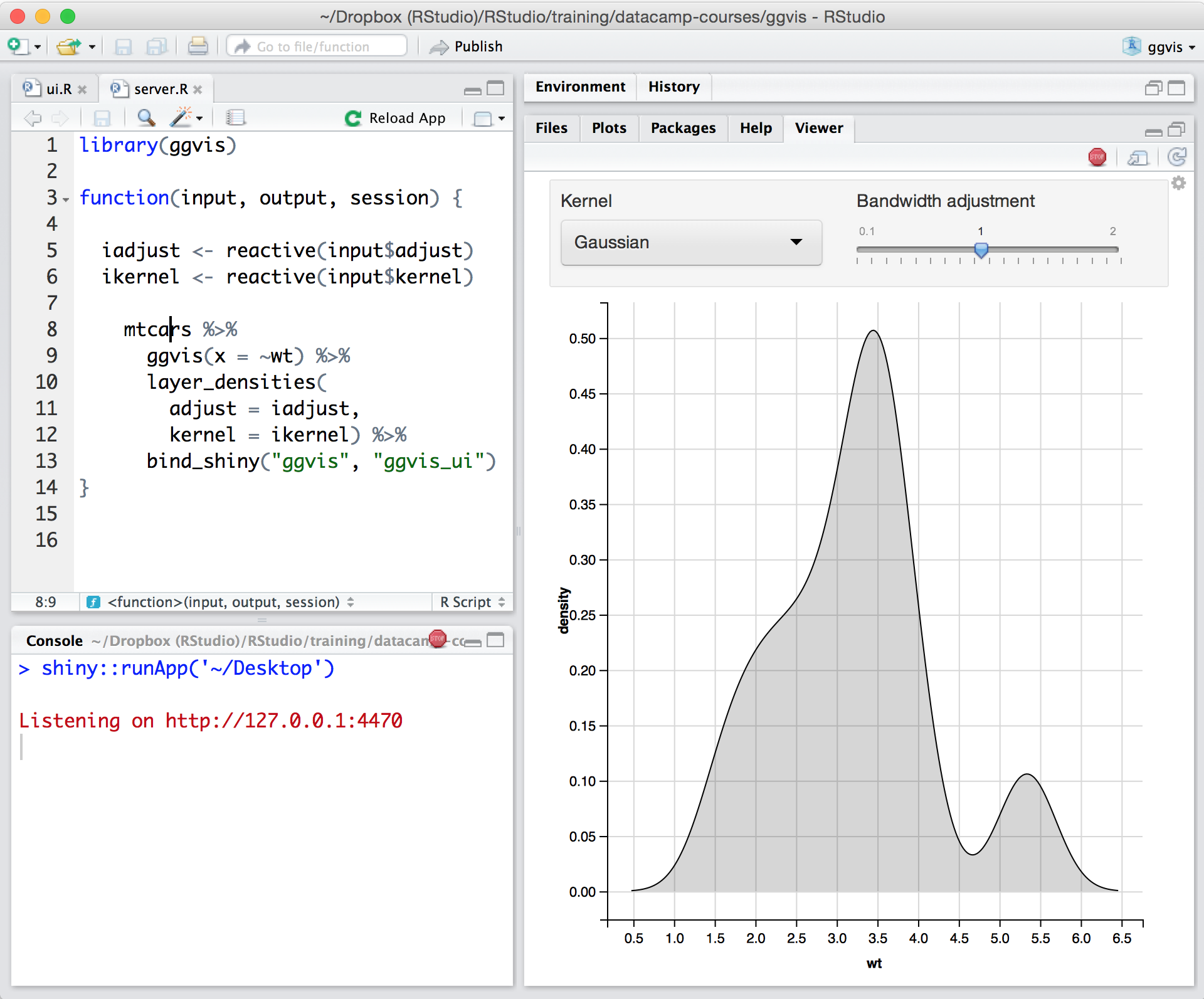
Screenshot of Posit runs on most desktops or on a server and accessed over the webScreenshot of Posit supports authoring HTML, PDF, Word Documents, and slide showsScreenshot of Posit supports interactive graphics with Shiny and ggvisScreenshot of Shiny combines the computational power of R with the interactivity of the modern webScreenshot of Remote Interactive Sessions: Start R and Python processes from Posit Workbench within various systems such as Kubernetes and SLURM with Launcher.Screenshot of Jupyter: Author and edit Python code with Jupyter using the same Posit Workbench infrastructure.