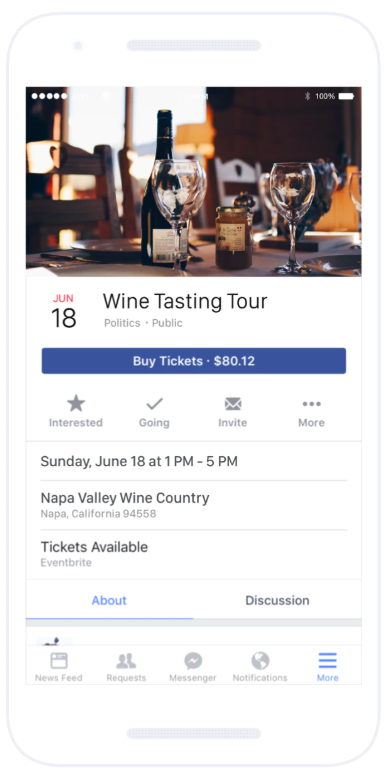
Eventbrite is a global ticketing and event technology platform that provides creators of events with tools and resources to plan, promote, and produce live experiences. The vendor says event organizers can benefit from Eventbrite’s self-service event planning tools including email invitation creation, RSVP tracking, and ticket selling. Ticket sales can be managed online via the ticketing website or through integration with social media sites including Facebook, and real-time sales data…
N/A
SignUpGenius
Score7 out of 10
N/A
SignUpGenius in Charlotte offers an event sign up and registration site and service for entities organizing small groups, with payment processing, email and text reminding, forms with visual design themes and templates, among other features.
N/A
Pricing
Eventbrite
SignUpGenius
Editions & Modules
No answers on this topic
No answers on this topic
Offerings
Pricing Offerings
Eventbrite
SignUpGenius
Free Trial
No
No
Free/Freemium Version
Yes
No
Premium Consulting/Integration Services
Yes
No
Entry-level Setup Fee
No setup fee
No setup fee
Additional Details
Only pay when ticket sales are made
Essentials plan: 2% + $0.79/ paid ticket
Professional plan: 3.5% + $1.59/ paid ticket
Premium plan: contact Eventbrite for a custom pricing plan
Free for free events
We're a nonprofit organization so we have a very lean time, labor, and money so the super easy self-explanatory nature makes it easy for our team to admin an event. The simple UI [of Eventbrite] keeps our focus on the event and avoids any headache-inducing tech hurdles. There're just enough user roles to handle multi-staffer admin. A less appropriate situation is an event that is huge in complexity with a custom workflow and processing which Eventbrite's not built to handle in-house such as multi-step registration, multiple item and category all-select options during registration, multi-event type (not just physical or ticket but virtual goods tracking), more HootSuite-like social media refinery, etc.
A de minimis incentive was given to thank the reviewer for their time. The incentive was not used to bias or drive a particular response, nor was the incentive contingent on a positive endorsement. More Info
If you are planning large events and you need an accurate headcount, the SignUpGenius is for you! Additionally, if you are trying to get a variety of volunteers to meet various needs, then you should really check out SignUpGenius! One specific way that we have used SignUpGenius is by getting the parents of our youth ministry students to bring refreshments to youth groups on Sunday mornings. We set up a SignUpGenius sign-up sheet where they can all sign up for various Sundays to bring refreshments, which really helps our students focus on Sundays.
A de minimis incentive was given to thank the reviewer for their time. The incentive was not used to bias or drive a particular response, nor was the incentive contingent on a positive endorsement. More Info
Event management--providing a detailed description of the event (date, time, place) plus details of the event (speakers, topic, sponsors, etc.)
Registrations--provides enough details about people who register, and tools to manage those registrations (add people manually who didn't pre-register, cancel orders, check-in of attendees)
Event promotion--events created using Eventbrite can be found by searching Eventbrite for local events
A de minimis incentive was given to thank the reviewer for their time. The incentive was not used to bias or drive a particular response, nor was the incentive contingent on a positive endorsement. More Info
A de minimis incentive was given to thank the reviewer for their time. The incentive was not used to bias or drive a particular response, nor was the incentive contingent on a positive endorsement. More Info
I'd like to see Eventbrite add more customization to the event page layout. It would be nice to be able to differentiate our event through more specific design.
I've had occasional problems with email formatting in the Eventbrite email builder. It would be nice to have a slightly more trustworthy builder.
Other than those two things, I think Eventbrite does exactly what it needs to do.
A de minimis incentive was given to thank the reviewer for their time. The incentive was not used to bias or drive a particular response, nor was the incentive contingent on a positive endorsement. More Info
Some of the layout and terminology are a little confusing and could be more user-friendly. It took me some time and playing around to figure out that the days and times you put in are a step which just produces a grid of possible times, and that choosing which slots to activate is a second step required. It later made sense why it was set up this was (allows you to input a large block of times at once and then select the particular ones you need, and makes it possible to add a second person with a different schedule on the same sign up, giving the appointment setters more options overall to choose from)
Wish it would intuitively (or add an option to...) replicate location for any additional days and times you add to the same sign up. Has to be manually added (or copied and pasted).
A de minimis incentive was given to thank the reviewer for their time. The incentive was not used to bias or drive a particular response, nor was the incentive contingent on a positive endorsement. More Info
Excellent platform and easy to use to create events. Eventbrite sets the standard for simple, effective and safe ticketing platforms. Our customers trust Eventbrite and we've always done well when we use this platform for ticketing. They have recently updated some of the virtual connectivity tools which make it even easier to set up and promote virtual events.
A de minimis incentive was given to thank the reviewer for their time. The incentive was not used to bias or drive a particular response, nor was the incentive contingent on a positive endorsement. More Info
A de minimis incentive was given to thank the reviewer for their time. The incentive was not used to bias or drive a particular response, nor was the incentive contingent on a positive endorsement. More Info
Great platform with so many incredible features. It streamlines workflow, communication, messaging, and analyzing data. I know of no other platform that can do what Eventbrite can do for the price or user-friendliness. They also offer great support for new users and integrate well with other platforms (i.e., social media and Sched).
A de minimis incentive was given to thank the reviewer for their time. The incentive was not used to bias or drive a particular response, nor was the incentive contingent on a positive endorsement. More Info
I haven't yet needed to contact customer support, but the information provided next to the various features has been exceptionally helpful. This info is located just to the right of most options, and it provides answers to frequently asked questions. At this point, that information has been enough to keep me from having to contact anyone.
A de minimis incentive was given to thank the reviewer for their time. The incentive was not used to bias or drive a particular response, nor was the incentive contingent on a positive endorsement. More Info
I don't have any feedback for support because I have not had to use support (if referring to IT support). If this question is in referral to support from other staff/company, then it has been received well in that sense.
A de minimis incentive was given to thank the reviewer for their time. The incentive was not used to bias or drive a particular response, nor was the incentive contingent on a positive endorsement. More Info
Just jump in, don't over thinking it, doing it will net the very few basic questions you'll have. There's not much complexity so one doesn't need to plan as if moving a canal. It's as simple as can be.
A de minimis incentive was given to thank the reviewer for their time. The incentive was not used to bias or drive a particular response, nor was the incentive contingent on a positive endorsement. More Info
My "go to" for event registration has always been Constant Contact because they don't charge additional processing fees above the standard transaction. If it's a more basic event where I just need to capture name, email, and payment, I'll continue to use Constant Contact over Eventbrite. However, if it's more complex and requires marketing, I would choose Eventbrite.
A de minimis incentive was given to thank the reviewer for their time. The incentive was not used to bias or drive a particular response, nor was the incentive contingent on a positive endorsement. More Info
I prefer the use of SignUpGenius as it is more user-friendly. I am not limited to 10 questions and then have to pay for additional features. While I do not like the additional feature payment, as we are a nonprofit, I will continue using the free services.
A de minimis incentive was given to thank the reviewer for their time. The incentive was not used to bias or drive a particular response, nor was the incentive contingent on a positive endorsement. More Info
A dedicated URL for each event has been easy to use for tying events to editorial content, promotion and marketing.
For ticketed events, it has been an easy -to-use system without requiring a lot of training on a complicated technology. It is also competitively priced for transaction management.
Whether we have discovered any Eventbrite users via the Eventbrite site promotion, we appreciate it as a recommendation of our event for like-minded event attendees.
A de minimis incentive was given to thank the reviewer for their time. The incentive was not used to bias or drive a particular response, nor was the incentive contingent on a positive endorsement. More Info
Being able to share the form with people inside and outside your organization allows less back and forth via email when scheduling meetings - saving time and money
The free version is available as long as you'd like - it's not a trial version - a lot of companies can get away with only using the free version
A de minimis incentive was given to thank the reviewer for their time. The incentive was not used to bias or drive a particular response, nor was the incentive contingent on a positive endorsement. More Info