Overview
ProductRatingMost Used ByProduct SummaryStarting Price
Flowdock
Score 9.5 out of 10
N/A
Flowdock is a collaboration tool built around a chat and team inbox interface. Flowdock is available via app or as a browser-based solution. It was originally offered by Rally Software Development, which was acquired by CA Technologies, which was acquired by Broadcom in 2018.N/A
Lightning Tools Lightning Conductor
Score 9.0 out of 10
Mid-Size Companies (51-1,000 employees)
The Lightning Conductor is a content aggregation tool for Microsoft SharePoint Online and Microsoft Teams. Users can build rich, modern content reports based upon SharePoint lists, SharePoint Search, Microsoft Graph or Microsoft 365 Groups. Content can be aggregated from lists and libraries, and other applications such as Planner, To Do, OneDrive, and Teams.
$2,200
per year per installation
Slack
Score 9.1 out of 10
N/A
Slack is a group messaging or team collaboration app that aims to simplify communication for businesses. Features include open discussions, private groups, and direct messaging, as well as deep contextual search and message archiving, and file sharing. Slack integrates with a number of other tools, such as MailChimp, Dropbox, and Google Drive. Slack was acquired by Salesforce in December 2020. The product is free to use, and also has paid plans with more features and greater controls. The…
$8.75
per month per user
Pricing
FlowdockLightning Tools Lightning ConductorSlack
Editions & Modules
No answers on this topic
Lightning Conductor WSP
From 1950
per year One WFE
Lightning Conductor Enterprise Edition
POA
per year Four or more WFE
Lightning Conductor Online
From 2200
per year per installation
Lightning Conductor Plus (Includes Data Viewer)
From 2500
per year per installation
Lightning Conductor Online Enterprise Edition (>10,000 users)
POA
per year per installation
Free
$0
Pro
$7.25*
per month per user
Business+
$12.50*
per month per user
Enterprise
Contact Sales
Offerings
Pricing Offerings
FlowdockLightning Tools Lightning ConductorSlack
Free Trial
NoYesYes
Free/Freemium Version
NoNoYes
Premium Consulting/Integration Services
NoYesNo
Entry-level Setup FeeNo setup feeNo setup feeNo setup fee
Additional DetailsPrices stated are minimum per installation for "stock" products. $2.20 per user/year on top of base price. Enterprise editions can be amended to suit business needs if deemed necessary, additional costs incurred and TBD. All packages include free technical support. Free upgrades available to latest versions of tool as they are released. (online version)*Per active user, per month, when paying once a year. Pro is $8.75 USD per active user when paying month to month. Business+ is $15.00 USD per active user when paying month to month.
More Pricing Information
Community Pulse
FlowdockLightning Tools Lightning ConductorSlack
Considered Multiple Products
Flowdock
Chose Flowdock
Slack is a better product. They're taking the spirit of the startup and moving quickly towards IPO. In my own experience, Slack provides enough software integrations with hope for future releases that continue to improve the product. The early days of Flowdock were very …
Chose Flowdock
Slack is a similar software.
Private chat or channels are well implemented in both softwares and both are also very easy to setup.
Besides of some usability problemas I think Flowdock is still better than Slack in this user experience and design.
Lightning Tools Lightning Conductor

No answer on this topic

Slack
Chose Slack
Slack is like an advanced version of any tool that I've ever used in the past. It's super simple and clean and makes chatting and organizing tasks, projects and content super easy. I think every company should be using Slack if they want to truly have their team be the most …
Chose Slack
First, it was the pricing. Slack is much cheaper than the competitors and offers more features. We liked how there was no implementation charge involves and how easy it was implement as well.
You can add interns or guest for no additional cost, managing the team seats is super …
Chose Slack
Slack blows its competition out of the water, especially the voice call quality: it's second-to-none. Also, it has the most thorough integration support in the business.
Chose Slack
I much prefer Slack.
Features
FlowdockLightning Tools Lightning ConductorSlack
Project Management
Comparison of Project Management features of Product A and Product B
Flowdock
4.9
2 Ratings
45% below category average
Lightning Tools Lightning Conductor
8.6
2 Ratings
10% above category average
Slack
7.9
625 Ratings
2% above category average
Task Management6.72 Ratings8.82 Ratings7.7428 Ratings
Gantt Charts3.01 Ratings00 Ratings6.961 Ratings
Scheduling4.01 Ratings00 Ratings7.8361 Ratings
Workflow Automation2.01 Ratings00 Ratings8.1394 Ratings
Mobile Access7.22 Ratings00 Ratings9.4598 Ratings
Search5.72 Ratings8.42 Ratings8.3605 Ratings
Visual planning tools6.01 Ratings00 Ratings7.4273 Ratings
Communication
Comparison of Communication features of Product A and Product B
Flowdock
3.8
2 Ratings
71% below category average
Lightning Tools Lightning Conductor
-
Ratings
Slack
8.8
633 Ratings
9% above category average
Chat8.92 Ratings00 Ratings9.6632 Ratings
Notifications7.72 Ratings00 Ratings8.8629 Ratings
Discussions7.72 Ratings00 Ratings9.2617 Ratings
Surveys2.01 Ratings00 Ratings8.1410 Ratings
Internal knowledgebase1.01 Ratings00 Ratings7.8409 Ratings
Integrates with GoToMeeting1.01 Ratings00 Ratings8.9110 Ratings
Integrates with Gmail and Google Hangouts1.01 Ratings00 Ratings8.7182 Ratings
Integrates with Outlook1.01 Ratings00 Ratings8.9120 Ratings
File Sharing & Management
Comparison of File Sharing & Management features of Product A and Product B
Flowdock
7.8
1 Ratings
3% below category average
Lightning Tools Lightning Conductor
-
Ratings
Slack
8.4
600 Ratings
5% above category average
Video files8.01 Ratings00 Ratings8.3538 Ratings
Audio files8.01 Ratings00 Ratings8.5525 Ratings
Document collaboration8.01 Ratings00 Ratings8.0426 Ratings
Access control8.01 Ratings00 Ratings8.3409 Ratings
Advanced security features7.01 Ratings00 Ratings8.3360 Ratings
Versioning00 Ratings00 Ratings8.2324 Ratings
Integrates with Google Drive00 Ratings00 Ratings9.0211 Ratings
Device sync00 Ratings00 Ratings9.0452 Ratings
Best Alternatives
FlowdockLightning Tools Lightning ConductorSlack
Small Businesses
Stackby
Stackby
Score 8.9 out of 10
Stackby
Stackby
Score 8.9 out of 10
Stackby
Stackby
Score 8.9 out of 10
Medium-sized Companies
Troop Messenger
Troop Messenger
Score 9.8 out of 10
Troop Messenger
Troop Messenger
Score 9.8 out of 10
Troop Messenger
Troop Messenger
Score 9.8 out of 10
Enterprises
HCL Connections
HCL Connections
Score 9.0 out of 10
HCL Connections
HCL Connections
Score 9.0 out of 10
HCL Connections
HCL Connections
Score 9.0 out of 10
All AlternativesView all alternativesView all alternativesView all alternatives
User Ratings
FlowdockLightning Tools Lightning ConductorSlack
Likelihood to Recommend
6.6
(2 ratings)
9.0
(4 ratings)
9.1
(625 ratings)
Likelihood to Renew
10.0
(1 ratings)
9.1
(1 ratings)
10.0
(25 ratings)
Usability
-
(0 ratings)
-
(0 ratings)
9.0
(248 ratings)
Availability
-
(0 ratings)
-
(0 ratings)
10.0
(2 ratings)
Performance
-
(0 ratings)
-
(0 ratings)
10.0
(2 ratings)
Support Rating
-
(0 ratings)
9.1
(1 ratings)
9.9
(68 ratings)
Implementation Rating
-
(0 ratings)
-
(0 ratings)
8.7
(5 ratings)
Configurability
-
(0 ratings)
-
(0 ratings)
10.0
(2 ratings)
Contract Terms and Pricing Model
-
(0 ratings)
-
(0 ratings)
10.0
(1 ratings)
Ease of integration
-
(0 ratings)
-
(0 ratings)
9.2
(2 ratings)
Product Scalability
-
(0 ratings)
-
(0 ratings)
10.0
(1 ratings)
Professional Services
-
(0 ratings)
-
(0 ratings)
10.0
(1 ratings)
Vendor post-sale
-
(0 ratings)
-
(0 ratings)
10.0
(1 ratings)
Vendor pre-sale
-
(0 ratings)
-
(0 ratings)
10.0
(1 ratings)
User Testimonials
FlowdockLightning Tools Lightning ConductorSlack
Likelihood to Recommend
Broadcom
Flowdock is well suited for small teams and to environments that doesn't need too much reliability. I think it has some management problems that can make your life difficult if you have to manage a big amount of users. If you want just a tool communication with basic features (without using any integration or robust features) it can be suitable for you. You should try Flowdock using its free version for a small team and compare with others similar products. Flowdock delivers team chat and collaboration features, but is not necessarily the best product. Maybe some usability problems that disturb me won't be so relevant to you.
Read full review
Lightning Tools
Having experience of SharePoint On Premise and also SharePoint Online, there isn't an out of the box app/webpart that enables you to 'roll up content' from a variety of source's (in my case SP Lists, but there are many other data sources it works with) across site collections with an easy to use and intuitive interface which is what Lightning tools excels at.
Read full review
Salesforce
Slack is great for tracking commits to new coding projects. You can take parts of code that still need to be implemented later and easily search through the history of comments if there is something that goes wrong with a code commitment. It can be difficult for people that only like Teams to adjust to a new platform if you are using both to communicate.
Read full review
Pros
Broadcom
  • Mobile app experience
  • Software integrations
  • Notifications
Read full review
Lightning Tools
  • Aggregate documents across SharePoint site & libraries
  • Filtering for owner/person responsible & due dates
  • Ease of end-user filtering on columns
  • Color-coding & other formatting
Read full review
Salesforce
  • Huddles Run smoothly without any interferences.
  • Smooth individual calls quick and easy without any interruptions.
  • seamless notifications across multiple devices
  • The ability to easily tag a team member to urgently attend to a specific escalation.
  • Slack being user friendly and able to integrate easily with other platforms and apps.
  • How to easily open up different channels for different escalations and needs.
  • a safe direct messaging option.
Read full review
Cons
Broadcom
  • One thing a little bit annoying is that a lot of links to others Flowdock sections (preferences, external services, etc) will open a new window/tab. Each click may take you to a new window and you can get lost easily.
  • There isn't a quick access list to members of your organization to start a private chat. I took a while to find how to do that. The interface and usability could be better.
  • There isn't an app for Windows Phone.
  • Sometimes you try to load some conversation and it doesn't show anything. It is not frequently but happens sometimes.
Read full review
Lightning Tools
  • Mobile Friendly
  • Calendar/Gantt views
  • Complex/Custom Logic
Read full review
Salesforce
  • Would love a better integration with GitHub. For example, notifications when your PR is updated, when review is requested, @-mention in comments, etc.
  • Improved "Later" tab, for example the ability to create to-do lists or making the "Later" tab into a more powerful to-do list (annotate items with notes)
  • More powerful integrations, e.g. Google Calendar could render a calendar view within Slack, rather than sending the daily schedule
Read full review
Likelihood to Renew
Broadcom
I go with the flow because I'm a newer employee and Flowdock works as advertised. If it were my decision to choose a team communciator for the organization, I'd recommend we go with Slack for its robust features and ever-changing/evolving software integrations. Slack is the outright innovator in the space and will continue to hold that role for some time.
Read full review
Lightning Tools
No answers on this topic
Salesforce
To be more transparent, I give 10 because Slack serves our collaboration needs. It provide us a good platform for team communication relaying important update within the company, it has even mobile app where you can install in your phone to monitor any updates within that team that needs your immediate attention and intervention.
Read full review
Usability
Broadcom
No answers on this topic
Lightning Tools
No answers on this topic
Salesforce
My rating was 7. Its intuitive interface and user-friendly features like channels, threads, and integrations make it excellent for team communication and onboarding. However, its usability is held back by the resource-intensive desktop app and cluttered feeling in large workspaces. The mobile app's performance and unreliable notifications have also been noted as weaknesses.
Read full review
Reliability and Availability
Broadcom
No answers on this topic
Lightning Tools
No answers on this topic
Salesforce
Yes, the app works 24/7. I don't even recall having any period that we could not use since the implementation. Even the maintenance periods are barely noticeable and our work is not impacted by it when it happens.
Read full review
Performance
Broadcom
No answers on this topic
Lightning Tools
No answers on this topic
Salesforce
Slack is a soft app, we don't have many issues with it. I recall one or two people complaining about something during our usage period, but I didn't have a bad experience. When the app is slow, usually the problem is with my computer or my internet. The app works just fine.
Read full review
Support Rating
Broadcom
No answers on this topic
Lightning Tools
The Lightning Tools support team responds quickly, and team members are very friendly and helpful.
Read full review
Salesforce
Whenever I've had to troubleshoot an issue with Slack (which, to be honest, has not happened very often), their online documentation has been easy to locate, easy to understand, and effective in resolving my issue. Slack's ever-growing popularity also means that there's a large community of practice out there that can be depended upon.
Read full review
Implementation Rating
Broadcom
No answers on this topic
Lightning Tools
No answers on this topic
Salesforce
I was not part of the implementation team, but I recall being 100% happy and excited to learn and use a new tool. I'm still am to be honest.
Read full review
Alternatives Considered
Broadcom
Slack is a similar software.
Private chat or channels are well implemented in both softwares and both are also very easy to setup.
Besides of some usability problemas I think Flowdock is still better than Slack in this user experience and design.
The second point is the price. Flowdock is half price of Slack ($3/month). If you are a student or a non-profit organization, you are able to get some special license.
Read full review
Lightning Tools
I haven't found another product to compare this one to. Only in SharePoint Online which has a similar App 'Highlight Webpart' ... it's far too complicated to set up and requires learning yet another language and exporting and importing via PowerShell to get any real results that would be useful.
Read full review
Salesforce
I like Slack better than ClickUp, because I would spend 30-60 minutes a day updating my ClickUp tasks. The way ClickUp was used was very micromanaging. I billed by the hour, so I was willing to put in the time to alert the boss what tasks I was working on.
One of my jobs used Hive - I mostly just ran it in the background in case anyone messaged me. I did not use it often.
Read full review
Return on Investment
Broadcom
  • Our company uses it by default.
  • I enjoy the ability to communicate outside of text messages...keeps the conversation on in it's own bucket.
Read full review
Lightning Tools
  • Policies easier to portray
Read full review
Salesforce
  • Slack has been incredibly helpful in connecting various tech apps and ecosystems, creating a more streamlined and responsive process.
  • Slack has made it significantly easier to communicate with our team members across multiple time zones, creating a more engaging environment for our all-remote team.
Read full review
ScreenShots

Lightning Tools Lightning Conductor Screenshots

Screenshot of MODERN SHAREPOINT LIST ROLLUP
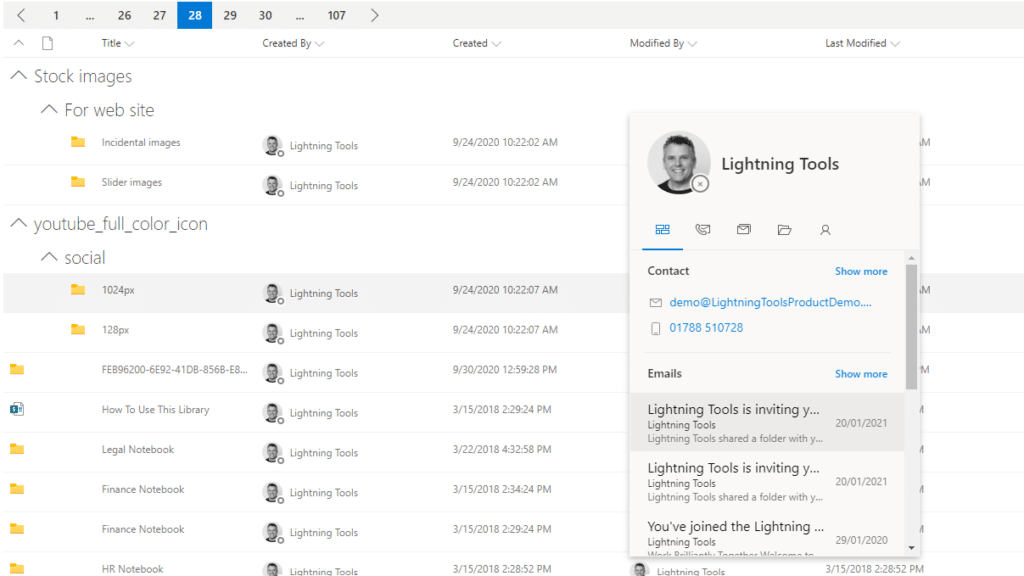
The Lightning Conductor is a SharePoint Content Aggregator that can be configured quickly by business users. The Lightning Conductor can be used to aggregate content from SharePoint Lists such as Tasks, Document Libraries, Contact Lists, and Custom Lists making it easy to view content in one place even if it is distributed across many sites and site collections. Key data can be highlighted using conditional formatting and data-bars as shown. Content from Search and Microsoft Graph can also be aggregated with the Lightning Conductor.Screenshot of CONTENT AGGREGATION WITHIN MICROSOFT TEAMS
The Lightning Conductor Web Part can be used within Microsoft SharePoint or Microsoft Teams. Even if content is stored within SharePoint sites, it is useful to have aggregated Documents, Tasks, Announcements, Calendars or Custom Lists from multiple sites displayed in a single handy view in Microsoft Teams. The Lightning Conductor can be added as a Teams Tab in any Microsoft Teams Channel.Screenshot of BUILDING REPORTS ON MICROSOFT GRAPH
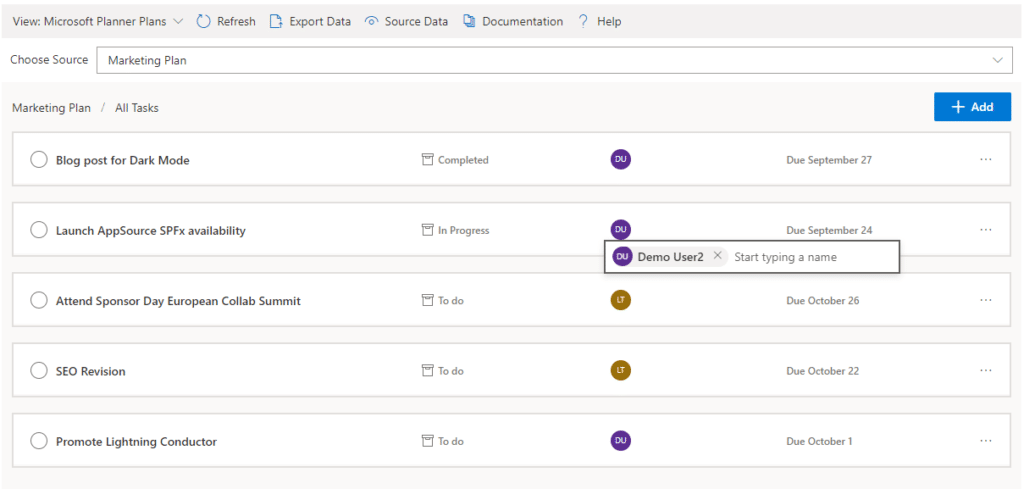
The Lightning Conductor can be used (without code) to aggregate content from Microsoft Graph as well as Search and SharePoint Lists. This example displays Microsoft Planner Plans and Microsoft Planner Tasks where users can Add new Tasks, Assign Users to Planner Tasks, Delete Tasks, and Complete Tasks. The same can be performed on Microsoft To Do items and displayed within Modern SharePoint pages or Microsoft Teams Tabs. The Lighting Conductor can also contain multiple views of content, making it ideal to display all of your tasks from SharePoint Task lists, Microsoft To Do and Microsoft Planner in a single web part or Teams Tab.

*Microsoft Graph Reports are only available for SharePoint Online and not SharePoint 2019.Screenshot of BUILDING REPORTS ON MICROSOFT 365 GROUPS
Powered by Microsoft Graph, the Microsoft 365 Group Rollup Provider enables users to aggregate content by browsing and selecting Microsoft 365 Groups. Within Microsoft 365 Groups, you’ll be able to select entities such as Drive Items, Owners, Members, Planner Plans, Planner Tasks, Events, Posts,  Sites, Lists, and Calendars.

*Microsoft Graph Reports are only available for SharePoint Online and not SharePoint 2019.Screenshot of AGGREGATING USING SEARCH
When performance is critical, search can be used for rollups. The Lightning Conductor offers three data source configurations to get to content. Object Model (Real Time Aggregation from SharePoint Lists), Microsoft Graph (Aggregation from Graph Entities such as Planner, OneDrive, Outlook), and Search. The Search Data Source enables the aggregation of content from large SharePoint lists and libraries when performance is critical. Thousands of documents can be displayed in under a second using Search.Screenshot of HIGHLIGHTING KEY BUSINESS DATA WITHIN VIEWS
End users and Site Owners can highlight the data that is important to them, the data that they need to prioritize. Using conditional formatting, data bars, and icons, conditions can be configured to highlight the data that is most important. Icons and Data Bars can be any color or size desired. Examples include highlighting High Priority tasks, Showing data bars for the completion progress of Tasks, or indicating which tasks are assigned to any particular user.