A software project management system used to plan, track and release great software with this lightweight and customizable system that integrates into any project management workflow. FogBugz is designed for software development teams and includes all the project management tools developers need straight out of the box. Users can: Track projects from start to finish - With tasks and subtasks for each case with required details and track them to ensure…
$62
per month
Quire
Score 8.2 out of 10
N/A
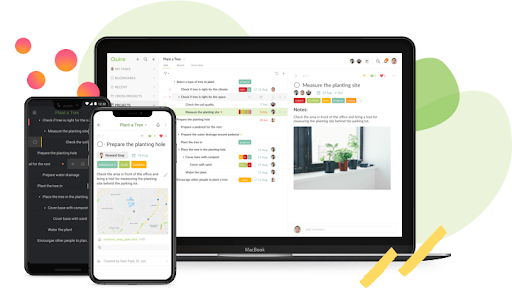
Quire is a visual collaboration platform that enables task and project management. It allows users to visualize their workflows and improves real-time collaboration.
$10.95
per month per user
Trello
Score 8.4 out of 10
N/A
Trello from Atlassian is a project management tool based on a Kanban framework. Trello is ideal for task-management in a to-do list format. It supports sharing boards and cards across users or teams. The product offers a free version, and paid versions add greater automation, collaboration, and administrative control.
$6
per month per user
Pricing
FogBugz
Quire
Trello
Editions & Modules
3 Years
$62
per month
2 years
$64
per month
1 Year
$68
per month
Monthly
$75
per month
Professional
$10.95
per month per user
Premium
$18.95
per month per user
Enterprise
$24.95
per month per user
Standard
$6
per month per user
Premium
$12.50
per month per user
Enterprise
$17.50
per month per user
Free
Forever Free
Offerings
Pricing Offerings
FogBugz
Quire
Trello
Free Trial
Yes
Yes
No
Free/Freemium Version
No
Yes
Yes
Premium Consulting/Integration Services
No
Yes
No
Entry-level Setup Fee
No setup fee
No setup fee
No setup fee
Additional Details
—
—
A discount is offered for annual billing and for larger numbers of users.
I like Fogbugz a LOT because of the compressed list view. This was essential to me when my team and I were working on anywhere between 100 -1000 cases. I can't imagine having 1000 Jira tickets to manage the processes that we were managing. It's much easier to work with a …
FogBugz has been a very useful tool to our organization, and much preferred over other options we reviewed, mainly JIRA. There are still some improvements needed, but with the fairly recent acquisition by DevFactory, we have a great deal of hope for what is in store given DevFactory's focus and transparency. It seems like both DevFactory and FogBugz customers are eager for substantial improvements on the front-end, but there is/was a great deal of backend housecleaning that definitely needed to take place first.
Quire is useful for tracking daily to-do's or keeping track of a project. It's not as clean as some other software (such as Nuclino, for example) and can get a little messy when creating a Workspace. It was difficult for me to know what was private and what was visible to my collaborators
For teams or individuals with lots of individual tasks/details to track, Trello is perfect! It basically removes the need for a paper checklist. For those that need an overall project management tool that requires less tasks and more overarching goals, collaboration amongst various teams, and gantt charts I would suggest monday.com
Tasks, Subtasks, and notes. All three of these areas were critical for our team. Tasks in Fogbugz were a bit easier to see than in more bug based software like Trello or JIRA
The entire screen is used to view a task or case. Clicking on a task or case will open up and take up the entire screen, aside from the sidebar nav columns. I like to see details and I think Fogbugz does this very well, using up as much digital real estate as possible.
Flowcharting in Fogbugz with Creately is nice - instead of getting an exterior flowchart software like Lucidchart, Creately works right in Fogbugz.
The simplicity of a single admin type user is not great because anyone who can create a job or client in the system, can also add and delete users. Content and User administrative rights should be separated.
There are ways to change the terminology/lexicon within the tool, but we are not able to get it to work even after reaching out to tech support. So we are forced to use the system terminology that doesn't match up to our company making training a bit difficult.
There is a subscribe function that you can opt into, there should be a way to add subscribers as you create a new task.
I am very likely to renew Trello, because it doesn't cost anything to do so. I am also very likely to use Trello's upgraded features in the future because a lot of my team's data is stored on there and they have already gotten used to the platform. Trello is very easy for new team members to pick up, making the onboarding and usability very streamlined.
Trello is incredibly intuitive, both on desktop and mobile right away. It is also full of helpful features that make it even easier to use, and is flexible enough to suit almost any organizational need. Onboarding for the software is thorough, but concise, and the service is frequently updated with even more QOL improvements.
I haven't reached out to their support very often and their support is very limited anyway for the free users. They do have tons of great articles and videos in their Help Center and constantly send emails with updates and add-ons to the product. The fact that I've barely ever had to contact their support team means that they've developed a great product.
For our small business, getting a few of us started well on Trello was the key, I think. As long as a couple of us were really comfortable with the interface, we could lead others and help them with any questions. From now on, anyone who works with us just naturally uses Trello for information sharing - it's just part of what we do.
Trello is more simple and not as "robust" as the other tools, but it's easier to use and manage and understand and ACTUALLY get stuff done with. It's simplicity is part of the beauty of using it. You don't need a million options that nobody uses, you just need to get stuff done.
Saves time by quickly allowing Developers to make the necessary notes without getting bogged down in bloated UIs
Has allowed us to look back easily and see the exact code changes made for the exact Case to aid in decisions for current changes, increasing the certainty of the decided path, without regression
Trello keeps me organized, focused, and on track. I could filter the Trello board to only see my issues and understand what I needed to work on and when.
Trello helped our team implement an agile structure. It's a very simple kanban method of viewing all of your team's tasks and statuses. You can completely customize the columns to your team's specific workflow and create tags relevant to your work.
Trello helps reduce unnecessary communications between teams. When I want to request translations, I simply create a card on the localization Trello board -- no need to directly message anyone on the team, and I can watch the status of the card change from "in progress" to "in review" to "translated," all without having to directly ask for updates.