The Forcepoint ONE Secure Web Gateway (SWG) is one of the three foundational gateways of the Forcepoint ONE all-in-one cloud platform. Forcepoint ONE SWG monitors and controlsany interaction with any website, including blocking access to websites based on category and risk score, blocking download of malware, blocking upload of sensitive data to personal filesharing accounts, detecting shadow IT, and optionally providingRemote Browser Isolation (RBI) with Content Disarm andReconstruction (CDR).
N/A
Microsoft Defender for Endpoint
Score 8.8 out of 10
N/A
Microsoft Defender for Endpoint (formerly Microsoft Defender ATP) is a holistic, cloud delivered endpoint security solution that includes risk-based vulnerability management and assessment, attack surface reduction, behavioral based and cloud-powered next generation protection, endpoint detection and response (EDR), automatic investigation and remediation, managed hunting services, rich APIs, and unified security management.
$2.50
per user/per month
Watchguard Endpoint Security
Score 8.7 out of 10
N/A
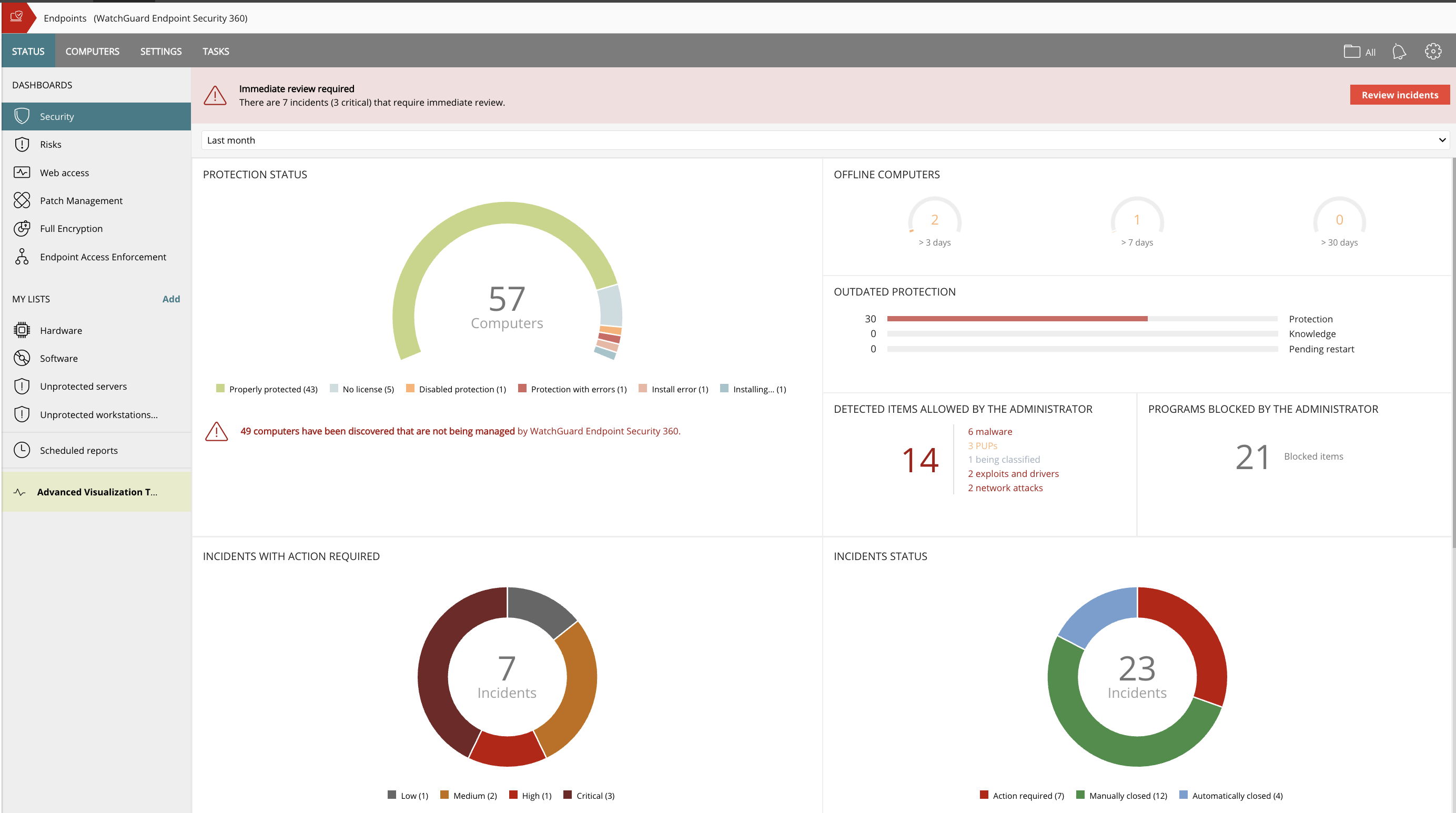
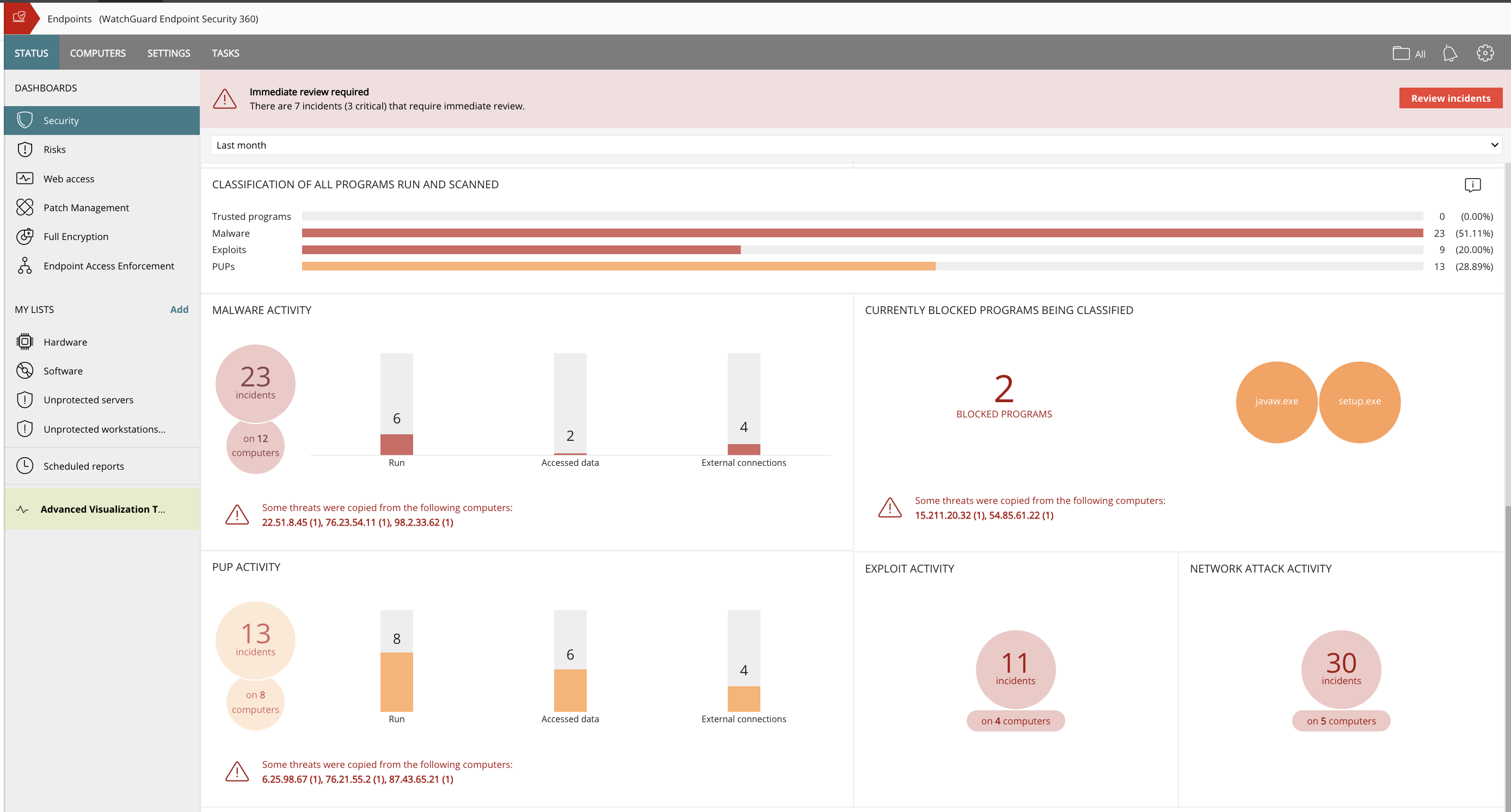
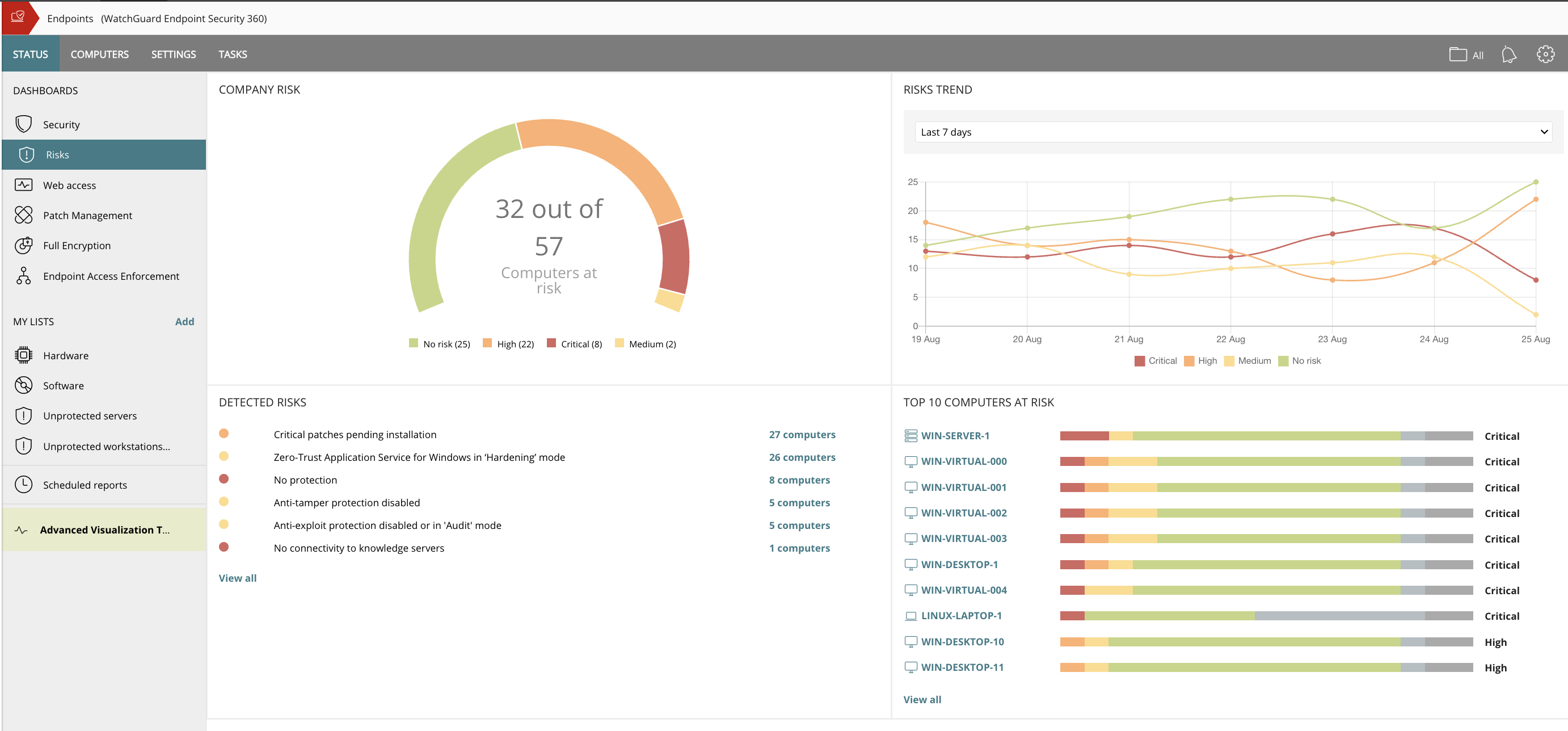
WatchGuard EPDR (formerly Panda Adaptive Defense 360) combines next-generation antivirus protection, endpoint detection and response (EDR), patch management, content filtering, email security, full disk encryption, and more, into one package. The platform touts a unique zero-trust security service that certifies the legitimacy and safety of all running applications thanks to a combination of automated, AI-driven processes and investigation services provided by a team of malware analysts.
Panda Adaptive Defense, in combination with Panda Systems Management, was a pretty big and powerful suite of AV software. However, the AV is pretty traditional, all things considered. ATP will always have a slight advantage due to its ability to seamlessly integrate with the …
We used Kaspersky for all of our clients for many years. It was a good platform, but Panda Adaptive Defense works better and is easier to manage. Adaptive Defense 360 classifies the network environment first and will only allow trusted applications in the future upon review and …
For a long time, the centralized administration and the pool licenses were our intention to use [Adaptive Defense 360 / WatchGuard EPDR]. At the moment, the blocking against unknown programs and whitelisting of common programs are the main parts to use [Adaptive Defense 360 / …
Over the years, [in our experience], the maintenance of the Forcepoint Web Security solution proved to be more cumbersome and troublesome with each version upgrade. In addition, it did not transition well to support the large increase of remote workers. We also experienced weird incompatibilities with the client. We have since replaced this solution with Zscaler Internet Access, a cloud-based secure web gateway solution with a client that behaves as expected, is more flexible, and requires significantly less administration.
It's well-suited if you're already a Microsoft shop, particularly if there are budgeting concerns or it's a smaller operation where you might not have the finances to have a more diverse toolset. Falling back on something built-in because you're already a Microsoft customer is really helpful. Areas where I would say it's less appropriate are if you're not already a Microsoft customer. If you're a Google shop, then maybe it doesn't make the most sense. And then I'd say if you have large budgets, a wide diversity of systems, or a very large footprint, then having something ancillary, or at least another tool, can be impactful as far as making sure you have better visibility.
I would recommend Watchguard Endpoint Security to organizations that are already using WatchGuard Firebox with the Total Security suite or those looking for an additional layer of endpoint protection. The bundled licensing provides strong value and makes it easy to extend protection from the network level to the endpoint. In our case, we primarily use it as a supplement to SentinelOne, and it integrates well in that role. The agent has been stable, the cloud management is straightforward, and it has not caused operational issues in our environment. For businesses that want added visibility and layered security alongside their primary endpoint solution, Watchguard Endpoint Security is a solid option.
The big thing for us is on endpoint, it kind of integrates with everything else that we already have because we use Microsoft completely. And so that helps us with being able to integrate, and send things over to Azure Sentinel as we need to as well.
The user access logs contain a lot of useless information. I understand this is very hard to tackle as I've seen this across any product that logs web activity.
I would like to see more customization options of website block pages.
Differently. The biggest thing is that if there is a particular update to it that, for whatever reason, is incompatible with, like, an EHR or some software that we have, there is no easy way to roll back. There's not just like a one click rollback or anything like that. So we have to get in and do that. We've actually written a tool ourselves to manage that, so that's something that's missing.
EndPoint has an optional feature for automatic and remote software updates on endpoints, a handy option for keeping computers up-to-date and secure. However, it is not used to install new software but only to update it. We believe that this part is instrumental, but it is somewhat incomplete.
Another drawback is that some complementary functions to the antivirus, such as the one above, are optional and require a separate subscription.
The implementation of EndPoint requires some planning, especially the time required to harden and learn the system. This is not critical and is typical for this type of system, but it is necessary to plan it well.
It is very stable, the organisation has "locked in" the product and has no plans to change or try another product. We have already renewed our 2019-2020 licenses. It is user friendly and people catch on easily when they first use it. The only downtime is when we install Microsoft updates! It has excellent reporting which help in determining how the organisation's Internet is used and also during both internal and external IT audits.
Cost add-ons for Security features is nickel and diming the process to keep pace with cybercrime. Limited Education budgets require us to be more pro-active in finding cost-effective measures to protect our devices, staff and students. Defender is a strong, well-featured product that is pricing itself out of the education market
The ease of use, pricing, support, reliability, and quality of the product. Panda / WatchGuard products are highly rated, priced right and easy to maintain. All of this make it very easy to renew and purchase new licenses for us and our clients.
Despite the intimidating Linux CLI when you use the appliance for troubleshooting, the web security usability compensates as most of the Administration of the system is done there. It is GUI based and has an easy to use UI where one can navigate around rather easily like getting reports, checking alerts, looking the whole setup under deployment to check if all services are running in one place though there are other parts to the system.
It's fairly good whenever you talk about leveraging it, but your staff just has to go read the tech articles. Microsoft does a great job of producing Microsoft technical articles. And so if you can go out there and take the time to read them, you will learn how to do it. It's just not intuitive from the screen if you're just kind of going through it for the first time.
Easy and intuitive MSP management portal to manage all of your clients from a single pane of glass. Policies can be pushed down globally or individually based on needs. The client portal allows access to their tenant information and installs only which is nice if you are working with clients who might have an internal person or an IT team that also wants access to things to manage themself.
Microsoft Defender for Endpoint chugs along just fine no matter what we throw at it and what systems it's running on. It doesn't take up a lot of resources either, so that's welcomed.
The software is 100% managed on a cloud platform that can be managed via an account even if they are not present within the company network where the software is installed, I even always opened the control panel on the browser of my smartphone to monitor the situation.I have never experienced any abnormal software crashes
The only annoyance I complain, if we want to be picky, is the fact of the constant disconnections from the control panel.Every about 4 hours the account logs out even if I set the "remember this device" flag; having said that I have not noticed neither slowdowns nor conflicts with other software
The is a quick first response to acknowledge your issue and the Engineers never take more than two hours to fix an issue and we hardly get issues looking at the fact that the system is pretty stable. There is also a robust Knowledge Base in the site for known problems.
The first time I tried to onboard my macOS endpoints to MDE I struggled for quite a bit. I had to reach out to Microsoft's MDE support team. The tech was very helpful in walking me through the steps during a screen share session
I gave it a 10 because I compare it to air conditioning. I need it to work every day, 24/7. I need it to be reliable and not something that requires a ton of interaction from staff to make sure it works every day. In addition, I should be able to run other things at my house when the AC is on. Panda fits that description.
The training was very helpful. It demonstrated how to configure the service for initial install, items to monitor, and how to set up for ongoing protection. Hands on training is more helpful but this is a good starting point
Research known issues with upgrading from the Support Knowledge base, this will enable you avoid road blocks along the way and reduce your dependence on Forcepoint Support
Deployment was handled by our team here and everything went pretty smoothly. We did have a few hiccups in our test group, but that only took a bit to get ironed out.
Implementation shouldn't present any problems in standard office environments. In environments with development teams, however, caution is needed. If zero trust is enabled, mechanisms must be in place to ensure that internal software isn't classified as a false positive (software certificate, exception folder, etc.)
To be honest, once using Forcepoint for our Web Security, I have not wanted to look anywhere else. The dashboard gives me quick insight of threats, productivity, and bandwidth usage. Again, this is a layer in my security and it fills many holes. I feel safe and I do like I can just let it do its thing
I've used Sophos, Bitdefender, SentinelOne, and, of course, Microsoft Defender for Endpoint. We chose this at the time because we were such a Microsoft shop that it just seemed to integrate well with all the other things that we had set up with Microsoft.
We didn't spend much time looking into Symantec - but it was the software of choice for the district before I joined. That said, we were pretty easily talked into Watchguard Endpoint Security as we were already in the Watchguard world of products. Moving to their EDR just seemed to make sense for our organization
With the implementation of watchguard (at the beginning Panda Endpoint, but it is the same) I was able to insert in the control panel all the unauthorized software previously installed by colleagues without any authorization from the various department heads.Now any licensed software goes into lockdown and can be unlocked from the control panel
Being a non-profit the cost is a bit higher than some competitors so our ROI takes a bit longer to recoup. I would really like to see better non-profit pricing.
The ease of doing a report on someone cuts down on the IT man-hours to do website tracking for managers as we can do it from a central point whereas in the past (prior to Forcepoint/Websense) we would have to ghost their machine to look for activity as well as their local servers.
I'd probably say improved security outcomes and reduced risks. Vulnerability management has been crazy over these past few years just because of the amount of vulnerabilities that are getting discovered and reported. But Microsoft Defender for Endpoint has given us great visibility around that, even though it's a lot. And from that data, we have used it to help fix vulnerabilities, work with our systems team, and work with the appropriate teams to get those vulnerabilities resolved.
By committing to go all in on Watchguard Advanced EPDR across our whole client base, we maximized our price position - enabling us to offer the best endpoint security at a price better than what lesser competitive products cost.
Leveraging Watchguard Endpoint Security as part of our unified platform strategy provides better integrated security, managed through Watchguard's cloud architecture. This significantly reduces our cost to deploy, manage, and support our client's. Our improved security offering, better delivery, and stronger price position has helped us achieve 56% growth in our managed services business over the past 18-months.
Organizations that have disparate cyber security products often require specialists for each solution in their stack. Watchguard provides outstanding training resources that equip our entire technical staff - significantly improving our service delivery while lowering our overall cost of business.