Freshdesk (a product of Freshworks Inc.) is a customer service solution with enterprise capability. Freshdesk unifies channels, conversations, AI capabilities, customer insights, and advanced ticketing into the Freshdesk Command Center so agents are ready to resolve. With Freddy, People-first AI, customer service teams can take AI agents live in minutes to fully resolve complex and simple queries, get response and resolution assistance from AI copilot, and stay ahead with AI insights.…
$18
per month per user
SolarWinds Web Help Desk (WHD)
Score6.1 out of 10
N/A
SolarWinds
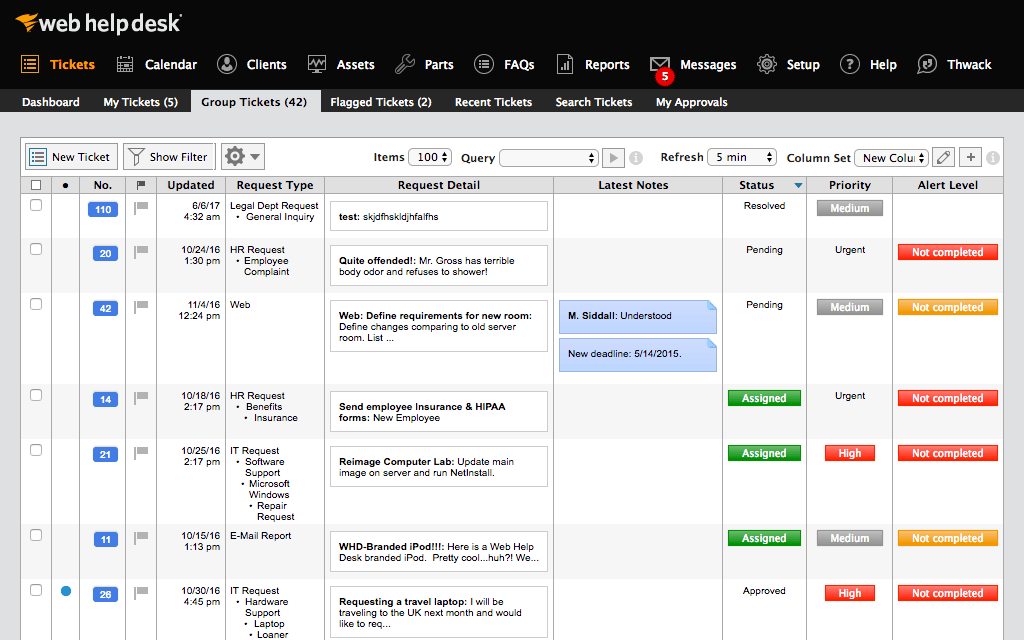
Web Help Desk is ticketing and IT asset management software. It is designed to
simplify help desk management. This solution includes built-in ticketing
management, asset management, change management, and knowledge base
capabilities.
$533
per year per user
Pricing
Freshdesk
SolarWinds Web Help Desk (WHD)
Editions & Modules
Growth
$18
per month per agent
Pro
$59
per month per agent
Enterprise
$95
per month per agent
No answers on this topic
Offerings
Pricing Offerings
Freshdesk
SolarWinds Web Help Desk (WHD)
Free Trial
Yes
Yes
Free/Freemium Version
Yes
No
Premium Consulting/Integration Services
Yes
No
Entry-level Setup Fee
No setup fee
No setup fee
Additional Details
—
SolarWinds also offers Perpetual licensing starting at $1129 per technician.
Network Systems Administrator in Information Technology at The University of the Arts (Higher Education, 201-500 employees)
Chose SolarWinds Web Help Desk (WHD)
Web Help Desk is definitely lacking in the UI/UX department compared to most other ticketing systems I have used int he past. It's very utilitarian; however, what it lacks in UI it makes up for in extensibility and customization. The main issue that the developers need to …
A de minimis incentive was given to thank the reviewer for their time. The incentive was not used to bias or drive a particular response, nor was the incentive contingent on a positive endorsement. More Info
Technology Specialist in Information Technology at School District of the Chathams (Education Management, 51-200 employees)
Chose SolarWinds Web Help Desk (WHD)
We primarily selected SolarWinds Web Help Desk because of the rich feature set and low price point. When we were doing comparisons of the different suites available, we wanted to find an easy to deploy, feature rich, and inexpensive solution. Web Help Desk met all these …
A de minimis incentive was given to thank the reviewer for their time. The incentive was not used to bias or drive a particular response, nor was the incentive contingent on a positive endorsement. More Info
I believe Freshdesk is well-suited for companies that manage multiple accounts, such as those in the Business Process Outsourcing industry. It has all the necessary capabilities, such as ticket management that uses omnichannel to receive ticket requests from service requests (managed internally) in the system, emails, etc. There are also several workflow automations that can be built within the platform/system. What is lacking is the API documentation, which limits the possibilities for further automations. Overall, it is a highly recommended tool for managing employee productivity and timeliness.
A de minimis incentive was given to thank the reviewer for their time. The incentive was not used to bias or drive a particular response, nor was the incentive contingent on a positive endorsement. More Info
SolarWinds WHD is well suited if you have a limited budget, as it costs less than many help desk software packages that are more full featured and modern in their design. It is not well suited to an environment where you want to manage inventory, users, purchases and tickets all in one package. It has an asset feature that we don't use but that looks quite limited. We track our assets and users separately from this.
A de minimis incentive was given to thank the reviewer for their time. The incentive was not used to bias or drive a particular response, nor was the incentive contingent on a positive endorsement. More Info
No prior experience with similar platforms is required to use Freshdesk. I found its interface to be quite intuitive, at least for the end user.
It's easy to connect with other platforms, so you can sync and manage data from other platforms because the integrations work correctly.
Freshdesk's technical support is quite responsive, with short and effective response times. They have easily handled my questions and issues.
It has tools for customizing automated chats, answering frequently asked questions before transferring to an agent. Its configuration is extensive and highly customizable.
A de minimis incentive was given to thank the reviewer for their time. The incentive was not used to bias or drive a particular response, nor was the incentive contingent on a positive endorsement. TR verified that a representative sample of customers was invited. More Info
Customized reporting allows us to track our service and support better, and find where we need improvements. This allows us to constantly upgrade our service levels and keep the customers happy.
Detailed tracking and response to the end users have led to quicker remediation of tickets. We are able to see where we need a better response or where to add additional resources for support.
Overall metrics allow us to staff properly for our tickets by location and remote users.
A de minimis incentive was given to thank the reviewer for their time. The incentive was not used to bias or drive a particular response, nor was the incentive contingent on a positive endorsement. More Info
A de minimis incentive was given to thank the reviewer for their time. The incentive was not used to bias or drive a particular response, nor was the incentive contingent on a positive endorsement. More Info
Because of AD integration, users sometimes try logging in with their email address and not AD credentials. The user then calls stating they can't put a ticket in, it would be nice if there was a method of matching the AD Email field with a login.
Setting up new techs with the building they are responsible for can be a little messy
I would like to see the UI updated. It looks old, even in the latest releases.
A de minimis incentive was given to thank the reviewer for their time. The incentive was not used to bias or drive a particular response, nor was the incentive contingent on a positive endorsement. More Info
New support agents can learn the system quickly, minimizing training time and maximizing productivity from day one. Agents are more willing to use a system that is simple, reducing resistance to change and ensuring all interactions are logged (a common problem with complex systems). The platform is known for being easy to set up and customize, allowing teams (especially smaller ones) to get started with minimal technical expertise.The platform makes it easy to set and monitor Service Level Agreements (SLAs), ensuring customers get timely responses and helping managers enforce performance standards.
A de minimis incentive was given to thank the reviewer for their time. The incentive was not used to bias or drive a particular response, nor was the incentive contingent on a positive endorsement. TR verified that a representative sample of customers was invited. More Info
We are definitely going to be sticking with Web Help Desk for the foreseeable future since the product is very inexpensive for the features that it provides, the integration that it has with our existing systems, and the ease for managing users, assets, locations, and tickets. Web Help Desk is a great product that is backed by even better support, which is well worth looking into if you are considering moving to a new ticketing system.
A de minimis incentive was given to thank the reviewer for their time. The incentive was not used to bias or drive a particular response, nor was the incentive contingent on a positive endorsement. More Info
Freshdesk is extremely easy to use as implemented it on our own with average technical skills. A lot of the options are straightforward and Freshdesk provides easy-to-understand explanations for some of the more complex-sounding ones. We recently onboarded new specialists and they were able to learn Freshdesk with minimal training.
A de minimis incentive was given to thank the reviewer for their time. The incentive was not used to bias or drive a particular response, nor was the incentive contingent on a positive endorsement. TR verified that a representative sample of customers was invited. More Info
I give it this rating based on my experience with SNOW which I would rate lower because it is so difficult to find anything in SNOW. It might be better with more time to configure but we "had a box to check" and it met that requirement and I haven't had time to refine it.
A de minimis incentive was given to thank the reviewer for their time. The incentive was not used to bias or drive a particular response, nor was the incentive contingent on a positive endorsement. More Info
I have encountered a lot of errors in the Freshdesk, however, they tend to resolve it on priority or at least they will share the timeline by when this can be resolved. Most of the time the issue has been from the other partner's end. They take time to resolve their vendor issues and they don't have any timelines in case of developed app errors.
A de minimis incentive was given to thank the reviewer for their time. The incentive was not used to bias or drive a particular response, nor was the incentive contingent on a positive endorsement. More Info
The reports take a lot of time to download if the time period is large. Also, the tickets take their sweet time to open and load. It is not fast as Zendesk. Only 30 tickets are visible in a single go and there isn't any option to select all. If we need to change the pages and dashboards it takes a lot of time to open.
A de minimis incentive was given to thank the reviewer for their time. The incentive was not used to bias or drive a particular response, nor was the incentive contingent on a positive endorsement. More Info
Because I never worked with a company that responds so quickly to their customer! They are always fast at responding and very open to new ideas and quickly turning them around to include them in future releases. They walk us through when we need assistance and are very good at communicating. Overall top notch support
A de minimis incentive was given to thank the reviewer for their time. The incentive was not used to bias or drive a particular response, nor was the incentive contingent on a positive endorsement. More Info
SolarWinds is a great customizable and affordable ticketing system. We use SolarWinds Web Help Desk for IT and Software Development trouble ticket tracking and resolution. The reporting that SolarWinds provides is great since it helps us discover problem areas and fix those areas so they don't keep reoccurring
A de minimis incentive was given to thank the reviewer for their time. The incentive was not used to bias or drive a particular response, nor was the incentive contingent on a positive endorsement. More Info
In-person training is provided to all the agents and it is very easy to learn the basics of the Freshdesk interface. Solving tickets via dashboards, replying to the guest queries in bulk via Freshdesk. The training which is a bit hard is creating the logic according to the ticket flow and intergeration.
A de minimis incentive was given to thank the reviewer for their time. The incentive was not used to bias or drive a particular response, nor was the incentive contingent on a positive endorsement. More Info
This tool is no doubt easy to learn but in-person training is a lot better than online training. It takes time to grasp things in the online training, however, in pandemic we have done all the training online. Apart from a bit more time we haven't faced any issues with online training.
A de minimis incentive was given to thank the reviewer for their time. The incentive was not used to bias or drive a particular response, nor was the incentive contingent on a positive endorsement. More Info
Was a fairly quick implementation for us. However, we are only doing email integration and not some of the more complex integrations that are possible. One clarification on an earlier question. I selected that Freshdesk doesn't have a given feature, but this is not true. I selected this because there wasn't a selection for I don't use the feature. This is a weakness in the survey.
A de minimis incentive was given to thank the reviewer for their time. The incentive was not used to bias or drive a particular response, nor was the incentive contingent on a positive endorsement. More Info
Take the time to roll out a test VM to configure and make changes to before doing a live deployment, this way you don't end up with a VM that has been tweaked and re-tweaked until it's perfect and instead end up with a final, polished product. I would also recommend taking the time to read through the support forums for figuring out minor issues that may pop up, chances are that you aren't going to be the first one to encounter them. When all is said and done, SolarWinds Support is VERY responsive and you shouldn't hesitate to contact them.
A de minimis incentive was given to thank the reviewer for their time. The incentive was not used to bias or drive a particular response, nor was the incentive contingent on a positive endorsement. More Info
Compared to Crisp, Freshdesk offers much more organization and is just much more helpful when it comes to having more than one region/team. Not that Crisp is bad, but with Freshdesk, internal communication and collaboration are much easier, which was quite important for our team to grow.
A de minimis incentive was given to thank the reviewer for their time. The incentive was not used to bias or drive a particular response, nor was the incentive contingent on a positive endorsement. More Info
Web Help Desk is definitely lacking in the UI/UX department compared to most other ticketing systems I have used int he past. It's very utilitarian; however, what it lacks in UI it makes up for in extensibility and customization. The main issue that the developers need to address is the use of a Web Objects back-end.
A de minimis incentive was given to thank the reviewer for their time. The incentive was not used to bias or drive a particular response, nor was the incentive contingent on a positive endorsement. More Info
I was not very involved with the purchase/contract (my company purchased Fresjdesk before I was brought on), but I will say that pricing per agent made it difficult to grow our support team. Additionally, we were kind of disappointed after our upgrade because it didn't solve our pain points as much as we expected.
A de minimis incentive was given to thank the reviewer for their time. The incentive was not used to bias or drive a particular response, nor was the incentive contingent on a positive endorsement. More Info
My company had Freshdesk agents from support and success. It's generally difficult to customize permissions for different agent "roles." We were a fully distributed company, so "multiple sites" doesn't apply to us. We found Freshdesk features lacking as we grew our customer base, and adding agents wasn't easy because price steeply increases with number of agents.
A de minimis incentive was given to thank the reviewer for their time. The incentive was not used to bias or drive a particular response, nor was the incentive contingent on a positive endorsement. More Info
A de minimis incentive was given to thank the reviewer for their time. The incentive was not used to bias or drive a particular response, nor was the incentive contingent on a positive endorsement. More Info
A de minimis incentive was given to thank the reviewer for their time. The incentive was not used to bias or drive a particular response, nor was the incentive contingent on a positive endorsement. More Info
A de minimis incentive was given to thank the reviewer for their time. The incentive was not used to bias or drive a particular response, nor was the incentive contingent on a positive endorsement. More Info