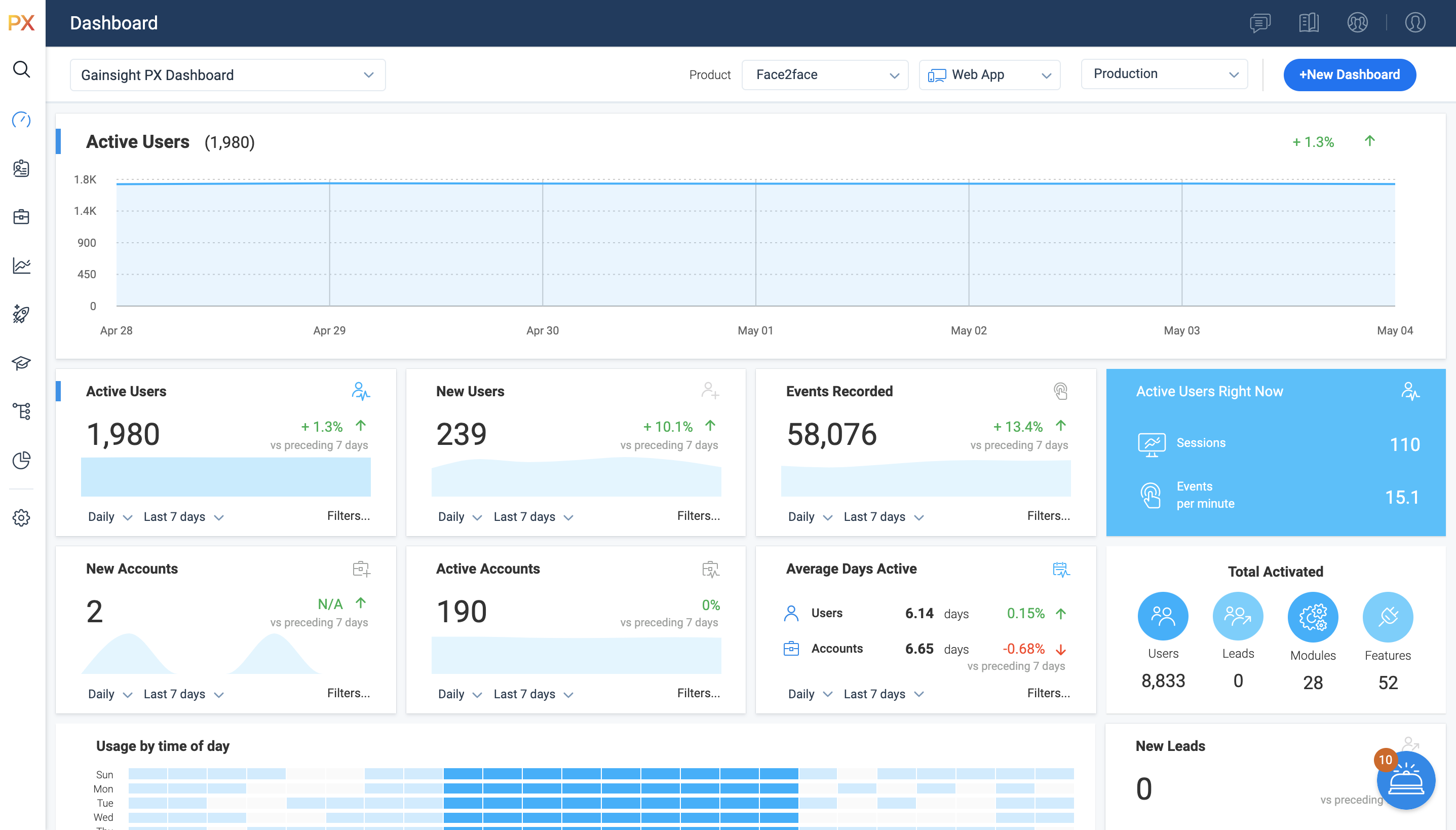
For SaaS products, Gainsight's product experience software enables companies to track every step of their user's journey and fully understand how they're interacting with a product over time.
$0
100 or less MAUs (Monthly Active Users)
Spekit
Score9.2 out of 10
N/A
Spekit is a just-in-time enablement engine that embeds answers, coaching, and sales content directly in the tools revenue teams use. From drafting prospect emails to updating deal stages in Salesforce or reviewing Gong calls, Spekit’s AI Sidekick understands what sellers need in the moment and surfaces the precise message, content asset, or process guidance to keep momentum moving. Built for Sales Enablement & Product Marketing Teams Spekit supports various use…
It’s a robust tool that allows you to easily map and track key features and actions within your products. It also allows for in app communications to help guide the user through the path you want them to follow. The ability to connect with Gainsight CS also allows you to leverage that data to drive actions for the account team, incorporate it in health scoring, and use it to trigger digital programs. You do need a well thought out strategy for management of the platform, the data and how you will use it.
Spekit is extremely well-suited for customer-facing teams who truly have a business need for "just-in-time learning." While we all benefit from the concept of just-in-time learning, organizational representatives who must perform to a high standard in front of external-facing stakeholders particularly benefit from having quick access to processes, definitions, answers, contacts, and more in a tool that is easy to navigate. Spekit may not, however, be well suited for cash-strapped organizations that already have a content management tool like Confluence or SharePoint and can't afford to meet their customer-facing teams in the middle. While Confluence and SharePoint serve very important needs, they don't do a particularly good job of making content easy to find in a pinch. Spekit does.
A de minimis incentive was given to thank the reviewer for their time. The incentive was not used to bias or drive a particular response, nor was the incentive contingent on a positive endorsement. More Info
Gainsight PX provides powerful segmentation capabilities to help marketers target the right customers with the right message. Through its segmentation capabilities, Gainsight PX enables marketers to create custom segments based on user behavior, demographics, and other criteria to ensure that the right message is delivered to the right customer.
Gainsight PX offers robust analytics capabilities to help marketers gain insights into customer behavior and engagement. Through its analytics capabilities, Gainsight PX enables marketers to track user engagement, identify customer trends, and gain insights into customer behavior.
Gainsight PX provides an intuitive user interface to help marketers quickly and easily create and manage campaigns. Through its user interface, Gainsight PX enables marketers to create and manage campaigns with ease, allowing them to quickly launch campaigns and track their progress.
A de minimis incentive was given to thank the reviewer for their time. The incentive was not used to bias or drive a particular response, nor was the incentive contingent on a positive endorsement. More Info
A de minimis incentive was given to thank the reviewer for their time. The incentive was not used to bias or drive a particular response, nor was the incentive contingent on a positive endorsement. More Info
Dashboards. There is no way to provide notes to others which would be very beneficial in consuming data across a team. Lacking functionality - no resizing, no organization options, run into bugs when using it frequently, overall hard to design a layout that is easy to follow.
No way to identify what features/elements are being used but aren't tagged. This would be a huge value add.
Retention Analyzer. Default view doesnt allow for filtering and includes test data. In our case this doesnt allow for a true comparison between two segments.
Segments. You can't use segments in areas you should be able to. I shouldnt have to recreate a segment as a saved filter.
A de minimis incentive was given to thank the reviewer for their time. The incentive was not used to bias or drive a particular response, nor was the incentive contingent on a positive endorsement. More Info
A de minimis incentive was given to thank the reviewer for their time. The incentive was not used to bias or drive a particular response, nor was the incentive contingent on a positive endorsement. More Info
A de minimis incentive was given to thank the reviewer for their time. The incentive was not used to bias or drive a particular response, nor was the incentive contingent on a positive endorsement. More Info
It is a good product, but like with every product, there is room for improvement or even just things I, as a user, would prefer, such as the ability to click on a company and have it go to Salesforce instead of Insight. It can also be difficult to find certain reports.
A de minimis incentive was given to thank the reviewer for their time. The incentive was not used to bias or drive a particular response, nor was the incentive contingent on a positive endorsement. More Info
As an administrator, it is very easy to navigate. I can easily see which content is performing well, which content has not been touched. It's simple to teach new team members how to create content. We have added new authors easily in multiple groups in the business.
A de minimis incentive was given to thank the reviewer for their time. The incentive was not used to bias or drive a particular response, nor was the incentive contingent on a positive endorsement. More Info
I have not had to contact support frequently but when I have I used the chat and my questions were answered immediately. I've also used their knowledge center, help documentation and training videos which are all very thorough. The support we've received from our Customer Success Manager has been helpful as well.
A de minimis incentive was given to thank the reviewer for their time. The incentive was not used to bias or drive a particular response, nor was the incentive contingent on a positive endorsement. More Info
Heap has a great value proposition and very nice user experience. But it lacks the clear funnel analysis that Gainsight PX provides. Plus Heap also does not have integration with a lot of CRMs and Customer data platforms. Also, Additionally if you go in the market to find Heap implementors or SI vendors, you won't find any.
A de minimis incentive was given to thank the reviewer for their time. The incentive was not used to bias or drive a particular response, nor was the incentive contingent on a positive endorsement. More Info
Spekit may not be as robust as Confluence or organized as SharePoint, but its use of embedded tooltips (Speks) and browser extension put it in the S Tier for "just-in-time learning" platforms - particularly for customer-facing teams.
A de minimis incentive was given to thank the reviewer for their time. The incentive was not used to bias or drive a particular response, nor was the incentive contingent on a positive endorsement. More Info
Allow us to integrate actual product usage with Salesforce.
Too much developer time went into it, especially when the premise was that this was mostly going to be handled by the Product team. This was mostly because the Gainsight PX event editor doesn't support more complex querying on events.
A de minimis incentive was given to thank the reviewer for their time. The incentive was not used to bias or drive a particular response, nor was the incentive contingent on a positive endorsement. More Info
The time saved from using Spekit is incredible. No more calls/emails asking "what's this field for?" or "How do I do ?" It's all right there, thanks to Spekit.
Using Spekit has provided an unexpected morale boost because it's not only easy to use, but it's making work more enjoyable too.