GetAccept vs. Zoho Sign

Overview
ProductRatingMost Used ByProduct SummaryStarting Price
GetAccept
Score 9.4 out of 10
N/A
GetAccept is a software platform designed for sales professionals which facilitates deal design, orchestration and closure. Sales management and marketing teams are able to create automated deal workflows on behalf of sales representatives; combining video, live chat, collateral, canned emails and reminder messaging to nurture prospects through pre-nominated sales stages. Sales representatives are then able to further personalize these templates prior to use by adding personal anecdotes…N/A
Zoho Sign
Score 9.1 out of 10
Small Businesses (1-50 employees)
Zoho Sign is a digital signing service that lets you execute contracts quickly without the hassles of transporting paper documents while ensuring security and legality. It works completely on cloud and integrates readily with your everyday apps. According to the vendor, Zoho Sign is perfect for anyone who needs to sign business documents but widely used for HR, legal, finance, HR, and sales functions. Documents that can be signed include:…
$0
per user
Pricing
GetAcceptZoho Sign
Editions & Modules
No answers on this topic
Free
$0.00
per user
Standard
$10.00
per user/ month
Professional
$15.00
per user/ month
Offerings
Pricing Offerings
GetAcceptZoho Sign
Free Trial
NoNo
Free/Freemium Version
NoYes
Premium Consulting/Integration Services
NoNo
Entry-level Setup FeeNo setup fee$10 per user
Additional Details
More Pricing Information
Community Pulse
GetAcceptZoho Sign
Considered Both Products
GetAccept
Chose GetAccept
Both have their own merits and demerits. GetAccept helps us securely sign documents which is very useful as compared to the others. It is suited for us as we work with a lot of proposals that are issued frequently. We selected GetAccept because of their humanized sales …
Chose GetAccept
This is the first time I have used software like GetAccept after it was recommended to me by a colleague. Therefore I cannot compare with other similar software. Indeed, the shortcomings of GetAccept (such as the interface to be improved or the difficulty in using the same …
Chose GetAccept
Ease of use is very user-friendly in order to work on any task. It has the maximum features as compared to its competitors which are a quite useful and enhanced program that enables in order to do the CRM easy. Also, it provides particular support to the problems which we faced …
Chose GetAccept
As an alternative to PandaDoc, GetAccept is efficiently integrated into our CRM platform. It makes it simple to manage contracts and addendum for many customers. Automated emails and templates are the most timesaving features of the software. For sending cold emails, these …
Chose GetAccept
GetAccepted is very similar to other softwares in some aspects but it has very remarkable differences, for example the other softwares not track each page that the customer reviwed the document sent. In addition the account in Get accepted is more complete, something that I …
Chose GetAccept
HubSpot is an entire CRM platform that has the capability to send agreements with their quotes feature. GetAccept is online, a software for signing and sending contracts and a great one at that. I'd say there's no need to pick one or the other - pick both. They have an …
Chose GetAccept
GetAccept is far easier to use than both of the options listed above. DocuSign does a lot of things that small and mid-market companies don't need, and is more expensive. PandaDoc was difficult to edit and the Salesforce integration was hard to use as a rep.
Chose GetAccept
GetAccept is easier to use and has much more functionality.
Chose GetAccept
GetAccept has more features and a better dashboard. We moved from PandaDoc because of the SMS and video capabilities of GetAccept.
Chose GetAccept
The decision to switch from Octiv to GetAccept happened when I was a newer rep at the company. I was not involved in the decision-making process. From what I know, individual sales reps were looking for an easier-to-use platform. I liked the real-time text notifications on both …
Chose GetAccept
DocuSign provides the same level of functionality as GetAccept, but with a smaller, more attentive customer service team. Due to their size, I believe GetAccept can pivot quicker and configure themselves more easily to fit our organization's individual needs. DocuSign is …
Chose GetAccept
GetAccept has a lot more personalized feel to it.
Zoho Sign
Chose Zoho Sign
Price is important but it has all the same features as some of the main brand names on the market which makes this package ideal for small businesses and larger ones looking at costs. The advantage we find is that we can edit forms with drop-down boxes and preset answers for …
Chose Zoho Sign
Before using Zoho Sign, we simply send out PDFs and had our partners and clients sign them and send them back. Obviously, Zoho Sign stacks pretty high against that because of how professional it is, how much simpler it is for us to use, and how much time it saves us.
Chose Zoho Sign
Docusign seems to be more commonly used and often times clients will ask if we can use that as opposed to Zoho Sign.
Chose Zoho Sign
I was a paid subscriber to Adobe prior to using Zoho, and found their solution expensive and inflexible. DocuSign may be the market leader, but Zoho fits better into our overall needs, especially since it integrates well with our other Zoho products.
Best Alternatives
GetAcceptZoho Sign
Small Businesses
Foxit eSign
Foxit eSign
Score 9.2 out of 10
Foxit eSign
Foxit eSign
Score 9.2 out of 10
Medium-sized Companies
MSB Docs
MSB Docs
Score 9.4 out of 10
MSB Docs
MSB Docs
Score 9.4 out of 10
Enterprises
DocuSign
DocuSign
Score 8.8 out of 10
DocuSign
DocuSign
Score 8.8 out of 10
All AlternativesView all alternativesView all alternatives
User Ratings
GetAcceptZoho Sign
Likelihood to Recommend
8.4
(0 ratings)
9.0
(0 ratings)
Usability
8.7
(0 ratings)
-
(0 ratings)
Support Rating
7.1
(0 ratings)
-
(0 ratings)
User Testimonials
GetAcceptZoho Sign
Likelihood to Recommend
GetAccept has shown great progress in the digital electronic signature market, we have had almost no problems since adopting it, although at some point we thought about stopping using the GetAccept server. It is very practical for both the client and the advisor using it. It has a very intuitive interface and the management is amazing.
Read full review
I think Zoho is great for a smaller organization that needs a few documents signed. A larger organization that would use it on a daily basis may not like it because they would want an easier to use and more professional setup. For example:
  • The document shows up as coming from Zoho Sign, which is not a professional look.
  • There is no way to create a document within Zoho Sign. A document needs to be uploaded (or you can use a pre-uploaded template).
Read full review
Pros
  • The ability to forward agreements along with a video of me describing the agreements. It makes it more personalized and it's always well received by the recipient.
  • You can track in real time when a document has been viewed and for how long.
  • You can always reference the history of each client agreement. Easy access.
Read full review
  • Delivers documents safely.
  • Secure document signatures.
Read full review
Cons
  • In some cases could be angry that software ask you for feedback many times, for example, when you are filling out a contract
  • something that happen occasionally is a little bit complicate find some documents in my screen, I mean if you could improve the way how the recent files appear on the screen could be great. not always happen but it is not good.
  • I would love to have templates that allow me create files in a easy way.
Read full review
  • It integrates from sign to the CRM (in that order) poorly. To have the doc associated with the contact it can ONLY come from the CRM.
Read full review
Usability
I think it's a good product.
Read full review
No answers on this topic
Support Rating
The Customer Support team was responsive. I typically submitted questions while I was using the app and via the web. The FAQ support base was alright. I cannot recall a time when I used that as opposed to connecting with a rep. I believe all communication was via email. Dalius was great at soliciting feedback. I particularly valued him offering support for best practices as it related to more strategic ways to use GetAccept.
Read full review
No answers on this topic
Alternatives Considered
Ease of use is very user-friendly in order to work on any task. It has the maximum features as compared to its competitors which are a quite useful and enhanced program that enables in order to do the CRM easy. Also, it provides particular support to the problems which we faced and resolve them asap.
Read full review
Price is important but it has all the same features as some of the main brand names on the market which makes this package ideal for small businesses and larger ones looking at costs. The advantage we find is that we can edit forms with drop-down boxes and preset answers for the forms. Each entry field can be customized by data type and length or allow the client to enter their own answers.
Read full review
Return on Investment
  • It has incredibly increased the efficiency of students' work thanks to the possibility to work remotely with mobile devices.
  • GetAccepts has made it possible to create very realistic sales simulations, even if it is not educational software. It is therefore very flexible in its uses.
  • The possibility of tracking each page that is viewed helps evaluate what the Client is thinking.
Read full review
  • Because we are Zoho One users, it is bundled, therefore we don't have to spend money on another signing solution.
Read full review
ScreenShots

Zoho Sign Screenshots

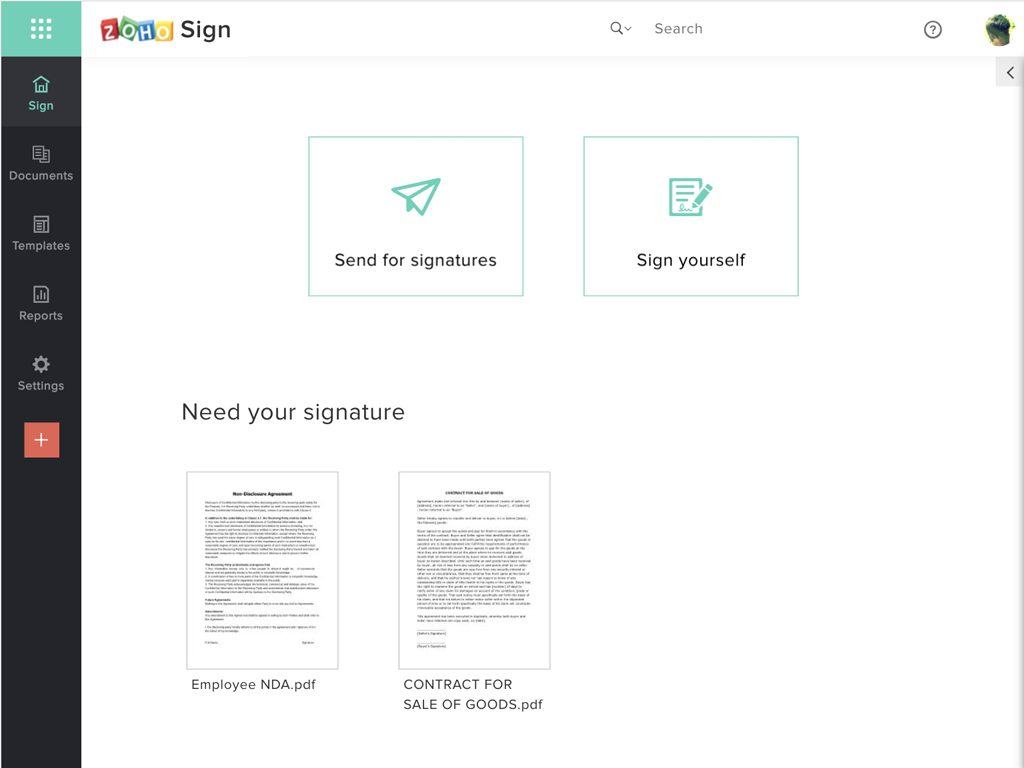
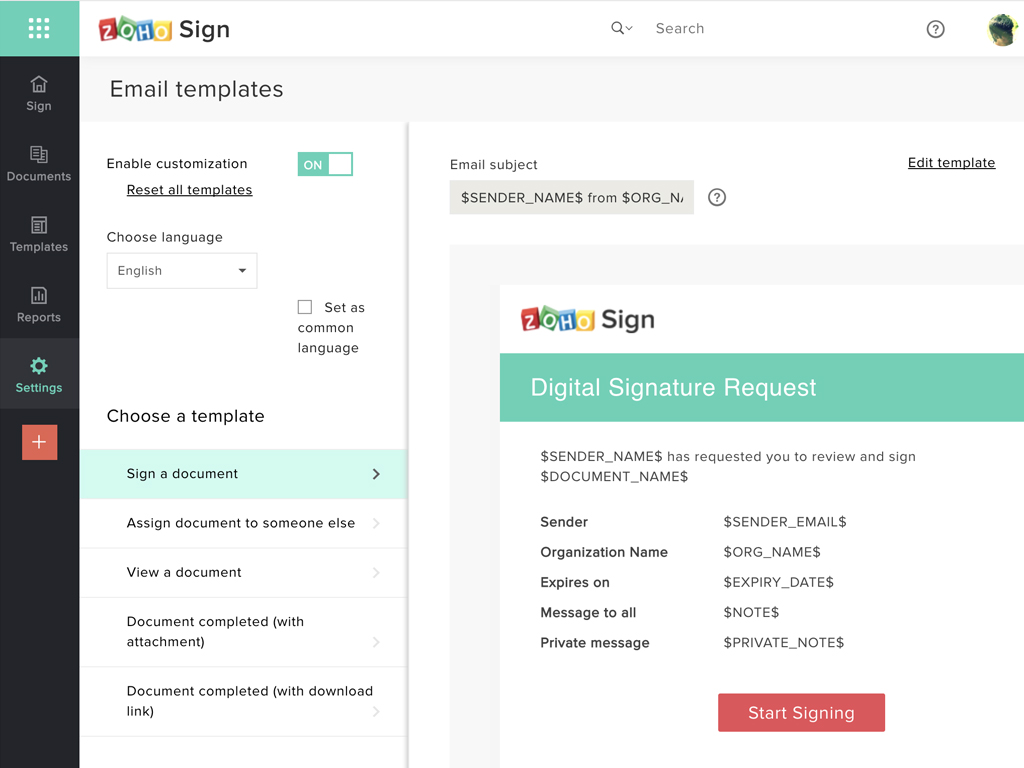
Screenshot of Zoho Sign DashboardScreenshot of Sending documents for signatures using templatesScreenshot of All document sent using Zoho SignScreenshot of Rebranding email templates sent from Zoho Sign