TrustRadius: an HG Insights company

Save this comparison

Save this comparison

Add Product

Recommended Comparisons

    Overview
    ProductRatingMost Used ByProduct SummaryStarting Price

    Google Analytics

    Score8.3 out of 10
    N/AGoogle Analytics is perhaps the best-known web analytics product and, as a free product, it has massive adoption. Although it lacks some enterprise-level features compared to its competitors in the space, the launch of the paid Google Analytics Premium edition seems likely to close the gap.

    $0

    per month

    Rencore Code (SPCAF)

    Score8.8 out of 10
    Enterprise companies (1,001+ employees)
    Many organizations that use Office 365 are exposed to security risks that they are unaware of. As they extend SharePoint to meet their business needs, they build applications using technologies that range from end-user Microsoft Flow to developer-focused SharePoint Framework. Unfortunately, all of these custom applications are capable of circumventing the security measures organizations have in place exposing the organization and its data to security…N/A
    Pricing
    Google AnalyticsRencore Code (SPCAF)
    Editions & Modules
    Google Analytics 360
    150,000
    per year
    Google Analytics
    Free
    No answers on this topic
    Offerings
    Pricing Offerings
    Google AnalyticsRencore Code (SPCAF)
    Free Trial
    NoYes
    Free/Freemium Version
    YesNo
    Premium Consulting/Integration Services
    NoYes
    Entry-level Setup FeeNo setup feeOptional
    Additional Details——
    More Pricing Information
    Community Pulse
    Google AnalyticsRencore Code (SPCAF)
    Considered Both Products
    Google
    No answer on this topic
    Rencore
    No answer on this topic
    Key User Insights
    Would buy again
    96%
    Would buy again
    101 Answers
    No answers on this topic
    Delivers good value for the price
    100%
    Delivers good value for the price
    100 Answers
    No answers on this topic
    Happy with the feature set
    99%
    Happy with the feature set
    104 Answers
    No answers on this topic
    Lived up to sales and marketing promises
    97%
    Lived up to sales and marketing promises
    77 Answers
    No answers on this topic
    Implementation went as expected
    96%
    Implementation went as expected
    87 Answers
    No answers on this topic
    Features
    Google AnalyticsRencore Code (SPCAF)
    Web Analytics
    Comparison of Web Analytics features of Google Analytics and Rencore Code (SPCAF)
    Feature
    Google Analytics
    8.4
    11 Ratings
    4% above category average
    Rencore Code (SPCAF)
    -
    Ratings
    Lead Conversion Tracking8.210 Ratings00 Ratings
    Bounce Rate Measurement8.410 Ratings00 Ratings
    Device and Browser Reporting9.311 Ratings00 Ratings
    Pageview Tracking9.111 Ratings00 Ratings
    Event Tracking8.411 Ratings00 Ratings
    Reporting in real-time7.810 Ratings00 Ratings
    Referral Source Tracking8.610 Ratings00 Ratings
    Customizable Dashboards7.910 Ratings00 Ratings
    Best Alternatives
    Google AnalyticsRencore Code (SPCAF)
    Small Businesses
    Matomo Analytics
    Score9 out of 10
    No answers on this topic
    Medium-sized Companies
    Lead Forensics
    Score8.9 out of 10
    Trend Vision One Email and Collaboration Security
    Score9.9 out of 10
    Enterprises
    Chartbeat
    Score9.2 out of 10
    Checkmarx
    Score7.6 out of 10
    All AlternativesView all alternativesView all alternatives
    User Ratings
    Google AnalyticsRencore Code (SPCAF)
    Likelihood to Recommend
    8.5
    (193 ratings)
    8.8
    (11 ratings)
    Likelihood to Renew
    9.0
    (51 ratings)
    -
    (0 ratings)
    Usability
    7.4
    (19 ratings)
    -
    (0 ratings)
    Availability
    10.0
    (4 ratings)
    -
    (0 ratings)
    Performance
    10.0
    (2 ratings)
    -
    (0 ratings)
    Support Rating
    7.0
    (42 ratings)
    9.1
    (2 ratings)
    Online Training
    10.0
    (2 ratings)
    -
    (0 ratings)
    Implementation Rating
    9.0
    (7 ratings)
    -
    (0 ratings)
    Configurability
    6.0
    (2 ratings)
    -
    (0 ratings)
    Ease of integration
    10.0
    (1 ratings)
    -
    (0 ratings)
    Product Scalability
    10.0
    (2 ratings)
    -
    (0 ratings)
    Vendor post-sale
    10.0
    (1 ratings)
    -
    (0 ratings)
    Vendor pre-sale
    9.0
    (1 ratings)
    -
    (0 ratings)
    User Testimonials
    Google AnalyticsRencore Code (SPCAF)
    Likelihood to Recommend
    Google
    Google Analytics is particularly well suited for tracking and analyzing customer behavior on a grocery e-commerce platform. It provides a wealth of information about customer behavior, including what products are most popular, what pages are visited the most, and where customers are coming from. This information can help the platform optimize its website for better customer engagement and conversion rates. However, Google Analytics may not be the best tool for more advanced, granular analysis of customer behavior, such as tracking individual customer journeys or understanding customer motivations. In these cases, it may be more appropriate to use additional tools or solutions that provide deeper insights into customer behavior.
    Read full review
    Rencore
    For Microsoft shops that are doing custom development on the Microsoft cloud platform in Office 365 and Azure, the Rencore toolset is an absolute must, especially if you are involved in converting farm solutions to cloud, or just moving into cloud development for the first time.
    Read full review
    Pros
    Google
    • Multiple reports to see website use and behavior
    • Allows you to customize reports with days, weeks, months, and years
    • You can build out a dashboard to easily view stats from multiple websites in one place
    • You can share analytics reports via the dashboard, automatically emailed PDFs or in other formats
    Incentivized
    Read full review
    Rencore
    • Unique expert knowledge of their target platforms. Not many companies have such a unique position in their target market. Their employees have a deep understanding of SharePoint, Office 365 and Azure and also regularly advise Microsoft on these matters.
    • Community involvement and contribution to open source projects. Key employees at Rencore are considered thought leaders in their area of expertise and contribute to high profile Microsoft open source initiatives.
    • Rencore's unique position when it comes to code quality analysis in the SharePoint space sets it apart. There's really no alternative.
    • Platform governance is another Rencore strength. No other product provides the insights into your SharePoint Online environment with full auditing of not only configuration changes but also who changed which code where and when. Again no alternatives exist.
    Read full review
    Cons
    Google
    • Data sampling is somewhat inaccurate on the free tier - this is addressed in premium but is expensive.
    • Some of the UI is very similar in naming when presenting different data, some in-situ information might be useful.
    • Gotchas around filtering and data validation.
    • Implementation can be tricky, it can take a lot of time and expertise to get a full, accurate picture of your metrics.
    Incentivized
    Read full review
    Rencore
    • Rencore's product line is of course still a bit of a niche: SharePoint code quality is not something every organization on the planet is concerned with - although Rencore does much more than that.
    • We feel Rencore's marketing efforts are mainly targeted at technologists. There's a lot of other potential, especially for their platform governance product.
    Read full review
    Likelihood to Renew
    Google
    We will continue to use Google Analytics for several reasons. It is free, which is a huge selling point. It houses all of our ecommerce stores' data, and though it can't account for refunds or fraud orders, gives us and our clients directional, real time information on individual and group store performance.
    Incentivized
    Read full review
    Rencore
    No answers on this topic
    Usability
    Google
    Google Analytics provides a wealth of data, down to minute levels. That is it's greatest detriment: find the right information when you need it can be a cumbersome task. You are able to create shortcuts, however, so it can mitigate some of this problem. Google is continually refining Analytics, so I do not doubt there will be improvements
    Read full review
    Rencore
    No answers on this topic
    Reliability and Availability
    Google
    We all know Google is at top when it comes to availability. We have never faced any such instances where I can suggest otherwise. All you need is a Google account, a device and internet connection to use this super powerful tool for reporting and visualising your site data, traffic, events, etc. that too in real time.
    Read full review
    Rencore
    No answers on this topic
    Performance
    Google
    This has been a catalyst for improving our site's traffic handling capabilities. We were able to identify exit% from our sites through it and we used recommendations to handle and implement the same in our sites. We have been increasing the usage of Google Analytics in our sites and never had any performance related issues if we used Analytics
    Read full review
    Rencore
    No answers on this topic
    Support Rating
    Google
    The Google reps respond very quickly. However, sometimes they can overly call you to set up an apportionment. I'm very proficient and sometimes when I talk to reps, they give beginner tutorials and insights that are a waste of time. I wish Google would understand my level of expertise and assign me to a rep (long-term) that doesn't have to walk me through the basics.
    Incentivized
    Read full review
    Rencore
    Rencore support is unbeatable
    Read full review
    Online Training
    Google
    love the product and training they provide for businesses of all sizes. The following list of links will help you get started with Google Analytics from setup to understanding what data is being presented by Google Analytics.
    1. How to Use Google Analytics for Beginners – Mahalo’s how-to guide for beginners.
    2. A beginner’s guide to Google Analytics – A free eBook walking you through Google Analytics from setup to understanding what data is being presented.
    3. Getting to Know Your Google Analytics Dashboard – The title says it all! This is a brief post with one goal: to introduce you to the Google Analytics dashboard.
    4. Google Analytics for Beginners: How to Make the Most of Your Traffic Reports– This guide doesn’t cover setup, but it does a great job of helping you to better understand the data being presented.
    5. Google Analytics Video Tutorial 1: Setup – A video presentation that walks you through Google Analytics setup.
    6. Google Analytics Video Tutorial 2: Essential Stats – A video presentation that introduces you to some of the most important data being presented in Google Analytics.
    Read full review
    Rencore
    No answers on this topic
    Implementation Rating
    Google
    I think my biggest take away from the Google Analytics implementation was that there needs to be a clear understanding of what you want to achieve and how you want to achieve it before you start. Originally the analytics were added to track visitors, but as we became more savvy with the product, we began adding more and more functionality, and defining guidelines as we went along. While not detrimental to our success, this lack of an overarching goal resulted in some minor setbacks in implementation and the collection of some messy data that is unusable.
    Read full review
    Rencore
    No answers on this topic
    Alternatives Considered
    Google
    I have not used Adobe Analytics as much, but I know they offer something called customer journey analytics, which we are evaluating now. I have used Semrush, and I find them much better than Google Analytics. I feel a fairly nontechnical person could learn Semrush in about a month. They also offer features like competitive analysis (on content, keywords, traffic, etc.), which is very useful. If you have to choose one among Semrush and Google Analytics, I would say go for Semrush.
    Incentivized
    Read full review
    Rencore
    I don't know of any products that compete in the space and if there were any, they would not stand a chance against Rencore. Behind any good product is a team of highly skilled individuals, who all have the same goal, who are passionate what they do and lastly, are in it for the betterment of where they started; As Developers themselves. You can't buy that
    Read full review
    Scalability
    Google
    Google Analytics is currently handling the reporting and tracking of near about 80 sites in our project. And I am not talking about the sites from different projects. They may have way more accounts than that. Never ever felt a performance issue from Google's end while generating or customising reports or tracking custom events or creating custom dimensions
    Read full review
    Rencore
    No answers on this topic
    Return on Investment
    Google
    • It has helped us gain understanding of what is going on on our website.
    • It has helped us determine areas that need fixing (i.e. pages with extremely high bounce rates may need to be redone).
    • It has helped us understand our biggest avenues for bringing traffic to the website and business in general.
    • It has helped guide our website redesign.
    Incentivized
    Read full review
    Rencore
    • The clear impact was the amount of time saved code reviewing or going through lines of code marked off by other tools that are not relevant. We cannot put a number on it since the project started off with the tool in place but based on the rules applied it could be as high as 20% of the project time.
    Read full review
    ScreenShots

    Rencore Code (SPCAF) Screenshots

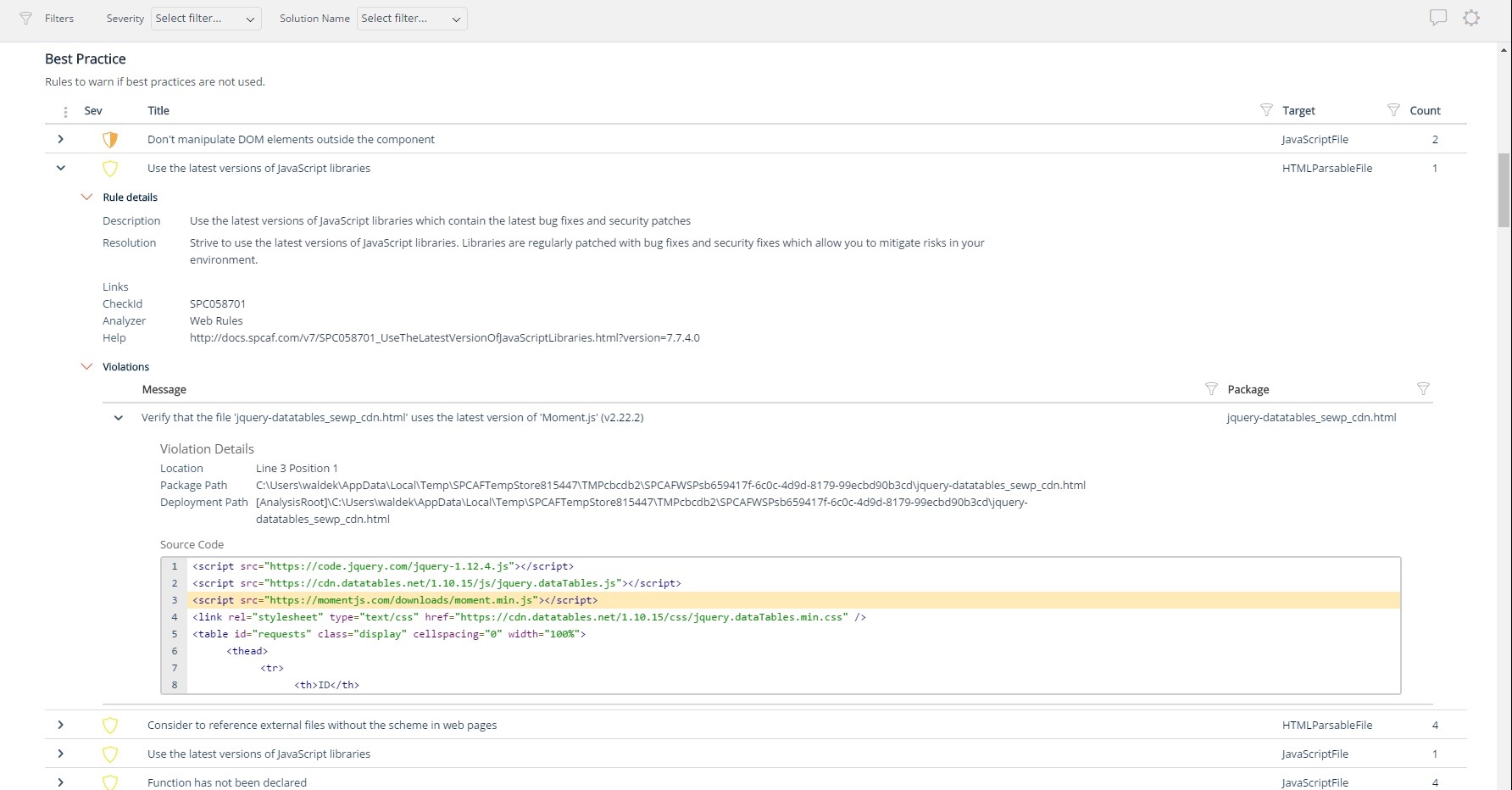
    Screenshot of Using third party libraries allows you to build your SharePoint and Office 365 applications faster and focus on functionality specific for your organization. But regularly, security vulnerabilities are discovered in these external dependencies. If left unpatched, they become a security risk for your organization and its data. Rencore automatically warns you when any of the third-party libraries used in your applications has known vulnerabilities that could be exploited to hack your environment.Screenshot of Third-party libraries are regularly updated to improve performance and stability. Many organizations however don’t know when a new version of the library they use in their SharePoint and Office 365 applications is released and they keep using the old versions which exposes them not only to bugs but also to security risks. Rencore automatically warns you when a new version of a library that you use is available allowing you to verify the contents and the impact of the upgrade.Screenshot of Without proper tooling, it’s impossible to successfully enforce an application governance plan in SharePoint and Office 365. The number of ways in which users could possibly extend SharePoint combined with the thousands of pages and hundreds of settings that can be configured, make it impossible to continuously monitor for alignment with the organizational policies. 

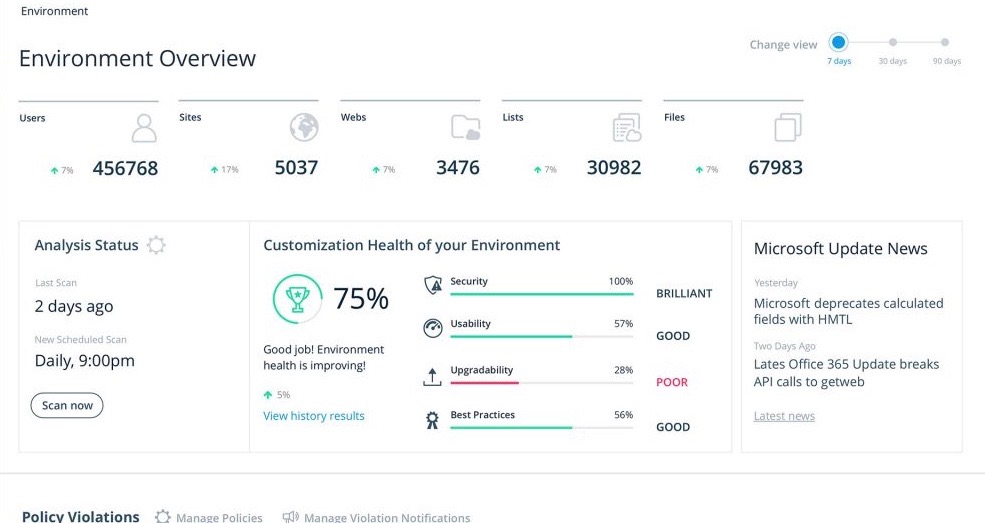
Rencore helps you understand the configuration of your tenant as well as discover the different SharePoint and Office 365 applications used in your organization. With Rencore you will easily understand how these applications are built, which dependencies they have and which possible risks they expose your organization to.Screenshot of Your organization tailors SharePoint and Office 365 to its specific needs to get more value of its investment in the platform. But each organization has different needs and is subject to different laws and regulations. 

Rencore allows you to configure what policies you want to enforce in your tenant. Each violation gets reported so that you can take corrective action and successfully enforce your organization’s application governance plan.Screenshot of As you start discovering issues in your SharePoint and Office 365 environment, you will be taking corrective actions to mitigate the risks. Rencore helps you track these issues and the related tasks so that you can easily follow up on the status of each issue and control that your organization is improving over time.Screenshot of It’s not enough to have your SharePoint and Office 365 applications verified for compliancy with your organization’s policies before using them in production. As your applications evolve, they will require changes and each change exposes you to a number of risks. Rencore helps you track how your applications change over time, even if these applications don’t follow centralized deployment and are managed by power-users. Each change is assessed for potential risks that it could expose your organization to.