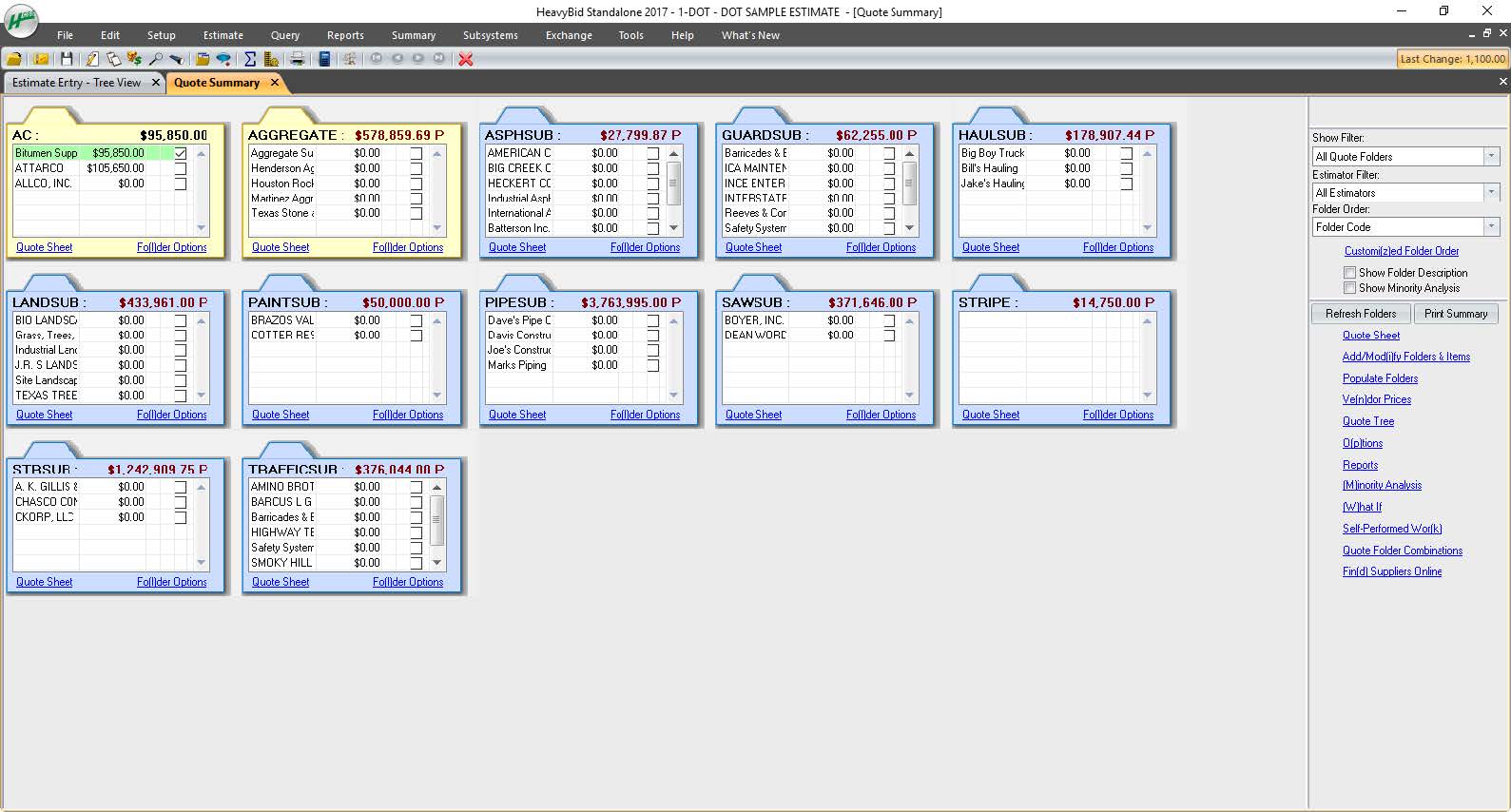
HCSS is a construction software suite. It includes functionality for bidding, time card and project management, safety, planning, scheduling, equipment management, and data warehousing and reporting. Each module can be purchased separately. The suite can be hosted in the cloud.
N/A
Sage HRMS
Score9.8 out of 10
N/A
Sage HRMS is an HR management solution that integrates payroll, benefits, recruiting, employee self-service, and analytics capabilities.
N/A
Pricing
HCSS
Sage HRMS
Editions & Modules
No answers on this topic
No answers on this topic
Offerings
Pricing Offerings
HCSS
Sage HRMS
Free Trial
No
No
Free/Freemium Version
No
No
Premium Consulting/Integration Services
Yes
Yes
Entry-level Setup Fee
Required
No setup fee
Additional Details
—
—
More Pricing Information
Features
HCSS
Sage HRMS
Construction Project & Field Management
Comparison of Construction Project & Field Management features of HCSS and Sage HRMS
Feature
HCSS
5.1
34 Ratings
40% below category average
Sage HRMS
-
Ratings
Plan distribution & viewing
5.010 Ratings
00 Ratings
Plan markups & sharing
5.07 Ratings
00 Ratings
Issue tracking & punchlists
5.014 Ratings
00 Ratings
Photo documentation
5.026 Ratings
00 Ratings
Jobsite reports
6.031 Ratings
00 Ratings
Document sharing
5.018 Ratings
00 Ratings
RFI tools
3.01 Ratings
00 Ratings
Collaboration & approvals
5.020 Ratings
00 Ratings
Mobile app
7.029 Ratings
00 Ratings
Human Resource Management
Comparison of Human Resource Management features of HCSS and Sage HRMS
Feature
HCSS
-
Ratings
Sage HRMS
5.5
9 Ratings
39% below category average
Employee demographic data
00 Ratings
8.08 Ratings
Employment history
00 Ratings
8.09 Ratings
Job profiles and administration
00 Ratings
1.39 Ratings
Workflow for transfers, promotions, pay raises, etc.
00 Ratings
7.99 Ratings
Organizational charting
00 Ratings
6.04 Ratings
Organization and location management
00 Ratings
6.06 Ratings
Compliance data (COBRA, OSHA, etc.)
00 Ratings
1.27 Ratings
Payroll Management
Comparison of Payroll Management features of HCSS and Sage HRMS
Feature
HCSS
-
Ratings
Sage HRMS
4.8
7 Ratings
52% below category average
Pay calculation
00 Ratings
6.17 Ratings
Support for external payroll vendors
00 Ratings
4.04 Ratings
Off-cycle/On-Demand payment
00 Ratings
6.92 Ratings
Benefit plan administration
00 Ratings
2.16 Ratings
Direct deposit files
00 Ratings
8.07 Ratings
Salary revision and increment management
00 Ratings
3.06 Ratings
Reimbursement management
00 Ratings
3.27 Ratings
Leave and Attendance Management
Comparison of Leave and Attendance Management features of HCSS and Sage HRMS
Feature
HCSS
-
Ratings
Sage HRMS
1.2
7 Ratings
149% below category average
Approval workflow
00 Ratings
1.26 Ratings
Balance details
00 Ratings
1.27 Ratings
Annual carry-forward and encashment
00 Ratings
1.06 Ratings
Employee Self Service
Comparison of Employee Self Service features of HCSS and Sage HRMS
Feature
HCSS
-
Ratings
Sage HRMS
3.9
8 Ratings
72% below category average
View and generate pay and benefit information
00 Ratings
4.18 Ratings
Update personal information
00 Ratings
4.27 Ratings
View company policy documentation
00 Ratings
1.16 Ratings
Employee recognition
00 Ratings
6.04 Ratings
View job history
00 Ratings
4.05 Ratings
Asset Management
Comparison of Asset Management features of HCSS and Sage HRMS
Feature
HCSS
-
Ratings
Sage HRMS
7.0
2 Ratings
14% below category average
Tracking of all physical assets
00 Ratings
7.02 Ratings
HR Reporting
Comparison of HR Reporting features of HCSS and Sage HRMS
Feature
HCSS
-
Ratings
Sage HRMS
3.7
8 Ratings
69% below category average
Report builder
00 Ratings
2.07 Ratings
Pre-built reports
00 Ratings
1.28 Ratings
Ability to combine HR data with external data
00 Ratings
8.06 Ratings
Onboarding
Comparison of Onboarding features of HCSS and Sage HRMS
Feature
HCSS
-
Ratings
Sage HRMS
7.0
4 Ratings
14% below category average
New hire portal
00 Ratings
7.04 Ratings
Manager tracking tools
00 Ratings
7.03 Ratings
Performance and Goals
Comparison of Performance and Goals features of HCSS and Sage HRMS
Feature
HCSS
-
Ratings
Sage HRMS
7.3
2 Ratings
11% below category average
Corporate goal setting
00 Ratings
8.01 Ratings
Individual goal setting
00 Ratings
7.02 Ratings
Line-of sight-visibility
00 Ratings
8.01 Ratings
Performance tracking
00 Ratings
6.02 Ratings
Performance Management
Comparison of Performance Management features of HCSS and Sage HRMS
Feature
HCSS
-
Ratings
Sage HRMS
7.8
5 Ratings
2% below category average
Performance plans
00 Ratings
9.03 Ratings
Performance improvement plans
00 Ratings
8.03 Ratings
Review status tracking
00 Ratings
7.03 Ratings
Review reminders
00 Ratings
8.04 Ratings
Multiple review frequency
00 Ratings
7.03 Ratings
Succession Planning
Comparison of Succession Planning features of HCSS and Sage HRMS
Feature
HCSS
-
Ratings
Sage HRMS
8.5
1 Ratings
7% above category average
Create succession plans/pools
00 Ratings
9.01 Ratings
Candidate ranking
00 Ratings
8.01 Ratings
Candidate search
00 Ratings
8.01 Ratings
Candidate development
00 Ratings
9.01 Ratings
Recruiting / ATS
Comparison of Recruiting / ATS features of HCSS and Sage HRMS
Our operation uses several pieces of what we call specialty equipment (not used every day on every job). The foreman when finished will give a location of where this equipment is left, this many times can be very vague and lead to a lowboy driver trying to block around to find the piece or driving down a street he cannot get turned around in. With the GPS devices, the driver can pinpoint exactly where the unit is and if he has room to turn around at that location.
A de minimis incentive was given to thank the reviewer for their time. The incentive was not used to bias or drive a particular response, nor was the incentive contingent on a positive endorsement. More Info
Sage HRMS is a software that fits in all organizations whether small or large and this makes it the most suitable HR solution as it will help you manage your workforce even if it may appear small. The software has analytics and reporting tools that are applicable in performance management where you will use them in assessing the productivity of your employees and plan on how to improve further as a workforce. It further helps in employee on-boarding, payroll management, and talent management
A de minimis incentive was given to thank the reviewer for their time. The incentive was not used to bias or drive a particular response, nor was the incentive contingent on a positive endorsement. More Info
#1 is support! HCSS is by far the best software support of any product we have ever used. Unlike most software companies HCSS utilizes their support calls to help upgrade their software. When you here them tell you that they will write down a particular issue you come across during a support call if they can't help you then and there they will research and get an answer to you extremely fast. If the software will not do it, you can bet there is a good chance it will be on the list of enhancements you will see come out in the near future.
Estimating software is very extensive. Their software is capable of handling the smallest estimate all the way to the largest joint venture estimate. It has advanced features that make it extremely useful for analyzing job materials, subcontractors etc.
HeavyJob is an extremely useful tool for the field to keep the office up to date with job costs. Everything is at the Foreman's fingertips on Tablets to allow the information from the field to get uploaded to HeavyJob manager which then can export to accounting. We are also able to give our Foreman the ability to deal with the Daily and weekly safety needs (Tailgate Meetings, incident Investigation, observations etc.) right on the Tablets thru HeavyJob.
A de minimis incentive was given to thank the reviewer for their time. The incentive was not used to bias or drive a particular response, nor was the incentive contingent on a positive endorsement. More Info
All their apps are on mobile devices. Although there is not a clear company policy on Android versus iPhone. Updates for features lag behind on Android. Some apps are exclusive to one platform making it hard to fully interconnect all programs.
A de minimis incentive was given to thank the reviewer for their time. The incentive was not used to bias or drive a particular response, nor was the incentive contingent on a positive endorsement. More Info
I do not work with this software anymore, and I am not involved with the renewal of it. However, if I were, I would still suggest using it unless something better was introduced
A de minimis incentive was given to thank the reviewer for their time. The incentive was not used to bias or drive a particular response, nor was the incentive contingent on a positive endorsement. More Info
As mentioned, user interface appears messy and complicated at initial onset. Training is necessary but becomes easy to maneuver through after solid daily use.
A de minimis incentive was given to thank the reviewer for their time. The incentive was not used to bias or drive a particular response, nor was the incentive contingent on a positive endorsement. More Info
I have never had a bad experience or heard of one in 4 years of doing business with HCSS. That is unheard of even with the hurricanes and flooding in Houston area it feels like HCSS was always there and willing to help in every way.
I was not employed with PPI upon implementation. I would prefer to reference my previous statement, that each company needs to evaluate its culture and address your implementation accordingly. The purchasing company should assign an employee as point person and really take charge of not just the technical side of the implementation (HCSS pretty much handles that), but focus on company culture and training.
Other estimating products I have used consist of ICE/MC2 and MS Excel. ICE was not a good fit for our company, as they have awful technical support and offer very poor training. MS Excel is great for simple estimates where there is not a lot of data being compiled. However neither hold a candle to the power of HCSS Heavybid
Sage HRMS was very cost effective for a non-profit. It does all that we needed as a company and more. It also allows us to handle payroll ourselves instead of outsourcing [it].
A de minimis incentive was given to thank the reviewer for their time. The incentive was not used to bias or drive a particular response, nor was the incentive contingent on a positive endorsement. More Info
Because of the codebooks (bid item codebook for DOT's specifically), we're able to carve off significant time in "stick-building" estimates
It's very easy to train newer estimators with HeavyBid due to the abundance of resources available on HCSS Academy and elsewhere (i.e. Arthur Nix's material)
The KPI's and Insights that Pre-Con offers helps us to make better decisions on Bid Day.
A de minimis incentive was given to thank the reviewer for their time. The incentive was not used to bias or drive a particular response, nor was the incentive contingent on a positive endorsement. More Info
A de minimis incentive was given to thank the reviewer for their time. The incentive was not used to bias or drive a particular response, nor was the incentive contingent on a positive endorsement. More Info