Overview
ProductRatingMost Used ByProduct SummaryStarting Price
Icinga
Score 8.9 out of 10
N/A
Icinga is an open source network monitoring platform. It includes automation, modularized integration packages, and prebuilt alerts and reporting capabilities.N/A
Juniper Paragon Insights
Score 7.8 out of 10
N/A
Paragon Insights (formerly HealthBot) is a cloud-native, network health and diagnostic solution that provides operational intelligence across all service provider, cloud, and enterprise network domains, from network access to servers in the data center. Paragon Insights supports multiple open-source data collection formats, including Junos telemetry interface (JTI) and standards-based OpenConfig telemetry. Once collected, built-in advanced…N/A
PingPlotter
Score 8.9 out of 10
N/A
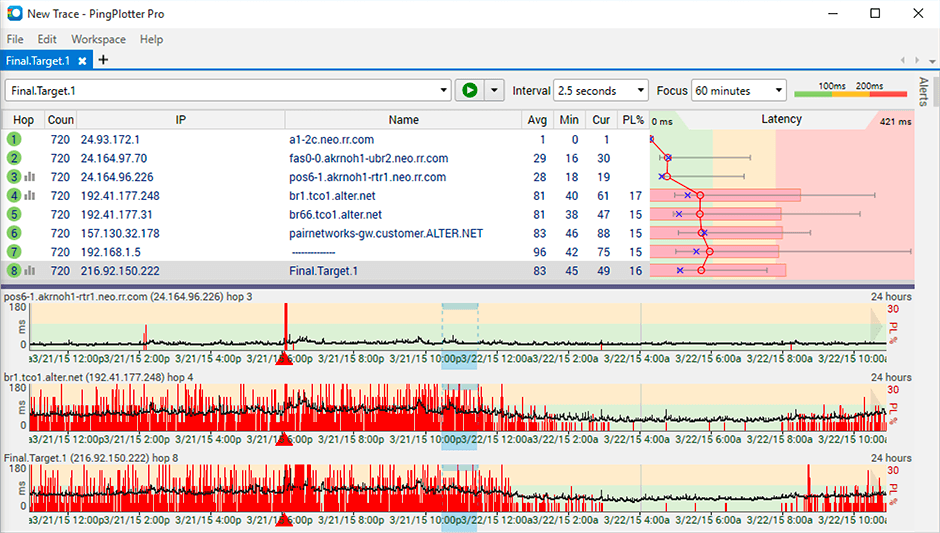
PingPlotter is a graphical traceroute and ping tool that visualizes network performance in a way that makes identifying the source of problems quicker and easier for everyone from online gamers and video streamers to VoIP admins and IT pros. Features for remote deployment, network monitoring, scripting, and a web interface are included along with several additional capabilities.
$0
per user
Pricing
IcingaJuniper Paragon InsightsPingPlotter
Editions & Modules
No answers on this topic
PingPlotter Free
$0.00
per user
PingPlotter Free
$0.00
per user
PingPlotter Standard
$6.99
per user per month
PingPlotter Professional
$29.00
per user per month
PingPlotter Standard
$39.99
per user
PingPlotter Professional
$349.00
per user
Offerings
Pricing Offerings
IcingaJuniper Paragon InsightsPingPlotter
Free Trial
NoNoYes
Free/Freemium Version
NoNoYes
Premium Consulting/Integration Services
NoNoNo
Entry-level Setup FeeNo setup feeNo setup feeNo setup fee
Additional Details
More Pricing Information
Community Pulse
IcingaJuniper Paragon InsightsPingPlotter
Features
IcingaJuniper Paragon InsightsPingPlotter
Network Performance Monitoring
Comparison of Network Performance Monitoring features of Product A and Product B
Icinga
-
Ratings
Juniper Paragon Insights
-
Ratings
PingPlotter
8.3
31 Ratings
3% above category average
Automated network device discovery00 Ratings00 Ratings8.221 Ratings
Network monitoring00 Ratings00 Ratings9.131 Ratings
Baseline threshold calculation00 Ratings00 Ratings9.122 Ratings
Alerts00 Ratings00 Ratings7.318 Ratings
Customizable reports00 Ratings00 Ratings7.818 Ratings
Best Alternatives
IcingaJuniper Paragon InsightsPingPlotter
Small Businesses
ConnectWise Automate
Score 8.4 out of 10
Auvik
Auvik
Score 8.5 out of 10
NinjaOne
NinjaOne
Score 9.1 out of 10
Medium-sized Companies
Logz.io
Logz.io
Score 8.5 out of 10
PingPlotter
PingPlotter
Score 8.9 out of 10
SolarWinds NetFlow Traffic Analyzer (NTA)
Score 9.4 out of 10
Enterprises
Zabbix
Zabbix
Score 8.5 out of 10
PingPlotter
PingPlotter
Score 8.9 out of 10
SolarWinds NetFlow Traffic Analyzer (NTA)
Score 9.4 out of 10
All AlternativesView all alternativesView all alternativesView all alternatives
User Ratings
IcingaJuniper Paragon InsightsPingPlotter
Likelihood to Recommend
8.0
(7 ratings)
7.6
(2 ratings)
9.2
(29 ratings)
Likelihood to Renew
9.0
(1 ratings)
-
(0 ratings)
-
(0 ratings)
Usability
-
(0 ratings)
-
(0 ratings)
9.1
(9 ratings)
Support Rating
-
(0 ratings)
-
(0 ratings)
9.0
(1 ratings)
User Testimonials
IcingaJuniper Paragon InsightsPingPlotter
Likelihood to Recommend
Icinga GmbH
Icinga is a world-class monitoring system. It can be used for most general monitoring situations. It is not a silver bullet, however, and there are instances where domain-specific monitoring systems are necessary. However, the output from those monitoring systems can be funneled into Icinga as a central monitoring and alerting system.
Read full review
Juniper Networks
There are many products in this particular space. I believe Juniper has divided up the product suite which comprises automation, programmability and general DevOps, but this also makes it frustrating, as the functionality may not be inherent to the particular product. I recommend making sure all use-cases are covered by the product or products prior to being implementation, because a partial solution may grow stagnant or losing funding if it does not meet all KPI.
Read full review
Pingman Tools
It is well suited for performing monitoring and testing from a single device. It is less appropriate if you have to monitor from multiple different endpoints. That type of deployment would be more of an enterprise application. If you are looking for an end user monitoring solution then PingPlotter is the one for you.
Read full review
Pros
Icinga GmbH
  • Wealth of community-developed plugins.
  • Stable codebase.
  • Icinga 2 supports distributed monitoring.
  • Very performant, can support tens of thousands of checks per server.
Read full review
Juniper Networks
  • Visibility: it is one of its key features that supports us by showing multidimensional views and facilitates [use] in the monitoring process.
  • Customization: its flexibility is worth appreciating and its dashboard offers customizations and we can have resource metrics according to our personalization.
  • Integration: integration is easy and great that allows us to integrate it with any 3rd source platform.
  • Data collection is another feature that allows us to collect data in our desired standard method.
Read full review
Pingman Tools
  • Monitor traffic in network
  • Measure stops when contacting network locations such as websites
  • Measures the lag and latency it takes to contact network locations
  • Gives you both induvidual measurements as well as good oversight
  • identifies when network lag or disconnect occurs
Read full review
Cons
Icinga GmbH
  • High learning curve, setting up Icinga from scratch can be a bit of a challenge starting out.
  • If the io2db process fails you UI stops updating, which can be very frustrating.
  • There is no simple mechanism for adding new hosts and services through the web UI, it's all very config-file based.
Read full review
Juniper Networks
  • Appliance-version would be a nice addition
  • Additional product/protocol support for a wider data ingress
  • Better documentation / online support
Read full review
Pingman Tools
  • Its a little confusing to see which targets are currently running pings and which ones are displayed in the plots.
  • Starting and stopping pings requires a right click and that would be better with a play/pause button I think.
  • Ability to drag and drop the graphs to reorder them.
  • more columns to show which targets are running and which are displayed. Currently this is done with symbols so you cant sort by just the running targets for example I've found.
Read full review
Likelihood to Renew
Icinga GmbH
Icinga is a solid solution which does everything it promises. It is backwards compatible with most Nagios instances, making the transition very easy. Once you get the hang of installing new plugins and editing configuration files expanding its monitoring capabilities are easy.
Read full review
Juniper Networks
No answers on this topic
Pingman Tools
No answers on this topic
Usability
Icinga GmbH
No answers on this topic
Juniper Networks
No answers on this topic
Pingman Tools
I installed it and it just started working. I realized I could then tweak it to show what I needed but didn't have to spend a long time configuring it before use, editing YAML files etc. Maybe that's fine for a network professional, but I only need this software if something goes wrong, and then need it to work quickly out of the box.
Read full review
Support Rating
Icinga GmbH
No answers on this topic
Juniper Networks
No answers on this topic
Pingman Tools
I have not had much contact with the PingPlotter support, only one time have I went to them and it was a positive experience. The questions I had were answered quickly and professionally. I have no issue with the experience I had with the Support team. This was from before and after the purchase of the product.
Read full review
Alternatives Considered
Icinga GmbH
Icinga is better than Nagios because of its nicer user interface. New Relic can monitor CPU/memory and disk usage, but it's more of a performance and application troubleshooting tool rather than monitoring
Read full review
Juniper Networks
We decided to go for Paragon after checking all the pros and
cons as we didn’t have a good experience of Memfault and maybe it was just
because we haven’t made enough research on it and we had to suffer cause of its
malfunctioning and difficulty. Moreover, I think that I can never regard
Memfault as a complete package which Paragon insight definitely is.
Read full review
Pingman Tools
I used Ping.app and UptimeLog.app on the Mac. These both provided different aspects. These two had a menubar to show me green or red for multiple connections. UptimeLog showed me very clearly when my connectivity was on or off and for exactly how long
Read full review
Return on Investment
Icinga GmbH
  • With one check you know which applications are faulty e.g. after an upgrade. Which is big time saver
  • You easily detect outages ion the applications so that your customer ideally does not even realize there was an outage.
  • Detect if the environment does deliver the same result as in the same time as before to detect shortages.
  • Additional information when debugging. Saved us several hours where we could simply point to a database which was slow.
Read full review
Juniper Networks
  • The KPI shown in the dashboards has assisted in business devices.
  • The playbooks with user- or event-triggered actions has reduced manhours.
  • The automated workflow has reduced outages due to human error.
Read full review
Pingman Tools
  • Great ROI, troubleshooting time has been reduced by 90%
  • Network Discoveries used to take 2 to 3 hours and were inconsistent - now it is a matter of minutes
  • lacks integration into our MSP toolkit, and we now use it as a stand alone product
Read full review
ScreenShots

PingPlotter Screenshots

Screenshot of Screenshot of Screenshot of