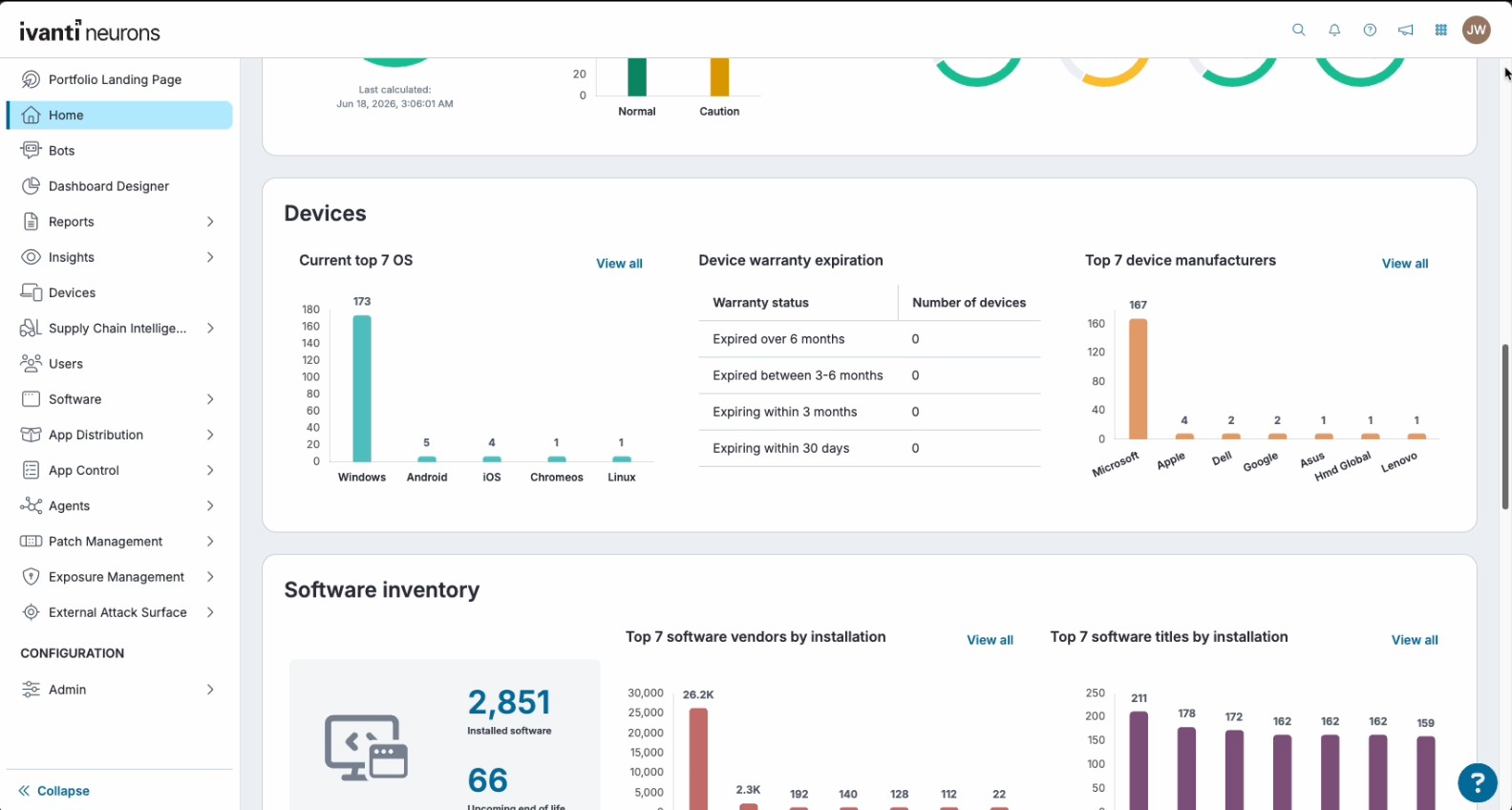
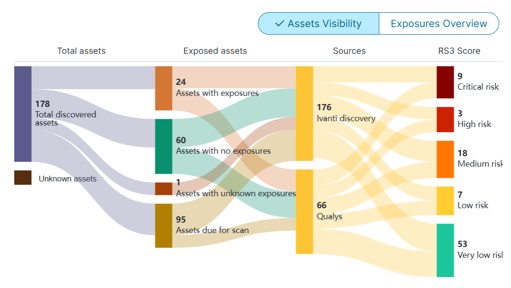
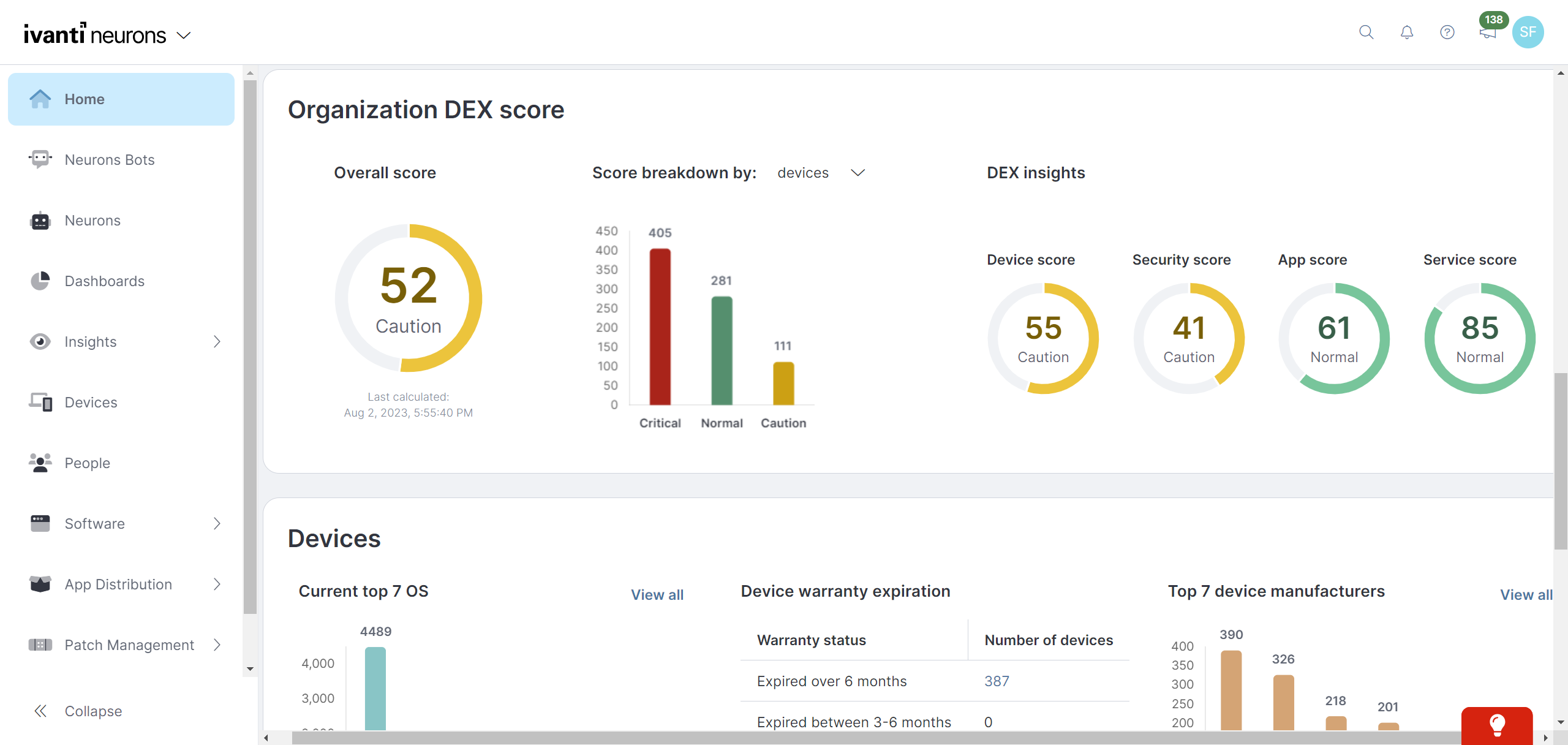
Ivanti Autonomous Endpoint Management (AEM) is an enterprise endpoint-operations solution built on the Ivanti Neurons platform. It combines unified endpoint management (UEM)—centralized management of desktops, mobile devices, and other endpoints—with digital employee experience monitoring, asset discovery, security controls, and automated remediation. Ivanti positions AEM as a broader solution layer that brings UEM, digital employee experience, and security capabilities together rather than as a…
N/A
JumpCloud
Score9.2 out of 10
N/A
JumpCloud® delivers a unified open directory platform used to securely manage identities, devices, and access across an organization. With JumpCloud, IT teams and MSPs enable users to work securely from anywhere and manage their Windows, Apple, Linux, and Android devices from a single platform.
I think that Ivanti Autonomous Endpoint Management can be well suited to most scenarios for patch management. The different options with Ring Deployments allow for rolling out patches in any number of circumstances. Typical monthly, weekly, daily, zero day response, etc. There is some lack of control over how to wrap up a deployment. What I mean is that in a scenario where we need extremely controlled rollouts, some of the features do not align well. For our organization, we would ideally evaluate patches that come out each Patch Tuesday. Select those patches for deployment, deploy those to our test servers over 3 days, wait 2 days, then deploy to production for 3 days. While we have plenty of control over the initial deployment, we have no clean way to say "after these 3 days, no longer deploy the patch". In our specific scenario, we sacrifice process to align with the tool's capabilities.
A de minimis incentive was given to thank the reviewer for their time. The incentive was not used to bias or drive a particular response, nor was the incentive contingent on a positive endorsement. TR verified that a representative sample of customers was invited. More Info
JumpCloud is least suited in situations where you have few devices, but lots of users. JumpCloud heavily focuses on the "One-User-One-Device" type of use, and does lack some of the features things like Active Directory is better suited for when having multiple users accessing one machine. Their Powershell APIs are fantastic and getting only more powerful. Lots of features are hidden behind these APIs, so admins not as familiar with Powershell would have more issues leveraging these tools. BYOD deployments are amazing, especially for macOS devices that are using Apple Business Manager and can leverage Zero Touch deployments. It is especially good at handling mixed systems, whereas other options, such as Jamf, are really suiting only for macOS, or Intune is more suited for Windows; JumpCloud managed to handle both systems well.
Ivanti Autonomous Endpoint Management is light weight and easy to install
Ivanti Autonomous Endpoint Management allows the user to defer a required restart. Allowing them to restart their machine at a time that's more convenient for them.
Comparatively, Ivanti Autonomous Endpoint Management is a budget friendly solution.
A de minimis incentive was given to thank the reviewer for their time. The incentive was not used to bias or drive a particular response, nor was the incentive contingent on a positive endorsement. More Info
User Management - The ability to control our users and set password/polices is made easy in the JC console
Device Management - Using JC each user is assigned to their own device with only the rights to do their job - When elevated rights are required, this is done simply via the JC console for the period of time required
SSO - Using JC's SAML SSO integrations we are building out our SSO offering and this is making for a much simpler daily user experience
A de minimis incentive was given to thank the reviewer for their time. The incentive was not used to bias or drive a particular response, nor was the incentive contingent on a positive endorsement. More Info
MDM has fallen a bit flat, however, with the recent acquisition of MobileIron I believe this will change but as of now there is some of this still built into the product
The antivirus portion of the product hasn't had much love and could use a bump. It is not bad at all but I would like to see it hit that next level.
Data Analytics is the most powerful tool inside this platform but it is so hard for people to figure it out that it often goes unused. It needs a good redesign.
SSO via OpenID - Opening up their SSO from just SAML to including OpenID (OAuth) would allow us to make more use of the service and to also incorporate it into some internal testing suites
Time Limited User Elevation - The ability to time limit a users elevation of privileges would be a great addition
Extending device management to include LPA - Least Privilege Access is becoming a bigger ask from our external auditors - Being able to do this via JC would be amazing
A de minimis incentive was given to thank the reviewer for their time. The incentive was not used to bias or drive a particular response, nor was the incentive contingent on a positive endorsement. More Info
MobileIron is a constantly evolving platform that stays current with industry trends. iOS updates? No problem, they're supported almost immediately after a new iOS version comes out. If you are a Core (on-prem) customer there is ample support and assistance to migrate to the Cloud version of MobileIron (although I've yet to convince my department head to approve the request). The platform is very robust and extremely configurable. Management roles can be delegated effectively to other staff without compromising security. These in alone are important, but even more important is the company itself - they are great to work with, from support to sales. We have never had a situation where MobileIron left us on our own, and many times support has gone way beyond what is simply required in order to educate us or extend the usefulness of the product
A de minimis incentive was given to thank the reviewer for their time. The incentive was not used to bias or drive a particular response, nor was the incentive contingent on a positive endorsement. TR verified that a representative sample of customers was invited. More Info
Importing devices and setting up patch deployment was very simple. The real star here is the automation built into Neurons though. Neurons is able to set up custom Bots commands which can automate troublesome servers which have custom start up and shut down commands that must be followed. User and SAML setup was also incredibly easy
A de minimis incentive was given to thank the reviewer for their time. The incentive was not used to bias or drive a particular response, nor was the incentive contingent on a positive endorsement. More Info
It's simple. I like how JumpCloud keeps things simple. Similar to Apple's ecosystem, they give you what you want with some extra features and bells and whistles but it doesn't take a large instruction manual to use it. They have the support system and KB articles to back up their product and learn about a feature and how to implement it
A de minimis incentive was given to thank the reviewer for their time. The incentive was not used to bias or drive a particular response, nor was the incentive contingent on a positive endorsement. More Info
A de minimis incentive was given to thank the reviewer for their time. The incentive was not used to bias or drive a particular response, nor was the incentive contingent on a positive endorsement. More Info
A de minimis incentive was given to thank the reviewer for their time. The incentive was not used to bias or drive a particular response, nor was the incentive contingent on a positive endorsement. More Info
TRM\TAM support has been generally very good. Getting reported bug fixes, design changes, UX problems resolved has been a pain. It is often difficult to get problems escalated beyond the TRM\TAM level. Support is fantastic when you can get it, getting it can often require more work than it should, and that is probably our biggest issue.
I have rarely contacted support. When I have, the responses were within expected time frames, and easy to access. Community support is incredible, both from the JumpCloud representatives, and the user base community at large. The support pages on the website also are typically very well written and strike a nice balance between having the technical information needed, and also being easy to understand for the small business types that might not have as much of a technical background as an IT Admin.
it was clear and understandable for me which is why i have a good hang of it the training material is also great which was provided by them. The help community and documentation is also great. all the questions were clearly answered and the person for clear and patient with it.
A de minimis incentive was given to thank the reviewer for their time. The incentive was not used to bias or drive a particular response, nor was the incentive contingent on a positive endorsement. More Info
It is online based, after learning content you can take a test and if you don't pass you get two other chances to pass. Once you pass the test you can print out your certification or save it
A de minimis incentive was given to thank the reviewer for their time. The incentive was not used to bias or drive a particular response, nor was the incentive contingent on a positive endorsement. More Info
A de minimis incentive was given to thank the reviewer for their time. The incentive was not used to bias or drive a particular response, nor was the incentive contingent on a positive endorsement. More Info
A de minimis incentive was given to thank the reviewer for their time. The incentive was not used to bias or drive a particular response, nor was the incentive contingent on a positive endorsement. More Info
Better in most all categories. On-prem was not an issue for my organization. MS SCCM was lacking features. Airwatch required increasing tiers of service in order to match [Ivanti Unified Endpoint Manager (formerly LANDESK Management Suite)] features, and lacked the robust inventory data we needed. Meraki was very simple to use, but did not meet our needs. I would say that most Airwatch customers aren't using all the features they are paying for, and could save lots of money by using Meraki instead.
A de minimis incentive was given to thank the reviewer for their time. The incentive was not used to bias or drive a particular response, nor was the incentive contingent on a positive endorsement. More Info
Some features would make more sense for us to be bundled by machine, instead of the user. We have fewer machines, and multiple users log into one machine, so doing something like paying per user for services like Patch Management are difficult to warrant the cost. I also feel a more complete package that includes common addon features; Patch Management and Password Manager, would be an improvement. It would also be nice if we could change packages, addons, and other billing services via self-service instead of reaching out to our account manager.
A de minimis incentive was given to thank the reviewer for their time. The incentive was not used to bias or drive a particular response, nor was the incentive contingent on a positive endorsement. More Info
A de minimis incentive was given to thank the reviewer for their time. The incentive was not used to bias or drive a particular response, nor was the incentive contingent on a positive endorsement. More Info
The installation of MobileIron was for security compliance so we could containerize email on BYOD devices and also control who got email on company phones (to prevent hourly workers from working on emails after hours). MobileIron met this need nicely.
MobileIron allowed us to utilize device certificates to prevent unauthorized devices from joining wireless networks in our company.
MobileIron allows our sales staff to get emails on the road and many users rely on the functionality and ease of the phone for general mail communication.
A de minimis incentive was given to thank the reviewer for their time. The incentive was not used to bias or drive a particular response, nor was the incentive contingent on a positive endorsement. More Info