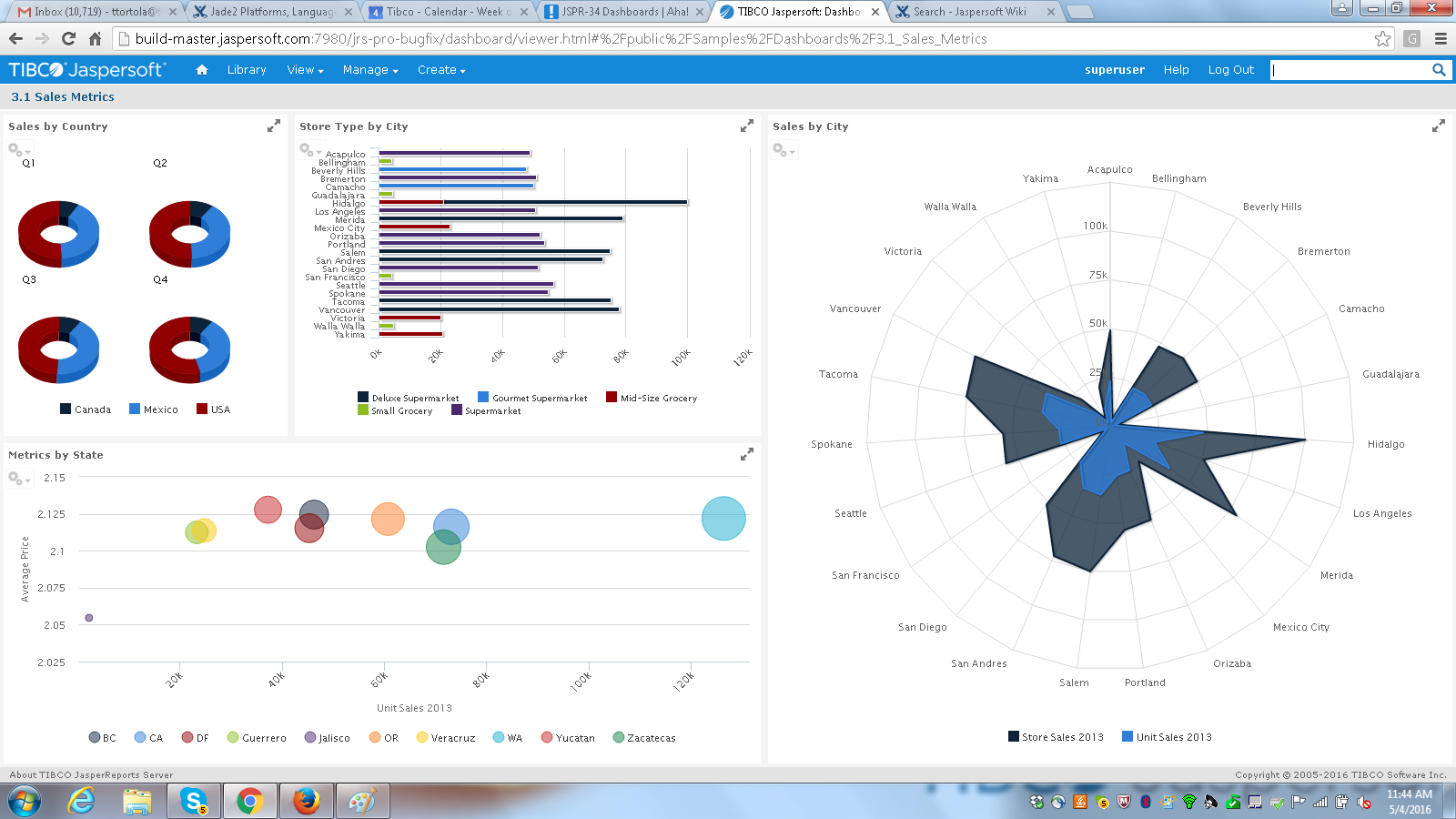
Jaspersoft commercial edition is an embedded business intelligence suite designed to be built-into SaaS products as an integrated reporting engine. It provides reports and dashboards for customer-facing applications without requiring app developers to build their own reporting engine.
N/A
Microsoft BI (MSBI)
Score 8.7 out of 10
N/A
Microsoft BI is a business intelligence product used for data analysis and generating reports on server-based data. It features unlimited data analysis capacity with its reporting engine, SQL Server Reporting Services alongside ETL, master data management, and data cleansing.
$14
per month per user
Toad Database Developer Tools
Score 8.9 out of 10
N/A
Toad by Quest is a database management toolset that database developers, administrators and data analysts use to simplify workflows, create code free from defects, automate frequent or repetitive processes, and minimize risks. Editions include Toad for Oracle, which automates administration tasks and helps proactively manage databases while embracing performance optimization and risk mitigation. Similar editions exist for IBM DB2, SQL Server, SAP, or MySQL and Postgres environments (Toad Edge).
$229
per year
Pricing
Jaspersoft
Microsoft BI (MSBI)
Toad Database Developer Tools
Editions & Modules
No answers on this topic
Power BI Pro
$14
per month per user
Power BI Premium
$24
per month per user
Toad Edge For MySQL
$229
per year
Toad Edge For Postgres
$229
per year
Toad for SQL - Pro Edition
$437
per year
Toad for Oracle - Base Edition
$550
per year
Toad for DB2 z/OS - Base Edition
$636
per year
Toad for SAP - Base Edition
$636
per year
Toad for SQL - Xpert Edition
$763
per year
Toad for Oracle - Professional Edition
$829
per year
Toad for SQL - Dev Edition
$930
per year
Toad for DB2 z/OS - Pro Edition
$996
per year
Toad for Oracle - Professional DB Admin Edition
$1,370
per year
Toad for DB2 z/OS - Xpert Edition
$1,529
per year
Toad for SAP - Xpert Edition
$1530
per year
Toad for Oracle - Xpert Plus Edition
$1,753
per year
Toad for DB2 z/OS - Dev Edition
$1,861
per year
Toad for SAP - Dev Edition
$1863
per year
Toad for SAP - Xpert+ Edition
$2099
per year
Toad for SAP - DBA Edition
$3661
per year
Offerings
Pricing Offerings
Jaspersoft
Microsoft BI (MSBI)
Toad Database Developer Tools
Free Trial
Yes
No
Yes
Free/Freemium Version
Yes
Yes
No
Premium Consulting/Integration Services
Yes
No
No
Entry-level Setup Fee
No setup fee
No setup fee
No setup fee
Additional Details
Jaspersoft offers flexible pricing for ISVs and SaaS per customer or by CPU core.
Mostly because of better looking reports than Microsoft. Other useful scenario for us was adhoc reports which reduced our development time. We were not satisfied about Microsoft reporting services improvements over the years, and hoped to get more from Jaspersoft. Simply when …
It is well suited for the fact of scalability itself and the breadth of features this application has in order to make the migration from legacy systems to the newer different versions more seamless and effective. Data integrity and security are the main aspects of this tool which does not lose their value when doing day-to-day operations for data mapping.
Microsoft BI has a lot of features and is a very powerful tool, especially if you have folks on your team that know how to utilize all of its capabilities. To truly unlock all that it can do, it does require people to have a deep understanding of its capabilities. That's where the software really shines. If you are looking for a simpler, more basic reporting tool, there are other programs available that do not require such a steep learning curve.
Toad for Oracle is very well suited for all Oracle implementations, be it single instance or RAC. It is best suited for use of Oracle DBA, Developer and Database Engineers. I don't recommend Toad for Oracle for Project Managers or Solution Architects. This can be a pricier choice for these people. They can do fine with free options like SQL Developer.
TIBCO Jaspersoft allows you to embed reports into your own application, which gives users the feeling they are using a single product.
TIBCO Jaspersoft Studio allows for more advanced report development, such as adding subreports, drilldown to detail reports, images, page headers, page footers, maps, and more.
TIBCO's Jaspersoft Domain Designer is very easy to use and navigate.
Toad is a de-facto standard tool for data developers and analysts. Generally speaking it provides almost every function needed to manage data in EDW with great performance and stability.
The nature of clinical data is big-sized: one table may have billions of rows. Toad provides critical functions to manage SQLs, e.g. Top SQL that can monitor and manage SQLs using CPU power and network bandwidth, so that EDW administrator can optimize ETL operations in the best efficiency.
Many of our data analysts are not computer science backgrounded (having clinical / nursing background). Toad provides great auditing tools such as Tuning Lab or SQL Scanner, so that data analysts can train themselves with guidance of the tool.
One of the issues we found during our implementation was that the reporting software would work faster for certain data sources and not the others. Extracting CSVs and XML was slower in comparison to JSON in our experience.
Jaspersoft Studio was the main IDE we used for development. Built atop the Eclipse IDE, we found that the tool was really resource intensive and generally take long time to initialize.
The power and control it gives is at the same time kind of a negative thing. There's too many options available, even when you don't need them. For simple database operations it's sometimes easier to just use SQL Developer since navigation is way more intuitive and easy.
Related with the above: there is a steep learning curve. However, since this is the main tool for any Oracle developer, this is not that much of a problem.
If I remember well, Toad used to be free, some 20 years ago. Or at least had a free version. It would be nice to have a free version. The dedicated Oracle developers and DBA's won't use the free version, but all the rest of us developers might use it instead of SQL Developer. It would make communications between everybody somewhat easier.
JasperSoft has been amazing. It is well documented, fast, and transparent in how it functions. We have been very confident in JasperSoft in every aspect of our business and offerings where we've used it. On top of that, their improvements to the product have been fantastic. I am really looking forward to seeing where they take their product and how we can leverage that to please our clients
Microsoft BI is fundamental to our suite of BI applications. That being said, Northcraft Analytics is focused on delighting our customers, so if the underlying factors of our decision change, we would choose to re-write our BI applications on a different stack. Luckily, mathematics are the fundamental IP of our technology... and is portable across all BI platforms for the foreseeable future.
I think it's a tool well suited for a software developer. Others with less coding skills could struggle somewhat with the tool. I find java a little unforgiving as a language for expressions and not very user friendly for the technically dis-inclined. Sometimes the numeric conversions cause issues (who knew that 0 and 0.0 would cause different things to happen). Previous experience with a reporting tool that used visual basic for its' expressions that I found much simpler to use. On the other hand, java is so widespread, you can easily google the syntax to accomplish what you need to do.
The Microsoft BI tools have great usability for both developers and end users alike. For developers familiar with Visual Studio, there is little learning curve. For those not, the single Visual Studio IDE means not having to learn separate tools for each component. For end-users, the web interface for SSRS is simple to navigate with intuitive controls. For ad-hoc analysis, Excel can connect directly to SSAS and provide a pivot table like experience which is familiar to many users. For database development, there is beginning to be some confusion, as there are now three tool choices (VS, SSMS, Azure Data Studio) for developers. I would like to see Azure Data Studio become the superset of SSMS and eventually supplant it.
I give is an 8 because nothing is a 10 and there is always room for improvement. I believe the user who is not as technologically inclined would be better suited with an easier way to identify the options for setting the layout up for Toad's GUI. To some it is very cumbersome and confusing.
SQL Server Reporting Services (SSRS) can drag at times. We created two report servers and placed them under an F5 load balancer. This configuration has worked well. We have seen sluggish performance at times due to the Windows Firewall.
They have a great customer support ticketing system in which they always respond same-day. They offer conference calls with srcreensharing as well in order to better understand your issues.
I wish that the lower level support access came with more than just 12 cases per year though as this makes us less likely to reach out for questions on things that we then instead try to solve ourselves which results in loss of time in trying to acquire new features and or solve a problem.
MSBI natively has a site that allows you to vote on user enhancements and bug fixes. This allows the largest nagging issues to float to the top and the development team can prioritize accordingly. As mentioned earlier, the large community base of MSBI developers assist technical resources in handling technical questions.
I give the overall support for Toad for Oracle a 10/10. This is because whenever there has been an issue with this software, our team has got an immediate response. The same can not be said for similar software. The most recent example of this is when we needed to renew our licenses. Some employees were unable to log in to code with the given license key. Support was able to resolve the issue quickly.
It did the job of getting us to our deadline we set for ourselves for initial launch. The customer we launched the product for was also there to learn about it at the same in order to better understand the capabilities. This helped greatly so that the customer was on the same page on what was possible when using jaspersoft. I think most people would not want their customers aware the product they are using is third-party but in this case it was a new experience for us both and so as we learned more about jaspersoft, we both had better communication on what the future road map was for their business needs in BI.
Resources available in the TIBCO Knowledge Base are covering almost everything. They are well organized, and covering almost every possibility. There is always the change to get back to the TIBCO support or to the dedicated Customer Success Manager whenever something very specific or bound to a customization is not covered.
I have used on-line training from Microsoft and from Pragmatic Works. I would recommend Pragmatic Works as the best way to get up to speed quickly, and then use the Microsoft on-line training to deep dive into specific features that you need to get depth with.
Having just completed an upgrade to the latest version of Jaspersoft, I am happy to say their support was very good. There were a couple of small challenges which were not easily resolved, but they were primarily related to the fact that we had skipped updates for a couple of versions. The current update procedures assumed we were upgrading from the prior latest version (6.4) to to the new version (7.1).
We are a consulting firm and as such our best resources are always billing on client projects. Our internal implementation has weaknesses, but that's true for any company like ours. My rating is based on the product's ease of implementation.
When looking at the different features of these reporting engines, and what we were going to be using it for, the answer seemed clear. Jasper offered exactly what we were looking for, and did so for a price that we were happy with. For a scalable, feature-rich reporting engine that doesn't break the bank, Jaspersoft is the way to go.
We have used the built in ConnectWise Manager reports and custom reports. The reports provide static data. PowerBI shows us live data we can drill down into and easily adjust parameters. It's much more useful than a static PDF report.
Toad is much better than Tableau query writer. Tableau is not intuitive and requires knowledge of proprietary database language to fully implement. Tableau does not perform as quickly and accurately as Toad. Toad is very easy and slim to install. Additional hardware is often required to run Tableau smoothly. Support for Tableau is even more expensive than Toad support.
When we demo our Jaspersoft environment to potential clients, their eyes light up and they sit up in their chairs a bit more. A lot of our meetings have ended with with the client very interested in our product due to Jaspersoft.
Our existing clients have been very satisfied with the adhoc features of Jaspersoft. We've been able to provide them better access to their data on their terms instead of ours. Of course this turns into a huge win for us.
We've always used SQL Server Reporting Services to deliver our reports to our clients. Converting to Jaspersoft has allowed us to generate the reporting layer that our clients demand. They no longer feel like they are settling for what we offer.
As a SaaS provider we see being able to provide self-service BI to our client users as a competitive advantage. In fact the MSSQL enabled BI is a contributing factor to many winning RFPs we have done for prospective client organisations.
However MSSQL BI requires extensive knowledge and skills to design and develop data warehouses & data models as a foundation to support business analysts and users to interrogate data effectively and efficiently. Often times we find having strong in-house MSSQL expertise is a bless.
Quick and easy query development helps reduce man-hours in a project which converts to real dollars.
Query analysis and tuning result in low database overhead and low latency, thus translating into real dollars because a system can thus handle more requests from customers.
Ease of use makes it easy to deploy greenhorns in projects with minimal training, thus helping save money. Otherwise menial and simple jobs would have required experienced DBAs.