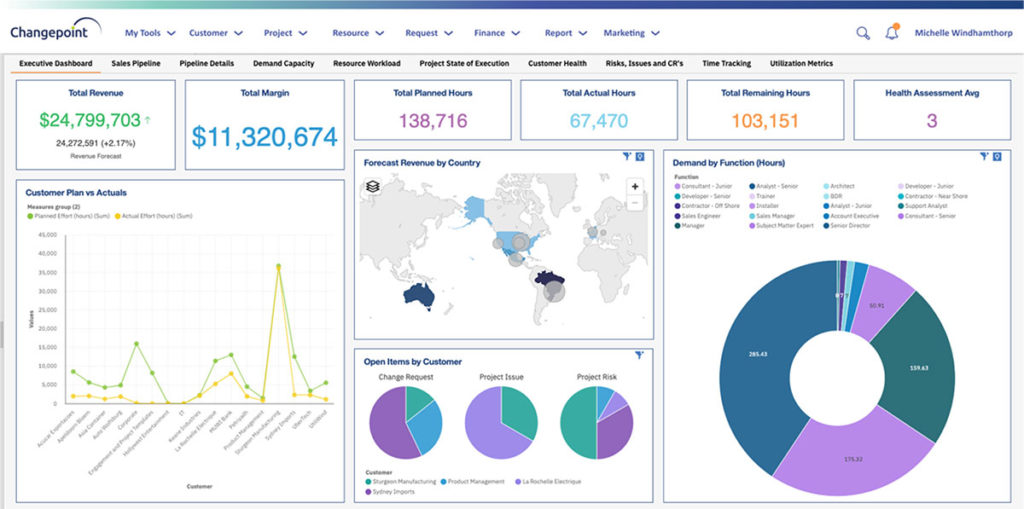
Planview Changepoint is a platform that marries professional services automation (PSA), project portfolio management (PPM) and business analytics to provide managers broad operational visibility and control over their strategic business portfolios.
N/A
Zoho Projects
Score 9.5 out of 10
N/A
Zoho Project is online project management and planning software that provides project teams with a web-based collaborative environment. Zoho Projects can also include a bug tracking module specifically design to support software development project. It is integrated with other Zoho products including Zoho CRM.
Planview Changepoint helps us to understand our key customers enabling us to capitalize on every financial opportunity and helps us to forecast demand against the capacities required for new opportunities, and also it automates and monitors contractual terms and conditions. It …
Changepoint was selected for its cost and what it can do. I was not involved in the decision to purchase Changepoint, but it appears to be a good decision.
The system predates me as I was not working for the company when the solution was chosen - I understand this may have been an 'overpromise, underdeliver' scenario. However, we are now moving towards replacing it with Supportworks - and having seen Supportworks in action I …
We believed that Changepoint matched up well, had better support and provided a better pricing structure that worked better for our budget constraints over time. The team was willing to work with us on the design of the tool for our needs and it wasn't going to break the bank …
We selected Changepoint as our PPM tool over ten years ago. We made this selection based upon their 'completeness of vision' and allowing us to develop our PMO processes with a single footprint. Changepoint has been very successful with product enhancements and maintains their …
n/a to me, we used to use spread sheets and a sharepoint site to house all the project related information and documents before we went to Changepoint.
Zoho Projects
Verified User
Anonymous
Chose Zoho Projects
I won't say that Zoho Projects is the best in comparison to its competitors, however, it does exactly what we need it to do and we are saving on the monthly fees we are paying for its competitors. The pros outweigh the cons. I would say that it's also not the fastest in terms …
We decided on Zoho Projects since the integration with Google Workspace is easier to perform. Also, the way to create our project templates was faster to perform, and we could integrate our final customers on all of their tasks that need focus. Finally, the principal point is …
We use other project management tools in other departments, I personally like Zoho Projects best because of the customization in terms of automation and customized reports in Zoho Analytics. The dashboards and data that can be used for decision making, tracking and management …
I would choose Hubspot & Asana over Zoho because of their intuitive UIs and functionality. I would choose Zoho over Basecamp only when you are managing hundreds of projects.
I found it easier to work with Zoho Projects. While working with WorkZone, my system got stuck between my work, and it cost us time to restart all of it. I couldn't switch between my work on WorkZone and my teammate; we're also having the same problem as I did. So we switch to …
MSP - Windows based. Not collaborative. Complex UI. Cannot be shared with people outside the organization easily. Cannot set security levels for users to access projects based on the rights granted to them. Trello and Asana - Expensive subscription plan. Limited …
Zoho Projects is far superior as a project management tool compared to the simple ones we investigated. The pricing was very competitive to the market and the free trial helped out with our proof of concept. Compared to Workfront, you get similar functionality but at a …
We were testing out ASANA at the time we moved on to Zoho. Zoho seemed to have more features that met our needs. Asana was not quite developed to the point of our liking. Zoho has an awesome calendar function that I loved, which Asana did not.
Zoho Projects provides a more limited set of functionality and customization options than other task/bug trackers on the market, but what it lacks in functionality it makes up for in ease of use. It probably has 80-90% of the features of its competitors but takes about a third …
I used Zoho projects initially because it was easy to setup and gets going for FREE. The best thing you can get out of Zoho projects is that it needs zero setup time. It is also a great tool for manage projects, however not that suitable for product management, I believe. Jira …
I have tried other task management products before I signed up for Zoho. The primary difference is Zoho projects goes beyond tasking. And the second factor is the operational mechanism you have behind it. If your operational framework is right, Zoho project will be the single …
We haven't used any other PM type projects so I can't say how Zoho Projects is vs some others but we've always had lists of things to do on ruled pads and white boards and while it functioned, using Zoho Projects significantly made a huge difference to our entire team. Plus, if …
SmartSheet is less user-friendly and more like a spreadsheet tool. Community Building (in the case of SmartSheet) is not encouraged within a millennial staffed company.
The interface of Zoho Projects is so clean and modern compared to the others. The functions and abilities of this product outshone it competitors and the price is very reasonable and competitive. Finding and adding information in Zoho Projects is very easy even for a novice. …
Verified User
Anonymous
Chose Zoho Projects
We have also evaluated Clarizen and although it's a good product, we are not quite ready to scale up to this yet.
Features
Jet.Build
Planview ChangePoint
Zoho Projects
Project Management
Comparison of Project Management features of Product A and Product B
Jet.Build
-
Ratings
Planview ChangePoint
-
Ratings
Zoho Projects
6.6
Ratings
15% below category average
Task Management
00 Ratings
00 Ratings
7.50 Ratings
Resource Management
00 Ratings
00 Ratings
7.00 Ratings
Gantt Charts
00 Ratings
00 Ratings
6.50 Ratings
Scheduling
00 Ratings
00 Ratings
5.50 Ratings
Workflow Automation
00 Ratings
00 Ratings
6.00 Ratings
Team Collaboration
00 Ratings
00 Ratings
7.50 Ratings
Support for Agile Methodology
00 Ratings
00 Ratings
6.30 Ratings
Support for Waterfall Methodology
00 Ratings
00 Ratings
8.00 Ratings
Document Management
00 Ratings
00 Ratings
6.00 Ratings
Email integration
00 Ratings
00 Ratings
6.00 Ratings
Mobile Access
00 Ratings
00 Ratings
5.00 Ratings
Timesheet Tracking
00 Ratings
00 Ratings
7.50 Ratings
Change request and Case Management
00 Ratings
00 Ratings
6.90 Ratings
Budget and Expense Management
00 Ratings
00 Ratings
6.00 Ratings
Professional Services Automation
Comparison of Professional Services Automation features of Product A and Product B
Changepoint is well-suited for consulting firms and other companies that charge clients for their time and have a need for significant project-management capabilities along with reporting and invoicing. It is not well-suited for companies that want a more basic solution to time reporting and expense reimbursement. The key questions to ask during the selection process revolve around this basic question: how are you going to use this software? Though it has a lot of functionality, the learning curve is steep and basic functionality is not as easy as one would expect.
My work involves projects of 5-15 people with numerous projects running simultaneously. Prior to Zoho, I did not have a central location from which to view all project statuses at once. Zoho looks to provide this and also looks like it will deliver. I am anxious to see how our organization's use of it develops. At this time, I feel I am likely to recommend Zoho Projects because my organization has made great software decisions in the past so I have a level of trust already that the research has been done that Zoho is the best solution for our line of work.
There are lots of reporting options. Once you figure out how to work the parameters of a report, the system is able to provide detailed and accurate compilations of data. There are also many custom reports than can be setup, as well. In my experience, we have told Changepoint PSA administrators what kind of report we were needed and they set it up for us, available in a 'custom reports' folder.
You can have several things open at once -- 'portals'. These are up at the top of the screen, much like how Google Chrome has tabs at the top. This is useful.
Swiss Army Knife: The suite of Zoho projects can be tailored to fit the needs of any business. It's great to have a bunch of different software offerings that will work together seamlessly.
Task Customization: Zoho allows you to customize your tasks more than other platforms (add start dates, due dates, dependencies, subtasks...)
The site could become slow with high volumes of traffic. This may have been due to the way that our infrastructure was setup.
Analytic reporting was not available in the version that we used. We created external reports to slice and dice the data and view it as the business demanded.
More flexibility on making the user interface more compact (like Excel or MSP). Current interface is well spaced, but some users may like a more compact view.
More simplified Gantt Charts that help us understand progress and dependencies.
Ability to export projects to Excel for sharing with others we can't/don't want to bring on to Zoho projects
Sometimes the decision to renew boils down to an old adage "if it isn't broken don't fix it". Previous to moving to Changepoint, it was obvious that we needed a better project management tool. Projects we completed on time but the time zone difference between the teams and several iterations of back and forth caused a number of communication issues with projects. The difference is night and day.
Zoho has been able to fit the needs of our Engineering organization. The employees and management that are using it have not found a 'catastrophic' reason to discontinue use. Although certain features and better support mechanisms would be much better, it has been able to keep with both basic needs and more advanced ones. A majority of the company has enjoyed the basic interface it offers, the apps it has for iPhone and Blackberry, the mobility of updating a project without needing to be connected to any type of server. There are still improvements that can be made in future releases but as the person who originally purchased the solution for our company, I have found it to be an excellently priced solution in the functionality it offers.
Zoho Projects is an easy project management tool to use. It provides all the functionality that we required for handling projects. We can easily create personal forms for projects and tasks, allowing us to add and report on our own desire. Apart from this we can create and edit documents in real time which saves our time. This allows us to share text docs, presentations, tables with the whole team and we can work on them together
Although it might lack intuitiveness, once you get a hang of how Zoho Projects works, you can do a LOT. The impact good project management has on profitability is huge, and it has helped not only improve communication and coordination when working on a project, but more importantly have adequate tracking of time, due dates and potential bottle necks
The system predates me as I was not working for the company when the solution was chosen - I understand this may have been an 'overpromise, underdeliver' scenario. However, we are now moving towards replacing it with Supportworks - and having seen Supportworks in action I genuinely cannot wait to switch from Changepoint and move on...
Zoho Projects provides a more limited set of functionality and customization options than other task/bug trackers on the market, but what it lacks in functionality it makes up for in ease of use. It probably has 80-90% of the features of its competitors but takes about a third of the time to get up and running and realizing value.
Our ability to maintain a global IS Scorecard helped us to maintain a focus on completing projects on time and within budget.
Having a single instance of Changepoint with projects aligned to specific portfolios helps senior management to maintain a focus on the investment of IS resources. It is foundational to our governance processes.
Unfortunately, prior to creating Project Task Templates we'd occasionally miss a step and something that was necessary would be overlooked.
The creation of the Project Templates was a team collaborative effort to make sure that everyone had some input as different people was integral to specific projects.
It took a little while to learn some of the more tricked out features like task dependency but even starting out with the most basic of features was very significant.