Overview
ProductRatingMost Used ByProduct SummaryStarting Price
Jive
Score 8.7 out of 10
N/A
Jive Software, part of the Aurea family of customer experience solutions, provides the gateway to an organization's most important assets – its knowledge and people. Jive's interactive intranet solution promises to connect people, information and ideas to help businesses outpace their competitors. The vendor says the product has more than 30 million users worldwide across every industry, and is consistently recognized as a leader by top analyst firms.N/A
Lightning Tools Lightning Conductor
Score 9.0 out of 10
Mid-Size Companies (51-1,000 employees)
The Lightning Conductor is a content aggregation tool for Microsoft SharePoint Online and Microsoft Teams. Users can build rich, modern content reports based upon SharePoint lists, SharePoint Search, Microsoft Graph or Microsoft 365 Groups. Content can be aggregated from lists and libraries, and other applications such as Planner, To Do, OneDrive, and Teams.
$2,200
per year per installation
Nconnect
Score 8.5 out of 10
N/A
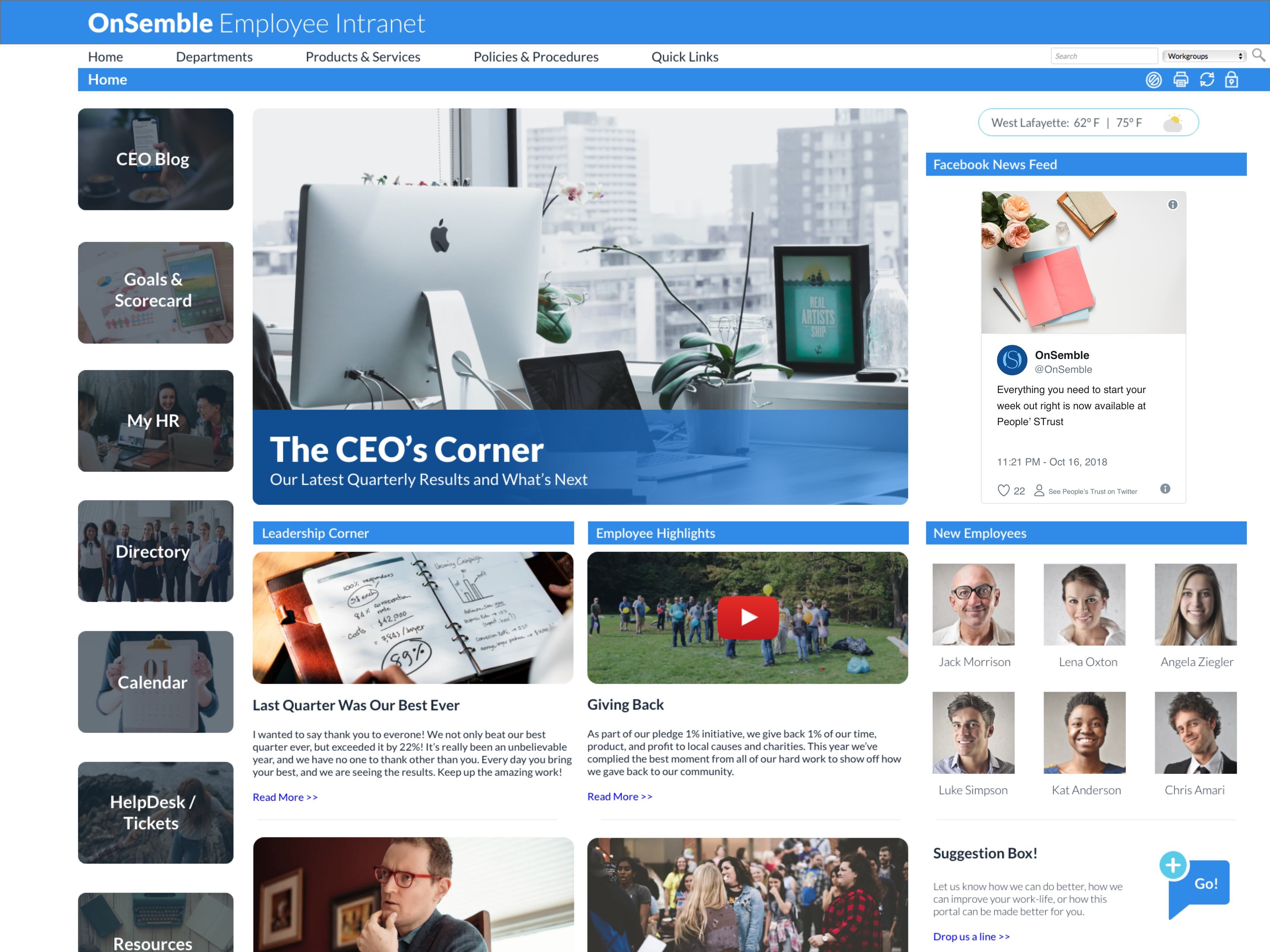
Nconnect (formerly OnSemble Intranet) is an mployee intranet that keeps everyone connected, a digital workplace to make employees feel valued. It is designed to keep remote teams engaged, and acts as the culture champion for the organization.N/A
Pricing
JiveLightning Tools Lightning ConductorNconnect
Editions & Modules
No answers on this topic
Lightning Conductor WSP
From 1950
per year One WFE
Lightning Conductor Enterprise Edition
POA
per year Four or more WFE
Lightning Conductor Online
From 2200
per year per installation
Lightning Conductor Plus (Includes Data Viewer)
From 2500
per year per installation
Lightning Conductor Online Enterprise Edition (>10,000 users)
POA
per year per installation
No answers on this topic
Offerings
Pricing Offerings
JiveLightning Tools Lightning ConductorNconnect
Free Trial
NoYesNo
Free/Freemium Version
NoNoNo
Premium Consulting/Integration Services
NoYesYes
Entry-level Setup FeeNo setup feeNo setup feeOptional
Additional DetailsPrices stated are minimum per installation for "stock" products. $2.20 per user/year on top of base price. Enterprise editions can be amended to suit business needs if deemed necessary, additional costs incurred and TBD. All packages include free technical support. Free upgrades available to latest versions of tool as they are released. (online version)
More Pricing Information
Community Pulse
JiveLightning Tools Lightning ConductorNconnect
Features
JiveLightning Tools Lightning ConductorNconnect
Project Management
Comparison of Project Management features of Product A and Product B
Jive
-
Ratings
Lightning Tools Lightning Conductor
8.6
2 Ratings
10% above category average
Nconnect
-
Ratings
Task Management00 Ratings8.82 Ratings00 Ratings
Search00 Ratings8.42 Ratings00 Ratings
Best Alternatives
JiveLightning Tools Lightning ConductorNconnect
Small Businesses
HCL Connections
HCL Connections
Score 9.0 out of 10
Stackby
Stackby
Score 8.9 out of 10
HCL Connections
HCL Connections
Score 9.0 out of 10
Medium-sized Companies
RWS Tridion Sites
RWS Tridion Sites
Score 9.0 out of 10
Troop Messenger
Troop Messenger
Score 9.8 out of 10
RWS Tridion Sites
RWS Tridion Sites
Score 9.0 out of 10
Enterprises
RWS Tridion Sites
RWS Tridion Sites
Score 9.0 out of 10
HCL Connections
HCL Connections
Score 9.0 out of 10
RWS Tridion Sites
RWS Tridion Sites
Score 9.0 out of 10
All AlternativesView all alternativesView all alternativesView all alternatives
User Ratings
JiveLightning Tools Lightning ConductorNconnect
Likelihood to Recommend
9.1
(37 ratings)
9.0
(4 ratings)
8.5
(5 ratings)
Likelihood to Renew
6.6
(17 ratings)
9.1
(1 ratings)
-
(0 ratings)
Usability
6.1
(4 ratings)
-
(0 ratings)
8.5
(2 ratings)
Availability
5.0
(1 ratings)
-
(0 ratings)
-
(0 ratings)
Performance
9.0
(1 ratings)
-
(0 ratings)
-
(0 ratings)
Support Rating
6.9
(2 ratings)
9.1
(1 ratings)
8.9
(3 ratings)
Online Training
5.0
(3 ratings)
-
(0 ratings)
-
(0 ratings)
Implementation Rating
3.0
(1 ratings)
-
(0 ratings)
-
(0 ratings)
User Testimonials
JiveLightning Tools Lightning ConductorNconnect
Likelihood to Recommend
Aurea
It's definitely worth considering Jive for the type of application we've developed i.e. a central shared repository for all employees to host and discuss information. I can't say I have ever used a superior tool, but they may exist. I'm just not sure I would want to use it exclusively for file hosting, though. It does integrate with various other tools, so perhaps it would be fine if used in conjunction with another tool for that purpose.
Read full review
Lightning Tools
Having experience of SharePoint On Premise and also SharePoint Online, there isn't an out of the box app/webpart that enables you to 'roll up content' from a variety of source's (in my case SP Lists, but there are many other data sources it works with) across site collections with an easy to use and intuitive interface which is what Lightning tools excels at.
Read full review
Ncontracts
OnSemble is solving a lot of problems that our organization had prior to its implementation:
  • We can track communication readership.
  • We can engage with our fellow teammates through chats and recognition.
  • We have a central location for all job-related links.
  • We are just now delving into adding departmental pages so folks can communicate within their teams.
I'm not sure of a scenario where OnSemble wouldn't be appropriate - if you have a company that needs to centralize communication, documentation, and share ideas, it's an excellent choice.
Read full review
Pros
Aurea
  • Individual design
  • Presence of Russian language (localization can be independently established)
  • You can configure several information tapes with different themes. One for work, the second for communication
  • A newly-arrived network user immediately receives a prepared block for beginners. After completing several game tasks, the user will receive the basics of using Jive.
  • There is a template for each scenario. There is even a template for planning R&D, and there are more than twenty of them.
  • Integrates with MS Office, Google Drive, Google Docs
  • There are all platforms (even Winphone and blackberry)
  • You can create forum threads
Read full review
Lightning Tools
  • Aggregate documents across SharePoint site & libraries
  • Filtering for owner/person responsible & due dates
  • Ease of end-user filtering on columns
  • Color-coding & other formatting
Read full review
Ncontracts
  • powerful, yet simple to use, document management for sharing
  • custom help desk form creation/submission with targeted audience
  • integration friendly with document types (e.g., xls, pdf, doc, etc.)
Read full review
Cons
Aurea
  • Search functionality is very weak
  • The information architecture and taxonomy doesnt allow for easy discoverability of content
  • It's hard to navigate the and find spaces/groups that I already know about
  • The main profile/interface does not allow easy access to key tasks or common tasks.
Read full review
Lightning Tools
  • Mobile Friendly
  • Calendar/Gantt views
  • Complex/Custom Logic
Read full review
Ncontracts
  • Permissions - granting permissions at different levels for users is tedious - would like to see permissions simplified.
Read full review
Likelihood to Renew
Aurea
There are always external factors that can impact this decision but currently, the Jive platform is maintaining its lead in the market place in this area. If the innovation in this space by Jive continues, then this number will remain high. Integration with other systems and adaptability to changes in the market or in client needs will also make this decision hard to predict more then 6 months into the future
Read full review
Lightning Tools
No answers on this topic
Ncontracts
No answers on this topic
Usability
Aurea
It was harder to use that expected. The admin needs to be code savvy to truly customize the system. And users need to trained on the system and the setup. Trainings and monitoring need to continue to enforce use.
Read full review
Lightning Tools
No answers on this topic
Ncontracts
As a user: it's pretty intuitive and the only thing holding a user back from getting everything out of it is a lack of curiosity. As an admin: it's not super intuitive. The training and the setup process are crucial to be able to use and maintain the portal, and we still sometimes have questions.
Read full review
Reliability and Availability
Aurea
Uptime was OK. But there was one day that the system crashed for a whole day. Our company was unable to operate. And all the plugins to word/excel froze causing those systems to freeze.

Jive posted a statement to the media saying all customers were up, but we were not.
Read full review
Lightning Tools
No answers on this topic
Ncontracts
No answers on this topic
Performance
Aurea
The product worked as designed. It just didn't work for our needs.
Read full review
Lightning Tools
No answers on this topic
Ncontracts
No answers on this topic
Support Rating
Aurea
They did an OK job when I needed them. Except for the one day the system went down. Jive pointed the finger at the hosting company, and the hosting company pointed the finger at Jive. No reliable information came to us.
Read full review
Lightning Tools
The Lightning Tools support team responds quickly, and team members are very friendly and helpful.
Read full review
Ncontracts
I have always been pleased with my experiences with OnSemble's Support team. First, they have a great library of articles to help me study and guide for many of my questions. But when I cannot quite comprehend, or I "run into the wall", I can be assured that I'll be contacted quickly with a pleasant voice to work through whatever my question/issue may be. Kudos to OnSemble Support!
Read full review
Online Training
Aurea
Jive online training is there. It is OK/average. I feel some other companies are doing better. It is not a piece that is required to have a successfully implementation, but it could be useful to improve it
Read full review
Lightning Tools
No answers on this topic
Ncontracts
No answers on this topic
Implementation Rating
Aurea
If I did this over, I would hire out the implementation. They know the best practices and could have guided us to make an easier to use setup.
Read full review
Lightning Tools
No answers on this topic
Ncontracts
No answers on this topic
Alternatives Considered
Aurea
We had a Google phone number set up before and Jive was a lot better option than that. It is more consistent and can be configured much easier and with more advanced settings. Additionally, based on the pricing as well as working with the rep on our account, it was a perfect option for us
Read full review
Lightning Tools
I haven't found another product to compare this one to. Only in SharePoint Online which has a similar App 'Highlight Webpart' ... it's far too complicated to set up and requires learning yet another language and exporting and importing via PowerShell to get any real results that would be useful.
Read full review
Ncontracts
The software is easy to use, customizable, and intuitive to its users
Read full review
Return on Investment
Aurea
  • reduce email traffic
  • reduce amount of files/documents scattered & lost across shared drives
  • increased discovery, awareness and interaction of historically more separated individuals & team functions across the organisation
  • from an IT perspective, we've benefited from improved IT operations (e.g. troubleshooting info shared and easily searched/found with all team members - such that even junior team members can solve technical problems outside of business hours, lessening the burden for standby/call-in for more senior team members)
Read full review
Lightning Tools
  • Policies easier to portray
Read full review
Ncontracts
  • Streamlined documentation - positive impact.
  • Convenient calendar and access to timeclock - positive impact.
  • Hub for staff to gather everything they may need to successfully assist our members - positive impact.
Read full review
ScreenShots

Jive Screenshots

Screenshot of Jive's Interactive Intranet software provides a single platform for employee collaboration without complication.

Lightning Tools Lightning Conductor Screenshots

Screenshot of MODERN SHAREPOINT LIST ROLLUP
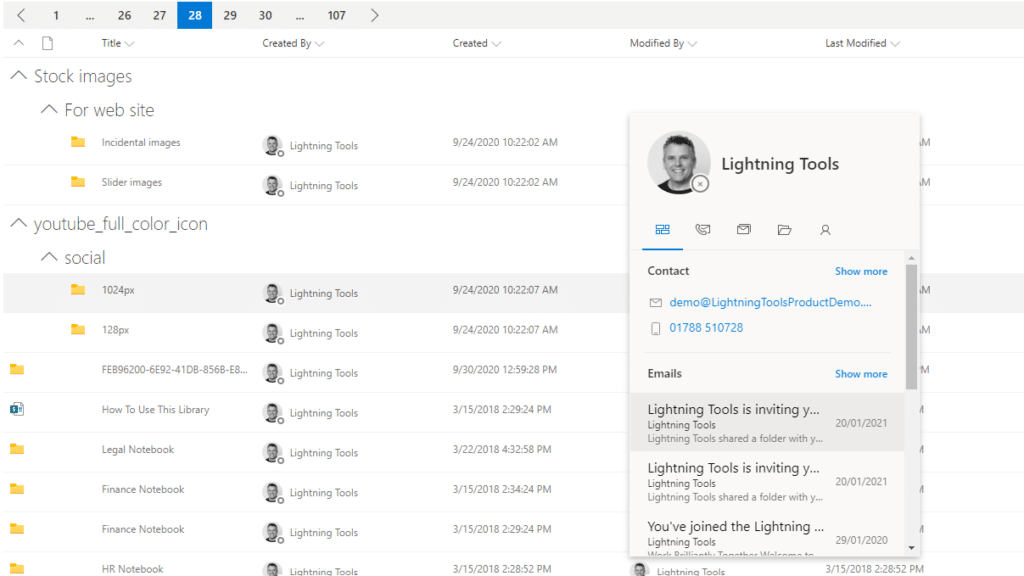
The Lightning Conductor is a SharePoint Content Aggregator that can be configured quickly by business users. The Lightning Conductor can be used to aggregate content from SharePoint Lists such as Tasks, Document Libraries, Contact Lists, and Custom Lists making it easy to view content in one place even if it is distributed across many sites and site collections. Key data can be highlighted using conditional formatting and data-bars as shown. Content from Search and Microsoft Graph can also be aggregated with the Lightning Conductor.Screenshot of CONTENT AGGREGATION WITHIN MICROSOFT TEAMS
The Lightning Conductor Web Part can be used within Microsoft SharePoint or Microsoft Teams. Even if content is stored within SharePoint sites, it is useful to have aggregated Documents, Tasks, Announcements, Calendars or Custom Lists from multiple sites displayed in a single handy view in Microsoft Teams. The Lightning Conductor can be added as a Teams Tab in any Microsoft Teams Channel.Screenshot of BUILDING REPORTS ON MICROSOFT GRAPH
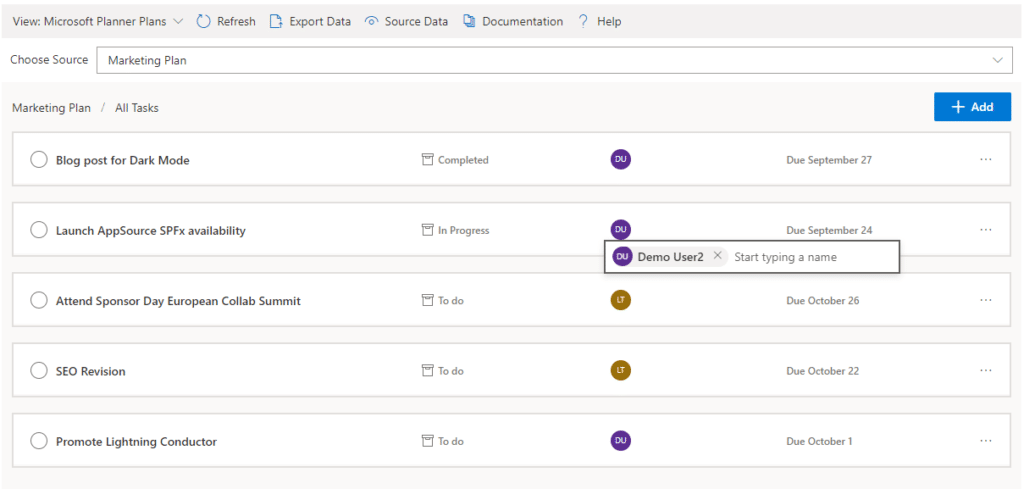
The Lightning Conductor can be used (without code) to aggregate content from Microsoft Graph as well as Search and SharePoint Lists. This example displays Microsoft Planner Plans and Microsoft Planner Tasks where users can Add new Tasks, Assign Users to Planner Tasks, Delete Tasks, and Complete Tasks. The same can be performed on Microsoft To Do items and displayed within Modern SharePoint pages or Microsoft Teams Tabs. The Lighting Conductor can also contain multiple views of content, making it ideal to display all of your tasks from SharePoint Task lists, Microsoft To Do and Microsoft Planner in a single web part or Teams Tab.

*Microsoft Graph Reports are only available for SharePoint Online and not SharePoint 2019.Screenshot of BUILDING REPORTS ON MICROSOFT 365 GROUPS
Powered by Microsoft Graph, the Microsoft 365 Group Rollup Provider enables users to aggregate content by browsing and selecting Microsoft 365 Groups. Within Microsoft 365 Groups, you’ll be able to select entities such as Drive Items, Owners, Members, Planner Plans, Planner Tasks, Events, Posts,  Sites, Lists, and Calendars.

*Microsoft Graph Reports are only available for SharePoint Online and not SharePoint 2019.Screenshot of AGGREGATING USING SEARCH
When performance is critical, search can be used for rollups. The Lightning Conductor offers three data source configurations to get to content. Object Model (Real Time Aggregation from SharePoint Lists), Microsoft Graph (Aggregation from Graph Entities such as Planner, OneDrive, Outlook), and Search. The Search Data Source enables the aggregation of content from large SharePoint lists and libraries when performance is critical. Thousands of documents can be displayed in under a second using Search.Screenshot of HIGHLIGHTING KEY BUSINESS DATA WITHIN VIEWS
End users and Site Owners can highlight the data that is important to them, the data that they need to prioritize. Using conditional formatting, data bars, and icons, conditions can be configured to highlight the data that is most important. Icons and Data Bars can be any color or size desired. Examples include highlighting High Priority tasks, Showing data bars for the completion progress of Tasks, or indicating which tasks are assigned to any particular user.

Nconnect Screenshots

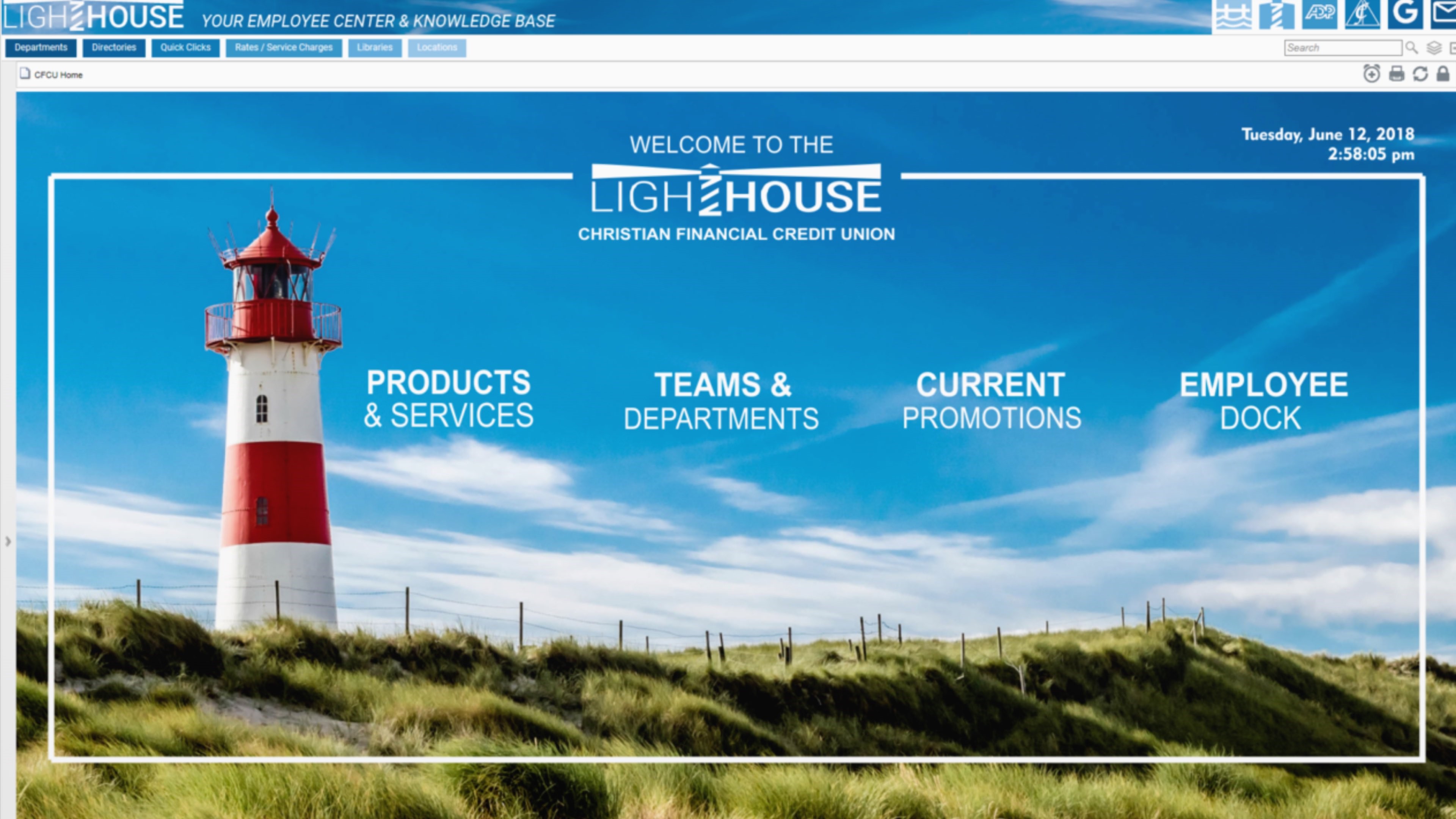
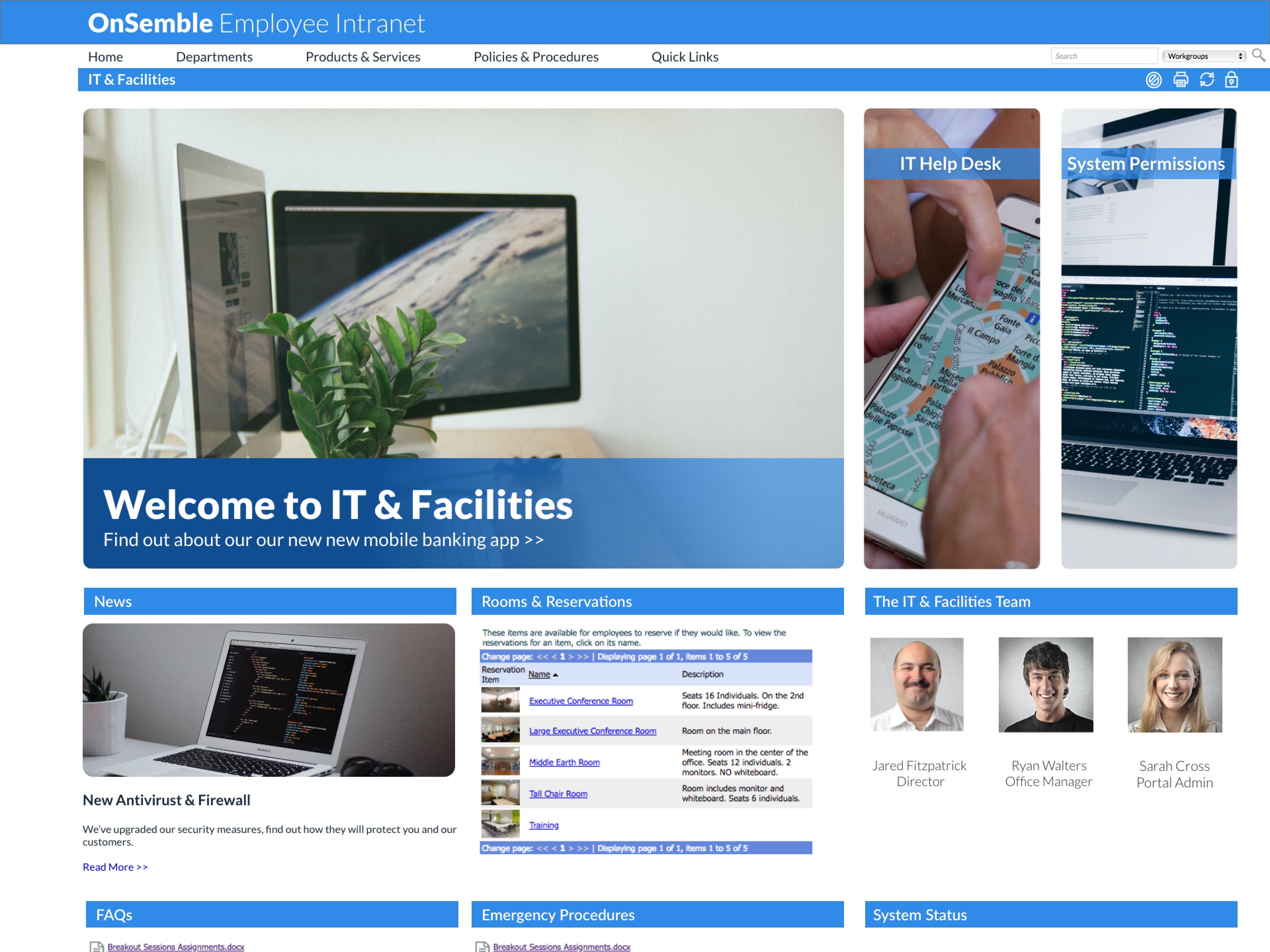
Screenshot of OnSemble connects your entire workplace to the central hub of truth, builds your culture, and inspires employee engagement.Screenshot of Every HR manager knows getting new employees started off on the right foot is mission critical. That's why OnSemble leverages role-based permission management system to control access to your software, files, and your critical digital infrastructure.Screenshot of In-house or hosted, we cover your full stack security and IT requirements. OnSemble is fast, flexible, and scales with your organization so that you have time to focus on more pressing work.Screenshot of OnSemble has everything a marketing team needs to put their culture front and center. Your portal is the first place employees see when they boot up their PC in the morning – make it reflect your organization's values, your branding, and your charm.Screenshot of OnSemble connects your entire workplace to the central hub of truth, builds your culture, and inspires employee engagement.