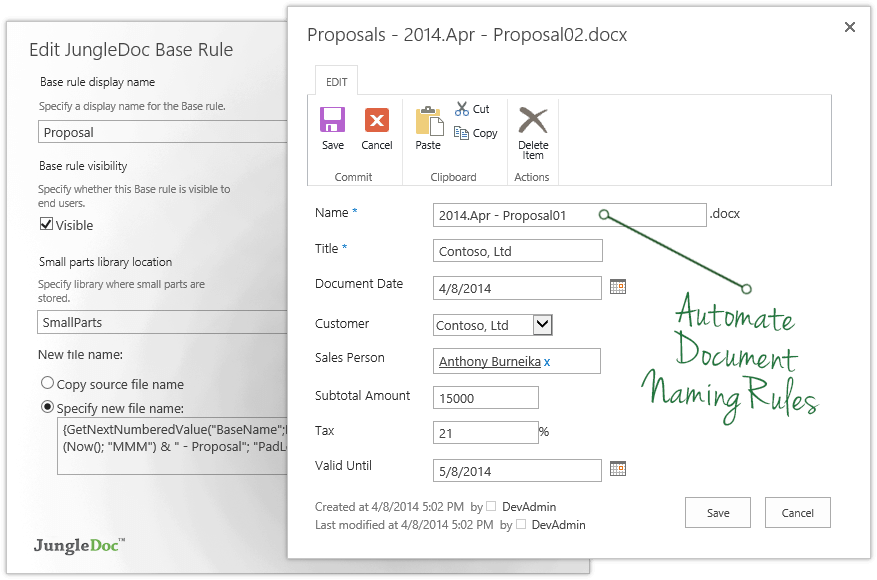
JungleDocs takes properties and parts of an existing document and puts them into a new one. The vendor’s value proposition is that this prevents possible mistakes and saves up to 90% of the user’s time that would be used on inputting and copy-pasting operations. Key features include: Word and PowerPoint document generation and automation Document mail merge from SharePoint lists Template processing engine uses Open XML technology for very fast and…
N/A
OpenText Documentum
Score9 out of 10
N/A
OpenText acquired Documentum from Dell EMC in 2017, and now supports the enterprise content management (ECM) system. The vendor says users can build content-centric applications and solutions from collaborating on business documents to delivering case-based applications to managing highly precise processes in the most regulated business environments.
N/A
Pricing
JungleDocs
OpenText Documentum
Editions & Modules
No answers on this topic
No answers on this topic
Offerings
Pricing Offerings
JungleDocs
OpenText Documentum
Free Trial
Yes
No
Free/Freemium Version
No
No
Premium Consulting/Integration Services
Yes
Yes
Entry-level Setup Fee
No setup fee
Optional
Additional Details
Licensed per Web Front End (WFE) Server
—
More Pricing Information
Features
JungleDocs
OpenText Documentum
Enterprise Content Management
Comparison of Enterprise Content Management features of JungleDocs and OpenText Documentum
Feature
JungleDocs
-
Ratings
OpenText Documentum
9.2
7 Ratings
13% above category average
Content capture & imaging
00 Ratings
10.07 Ratings
File sync, storage & archiving
00 Ratings
9.07 Ratings
Document management
00 Ratings
9.07 Ratings
Records management
00 Ratings
9.07 Ratings
Content search & retrieval
00 Ratings
9.07 Ratings
Enterprise content collaboration
00 Ratings
9.07 Ratings
Content publishing & creation
00 Ratings
9.07 Ratings
Security, risk management & information governance
Great for maintaining consistent language in proposals, contracts, RFI responses, and other legal documents. We can make sure our language passes our legal, regulatory and compliance departments without burdening each document with detailed reviews. This saves us time. When responding to RFIs, we have some standard language to several hundred questions and we can answer them by clicking the boxes. We put in an RFI response question # so they can easily be sorted to match the RFI document. Again, I can't count the labor hours saved. We use this to build plan documents and plan adoption agreements using building blocks that are added by selecting the sections and clicking some checkboxes to determine what gets added. JungleDocs is great for these use cases.
A de minimis incentive was given to thank the reviewer for their time. The incentive was not used to bias or drive a particular response, nor was the incentive contingent on a positive endorsement. More Info
Documentum is best used in medium to large institutions that can afford it, have alternate solutions for web publishing, and who have either in-house developers or can hire good Documentum developers (not the ones who know Java but do not understand ECM). It is, in my opinion, the best heavy duty ECM solution out there, assuming OT is not gutting it as we speak. That is my only hesitation to not giving it a 10, OpenText is an unknown quantity in this and I worry that they will only support Documentum until they have figured out how to fill the gap between Documentum and OT and then offer a migration path to OT with a Documentum sunsetting as an incentive.
A de minimis incentive was given to thank the reviewer for their time. The incentive was not used to bias or drive a particular response, nor was the incentive contingent on a positive endorsement. More Info
Auto population of documents from files stored on SharePoint. Eliminates extra steps for more efficacy.
Can also set up automation for managing documents. Our department uses specific naming conventions for our documents and JungleDocs allows the naming conventions to be automated to help eliminate human error.
A de minimis incentive was given to thank the reviewer for their time. The incentive was not used to bias or drive a particular response, nor was the incentive contingent on a positive endorsement. More Info
Records management: Compared to other content management systems, this provides a efficient and scalable solution. It gives lot of flexibility in managing the content as Records or Legal holds.
Workflow system has external plugins to connect with FAX, Mail, Database and FTP servers etc. which gives an option to integrate with any system with documentum.
Creation of websites and maintenance is easy. Content authors can create the pages with effective mechanism.
A de minimis incentive was given to thank the reviewer for their time. The incentive was not used to bias or drive a particular response, nor was the incentive contingent on a positive endorsement. More Info
The ability to update fields in headers and footers, if they change after the document has been created
When content or metadata change, the document doesn't auto update the fields in the document, you have to manually go and click the update option (excludes fields in headers or footers footers)
A de minimis incentive was given to thank the reviewer for their time. The incentive was not used to bias or drive a particular response, nor was the incentive contingent on a positive endorsement. More Info
WDK framework has been the biggest drawbacks from the application speed point of view, as well as client complexity and not so natural look and feel. Yes, with the latest releases much of these features are improved.
EMC is very expensive to buy, own and support, where some products require many dependent Docuemntum products to be installed to work at its best.
Stability is a key factor as well as its flexibility. Also, any organization that deploys Documentum will have made a significant investment in terms of time and money, so not renewing its commitment can come with a significant cost. That said, the decision to deploy Documentum initially should come only after extensive evaluation, knowing that once deployed it will likely remain the platform of choice.
A de minimis incentive was given to thank the reviewer for their time. The incentive was not used to bias or drive a particular response, nor was the incentive contingent on a positive endorsement. More Info
A de minimis incentive was given to thank the reviewer for their time. The incentive was not used to bias or drive a particular response, nor was the incentive contingent on a positive endorsement. More Info
JungleDocs was intuitively easier to use than eFileCabinet and Sharepoint. JungleDocs works with Sharepoint to extend its feature set and make it easier to use. Our team didn't feel that eFileCabinet was suitable for all of our use cases, especially the RFI response documents. We used a scorecard to rank the products and JungleDocs proved to be the winner.
A de minimis incentive was given to thank the reviewer for their time. The incentive was not used to bias or drive a particular response, nor was the incentive contingent on a positive endorsement. More Info
A de minimis incentive was given to thank the reviewer for their time. The incentive was not used to bias or drive a particular response, nor was the incentive contingent on a positive endorsement. More Info
A de minimis incentive was given to thank the reviewer for their time. The incentive was not used to bias or drive a particular response, nor was the incentive contingent on a positive endorsement. More Info
After this product, the client is able to manage content security and due to it, the client is able to use the business process, and this really reduces effort and increases the profit in business.
It provides integration with SAP easily which really helps the client to manage this effectively and with minimum effort system is ready to use.
Also searching, automated flows also create a bigger impact and reduce a lot manual effort.
A de minimis incentive was given to thank the reviewer for their time. The incentive was not used to bias or drive a particular response, nor was the incentive contingent on a positive endorsement. More Info