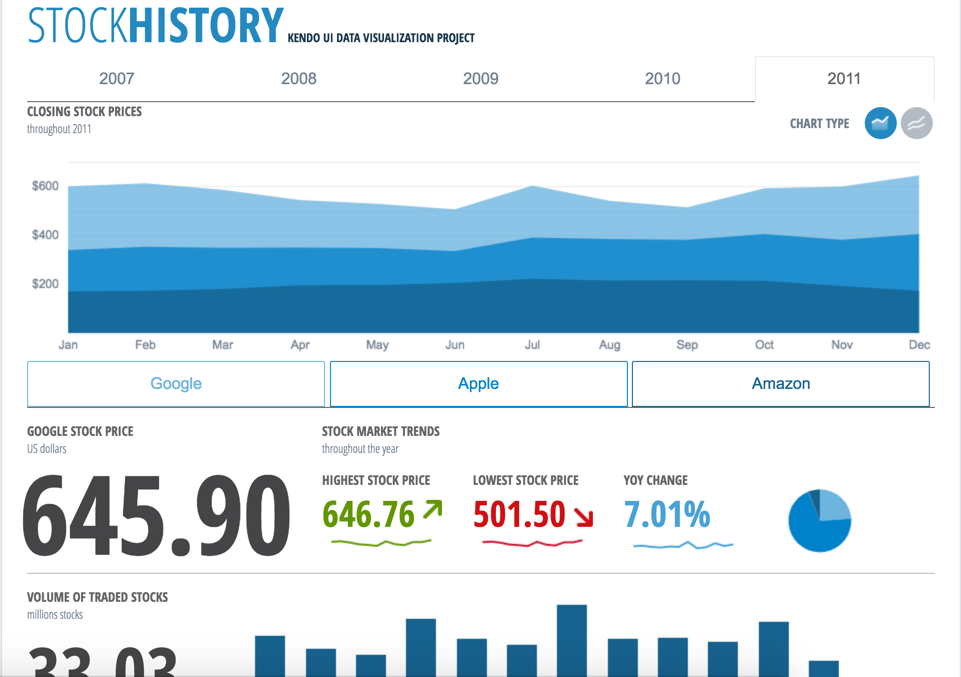
Kendo UI is a JavaScript UI toolkit that allows users to build responsive web-based apps integrated into their framework of choice (jQuery, Angular, React, or Vue). The vendor’s value proposition is that Kendo UI offers a large library of popular and configurable components ranging from sophisticated grids and charts to basic buttons, so users don’t have to waste development time building their UI. The vendor also says the large library of customizable themes means users can easily deploy a…
$999
per developer, royalty-free
Visual Studio
Score8.8 out of 10
N/A
Visual Studio (now in the 2022 edition) is a 64-bit IDE that makes it easier to work with bigger projects and complex workloads, boasting a fluid and responsive experience for users. The IDE features IntelliCode, its automatic code completion tools that understand code context and that can complete up to a whole line at once to drive accurate and confident coding.
Software Engineer II in Information Technology at Turlock Irrigation District (Information Technology & Services, 501-1000 employees)
Chose Progress Kendo UI
We currently use data tables in most of our applications that require a grid to be able to asynchronously perform CRUD operations on our web applications. It has served us well but Kendo UI has more widgets and better documentation to get the job done. Given the time, we would …
A de minimis incentive was given to thank the reviewer for their time. The incentive was not used to bias or drive a particular response, nor was the incentive contingent on a positive endorsement. TR verified that a representative sample of customers was invited. More Info
Verified User
Chose Progress Kendo UI
At the time of initial purchase, Kendo UI provided a more robust set of UI tools than other vendors.
A de minimis incentive was given to thank the reviewer for their time. The incentive was not used to bias or drive a particular response, nor was the incentive contingent on a positive endorsement. More Info
A de minimis incentive was given to thank the reviewer for their time. The incentive was not used to bias or drive a particular response, nor was the incentive contingent on a positive endorsement. More Info
Verified User
Chose Progress Kendo UI
We previously used DevExpress, and it was fine. We were embarking on a large project, and more people were familiar with Kendo than DevExpress, so we decided to standardize the platform with Kendo and move in that direction across all our work. It has been a fine …
A de minimis incentive was given to thank the reviewer for their time. The incentive was not used to bias or drive a particular response, nor was the incentive contingent on a positive endorsement. More Info
Verified User
Chose Progress Kendo UI
At the time we selected Kendo-UI there weren't any real alternatives that had as broad of support.
A de minimis incentive was given to thank the reviewer for their time. The incentive was not used to bias or drive a particular response, nor was the incentive contingent on a positive endorsement. More Info
A de minimis incentive was given to thank the reviewer for their time. The incentive was not used to bias or drive a particular response, nor was the incentive contingent on a positive endorsement. More Info
Software Developer in Engineering at Intelectix (Computer Software, 11-50 employees)
Chose Progress Kendo UI
I did not participate in the evaluation team for this tool. But I'm very happy with its general results. Right now we are not thinking about replacing it.
A de minimis incentive was given to thank the reviewer for their time. The incentive was not used to bias or drive a particular response, nor was the incentive contingent on a positive endorsement. More Info
Director - Technology Lead for Business Solutions in Information Technology at Duff & Phelps (Financial Services, 1001-5000 employees)
Chose Progress Kendo UI
I found Infragistics was lacking in some areas that Kendo UI was not. Once I switched over to Kendo, I never looked back so I'm not sure if they caught up or not. This was a number of years back and Kendo has always provided what I needed.
A de minimis incentive was given to thank the reviewer for their time. The incentive was not used to bias or drive a particular response, nor was the incentive contingent on a positive endorsement. More Info
Verified User
Chose Progress Kendo UI
It seems that Kendo UI is most complete tool of the market. Moreover, the documentation and examples seems to be better than other competitors. They always tries to bring the best in class UIs, even with new overcoming technologies. Rarely I see a bug in the system, that brings …
A de minimis incentive was given to thank the reviewer for their time. The incentive was not used to bias or drive a particular response, nor was the incentive contingent on a positive endorsement. More Info
Verified User
Chose Progress Kendo UI
Kendo UI and DevExpress are very similar controls libraries. They both have the same goal in mind and both get the job done. I believe Kendo UI is superior due to the extensive collection of code examples and available documentation. I would also say that Kendo UI beats out …
A de minimis incentive was given to thank the reviewer for their time. The incentive was not used to bias or drive a particular response, nor was the incentive contingent on a positive endorsement. More Info
Verified User
Chose Progress Kendo UI
We used to use Component One but changed over to Telerik controls because they seemed to stay on top of the industry trends and the pricing was reasonable. The implementation was easy and the developers all voted for Telerik. We even used their reporting engine as well. The …
A de minimis incentive was given to thank the reviewer for their time. The incentive was not used to bias or drive a particular response, nor was the incentive contingent on a positive endorsement. More Info
Verified User
Chose Progress Kendo UI
I worked for business using the Kendo UI product and it met all my needs. I haven't shopped the competitors.
A de minimis incentive was given to thank the reviewer for their time. The incentive was not used to bias or drive a particular response, nor was the incentive contingent on a positive endorsement. More Info
Application Architect in Information Technology at Transportation Safety Board of Canada (Government Administration, 201-500 employees)
Chose Progress Kendo UI
According to our needs Kendo UI offers the most complete library of controls and plugins. The grid, combobox and autocomplete controls were an absolute must to meet our needs. Kendo UI's reputation and the fact that many developers were already familiar with it also contributed …
A de minimis incentive was given to thank the reviewer for their time. The incentive was not used to bias or drive a particular response, nor was the incentive contingent on a positive endorsement. More Info
A de minimis incentive was given to thank the reviewer for their time. The incentive was not used to bias or drive a particular response, nor was the incentive contingent on a positive endorsement. More Info
Chief Executive Officer in Corporate at HG Interdevelopment Solutions Group SA de CV (Computer Software, 1-10 employees)
Chose Progress Kendo UI
We think that Kendo is a better option considering the cost/benefit relationship.
Is important for us to make a good balance between cost and benefit and Kendo UI provide this two goals, we gain in productivity and improve our users experience with little effort.
A de minimis incentive was given to thank the reviewer for their time. The incentive was not used to bias or drive a particular response, nor was the incentive contingent on a positive endorsement. TR verified that a representative sample of customers was invited. More Info
A de minimis incentive was given to thank the reviewer for their time. The incentive was not used to bias or drive a particular response, nor was the incentive contingent on a positive endorsement. More Info
A de minimis incentive was given to thank the reviewer for their time. The incentive was not used to bias or drive a particular response, nor was the incentive contingent on a positive endorsement. More Info
Verified User
Chose Progress Kendo UI
Availability of more "high level" components reducing the need for programming.
A de minimis incentive was given to thank the reviewer for their time. The incentive was not used to bias or drive a particular response, nor was the incentive contingent on a positive endorsement. More Info
CAA (Chief Applications Architect) in Information Technology at Addvance (Computer Software, 1-10 employees)
Chose Progress Kendo UI
Telerik ASP.NET controls have a significant advantage over DevExpress -- automated web tests, rich API for testing web pages containing Telerik controls. Telerik also has less strict license terms: - Telerik software is licensed on a per-seat basis - DevExpress software is …
A de minimis incentive was given to thank the reviewer for their time. The incentive was not used to bias or drive a particular response, nor was the incentive contingent on a positive endorsement. More Info
CEO (Chief Executive Officer) in Information Technology at Chickenlip Consulting Corp (Information Technology and Services, 1-10 employees)
Chose Progress Kendo UI
We have been Telerik users since 2008 and were pleased when the Kendo UI product was made available. We did evaluate other products such as Ruby, ASP.net, and Syncfusion, but decided that Kendo not only provided us with the toolset we needed but we could continue with a single …
A de minimis incentive was given to thank the reviewer for their time. The incentive was not used to bias or drive a particular response, nor was the incentive contingent on a positive endorsement. More Info
Verified User
Chose Progress Kendo UI
I haven't really evaluated any other similar products.
A de minimis incentive was given to thank the reviewer for their time. The incentive was not used to bias or drive a particular response, nor was the incentive contingent on a positive endorsement. More Info
A de minimis incentive was given to thank the reviewer for their time. The incentive was not used to bias or drive a particular response, nor was the incentive contingent on a positive endorsement. More Info
Geschäftsführer in Manufacturing at myTGA - connect GmbH (Facilities Services, 1-10 employees)
Chose Progress Kendo UI
TelerikASP.NET Controls are still more feature rich than Kendo UI, so I prefer to use them wherever possible. Open source controls are used only for special scenarios.
A de minimis incentive was given to thank the reviewer for their time. The incentive was not used to bias or drive a particular response, nor was the incentive contingent on a positive endorsement. More Info
A de minimis incentive was given to thank the reviewer for their time. The incentive was not used to bias or drive a particular response, nor was the incentive contingent on a positive endorsement. More Info
Verified User
Chose Visual Studio
For .Net development on the Windows platform, there really is not a better alternative.
A de minimis incentive was given to thank the reviewer for their time. The incentive was not used to bias or drive a particular response, nor was the incentive contingent on a positive endorsement. More Info
It allows us to extend the components or create new components in an easy way. The control suite is complete and powerful enough that you do not need to consider other competing packages. The controls are relatively easy to implement and when we ran into problems the documentation and online support were very reliable.
A de minimis incentive was given to thank the reviewer for their time. The incentive was not used to bias or drive a particular response, nor was the incentive contingent on a positive endorsement. More Info
When working with base C# code for desktop and web projects, then Microsoft Visual Studio is ideal as it provides the libraries and interfaces needed to quickly create, test and deploy solutions. It is when slightly more complex scenarios are required that issues can arise. The built-in integration for things like PowerBI Paginated Reports and dashboards is far from ideal.
A de minimis incentive was given to thank the reviewer for their time. The incentive was not used to bias or drive a particular response, nor was the incentive contingent on a positive endorsement. More Info
Kendo UI controls provides rich set of features and capability that is required for enterprise products.
Performance of controls are satisfactory overall though few other vendors provides extraordinary performance for specific controls and for specific purpose. Kendo UI provides most of the required controls and with rich feature that made us to select Kendo UI controls for our development.
Kendo UI controls quality, in terms of performance, robustness and well defined interfaces are very positive notes.
A de minimis incentive was given to thank the reviewer for their time. The incentive was not used to bias or drive a particular response, nor was the incentive contingent on a positive endorsement. More Info
Kendo UI is always moving forward and staying current with latest development trends. While that is beneficial, that can cause some issues when supporting customers (particularly government) that don't move their IT infrastructure along nearly as fast. A prime example is web font icons. Great and easy to use, but where Kendo UI utilizes web font icons as the sole means of displaying an icon, not all organizations (again, especially government) allow the use of these. There have been times where Kendo UI became unusable and we had to downgrade to a version a few years old. Makes continued payment for licenses sometimes feel wasted as we may not be able to always use the new releases
Kendo UI has a wonderful feedback system and they do indeed listen to the community. However, there do seem to be some instances where there is large support for a new feature/component and it never gets addressed. It is easy to understand that not all ideas are easy or even prudent to implement, but would be nice to see a better follow-up on ideas with a current status
Refreshing Kendo UI grids is simple, yet the standard API method causes the grid to return to the default state. We have many use cases where we would love to update the grid data but need current grid state (such as expanded detail rows, sorts, filters, etc) preserved after the grid is updated so that users do not have to perform grid actions again to return to the desired state.
A de minimis incentive was given to thank the reviewer for their time. The incentive was not used to bias or drive a particular response, nor was the incentive contingent on a positive endorsement. TR verified that a representative sample of customers was invited. More Info
A de minimis incentive was given to thank the reviewer for their time. The incentive was not used to bias or drive a particular response, nor was the incentive contingent on a positive endorsement. More Info
Nothing better has come along. I'm always on the lookout for new UI libraries and I have tried most of them. Kendo has done a good job of keeping my business. They aren't perfect, but no one has done it better as far as I can tell. I'll keep a look out and my rating may change in the future if they get complacent.
A de minimis incentive was given to thank the reviewer for their time. The incentive was not used to bias or drive a particular response, nor was the incentive contingent on a positive endorsement. More Info
VS is the best and is required for building Microsoft applications. The quality and usefulness of the product far out-weight the licensing costs associated with it.
A de minimis incentive was given to thank the reviewer for their time. The incentive was not used to bias or drive a particular response, nor was the incentive contingent on a positive endorsement. More Info
it's easy to implement in applications. The kendo widgets are able to be used in almost any type of business application which has a UI. For most part, once the developer has completed a project which uses Kendo, many time code can be copy/paste into a new application. Kendo UI documentation keeps improving so finding the answers to questions can be easy
A de minimis incentive was given to thank the reviewer for their time. The incentive was not used to bias or drive a particular response, nor was the incentive contingent on a positive endorsement. More Info
I love the overall usability of Microsoft Visual Studio. I’ve been using this IDE for more than 20 years, and I’ve seen it evolve by leaps and bounds. Today, with AI and code-suggestion/completion features, developers no longer need to remember countless libraries, methods, or language syntax, or invest a huge amount of programming effort to complete a project. It truly offers everything a developer needs to program, debug, test, and deploy in a single IDE.
A de minimis incentive was given to thank the reviewer for their time. The incentive was not used to bias or drive a particular response, nor was the incentive contingent on a positive endorsement. More Info
A de minimis incentive was given to thank the reviewer for their time. The incentive was not used to bias or drive a particular response, nor was the incentive contingent on a positive endorsement. More Info
A de minimis incentive was given to thank the reviewer for their time. The incentive was not used to bias or drive a particular response, nor was the incentive contingent on a positive endorsement. More Info
Overall, we are satisfied with the support offered by the Progress Kendo UI team. We had raised few helpline incidents in the past and they have been resolved timely by the team. Also, we were satisfied with the level of information and support provided by the team.
A de minimis incentive was given to thank the reviewer for their time. The incentive was not used to bias or drive a particular response, nor was the incentive contingent on a positive endorsement. More Info
There are many resources available supporting Visual Studio IDE. Microsoft whitepapers, forum posts, and online Visual Studio documentation. There are countless demonstration videos available, as well. If users are having issues, they can call Microsoft Support, but depending on the company's agreement with Microsoft, the number of included support calls will vary from organization to organization. I've found that Microsoft support calls can be hit or miss depending on who you get, but they can usually get you with the right support person for your issue.
A de minimis incentive was given to thank the reviewer for their time. The incentive was not used to bias or drive a particular response, nor was the incentive contingent on a positive endorsement. More Info
IT is very complicated to understand all the functions that the environment has if you are not familiar with this type of development environments. It is important to select a good in-person training to achieve to understand all the possibilities and the capacity of the application. In this case, you will be able to develop a lot type of different applications.
A de minimis incentive was given to thank the reviewer for their time. The incentive was not used to bias or drive a particular response, nor was the incentive contingent on a positive endorsement. More Info
If you are not accustomed to develop in this type of development environments it would be complicated to follow all the parts of the course because if the course does not include a great tour with all the concepts to develop you will not have the option to understand all the functions.
A de minimis incentive was given to thank the reviewer for their time. The incentive was not used to bias or drive a particular response, nor was the incentive contingent on a positive endorsement. More Info
it took me about one day to make the components available for all the team members, including a quick demo, parallel setup in everyone’s workstation and packages deployment into our nuget server after 3 days of one to one support, everyone was able to use the components or find help in the documentation or resuest support
A de minimis incentive was given to thank the reviewer for their time. The incentive was not used to bias or drive a particular response, nor was the incentive contingent on a positive endorsement. More Info
At the time of our product selection we identified better cross-browser compatibility and we estimated that turnaround for support was superior. At the time, the vendor had a higher positive feedback footprint among their user community.
I personally feel Visual Studio IDE has [a] better interface and [is more] user friendly than other IDEs. It has better code maintainability and intellisense. Its inbuilt team foundation server help coders to check on their code then and go. Better nugget package management, quality testing and gives features to extract TRX file as result of testing which includes all the summary of each test case.
A de minimis incentive was given to thank the reviewer for their time. The incentive was not used to bias or drive a particular response, nor was the incentive contingent on a positive endorsement. More Info
Kendo UI has saved us a ton of time in development.
We were able to get certain things to market faster due to the fact that we didn't have to piece multiple libraries together like is so common with modern web development.
Because of the price of the library, however, we have not been able to purchase upgrades every year.
A de minimis incentive was given to thank the reviewer for their time. The incentive was not used to bias or drive a particular response, nor was the incentive contingent on a positive endorsement. More Info
Using the integration between Visual Studio and our source control service, the cost of re-work and losing code is drastically reduced.
Paid versions of Visual Studio enable developers to be so much more productive than hacked-together open source solutions that it's hard to imagine developing in Windows without it.
When combined with support subscriptions and the vast array of free online help options available, Visual Studio saves our developers time by keeping them coding and testing, not wasting their time trying to guess their way out of problems or spend endless hours online hoping to find answers.
A de minimis incentive was given to thank the reviewer for their time. The incentive was not used to bias or drive a particular response, nor was the incentive contingent on a positive endorsement. More Info