Klaxoon, a Wrike company vs. Lightning Tools Lightning Conductor vs. Mural

Overview
ProductRatingMost Used ByProduct SummaryStarting Price
Klaxoon, a Wrike company
Score 9.8 out of 10
N/A
Klaxoon is presented by the vendor as a one-stop shop for collaborative tools that improves teamwork efficiency when working remotely or on-site. Meetings, workshops, learning sessions, workshops… everyone connects to Klaxoon via a web link, from any digital device (computer, smartphone, tablet…) and without anything to install. With a click, users share ideas through Brainstorm, Word Cloud, Quiz, Votes… From Fortune500 organisations to small businesses, universities and consultants, Klaxoon…N/A
Lightning Tools Lightning Conductor
Score 9.0 out of 10
Mid-Size Companies (51-1,000 employees)
The Lightning Conductor is a content aggregation tool for Microsoft SharePoint Online and Microsoft Teams. Users can build rich, modern content reports based upon SharePoint lists, SharePoint Search, Microsoft Graph or Microsoft 365 Groups. Content can be aggregated from lists and libraries, and other applications such as Planner, To Do, OneDrive, and Teams.
$2,200
per year per installation
Mural
Score 7.5 out of 10
N/A
MURAL (formerly Mural.ly) from Tactivos (DBA MURAL) in San Francisco is described by the vendor as a digital workspace and visual collaboration tool, designed for creative teams to make the process of design more efficient for distributed teams, working remotely.
$12
per month
Pricing
Klaxoon, a Wrike companyLightning Tools Lightning ConductorMural
Editions & Modules
No answers on this topic
Lightning Conductor WSP
From 1950
per year One WFE
Lightning Conductor Enterprise Edition
POA
per year Four or more WFE
Lightning Conductor Online
From 2200
per year per installation
Lightning Conductor Plus (Includes Data Viewer)
From 2500
per year per installation
Lightning Conductor Online Enterprise Edition (>10,000 users)
POA
per year per installation
Starter
$12
per month
Plus
$20
per month
Enterprise
Contact sales team
Offerings
Pricing Offerings
Klaxoon, a Wrike companyLightning Tools Lightning ConductorMural
Free Trial
YesYesYes
Free/Freemium Version
NoNoNo
Premium Consulting/Integration Services
YesYesNo
Entry-level Setup FeeNo setup feeNo setup feeNo setup fee
Additional DetailsPrices stated are minimum per installation for "stock" products. $2.20 per user/year on top of base price. Enterprise editions can be amended to suit business needs if deemed necessary, additional costs incurred and TBD. All packages include free technical support. Free upgrades available to latest versions of tool as they are released. (online version)Plans are billed annually.
More Pricing Information
Community Pulse
Klaxoon, a Wrike companyLightning Tools Lightning ConductorMural
Considered Multiple Products
Klaxoon, a Wrike company
Chose Klaxoon, a Wrike company
we are trying many visual collaboration applications. and we will choose the application that will offer us a more interactive environment. Miro is a very similar app and surpasses Klaxoon in terms of interface and simplicity. But Klaxoon is more successful with pre-designed …
Chose Klaxoon, a Wrike company
Klaxoon helps to facilitate the collaborative environment for decision-making processes to assess a situation, analyze the root causes of problems in a collective manner, improve processes, reach an agreement and define an action plan. We have implemented this tool for …
Lightning Tools Lightning Conductor

No answer on this topic

Mural

No answer on this topic

Features
Klaxoon, a Wrike companyLightning Tools Lightning ConductorMural
Project Management
Comparison of Project Management features of Product A and Product B
Klaxoon, a Wrike company
-
Ratings
Lightning Tools Lightning Conductor
8.6
2 Ratings
10% above category average
Mural
-
Ratings
Task Management00 Ratings8.82 Ratings00 Ratings
Search00 Ratings8.42 Ratings00 Ratings
Best Alternatives
Klaxoon, a Wrike companyLightning Tools Lightning ConductorMural
Small Businesses
Lucid Visual Collaboration Suite
Score 8.9 out of 10
Stackby
Stackby
Score 8.9 out of 10
Canva
Canva
Score 9.1 out of 10
Medium-sized Companies
Lucid Visual Collaboration Suite
Score 8.9 out of 10
Troop Messenger
Troop Messenger
Score 9.8 out of 10
Canva
Canva
Score 9.1 out of 10
Enterprises
Miro
Miro
Score 9.1 out of 10
HCL Connections
HCL Connections
Score 9.0 out of 10
Whimsical
Whimsical
Score 9.3 out of 10
All AlternativesView all alternativesView all alternativesView all alternatives
User Ratings
Klaxoon, a Wrike companyLightning Tools Lightning ConductorMural
Likelihood to Recommend
7.6
(11 ratings)
9.0
(4 ratings)
9.6
(21 ratings)
Likelihood to Renew
-
(0 ratings)
9.1
(1 ratings)
-
(0 ratings)
Usability
-
(0 ratings)
-
(0 ratings)
7.0
(1 ratings)
Support Rating
-
(0 ratings)
9.1
(1 ratings)
9.0
(1 ratings)
User Testimonials
Klaxoon, a Wrike companyLightning Tools Lightning ConductorMural
Likelihood to Recommend
Wrike
Easy for end-users to experience the workflow and processes (i.e. low entry barrier) and handle the tool. Easy for facilitators to create a digital board and to animate and create a good remote real-time or asynchronous experience. Moreover, it allows building Customer Journey Maps (CJM) for my end-users with very low time invested and a high level of reusability.
Read full review
Lightning Tools
Having experience of SharePoint On Premise and also SharePoint Online, there isn't an out of the box app/webpart that enables you to 'roll up content' from a variety of source's (in my case SP Lists, but there are many other data sources it works with) across site collections with an easy to use and intuitive interface which is what Lightning tools excels at.
Read full review
Mural
I've recommended MURAL to a lot of people in a lot of fields. This is a great tool for any group of people that might stand around a white board if they were in person. Even if they are in person, I still recommend it pretty often because, unlike a white board, MURAL is virtual, so it can go offline with you. I've recommended it to other Software Teams, individual software developers, engineering teams, Sales Managers, Office Staff, Manufacturing teams, and more.
Read full review
Pros
Wrike
  • There are many templates available in the library: very useful for organizing a workshop that always requires a method to support collective intelligence.
  • Klaxoon is great for working collaboratively at the same time. It is really visual and not very difficult to use. It has different kinds of interesting features, but you have to know about them.
  • Blackboard principle, confidentiality of contributions
Read full review
Lightning Tools
  • Aggregate documents across SharePoint site & libraries
  • Filtering for owner/person responsible & due dates
  • Ease of end-user filtering on columns
  • Color-coding & other formatting
Read full review
Mural
  • enables easy for all collaboration especially in the hybrid environment
  • makes brainstorming better as users can create digital sticky notes, draw diagrams, and add images to visually represent concepts and ideas
  • it helps to visualize data effectively - users can create charts, graphs, and diagrams to present data-driven insights to team members and stakeholders
Read full review
Cons
Wrike
  • From a user perspective I would say klaxoon offers all the good stuff. A few functions could be more developed like survey.
  • I personally had troubled organizing some of the boards to have the data from them exported in a nice way.
  • Hard to find more negative sides, but more templates for more use cases would always be nice :-)
Read full review
Lightning Tools
  • Mobile Friendly
  • Calendar/Gantt views
  • Complex/Custom Logic
Read full review
Mural
  • It'd be nice that the zoom regulation could be easier to manage
  • The advanced features are a little bit easy to adopt. Why not adding some agile trainings, or some other tools to facilitate their adoption
  • A faster and easier way to Integrate with ms office
Read full review
Usability
Wrike
No answers on this topic
Lightning Tools
No answers on this topic
Mural
Overall, MURAL is really easy to use, but there are a couple downsides. It's really easy to make areas of the board consistent because double clicking adds stickies that match those around the current one. It's really easy to connect the elements. And it's really easy to organize elements. Inconsistent controls, Panning, Line Connections, and latency are the only issues I had. My biggest issue is that the MURAL mouse buttons are very different from
most similar software. This always causes me problems switching to a
graphics software or 3D modelling software. Because MURAL uses the same button to pan and move elements, it's really easy to move things when panning around. The lines can also be a (sometimes huge) problem because thew will occasionally disappear or connect to things incorrectly. I think this is tied to latency issues which, in addition to causing phantom lines, can sometimes cause confusion to your team.
Read full review
Support Rating
Wrike
No answers on this topic
Lightning Tools
The Lightning Tools support team responds quickly, and team members are very friendly and helpful.
Read full review
Mural
Chat support tends to get back to you within a few hours and are always helpful.
Read full review
Alternatives Considered
Wrike
we are trying many visual collaboration applications. and we will choose the application that will offer us a more interactive environment. Miro is a very similar app and surpasses Klaxoon in terms of interface and simplicity. But Klaxoon is more successful with pre-designed boards. MURAL is a different concept and lags behind Klaxoon in terms of workspace.
Read full review
Lightning Tools
I haven't found another product to compare this one to. Only in SharePoint Online which has a similar App 'Highlight Webpart' ... it's far too complicated to set up and requires learning yet another language and exporting and importing via PowerShell to get any real results that would be useful.
Read full review
Mural
Mural was easier to use and share compared with Whiteboard. Whiteboard's functionality is limited. It is also integrated into Teams in an odd way that makes it difficult for team members to refer to old whiteboards. Mural as a stand alone web app is better.
Read full review
Return on Investment
Wrike
  • Klaxoon allows working in a group easily at the same time for people in different places. So the main benefit is to work collaboratively and to come back to the work anytime we want.
  • It was especially important during the Covid period when we could not organize on-site sessions with a real post-it. It helps also for online training or digital adoption thanks to the possibility to define the digital training journey with Module/Quiz sessions/Surveys.
  • we benefited from strong support from the Customer management services of Klaxoon to kick off the solution in a very good way.
Read full review
Lightning Tools
  • Policies easier to portray
Read full review
Mural
  • Mural allows us to draft communications for clients that aim to increase the NPS of the organization
  • Mural allows us to keep up with the agile framework, which reduces Time to Market of our products and initiatives
  • Mural allows us to identify blockers in our day to day tasks, which reduces the Cicle Time of our Kanban cards
Read full review
ScreenShots

Klaxoon, a Wrike company Screenshots

Screenshot of With a simple click, you share ideas through Brainstorm, Word Cloud, Quiz, Votes...

Lightning Tools Lightning Conductor Screenshots

Screenshot of MODERN SHAREPOINT LIST ROLLUP
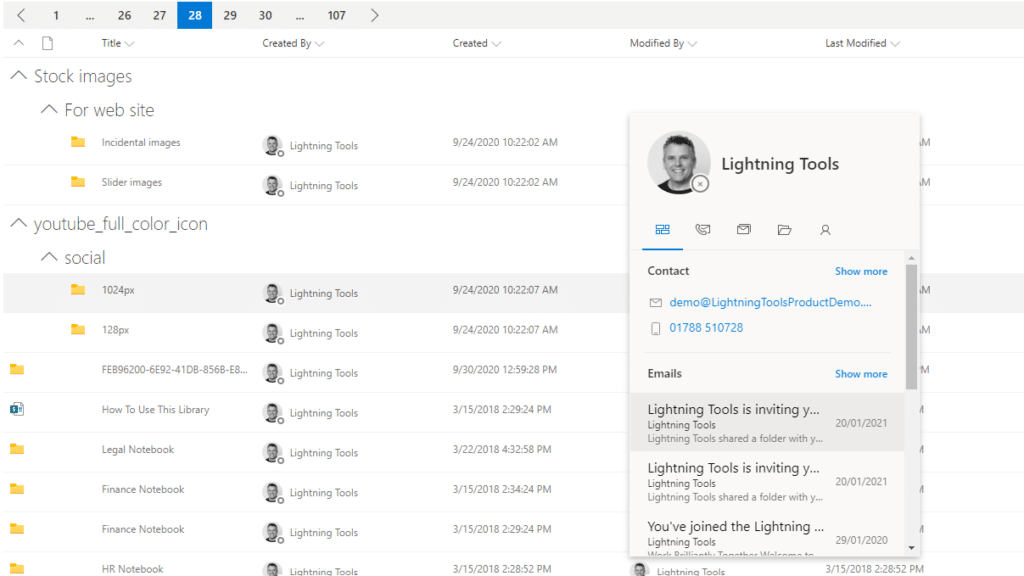
The Lightning Conductor is a SharePoint Content Aggregator that can be configured quickly by business users. The Lightning Conductor can be used to aggregate content from SharePoint Lists such as Tasks, Document Libraries, Contact Lists, and Custom Lists making it easy to view content in one place even if it is distributed across many sites and site collections. Key data can be highlighted using conditional formatting and data-bars as shown. Content from Search and Microsoft Graph can also be aggregated with the Lightning Conductor.Screenshot of CONTENT AGGREGATION WITHIN MICROSOFT TEAMS
The Lightning Conductor Web Part can be used within Microsoft SharePoint or Microsoft Teams. Even if content is stored within SharePoint sites, it is useful to have aggregated Documents, Tasks, Announcements, Calendars or Custom Lists from multiple sites displayed in a single handy view in Microsoft Teams. The Lightning Conductor can be added as a Teams Tab in any Microsoft Teams Channel.Screenshot of BUILDING REPORTS ON MICROSOFT GRAPH
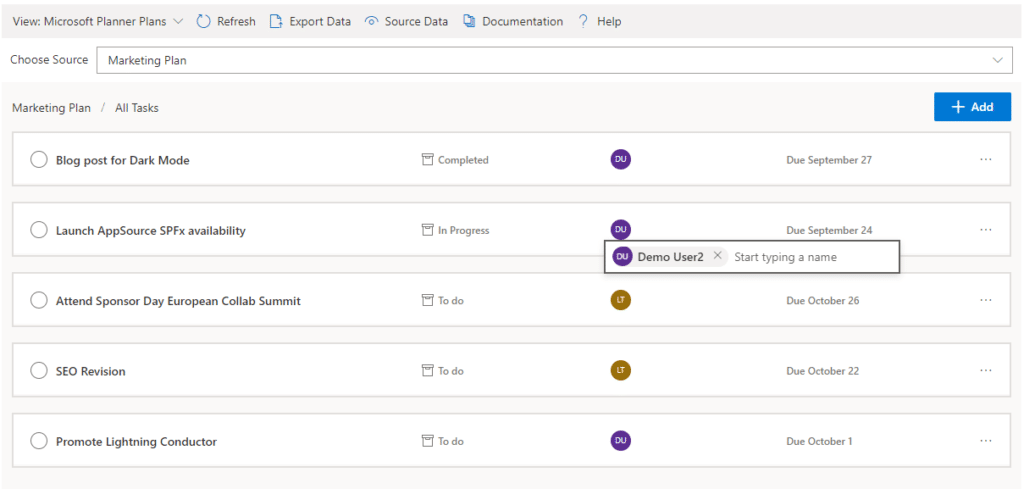
The Lightning Conductor can be used (without code) to aggregate content from Microsoft Graph as well as Search and SharePoint Lists. This example displays Microsoft Planner Plans and Microsoft Planner Tasks where users can Add new Tasks, Assign Users to Planner Tasks, Delete Tasks, and Complete Tasks. The same can be performed on Microsoft To Do items and displayed within Modern SharePoint pages or Microsoft Teams Tabs. The Lighting Conductor can also contain multiple views of content, making it ideal to display all of your tasks from SharePoint Task lists, Microsoft To Do and Microsoft Planner in a single web part or Teams Tab.

*Microsoft Graph Reports are only available for SharePoint Online and not SharePoint 2019.Screenshot of BUILDING REPORTS ON MICROSOFT 365 GROUPS
Powered by Microsoft Graph, the Microsoft 365 Group Rollup Provider enables users to aggregate content by browsing and selecting Microsoft 365 Groups. Within Microsoft 365 Groups, you’ll be able to select entities such as Drive Items, Owners, Members, Planner Plans, Planner Tasks, Events, Posts,  Sites, Lists, and Calendars.

*Microsoft Graph Reports are only available for SharePoint Online and not SharePoint 2019.Screenshot of AGGREGATING USING SEARCH
When performance is critical, search can be used for rollups. The Lightning Conductor offers three data source configurations to get to content. Object Model (Real Time Aggregation from SharePoint Lists), Microsoft Graph (Aggregation from Graph Entities such as Planner, OneDrive, Outlook), and Search. The Search Data Source enables the aggregation of content from large SharePoint lists and libraries when performance is critical. Thousands of documents can be displayed in under a second using Search.Screenshot of HIGHLIGHTING KEY BUSINESS DATA WITHIN VIEWS
End users and Site Owners can highlight the data that is important to them, the data that they need to prioritize. Using conditional formatting, data bars, and icons, conditions can be configured to highlight the data that is most important. Icons and Data Bars can be any color or size desired. Examples include highlighting High Priority tasks, Showing data bars for the completion progress of Tasks, or indicating which tasks are assigned to any particular user.

Mural Screenshots

Screenshot of the brainstorming templates that brings more minds to the table and helps turn good ideas into extraordinary work.Screenshot of energizers and icebreakers that help teams feel connected and open-minded so they can tackle big problems.Screenshot of strategic plan sharing, to improve people's sense of safety and expectation, leaving more brain space for creativity and innovation.Screenshot of retrospectives, which help teams get better and happier over time.