LASSO's Crew Management delivers a platform used to schedule, communicate, onboard, time track, travel, payroll, and book labor.
N/A
WorkBright
Score 9.9 out of 10
Mid-Size Companies (51-1,000 employees)
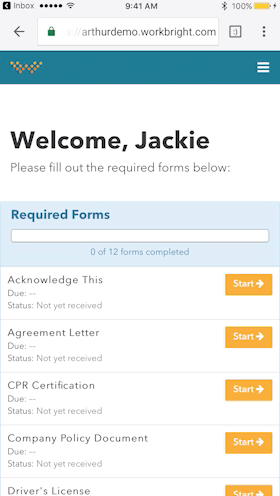
For businesses that are rapidly, seasonally, or just plain constantly hiring, WorkBright aims to take the cumbersome and traditionally paper-heavy process of onboarding and puts it all online. They make it possible for new employees to fill out their W4s, upload photos of licenses and certifications, sign digitally, and complete any paperwork from their laptop, tablet, or smartphone before they show up for their first day on the job. Integrations and an open API…
$158
hires per year
Zoho Projects
Score 9.2 out of 10
N/A
Zoho Project is online project management and planning software that provides project teams with a web-based collaborative environment. Zoho Projects can also include a bug tracking module specifically design to support software development project. It is integrated with other Zoho products including Zoho CRM.
$5
per month per user
Pricing
LASSO Crew
WorkBright
Zoho Projects
Editions & Modules
No answers on this topic
Onboarding
Starting at $158/mo
hires per year
Free
$0
Premium
$5
per month per user
Enterprise
$10
per month per user
Project Plus
Contact Sales
Offerings
Pricing Offerings
LASSO Crew
WorkBright
Zoho Projects
Free Trial
No
Yes
Yes
Free/Freemium Version
No
No
Yes
Premium Consulting/Integration Services
No
No
Yes
Entry-level Setup Fee
No setup fee
Required
Optional
Additional Details
—
Our pricing is based off the number of hires in a given contract year. All contracts are annual but can be billed on a monthly basis.
Discount offered for annual billing.
More Pricing Information
Community Pulse
LASSO Crew
WorkBright
Zoho Projects
Features
LASSO Crew
WorkBright
Zoho Projects
Project Management
Comparison of Project Management features of Product A and Product B
LASSO Crew
-
Ratings
WorkBright
-
Ratings
Zoho Projects
8.3
21 Ratings
7% above category average
Task Management
00 Ratings
00 Ratings
8.621 Ratings
Resource Management
00 Ratings
00 Ratings
8.520 Ratings
Gantt Charts
00 Ratings
00 Ratings
8.318 Ratings
Scheduling
00 Ratings
00 Ratings
8.819 Ratings
Workflow Automation
00 Ratings
00 Ratings
9.415 Ratings
Team Collaboration
00 Ratings
00 Ratings
9.321 Ratings
Support for Agile Methodology
00 Ratings
00 Ratings
6.35 Ratings
Support for Waterfall Methodology
00 Ratings
00 Ratings
8.812 Ratings
Document Management
00 Ratings
00 Ratings
8.217 Ratings
Email integration
00 Ratings
00 Ratings
8.217 Ratings
Mobile Access
00 Ratings
00 Ratings
8.419 Ratings
Timesheet Tracking
00 Ratings
00 Ratings
8.620 Ratings
Change request and Case Management
00 Ratings
00 Ratings
6.96 Ratings
Budget and Expense Management
00 Ratings
00 Ratings
7.715 Ratings
Professional Services Automation
Comparison of Professional Services Automation features of Product A and Product B
Transition to LASSO Crew was a real bear, but once we had all the pieces and parts in place and staff new how to use it, it solved the majority of our staffing headaches. We work on events across NYC and often have several events going on at the same time. Prior to LASSO Crew it was not uncommon for a supervisor to show up to a call with only a limited understanding of who was booked on the job, or for an employee to not be sure who or where they needed to report to that day. LASSO Crew-facing app and supervisor-facing website have entirely eliminated these headaches. Our staffing process is more streamlined than before, our rates and scheduling more transparent. Once you get past the initial hurdles of crew/team buy-in and implementation, the upsides are enormous.
Workbright is well suited because of the following reasons: 1. Data transmission between browser and application is highly encrypted 2. Bank grade data encryption for maximum security 3. Data is backed up at various locations 4. Database security is maintained to the highest standards with Engineers 5. Automated reminders and user correction error flow system
My work involves projects of 5-15 people with numerous projects running simultaneously. Prior to Zoho, I did not have a central location from which to view all project statuses at once. Zoho looks to provide this and also looks like it will deliver. I am anxious to see how our organization's use of it develops. At this time, I feel I am likely to recommend Zoho Projects because my organization has made great software decisions in the past so I have a level of trust already that the research has been done that Zoho is the best solution for our line of work.
We use it to manage our sales orders as there are lots of moving parts which are necessary to get client orders done properly.
I use it anytime I have a new idea I want to put into motion. As I can create a list for brainstorming, feedback, specific actions necessary in order to test and or implement the idea.
Unrelated to business, it's a great way to plan travel in order to make sure you don't forget those important things like passport, flight arrangement, client meeting confirmation, and meeting prep as far as what specific documents or things do you need to bring with you.
And since everyone is on the go and expected to keep up with work, the mobile/tablet app makes it a breeze to keep up, work on, and create new projects.
Some of the page layouts are clunky, especially the crew list page
LASSO Crew has a calendar feed that can link to gcal, iCal, etc but it’s very limited and doesn’t reliably update the calendar when the schedule changes.
I would like it to push automated clock-in/clock out alerts to my team. I can set these up manually by scheduling messages but it is a very cumbersome process.
Onboarding Paperwork - It would be great if there was only one website we had to log into. For example, I have to log into one to send paperwork, and then log into another domain to check the paperwork sent.
Note Timeline - Anytime any application is touched, viewed, etc. a note is made. We also utilize the note feature to communicate about each applicant. However, it gets quite messy when their are over 40 notes and you are not able to sort or organize them.
Attachments - Can't attach items in notes, would be nice feature for attaching images, snippets, pdfs, etc.
I've reviewed about 8 other project management solutions and Zoho Projects is the best I've seen without being overly complicated. Zoho Projects keeps getting better! Recent new enhancements makes it even easier to navigate. There are new keyboard shortcuts that cut my time way down. The tools are very easy to use.
The app is perfectly useable, if a bit limited in its functionality. The website, which functions as the "back end" of the app, takes awhile to learn. I carve out at least an hour of training on it for every new supervisor and fully expect to spend the first several weeks they use it to send them little reminders about how and when to do things. I have a few (older) supervisors who just out-and-out refuse to engage with LASSO Crew, but I think that has more to do with their aversion to change than it does the overall usability of the website.
Zoho Project has been very user-friendly. As a small business, we have a diverse group of people with varying skill sets. This platform has been easy for our team to learn, implement, and succeed with. The mobile version is also very handy for our team.
LASSO Crew takes customer support very seriously. My dedicated account rep responds to any issues directly, usually within one business day. When a crew member has an in-app problem they can't resolve the technical support team responds very quickly to any issue, usually with clear instructions about how to resolve the issue.
Although it might lack intuitiveness, once you get a hang of how Zoho Projects works, you can do a LOT. The impact good project management has on profitability is huge, and it has helped not only improve communication and coordination when working on a project, but more importantly have adequate tracking of time, due dates and potential bottle necks
We explored using IntelliEvent for crew management but their platform just wasn't as robust and they didn't seem to have timekeeping and payroll partners in place to support the back end. Other than that, I haven't found another platform or software that does what LASSO Crew does, it was built for the event industry, by the event industry, and that focus on audience really shows through.
WorkBright was selected as the primary HR software within our company. One of the main reasons it was selected is the intuitive user interface and dashboard. Additionally, the software had excellent features for the cost such as custom reporting, notifications, enhanced security, and training. WorkBright offered many features that other HR software in the same price range did not.
Zoho Projects provides a more limited set of functionality and customization options than other task/bug trackers on the market, but what it lacks in functionality it makes up for in ease of use. It probably has 80-90% of the features of its competitors but takes about a third of the time to get up and running and realizing value.
We've had some complaints from crew members that the communications they receive through the LASSO Crew system feel less personal than when we used to handle everything through direct emails and text messages.
LASSO Crew branding is super prominent on every communication we send from the platform, I wish they would center the client/employer a bit more and not make the LASSO Crew logo and color scheme the most identifiable thing on the page/email/message.
We needed a system to organize our growing business, so anything was better than what we had, which was nothing.
Recording time spend is a huge reason for using project software. It has made me aware of the tasks that are taking too long and where we are not being profitable as a company.
It has kept our team accountable for what needs to get completed and when projects are not in motion or completed timely. It's helpful to know in order to get billing out faster.