Microsoft BI is a business intelligence product used for data analysis and generating reports on server-based data. It features unlimited data analysis capacity with its reporting engine, SQL Server Reporting Services alongside ETL, master data management, and data cleansing.
$14
per month per user
SAP Customer Data Solutions
Score8.1 out of 10
N/A
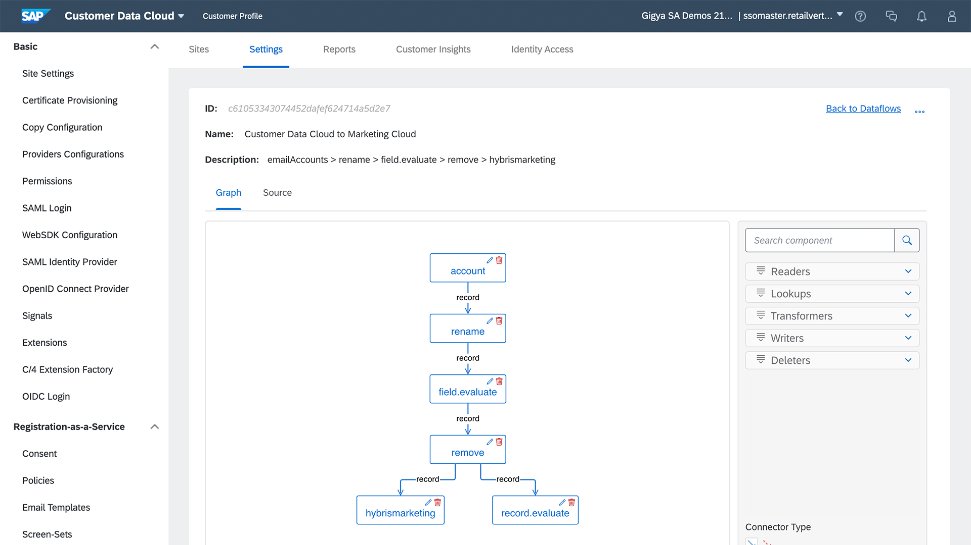
The SAP Customer Data Cloud, based on Gigya (acquired by SAP in 2017) is a product suite that allows users to identify consumers, business customers, or partners across devices and channels to drive registrations and engagement; manage access, permission, and consent; and transform data into unified customer profiles.
Microsoft BI has a lot of features and is a very powerful tool, especially if you have folks on your team that know how to utilize all of its capabilities. To truly unlock all that it can do, it does require people to have a deep understanding of its capabilities. That's where the software really shines. If you are looking for a simpler, more basic reporting tool, there are other programs available that do not require such a steep learning curve.
A de minimis incentive was given to thank the reviewer for their time. The incentive was not used to bias or drive a particular response, nor was the incentive contingent on a positive endorsement. More Info
It's best suited for business business to turn digital interaction in to richer and high value and experience that reach across computing platform also it offers a holistic and integrated approach to managing customer data and enhancing and personalized experience.it also draw actionable insights.because it offers wide range of products . perfect customer insight data solutions
A de minimis incentive was given to thank the reviewer for their time. The incentive was not used to bias or drive a particular response, nor was the incentive contingent on a positive endorsement. TR verified that a representative sample of customers was invited. More Info
A de minimis incentive was given to thank the reviewer for their time. The incentive was not used to bias or drive a particular response, nor was the incentive contingent on a positive endorsement. More Info
SAP's Customer Data Solutions provide a comprehensive customer view by collecting detailed data, including age, web activity, and buying history.
The software's strong analytics features give valuable information about how customers use content and products, so we can enhance our strategies.
SAP Customer Data Solutions offers insights to create specific marketing campaigns that sort audiences by preferences, browsing, and purchase behavior.
A de minimis incentive was given to thank the reviewer for their time. The incentive was not used to bias or drive a particular response, nor was the incentive contingent on a positive endorsement. More Info
I find the interface a bit complex and challenging to navigate. I remember having difficultly grasping it completely especially when I was new to the system. Simplifying the user experience would make it more accessible for everyone, making tasks quicker and more intuitive.
integrating it seamlessly with other software and platforms could enhance its functionality. I would really really love an integration between BenchMark email marketing tool.
A de minimis incentive was given to thank the reviewer for their time. The incentive was not used to bias or drive a particular response, nor was the incentive contingent on a positive endorsement. More Info
Microsoft BI is fundamental to our suite of BI applications. That being said, Northcraft Analytics is focused on delighting our customers, so if the underlying factors of our decision change, we would choose to re-write our BI applications on a different stack. Luckily, mathematics are the fundamental IP of our technology... and is portable across all BI platforms for the foreseeable future.
On the whole I am really impressed with SAP Customer Data Solutions and would highly recommend that other professionals look at this software to enhance their B2C and B2B sales
A de minimis incentive was given to thank the reviewer for their time. The incentive was not used to bias or drive a particular response, nor was the incentive contingent on a positive endorsement. TR verified that a representative sample of customers was invited. More Info
The Microsoft BI tools have great usability for both developers and end users alike. For developers familiar with Visual Studio, there is little learning curve. For those not, the single Visual Studio IDE means not having to learn separate tools for each component. For end-users, the web interface for SSRS is simple to navigate with intuitive controls. For ad-hoc analysis, Excel can connect directly to SSAS and provide a pivot table like experience which is familiar to many users. For database development, there is beginning to be some confusion, as there are now three tool choices (VS, SSMS, Azure Data Studio) for developers. I would like to see Azure Data Studio become the superset of SSMS and eventually supplant it.
A de minimis incentive was given to thank the reviewer for their time. The incentive was not used to bias or drive a particular response, nor was the incentive contingent on a positive endorsement. More Info
We mostly work with the API which is of very good quality and is well documented.However, some of our success is also due to having very talented developers on staff, and also understanding advanced gamification design. The tool supports a talented team! It won't actually do everything for you automatically.
The platform pulls data from multiple sources, cleaning, and restructuring it allowing us to expand our growth opportunities by providing highly tailored suggestions on each page for our visitors which made it tremendously simple for us to provide rich and customized experiences to our visitors in the best way possible.
A de minimis incentive was given to thank the reviewer for their time. The incentive was not used to bias or drive a particular response, nor was the incentive contingent on a positive endorsement. More Info
SQL Server Reporting Services (SSRS) can drag at times. We created two report servers and placed them under an F5 load balancer. This configuration has worked well. We have seen sluggish performance at times due to the Windows Firewall.
There are some latency issues. The 24 hour caching problem mentioned earlier is a problem. Sometimes the Gigya system makes two calls instead of a single call if we go directly to the social platform. For this reason, it's sometimes more efficient to go direct rather than use Gigya.
MSBI natively has a site that allows you to vote on user enhancements and bug fixes. This allows the largest nagging issues to float to the top and the development team can prioritize accordingly. As mentioned earlier, the large community base of MSBI developers assist technical resources in handling technical questions.
A de minimis incentive was given to thank the reviewer for their time. The incentive was not used to bias or drive a particular response, nor was the incentive contingent on a positive endorsement. TR verified that a representative sample of customers was invited. More Info
We have had multiple instances of help from Gigya to get our custom implementation working, including detailed technical assistance to a third party. We have found Gigya to be thorough and timely in their responses to all queries, which are consistently excellent.
A de minimis incentive was given to thank the reviewer for their time. The incentive was not used to bias or drive a particular response, nor was the incentive contingent on a positive endorsement. More Info
I have used on-line training from Microsoft and from Pragmatic Works. I would recommend Pragmatic Works as the best way to get up to speed quickly, and then use the Microsoft on-line training to deep dive into specific features that you need to get depth with.
They trained me in a train the trainer model. I then trained the internal team. Total training was about two hours, with an additional two hours for system setup. Training was maybe a little thin, but the system was fairly easy to learn and this wasn't really a problem.
We are a consulting firm and as such our best resources are always billing on client projects. Our internal implementation has weaknesses, but that's true for any company like ours. My rating is based on the product's ease of implementation.
There was a bit of a learning curve in the beginning, and perhaps we were unclear on some of our requirements. Once they figured out what we wanted though, things went pretty smoothly. Just some minor hiccups in the beginning
We have used the built in ConnectWise Manager reports and custom reports. The reports provide static data. PowerBI shows us live data we can drill down into and easily adjust parameters. It's much more useful than a static PDF report.
A de minimis incentive was given to thank the reviewer for their time. The incentive was not used to bias or drive a particular response, nor was the incentive contingent on a positive endorsement. More Info
Resources and specialized IT personnel is needed for the effective administration and deployment of Informatica Customer 360. This resource-intensive for smaller organizations. Although Informatica has the ability to integrate, the process of setting up and establishing these integrations can be difficult and may call for programming experience.
A de minimis incentive was given to thank the reviewer for their time. The incentive was not used to bias or drive a particular response, nor was the incentive contingent on a positive endorsement. More Info
A de minimis incentive was given to thank the reviewer for their time. The incentive was not used to bias or drive a particular response, nor was the incentive contingent on a positive endorsement. More Info
As a SaaS provider we see being able to provide self-service BI to our client users as a competitive advantage. In fact the MSSQL enabled BI is a contributing factor to many winning RFPs we have done for prospective client organisations.
However MSSQL BI requires extensive knowledge and skills to design and develop data warehouses & data models as a foundation to support business analysts and users to interrogate data effectively and efficiently. Often times we find having strong in-house MSSQL expertise is a bless.
A de minimis incentive was given to thank the reviewer for their time. The incentive was not used to bias or drive a particular response, nor was the incentive contingent on a positive endorsement. More Info
A de minimis incentive was given to thank the reviewer for their time. The incentive was not used to bias or drive a particular response, nor was the incentive contingent on a positive endorsement. More Info