Microsoft Exchange is a secure email / messaging gateway with file archiving and encryption / data loss capability, available as a hosted service (Exchange Online) or installed (Exchange Server).
N/A
Agentforce Marketing
Score7.6 out of 10
N/A
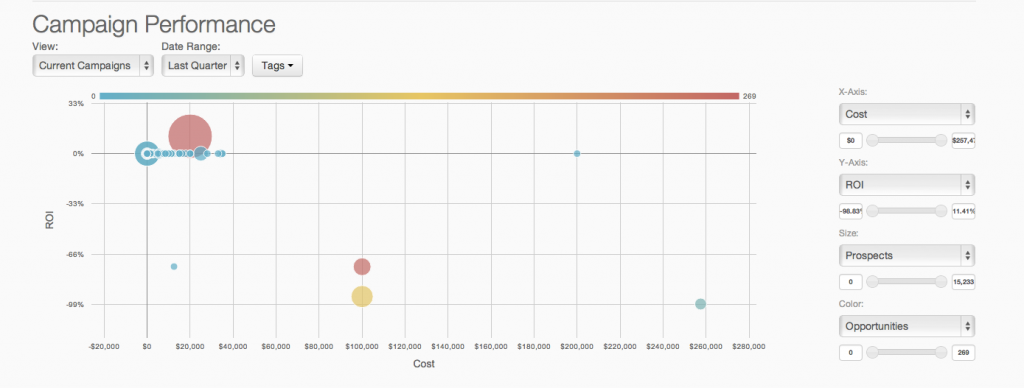
Marketing Cloud is a cloud-based digital marketing platform, used by marketers can segment their audience, deliver personalized messages, track campaign performance, engage leads and accounts, and optimize strategies based on real-time insights.
Creating and receiving emails is simple. Managing contacts is a nice feature, especially connecting to Active Directory. Calendar management is also helpful and sharing access to others' calendars for scheduling meetings is useful. And reserving resources such as rooms or equipment is also useful. Personal and shared mailboxes are good features, as well. Tasks are a little lacking, but other than that, the features are thorough.
A de minimis incentive was given to thank the reviewer for their time. The incentive was not used to bias or drive a particular response, nor was the incentive contingent on a positive endorsement. More Info
I think the product, by definition, is meant for marketing — and we use it exactly for that, for running campaigns. That’s the best-suited use case for the product. I don’t think it’s really meant to be used for anything else — that’s just not how it’s designed.
A de minimis incentive was given to thank the reviewer for their time. The incentive was not used to bias or drive a particular response, nor was the incentive contingent on a positive endorsement. More Info
As we have a large user base of 11,000 users we use MailTips to avoid people getting confused with people with similar names in the organization.
The integration between Teams Meeting and Resource booking is generally very good. The Scheduling Assistance makes it easy to scan calendars and find free periods to provisionally scheduled events.
Marking yourself as Out of the Office and busy is easy, as is sharing your calendar within the team/organization or individuals.
Voicemail integration and the ability to receive missed chats in your inbox are highly used and useful.
A de minimis incentive was given to thank the reviewer for their time. The incentive was not used to bias or drive a particular response, nor was the incentive contingent on a positive endorsement. More Info
A de minimis incentive was given to thank the reviewer for their time. The incentive was not used to bias or drive a particular response, nor was the incentive contingent on a positive endorsement. TR verified that a representative sample of customers was invited. More Info
The two main factors for the better reliability & Uptime of internally hosted Exchange Server depends on Exchange Server configuration and the level of investment the organization is willing to provide for hosting the Exchange Server On-Premise Environment. As the data is stored in the organization’s hardware, any disaster may lead to the loss of email and servers.
Losing data might affect business continuity and rebuilding it can be costly.
Security remains a major concern.
Security of data loss is main concern. To ensure that, organization needs to configure networks, systems and Exchange platform against possible threats.
A de minimis incentive was given to thank the reviewer for their time. The incentive was not used to bias or drive a particular response, nor was the incentive contingent on a positive endorsement. More Info
A de minimis incentive was given to thank the reviewer for their time. The incentive was not used to bias or drive a particular response, nor was the incentive contingent on a positive endorsement. TR verified that a representative sample of customers was invited. More Info
Email and calendars in a business setting are requirements. And Microsoft continues to be the standard of business applications. Microsoft 365 makes Microsoft Exchange easy to use. Everything is in the cloud. Let Microsoft take care of the hardware, the software, and the security. You just enable your business users with the functionality they need.
A de minimis incentive was given to thank the reviewer for their time. The incentive was not used to bias or drive a particular response, nor was the incentive contingent on a positive endorsement. More Info
As of right now we have not seen any other program that integrates as seamlessly into our Salesforce platform. We have barely scratched the surface of all the features and use cases. It would be irresponsible to make a move to another platform in the near future. We have not come up against any limitations that would prompt a need to switch
Microsoft Exchange has come a long way over the years and has nowhere near the technical overhead required for support as it did back in 2003/2007 and prior. The integrations with Teams, Defender, Sharepoint, Copilot and many other products make it a solid and well-rounded tool used for many day-to-day tasks.
A de minimis incentive was given to thank the reviewer for their time. The incentive was not used to bias or drive a particular response, nor was the incentive contingent on a positive endorsement. TR verified that a representative sample of customers was invited. More Info
You won't find another solution that has as many features as Salesforce Marketing Cloud Interaction Studio. We all know Salesforce, we all know how big they are and it's not for nothing... Their tools do most of the things you want, need and even imagine. Using it is complicated, but the usability is infinite.
A de minimis incentive was given to thank the reviewer for their time. The incentive was not used to bias or drive a particular response, nor was the incentive contingent on a positive endorsement. More Info
A de minimis incentive was given to thank the reviewer for their time. The incentive was not used to bias or drive a particular response, nor was the incentive contingent on a positive endorsement. More Info
Upgrades and timing of the upgrades were communicated well and planned during off hours for our work. If we did have a campaign scheduled during that time, it would kick-off after the system was back active. There were a few unplanned system down times, but it was a rare occurrence and those times were also short in duration.
A de minimis incentive was given to thank the reviewer for their time. The incentive was not used to bias or drive a particular response, nor was the incentive contingent on a positive endorsement. More Info
Though the make up of MA apps is not built this way today, it would be nice to see them become more real-time. The integration between Salesforce and Pardot is not a true real-time integration. If I modify something in Salesforce, those changes are not automatically reflected in Pardot immediately. There is a delay of about 15 minutes before the systems sync. This delay, although not long, is less than ideal We would love the systems to be integrated real time such that changes are propagated from one system to the other immediately.
We have a good enterprise agreement with Microsoft which affords us quick phone support. I have found the support staff knowledgeable and prompt with a solution when required. At times it may be difficult to schedule a call back, this is mainly due to our need for calls early in the morning which happens to be during a shift change at Microsoft support.
A de minimis incentive was given to thank the reviewer for their time. The incentive was not used to bias or drive a particular response, nor was the incentive contingent on a positive endorsement. More Info
They are really responsive and more than not solve the problem or give you insight to how you can manage the solution yourself. I do find however sometimes a long delay on the more complex issues when they need to loop in other departments. but overall a good experience with support
A de minimis incentive was given to thank the reviewer for their time. The incentive was not used to bias or drive a particular response, nor was the incentive contingent on a positive endorsement. TR verified that a representative sample of customers was invited. More Info
The trainers at the Pardot user conference (Elevate and Connections) were very knowledgeable and presented the material well. Again, the content was targeted to more of a new user audience, and was not really relevant for folks who had been using the product for 2+ years.
Pardot's online training touches on all topics briefly and vaguely without much indepth exploration into how a final outcome could look, such as Nurturing Campaigns, Email templates, landing page templates, etc... The only true way to uncover Pardot's full capabilities is to have Front End design and coding experience. Without this key skill set, I would not recommend Pardot to another business.
Implementation/conversion can be quite complex and, unless you have certified Exchange administrators in-house, you should strongly consider a 3rd party consultant for this implementation.
A de minimis incentive was given to thank the reviewer for their time. The incentive was not used to bias or drive a particular response, nor was the incentive contingent on a positive endorsement. More Info
From an IT perspective, once you set up the Javascript beacon and start collecting data there is a waiting game. During this time you can start labeling your site actions which can be labor intensive for a single person, but you don't really have the final end-users on the platform yet. We did a lot of training so users were experienced, but it wasn't until they had their first tasks to accomplish that they started using the system and had questions. I'd recommend setting up some immediate goals for an end-user to start segmenting for the purpose of displaying message campaigns so you can jump start end-user action.
Microsoft Exchange Product The best cloud-based enterprise-grade archiving platform with a host of features that enable files to be securely archived and retrieved with advanced search options. This tool is very easy to use and has a User-friendly interface. It is a highly reliable platform that allows all employees to automatically store their data without any limitations. It offers a cost-effective solution with customized policy management. We are happy that the customer support team is always fast and concerned, and the product's uninterrupted service experience. It is very good that it stores data in real-time without losing it, even in the event of a disaster. The cost-effective solution and integration with other tools are seamless.
A de minimis incentive was given to thank the reviewer for their time. The incentive was not used to bias or drive a particular response, nor was the incentive contingent on a positive endorsement. More Info
We use Salesforce Marketing Cloud for lead management, generating reports, tracking customer and dealer information, inputting orders, and more. I prefer HubSpot for email marketing and automation because it is easier to use and the emails are designed much better. We currently use Salesforce and HubSpot, and we are very happy to have both, as they have different pros/cons.
A de minimis incentive was given to thank the reviewer for their time. The incentive was not used to bias or drive a particular response, nor was the incentive contingent on a positive endorsement. TR verified that a representative sample of customers was invited. More Info
A de minimis incentive was given to thank the reviewer for their time. The incentive was not used to bias or drive a particular response, nor was the incentive contingent on a positive endorsement. TR verified that a representative sample of customers was invited. More Info
A de minimis incentive was given to thank the reviewer for their time. The incentive was not used to bias or drive a particular response, nor was the incentive contingent on a positive endorsement. More Info
Prior to this, we had no solution and literally were doing things on paper in a world where technology is outpacing paper. Having this process optimized has made it easier for the sales and marketing people to change information. From the training perspective, it has allowed us to see holes in where we could create additional support training, so the ROI here has been a lot more than just the optimization of a process.
A de minimis incentive was given to thank the reviewer for their time. The incentive was not used to bias or drive a particular response, nor was the incentive contingent on a positive endorsement. More Info
It has been an important factor in allowing seamless communication with clients and scheduling business meetings, which in turn works in the company's favor.
Haven't noticed any negative impact Exchange has had on our ROI. The support team is also responsive and helpful.
A de minimis incentive was given to thank the reviewer for their time. The incentive was not used to bias or drive a particular response, nor was the incentive contingent on a positive endorsement. More Info
Salesforce Marketing Cloud allows us to more efficiently reach out to a higher number of prospects.
Salesforce Marketing Cloud allows us to nimbly communicate important messages in a timely fashion to facilitate conversion.
Salesforce Marketing Cloud allows us to track who is opening our messages so that we can stop sending to those not interested and focus on the most engaged audiences.
A de minimis incentive was given to thank the reviewer for their time. The incentive was not used to bias or drive a particular response, nor was the incentive contingent on a positive endorsement. TR verified that a representative sample of customers was invited. More Info