Microsoft Project vs. OpenText Hightail

Overview
ProductRatingMost Used ByProduct SummaryStarting Price
Microsoft Project
Score 7.9 out of 10
N/A
Microsoft Project is a project management software. It provides core PM functionality, including agile workflow support and resource management. Project can be deployed in the cloud or on-premise.
$120
per year per user
OpenText Hightail
Score 9.2 out of 10
N/A
OpenText Hightail is a cloud-based collaboration software for creative content reviews and approvals. With one place for teams to share large, multimedia files, collect precise feedback and approve content, Hightail streamlines the creative process and helps teams keep projects on schedule.
$0
100MB per file upload
Pricing
Microsoft ProjectOpenText Hightail
Editions & Modules
Project Server
$0
Planner Plan 1
$10
per month per user
Planner and Project Plan 3
$30
per month per user
Planner and Project Plan 5
$55
per month per user
Project Standard 2024
$679.99
one-time fee per installation
Project Professional 2024
$1,129.99
one-time fee per installation
Lite
$0
100MB per file upload
Pro
$15
per user, per month
Teams
$30
per user/per month
Business
Custom
per user, per month
Offerings
Pricing Offerings
Microsoft ProjectOpenText Hightail
Free Trial
YesYes
Free/Freemium Version
NoYes
Premium Consulting/Integration Services
NoNo
Entry-level Setup FeeNo setup feeNo setup fee
Additional DetailsPlans are billed annually.Lite: Send large files with anyone. Files are limited to 100MB for each file size uploaded, 2GB storage max. Files expire after 7 days. Pro: Send large files with anyone and set advanced security permissions such as expiration dates and access codes. Files are limited to 25GB for each file size uploaded, with unlimited storage. Teams: Send large files, collaborate in real-time and manage creative projects with your team. The Hightail Teams plan allows you to purchase multiple users online (from 1-30 users per organization) and allows users to send file sizes up to 50GB with unlimited storage. The Teams plan also includes features such as file previews, organization, annotations, version control, discussions, follow-ups, approval routing and more. Business: Create unlimited visual project folders (called a Space) with collaboration and project management features such as approval routing and assigning to-dos, upload unlimited files up to 100GB each, protect them with access codes and manage user permissions., plus intuitive admin controls , detailed activity analysis for your entire company, advanced organization options and priority support.
More Pricing Information
Community Pulse
Microsoft ProjectOpenText Hightail
Features
Microsoft ProjectOpenText Hightail
Project Management
Comparison of Project Management features of Product A and Product B
Microsoft Project
8.0
111 Ratings
3% above category average
OpenText Hightail
-
Ratings
Task Management8.2110 Ratings00 Ratings
Resource Management7.7107 Ratings00 Ratings
Gantt Charts9.0107 Ratings00 Ratings
Scheduling8.5109 Ratings00 Ratings
Workflow Automation10.083 Ratings00 Ratings
Team Collaboration7.398 Ratings00 Ratings
Support for Agile Methodology4.883 Ratings00 Ratings
Support for Waterfall Methodology7.783 Ratings00 Ratings
Document Management9.077 Ratings00 Ratings
Email integration5.082 Ratings00 Ratings
Mobile Access10.067 Ratings00 Ratings
Timesheet Tracking10.073 Ratings00 Ratings
Change request and Case Management7.864 Ratings00 Ratings
Budget and Expense Management7.686 Ratings00 Ratings
Professional Services Automation
Comparison of Professional Services Automation features of Product A and Product B
Microsoft Project
8.8
79 Ratings
13% above category average
OpenText Hightail
-
Ratings
Quotes/estimates7.855 Ratings00 Ratings
Invoicing10.045 Ratings00 Ratings
Project & financial reporting7.576 Ratings00 Ratings
Integration with accounting software10.050 Ratings00 Ratings
Best Alternatives
Microsoft ProjectOpenText Hightail
Small Businesses
Stackby
Stackby
Score 8.9 out of 10
Frame.io
Frame.io
Score 9.1 out of 10
Medium-sized Companies
InEight
InEight
Score 8.4 out of 10

No answers on this topic

Enterprises
InEight
InEight
Score 8.4 out of 10

No answers on this topic

All AlternativesView all alternativesView all alternatives
User Ratings
Microsoft ProjectOpenText Hightail
Likelihood to Recommend
8.1
(111 ratings)
9.0
(8 ratings)
Likelihood to Renew
10.0
(3 ratings)
-
(0 ratings)
Usability
8.7
(9 ratings)
-
(0 ratings)
Support Rating
8.2
(34 ratings)
-
(0 ratings)
Implementation Rating
5.0
(1 ratings)
-
(0 ratings)
User Testimonials
Microsoft ProjectOpenText Hightail
Likelihood to Recommend
Microsoft
Microsoft Project Online is suited to Turnkey Projects where more Collaboration is required in Project Progress monitoring, risk assessment and conveying, issue recording and tracking. It is less appropriate when ERP Suites other than MS Dynamics are used, i.e when Enterprises need to integrate Finance / Accounting with It and having straight project management workflow
Read full review
OpenText
Hightail is my go-to source when I need to send large files that would never fit as regular attachments. That being said, sometimes there are files that would perfectly fit as attachments but I want the security that Hightail provides when sending sensitive or private material. It's very comforting knowing that the content I'm sending is only being received and viewed by the intended parties. It's also comforting for my clients when it's THEIR content that I'm sending for review.
Read full review
Pros
Microsoft
  • I love the Gantt Chart that Microsoft Project offers me, because it provides me with a view from various aspects, it provides me with exact details about the fulfillment of tasks over a period of time, it also allows me to make comparisons with the necessary data and the fulfilled data. by the employees, in order to know exactly if the project's expectations have been met.
  • I love the Gantt Chart that Microsoft Project offers me, because it provides me with a view from various aspects, it provides me with exact details about the fulfillment of tasks over a period of time, it also allows me to make comparisons with the necessary data and the fulfilled data by the employees, in order to know exactly if the project's expectations have been met.
  • The alert system for the fulfillment and delay of assignments is perfect. Microsoft Project allows me to configure the task system, I can assign the necessary tasks to fulfill the project, and the software alerts me immediately if the managers are fulfilling the assignments.
Read full review
OpenText
  • Management of content, communication, spaces, and projects in general.
  • Control of processes, tasks and activities between the different members of teams.
  • Collaborative work through different media and channels.
Read full review
Cons
Microsoft
  • Seems overly complicated for users sometimes in using Project and its functionalities
  • Hard to share files for those folks who do not have MS Project, and then have to print out for them
  • Can be confusing since it looks and feels like MS Excel
Read full review
OpenText
  • Some of our recipients are not very tech-savvy and can get confused with how to download a file. There is some room for improvement by making it clearer where the user should click to download the file.
Read full review
Likelihood to Renew
Microsoft
I like using Microsoft Project. It simplifies building a schedule
Read full review
OpenText
No answers on this topic
Usability
Microsoft
Microsoft
Project is easy to operate because data could be inserted, changed and
deleted like you are in an Excel timesheet. Besides, it provides a great
level of automation beween his fields allowing few data changes. Also, its
funcionalities are well defined and grouped in upper menus, so you can find a
funcionality quickly
Read full review
OpenText
No answers on this topic
Support Rating
Microsoft
Microsoft in recent years has transformed itself and gives a positive feeling when one interacts with the company. The company is focusing on its customers and willing to go extra mile to make customers happy.The company continues to invest in its products and bringing new features from time to time. Overall it is a positive feeling to be associated with such an iconic company.
Read full review
OpenText
No answers on this topic
Implementation Rating
Microsoft
I wasn't part of it so I don't know
Read full review
OpenText
No answers on this topic
Alternatives Considered
Microsoft
While many of the above tools are extremely well-versed, Microsoft Project's largest advantage comes from it being related to the largest business productivity company in the world. Project does have its sharing limitations - but regardless, offers one of the most robust tools in the market today. Microsoft Project is built with large-scale projects in mind but is more than up to the task for smaller projects as well. However, there are options available (especially cloud-based options) that may be more fitting for higher-level projects that do not require going into the weeds.
Read full review
OpenText
Honestly, once we started using Google Drive more efficiently and saw what improvements OpenText Hightail had made, it was hard to choose. But now that we more consistently use Google Drive, I use it probably 75% more than I use OpenText Hightail for the same tasks. I'm not sure how much longer I'll be a customer at OpenText but it's great to have both options.
Read full review
Return on Investment
Microsoft
  • Project saved me, as the project manager, countless hours of digging through tickets and schedules to plan everything out. It also saved me time in adjusting the project triangle as needed, since it does so much automatically.
  • It is costly, and since it requires extensive training to master, it's not just the high licensing cost that you need to take into account.
  • The reporting features - even just printing out Gantt charts - makes it far easier to communicate with stakeholders. That means less time for PMs doing all of this manually, and it means less follow-up questions and delays moving forward.
Read full review
OpenText
  • Hightail simply saves time. We no longer struggle with trying to meet the requirements of OutLook. When we have a file that is too large to send via OutLook we just "hightail it".
Read full review
ScreenShots

OpenText Hightail Screenshots

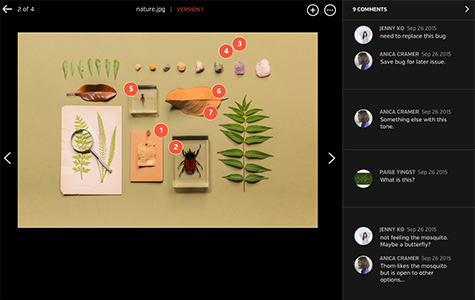
Screenshot of Improve review process with inline commenting for visual files.Screenshot of Compare each update instantly with visual versions.Screenshot of Bring everyone and everything together in a Space.Screenshot of Improve the audio and video review process with time-stamped commenting.