Microsoft Teams vs. Video In Person

Overview
ProductRatingMost Used ByProduct SummaryStarting Price
Microsoft Teams
Score 8.1 out of 10
N/A
Microsoft Teams combines video conferencing software with team collaboration tools. The communications platform allows MS Office users to conduct conference calls and share files via SharePoint, and join or initiate a group chat.
$4.80
per month per user
Video In Person
Score 0.0 out of 10
Enterprise companies (1,001+ employees)
Video In Person (VIP) by Yameo is a SaaS video solution used by businesses to build real-time video communication and interaction systems. Designed for diverse sectors including insurance, banking, automotive, retail, and field services, the customizable, white-label platform integrates into existing workflows and branding and provides connections from any device with an internet browser. VIP facilitates video interactions for scheduled consultations,…
$3,000
per year per user
Pricing
Microsoft TeamsVideo In Person
Editions & Modules
Microsoft Teams Essentials
$4.80
per month per user
Microsoft Teams Enterprise
$5.25
per month (paid yearly) per user
Microsoft Teams Enterprise
$5.25
per month per user
Microsoft 365 Business Basic
$7.20
per month per user
Microsoft 365 Business Standard
$15
per month per user
No answers on this topic
Offerings
Pricing Offerings
Microsoft TeamsVideo In Person
Free Trial
YesNo
Free/Freemium Version
YesNo
Premium Consulting/Integration Services
NoNo
Entry-level Setup FeeNo setup feeOptional
Additional DetailsDiscounts are available for non profit organizations.
More Pricing Information
Community Pulse
Microsoft TeamsVideo In Person
Features
Microsoft TeamsVideo In Person
Project Management
Comparison of Project Management features of Product A and Product B
Microsoft Teams
7.5
214 Ratings
3% below category average
Video In Person
-
Ratings
Task Management7.6158 Ratings00 Ratings
Gantt Charts7.081 Ratings00 Ratings
Scheduling7.7182 Ratings00 Ratings
Workflow Automation7.7108 Ratings00 Ratings
Mobile Access7.9204 Ratings00 Ratings
Search6.7186 Ratings00 Ratings
Visual planning tools8.2125 Ratings00 Ratings
Communication
Comparison of Communication features of Product A and Product B
Microsoft Teams
7.8
224 Ratings
2% below category average
Video In Person
-
Ratings
Chat8.9223 Ratings00 Ratings
Notifications7.9222 Ratings00 Ratings
Discussions8.3209 Ratings00 Ratings
Surveys7.5124 Ratings00 Ratings
Internal knowledgebase8.4136 Ratings00 Ratings
Integrates with GoToMeeting6.547 Ratings00 Ratings
Integrates with Gmail and Google Hangouts5.743 Ratings00 Ratings
Integrates with Outlook9.1155 Ratings00 Ratings
File Sharing & Management
Comparison of File Sharing & Management features of Product A and Product B
Microsoft Teams
7.8
209 Ratings
2% below category average
Video In Person
-
Ratings
Versioning8.4145 Ratings00 Ratings
Video files8.1177 Ratings00 Ratings
Audio files8.4178 Ratings00 Ratings
Document collaboration8.5192 Ratings00 Ratings
Access control8.2173 Ratings00 Ratings
Advanced security features7.8135 Ratings00 Ratings
Integrates with Google Drive5.353 Ratings00 Ratings
Device sync8.0149 Ratings00 Ratings
Best Alternatives
Microsoft TeamsVideo In Person
Small Businesses
Stackby
Stackby
Score 9.0 out of 10
Intermedia AnyMeeting Pro
Score 7.3 out of 10
Medium-sized Companies
Troop Messenger
Troop Messenger
Score 9.8 out of 10
JioMeet
JioMeet
Score 9.8 out of 10
Enterprises
HCL Connections
HCL Connections
Score 9.0 out of 10
Webex Meetings
Webex Meetings
Score 8.6 out of 10
All AlternativesView all alternativesView all alternatives
User Ratings
Microsoft TeamsVideo In Person
Likelihood to Recommend
8.3
(282 ratings)
-
(0 ratings)
Likelihood to Renew
3.7
(9 ratings)
-
(0 ratings)
Usability
8.7
(67 ratings)
-
(0 ratings)
Availability
9.0
(1 ratings)
-
(0 ratings)
Performance
8.0
(1 ratings)
-
(0 ratings)
Support Rating
8.3
(113 ratings)
-
(0 ratings)
Implementation Rating
10.0
(1 ratings)
-
(0 ratings)
Contract Terms and Pricing Model
6.3
(7 ratings)
-
(0 ratings)
Product Scalability
10.0
(1 ratings)
-
(0 ratings)
Professional Services
7.0
(7 ratings)
-
(0 ratings)
User Testimonials
Microsoft TeamsVideo In Person
Likelihood to Recommend
Microsoft
Teams is inferior to other platforms like Slack for messaging or Zoom. If it were up to me, I'd use Zoom for video conferencing as it's better for large groups and online training, and cleaner. Slack would be my preferred tool for chat as it's much easier to create channels, push notifications for teams, and integrations with other tools like Seismic.
Read full review
Yameo B.V.
No answers on this topic
Pros
Microsoft
  • Allows my team to communicate and set up smaller teams to share information appropriately.
  • Allows me to send out and connect to clients over Face To Face communications.
  • Allows me to coordinate between other MS products.
  • Allows my team to share documents internally and with our clients.
Read full review
Yameo B.V.
No answers on this topic
Cons
Microsoft
  • Microsoft Teams does rely on internet quality, so If you are needing information on found in Teams and your internet is down or choppy, you wont be able to access those files unlike if they were stored directly on your computer or network.
  • Some of the user interface of Microsoft Teams is not user friendly, it can take a long time to figure out how to use some tool even if you are using the help or troubleshooting.
  • Some of the Microsoft Teams features are limited to anyone using the free version vs. paid. With the paid, you have more storage, more video time, more tools. It would be nice to see the free version have the same features and ability.
Read full review
Yameo B.V.
No answers on this topic
Likelihood to Renew
Microsoft
Microsoft Teams is included with our Office 365 subscription and we have no intention of migrating off of Office 365 and Microsoft products. Since Microsoft Teams is included for free with our Office 365 subscription, and since we enjoy all the features, benefits, and functionality, there is no question that our team will continue to use the product
Read full review
Yameo B.V.
No answers on this topic
Usability
Microsoft
I personally have not come across a comparable platform that does what Microsoft Teams does and I believe there are very few competitors that offer the integration and user-friendly features that Microsoft Teams provides. You don't need to have special training to successfully benefit from Microsoft Teams features. If you can text, you can Microsoft Teams chat. If you can make a phone call, you can make a Microsoft Teams call - I think that in itself grants the platform a 10/10 rating for me.
Read full review
Yameo B.V.
No answers on this topic
Reliability and Availability
Microsoft
Rare, but outages do happen
Read full review
Yameo B.V.
No answers on this topic
Performance
Microsoft
Sometimes about once a week I get a message that says "Sorry, there seems to be something wrong". But it goes away in a few minutes.
Read full review
Yameo B.V.
No answers on this topic
Support Rating
Microsoft
The overall support provided by Microsoft for Microsoft Teams has been quite good but there is still some room for improvements. Microsoft needs to proactively work on fixing the open bugs in order to provide a seamless experience to the users. But over the service and experience provided by the Microsoft team have been quite satisfactory.
Read full review
Yameo B.V.
No answers on this topic
Implementation Rating
Microsoft
I find everything I need for my day-to-day work.
Read full review
Yameo B.V.
No answers on this topic
Alternatives Considered
Microsoft
We chose primarily because of the promised integration with the Microsoft Business Suite - which it mostly delivers on. That does give Teams an obvious advantage over competitors. IMHO Teams has a richer, more mature feature set, and the experience is more reliable and stable. Although like any of there there is room for imporvement.
Read full review
Yameo B.V.
No answers on this topic
Contract Terms and Pricing Model
Microsoft
Honestly, this tool is worth every penny. Yes, it's not free and you pay for the quality of services and the license. But the ROI and the benefits are all there. Also, the renewal, negotiation, and contract terms are all very well explained by our Microsoft account manager, and she's a charm.
Read full review
Yameo B.V.
No answers on this topic
Scalability
Microsoft
It does not appear to have a limit to how many teams and employees we can have using it
Read full review
Yameo B.V.
No answers on this topic
Professional Services
Microsoft
I used Skype for Business to take calls, hold conferences, and provide remote assistance to users. Microsoft Teams, on the other hand, is superior to Skype for Business in my opinion. My job entails a lot of screen sharing.
Read full review
Yameo B.V.
No answers on this topic
Return on Investment
Microsoft
  • I'm not sure I can point to a specific ROI, but it has improved our ability to communicate and work more effectively together.
  • It's also nice to have records of every interaction, photo, and document that has been shared. Less chance of something completely disappearing.
Read full review
Yameo B.V.
No answers on this topic
ScreenShots

Video In Person Screenshots

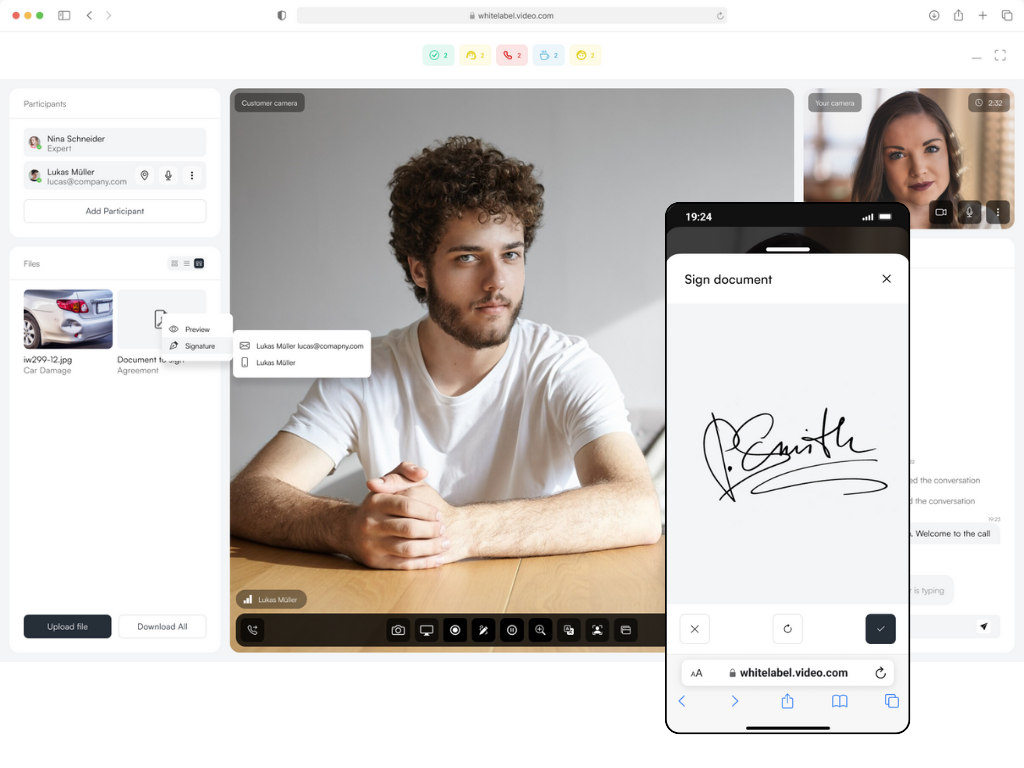
Screenshot of the interface where scheduled or Ad-hoc calls are possible. An option exists for in-bound calls where customers initiate a (video) call with agents.Screenshot of where to annotate, take pictures and record videos during video calls.Screenshot of the interface to E-sign documents during calls from desktop, tablet or mobile.