TrustRadius: an HG Insights company

Save this comparison

Save this comparison

Add Product

Recommended Comparisons

    Overview
    ProductRatingMost Used ByProduct SummaryStarting Price

    Mikogo

    Score1.2 out of 10
    N/AMikogo is a free screen sharing solution with built-in VoIP for online meetings, web presentations, web conferencing and sales demos.

    $156

    Annually

    PowerSchool SIS

    Score6.3 out of 10
    Mid-Size Companies (51-1,000 employees)
    The PowerSchool Student Information System covers administrative needs, such as scheduling, attendance, reporting, data management, faculty management, emergency/medical and health management, registration, and more for K-12 schools and districts. It is easy to use and boasts an industry-leading gradebook, PowerTeacher Pro. Users enjoy a fully web-based SIS that is flexible, configurable, and scalable with real-time updates on any operating system, browser or device.N/A
    Pricing
    MikogoPowerSchool SIS
    Editions & Modules
    Basic Annual
    $156
    Annually
    Professional Annual
    $228
    Annually
    Professional Lifetime
    $456
    Lifetime License per User
    Team Annual
    $468
    Annually
    Team Lifetime
    $936
    Lifetime License [Unlimited Users]
    No answers on this topic
    Offerings
    Pricing Offerings
    MikogoPowerSchool SIS
    Free Trial
    YesNo
    Free/Freemium Version
    YesNo
    Premium Consulting/Integration Services
    NoNo
    Entry-level Setup FeeNo setup feeNo setup fee
    Additional DetailsEnterprise plans are also available for larger organizations, with a custom number of users, meeting participants, and channels. Master Administration and Web API integrations are also available. Contact Mikogo for further information.—
    More Pricing Information
    Community Pulse
    MikogoPowerSchool SIS
    Considered Both Products
    BeamYourScreen
    No answer on this topic
    PowerSchool Group LLC
    No answer on this topic
    Key User Insights
    Would buy again
    No answers on this topic
    95%
    Would buy again
    18 Answers
    Delivers good value for the price
    No answers on this topic
    93%
    Delivers good value for the price
    14 Answers
    Happy with the feature set
    No answers on this topic
    89%
    Happy with the feature set
    17 Answers
    Lived up to sales and marketing promises
    No answers on this topic
    90%
    Lived up to sales and marketing promises
    9 Answers
    Implementation went as expected
    No answers on this topic
    92%
    Implementation went as expected
    12 Answers
    Features
    MikogoPowerSchool SIS
    Performance & Compatibility of Online Events Software
    Comparison of Performance & Compatibility of Online Events Software features of Mikogo and PowerSchool Student Information System
    Feature
    Mikogo
    3.1
    4 Ratings
    87% below category average
    PowerSchool Student Information System
    -
    Ratings
    High quality audio4.14 Ratings00 Ratings
    High quality video4.14 Ratings00 Ratings
    Low bandwidth requirements1.14 Ratings00 Ratings
    Mobile support3.22 Ratings00 Ratings
    Screen Sharing
    Comparison of Screen Sharing features of Mikogo and PowerSchool Student Information System
    Feature
    Mikogo
    6.0
    4 Ratings
    28% below category average
    PowerSchool Student Information System
    -
    Ratings
    Desktop sharing2.24 Ratings00 Ratings
    Whiteboards9.82 Ratings00 Ratings
    Online Meetings / Events
    Comparison of Online Meetings / Events features of Mikogo and PowerSchool Student Information System
    Feature
    Mikogo
    3.0
    4 Ratings
    93% below category average
    PowerSchool Student Information System
    -
    Ratings
    Calendar integration1.12 Ratings00 Ratings
    Meeting initiation1.24 Ratings00 Ratings
    Record meetings / events2.14 Ratings00 Ratings
    Slideshows7.63 Ratings00 Ratings
    Online Events Collaboration
    Comparison of Online Events Collaboration features of Mikogo and PowerSchool Student Information System
    Feature
    Mikogo
    2.1
    4 Ratings
    118% below category average
    PowerSchool Student Information System
    -
    Ratings
    Live chat1.24 Ratings00 Ratings
    Audience polling3.13 Ratings00 Ratings
    Q&A2.13 Ratings00 Ratings
    Online Events Security
    Comparison of Online Events Security features of Mikogo and PowerSchool Student Information System
    Feature
    Mikogo
    1.5
    4 Ratings
    137% below category average
    PowerSchool Student Information System
    -
    Ratings
    User authentication1.23 Ratings00 Ratings
    Participant roles & permissions1.13 Ratings00 Ratings
    Confidential attendee list2.13 Ratings00 Ratings
    Student and Faculty Administration
    Comparison of Student and Faculty Administration features of Mikogo and PowerSchool Student Information System
    Feature
    Mikogo
    -
    Ratings
    PowerSchool Student Information System
    8.5
    3 Ratings
    2% above category average
    Integrations with 3rd-Party Education Technology00 Ratings9.02 Ratings
    Online Registration Management00 Ratings10.02 Ratings
    District Communications, such as messaging and alerting00 Ratings8.12 Ratings
    Roster Management00 Ratings9.03 Ratings
    Platform Customization00 Ratings7.73 Ratings
    Teacher Self-Service00 Ratings9.03 Ratings
    Student Data Security00 Ratings9.43 Ratings
    Community Support00 Ratings7.43 Ratings
    Class Scheduling00 Ratings9.43 Ratings
    State and National-level Reporting00 Ratings7.12 Ratings
    Compliance Support00 Ratings7.62 Ratings
    Teacher and Parent Mobile Application00 Ratings8.03 Ratings
    Best Alternatives
    MikogoPowerSchool SIS
    Small Businesses
    ClickMeeting
    Score9.5 out of 10
    No answers on this topic
    Medium-sized Companies
    JioMeet
    Score9.8 out of 10
    Schoolmint Hero
    Score9.7 out of 10
    Enterprises
    Webex Meetings
    Score8.7 out of 10
    Schoolmint Hero
    Score9.7 out of 10
    All AlternativesView all alternativesView all alternatives
    User Ratings
    MikogoPowerSchool SIS
    Likelihood to Recommend
    1.2
    (4 ratings)
    9.0
    (32 ratings)
    Likelihood to Renew
    -
    (0 ratings)
    10.0
    (2 ratings)
    Usability
    -
    (0 ratings)
    8.0
    (1 ratings)
    Support Rating
    8.0
    (2 ratings)
    8.5
    (12 ratings)
    Implementation Rating
    -
    (0 ratings)
    8.0
    (1 ratings)
    Vendor post-sale
    -
    (0 ratings)
    10.0
    (1 ratings)
    Vendor pre-sale
    -
    (0 ratings)
    10.0
    (1 ratings)
    User Testimonials
    MikogoPowerSchool SIS
    Likelihood to Recommend
    BeamYourScreen
    Pros Mikogo is well-suited and cost-effective for the small business Simple & well-designed; easy to figure out. Works best for one-on-one client support. Cons No live customer support Free version has limited features (e.g. no invite meeting allowed) Trial version only 14 days
    Incentivized
    Read full review
    PowerSchool Group LLC
    PowerSchool Student Information System is a cool software that can be highly recommended to anyone who is living in the educational management space. It is proven that this software can reduce your manual workload massively if you use it right. Plus it is really worth the price you pay. Especially if you are in the administrative field, this software will help you to minimize manual efforts put into student registrations, staffing recruitment, and main resource management processes.
    Incentivized
    Read full review
    Pros
    BeamYourScreen
    • Inexpensive
    • Simple interface
    • Menus and prompts were clear
    Incentivized
    Read full review
    PowerSchool Group LLC
    • PowerSchool houses student or staff information that can be easily accessed by those teachers and administrators who need the information. This allows everyone to go to one place to access information.
    • Parents can view their child's grades at any time with their protected login on a parent portal. This allows teachers to keep parents informed and involved in their child's progress at school. When everyone works together it increases our students' chance for success.
    • PowerSchool offers videos to train new users. When we have new employees, the videos can be accessed at any time the employee needs as opposed to them waiting for someone to help them.
    Incentivized
    Read full review
    Cons
    BeamYourScreen
    • I'd like to be able to record a session easier.
    Incentivized
    Read full review
    PowerSchool Group LLC
    • Does not consistently communicate with related software such as Illuminate for Special Education Students.
    • Drop down menus frequently refresh as data is entered which slows down the user's ability to enter information.
    • Icons are sometimes unclear and not easily understandable. Word labels for some items might be more effective.
    Incentivized
    Read full review
    Likelihood to Renew
    BeamYourScreen
    No answers on this topic
    PowerSchool Group LLC
    We would be starting over at square one if we did not continue our PowerSchool subscription. We do not have a program in a place that would take its place.
    Incentivized
    Read full review
    Usability
    BeamYourScreen
    No answers on this topic
    PowerSchool Group LLC
    Great features, but it can feel very cumbersome at times
    Incentivized
    Read full review
    Support Rating
    BeamYourScreen
    I do not have any experience with Mikogo's support as I have never experienced any problem with it.
    Incentivized
    Read full review
    PowerSchool Group LLC
    Overall, I have not had to use support for PowerSchool Student Information System because our school district gives us training in each area in which we will be utilizing PowerSchool Student Information System. In terms of in-user support, I feel that there is mild to moderate user support that is built into PowerSchool SIS.
    Incentivized
    Read full review
    Alternatives Considered
    BeamYourScreen
    Mikogo has simple features and is easy to use. If you don't need lots of bells and whistles and just want to screen share or video conference on a small scale Mikogo works best. Join.me & TeamViewer are a bit confusing for the novice small business person. My experience with LogMeIn has been that it's sluggish. GoToMeeting works great but is pricey for the small firm that mainly does one-to-one support/training. I couldn't get Zoom to work right.
    Incentivized
    Read full review
    PowerSchool Group LLC
    I have heard good things for Infinite Campus and Skyward. I would [evaluate] each of them and see what fits your needs. Each has their strengths and weaknesses and so picking the right one for your needs is important. PowerSchool [Student Information System] does have some great features, but lacks some fundamental reports and functions to make it top notch.
    Incentivized
    Read full review
    Return on Investment
    BeamYourScreen
    • Zero positive impact
    • Spend just a little more with products like AnyDesk and get some real ROI
    • Short term, the product can be used on a trial basis (or at least it was available as a trial)
    Incentivized
    Read full review
    PowerSchool Group LLC
    • It has created shortcuts for all staff members, saving us time.
    • In creating shortcuts and combining many different systems into one, it is saving our school money.
    • It has created a safety net for teachers because grades and student information is stored electronically, which means teachers not having to worry about losing or misplacing their grade books.
    Incentivized
    Read full review
    ScreenShots

    Mikogo Screenshots

    Screenshot of Screen sharing between two windows desktop computersScreenshot of Phone conference and participant list options

    PowerSchool SIS Screenshots

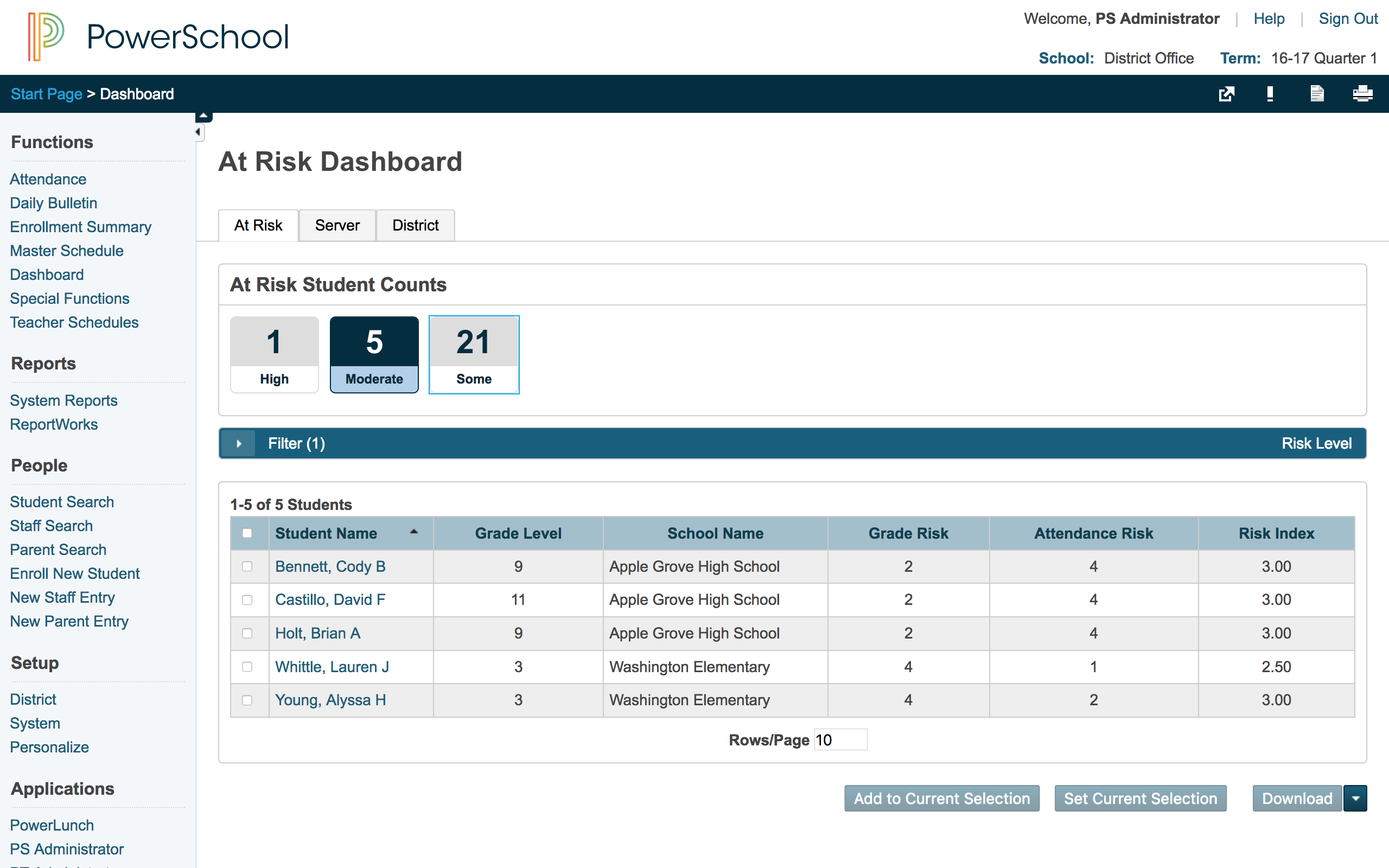
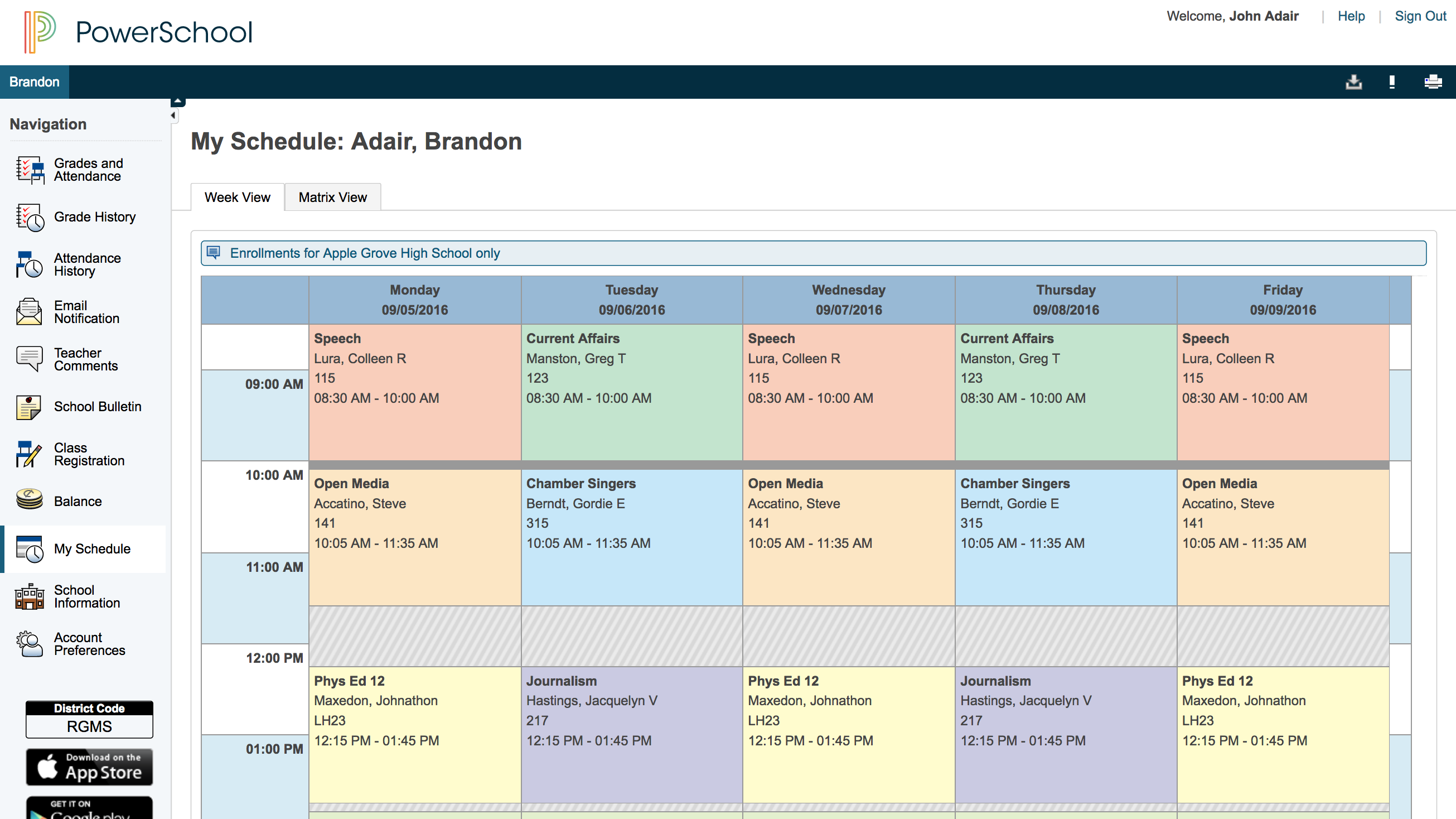
    Screenshot of Student attendanceScreenshot of Standards-based gradingScreenshot of At-risk dashboardScreenshot of Parent view of student schedule