Chose MongoDB
Also, using DocumentDB, and both are good, each was chosen based on the developer's expertise. So take advantage of in-house skills.

| Product | Rating | Most Used By | Product Summary | Starting Price |
|---|---|---|---|---|
 MongoDB | N/A | MongoDB is an open source document-oriented database system. It is part of the NoSQL family of database systems. Instead of storing data in tables as is done in a "classical" relational database, MongoDB stores structured data as JSON-like documents with dynamic schemas (MongoDB calls the format BSON), making the integration of data in certain types of applications easier and faster. | $0.10 million reads | |
 Neo4j | N/A | Neo4j is an open source embeddable graph database developed by Neo Technologies based in San Mateo, California with an office in Sweden. | $65 per month | |
 Microsoft SQL Server | N/A | Microsoft SQL Server is a relational database. | $1,418 Per License |
| MongoDB | Neo4j | Microsoft SQL Server | ||||||||||||||||||||||
|---|---|---|---|---|---|---|---|---|---|---|---|---|---|---|---|---|---|---|---|---|---|---|---|---|
| Editions & Modules |
|
|
| |||||||||||||||||||||
| Offerings |
| |||||||||||||||||||||||
| Entry-level Setup Fee | No setup fee | No setup fee | No setup fee | |||||||||||||||||||||
| Additional Details | Fully managed, global cloud database on AWS, Azure, and GCP | — | — | |||||||||||||||||||||
| More Pricing Information | ||||||||||||||||||||||||
| MongoDB | Neo4j | Microsoft SQL Server | |
|---|---|---|---|
| Considered Multiple Products |  MongoDB  Sonaj Gupta Software Developer Chose MongoDB optimize web application.  Jon Kern Manager Strategic Products Chose MongoDB I only briefly looked at CouchDB after I already began using MongoDB. Naturally, I have used many relational SQL databases. Since MongoDB did everything I needed, I saw no need to look around for alternatives.  Jeff Sherard Senior Leader Chose MongoDB MongoDB was the most full-featured NoSQL database we evaluated - that offered atomic transactions at a document level, built-in HA & DR, open source, robust queries, and enterprise level support. Other platforms had specific parts of what we were looking for - MongoDB had it all.  Eddy Wong Cofounder and CTO Chose MongoDB - Mongo had a query language - Mongo could be run easily on my laptop  Joshua Austill Application Developer Chose MongoDB I selected MongoDB because it works for well with web interfaces. All of the RDBMS alternatives would have required a lot more time writing schemas and working around retrieving data and mapping it. That could have been somewhat mitigated with Entity Framework, but that again … | Neo4j  Nitin Pasumarthy Software Engineer | Data Visualization Chose Neo4j  Rahul Chaudhary Software Engineer Chose Neo4j |  Microsoft SQL Server  Pritesh Patel Product Manager, Partnerships & Data Services Chose Microsoft SQL Server Microsoft SQL Server is a comprehensive solution as transactional database, data warehouse, analytics, reporting, and ETL. It also integrates with the cloud well (Azure). The ease of use and setup makes this better than Oracle Database because the query syntax is also different …  Michelle Sollicito Cloud Consultant Chose Microsoft SQL Server SQL Server is better for large databases containing structured relational data. It makes it easy to group and order, to sum and create tables of data from any data stored in a table or related tables. While Dynamodb is very good at STORING huge amounts of unstructured data, it …  Akshaya Bhardwaj Consultant Chose Microsoft SQL Server Lots of internet communities and the data processing speed is very high. It is very cost-effective and easy to learn.  Andy G Teasdale Analyst - Asset Managment Chose Microsoft SQL Server Microsoft is more appropriate for the requirements of this particular organisation due to its ability to handle structured data efficiently and the fact that it is already widely used.  Steve Jones Editor Chose Microsoft SQL Server I have been a SQL Server focused professional for over 20 years, so SQL Server is my first choice. I have experience and comfort, and the ability to get up to speed quickly. Oracle has been too expensive, though I think it has performed similar to SQL Server in the applications … |
| MongoDB | Neo4j | Microsoft SQL Server | |||||||||||||||||||||||||||||||
|---|---|---|---|---|---|---|---|---|---|---|---|---|---|---|---|---|---|---|---|---|---|---|---|---|---|---|---|---|---|---|---|---|---|
| NoSQL Databases |
|
| MongoDB | Neo4j | Microsoft SQL Server | |
|---|---|---|---|
| Small Businesses |  IBM Cloudant Score 7.4 out of 10 | IBM Cloudant Score 7.4 out of 10 |  InterSystems IRIS Score 7.9 out of 10 |
| Medium-sized Companies | IBM Cloudant Score 7.4 out of 10 | IBM Cloudant Score 7.4 out of 10 | InterSystems IRIS Score 7.9 out of 10 |
| Enterprises | IBM Cloudant Score 7.4 out of 10 | IBM Cloudant Score 7.4 out of 10 |  SAP IQ Score 10.0 out of 10 |
| All Alternatives | View all alternatives | View all alternatives | View all alternatives |
| MongoDB | Neo4j | Microsoft SQL Server | |
|---|---|---|---|
| Likelihood to Recommend | 10.0 (79 ratings) | 2.1 (9 ratings) | 8.0 (107 ratings) |
| Likelihood to Renew | 10.0 (67 ratings) | - (0 ratings) | 9.0 (8 ratings) |
| Usability | 10.0 (15 ratings) | 6.0 (1 ratings) | 7.6 (17 ratings) |
| Availability | 9.0 (1 ratings) | - (0 ratings) | 10.0 (1 ratings) |
| Performance | - (0 ratings) | - (0 ratings) | 9.0 (1 ratings) |
| Support Rating | 9.6 (13 ratings) | - (0 ratings) | 7.9 (26 ratings) |
| In-Person Training | - (0 ratings) | - (0 ratings) | 9.0 (1 ratings) |
| Online Training | - (0 ratings) | - (0 ratings) | 9.0 (1 ratings) |
| Implementation Rating | 8.4 (2 ratings) | - (0 ratings) | 9.0 (6 ratings) |
| Configurability | - (0 ratings) | - (0 ratings) | 10.0 (1 ratings) |
| Ease of integration | - (0 ratings) | - (0 ratings) | 9.0 (1 ratings) |
| Product Scalability | - (0 ratings) | - (0 ratings) | 9.0 (1 ratings) |
| Vendor post-sale | - (0 ratings) | - (0 ratings) | 9.0 (1 ratings) |
| Vendor pre-sale | - (0 ratings) | - (0 ratings) | 9.0 (1 ratings) |
| MongoDB | Neo4j | Microsoft SQL Server | |
|---|---|---|---|
| Likelihood to Recommend | MongoDB
 Kendal Droddy Senior System Engineer | Neo Technologies
| Microsoft
|
| Pros | MongoDB
 Ronald Melendez Desarrollador de software | Neo Technologies
 Anudeep Palanki Application Developer | Microsoft
|
| Cons | MongoDB
 Joshua Weaver Developer | Neo Technologies
Rahul Chaudhary Software Engineer | Microsoft
|
| Likelihood to Renew | MongoDB
Jon Kern Manager Strategic Products | Neo Technologies No answers on this topic | Microsoft
 Lisandro Fernigrini Sr Database Administrator / Developer |
| Usability | MongoDB
 Jose Manuel Ortega Software Engineer && Security researcher | Neo Technologies
| Microsoft
 Andy Erickson Senior Consultant |
| Reliability and Availability | MongoDB No answers on this topic | Neo Technologies No answers on this topic | Microsoft
|
| Performance | MongoDB No answers on this topic | Neo Technologies No answers on this topic | Microsoft
|
| Support Rating | MongoDB
 Mehmet Fatih Onal Technical Architect | Neo Technologies No answers on this topic | Microsoft
|
| In-Person Training | MongoDB No answers on this topic | Neo Technologies No answers on this topic | Microsoft
|
| Online Training | MongoDB No answers on this topic | Neo Technologies No answers on this topic | Microsoft
|
| Implementation Rating | MongoDB
 Tom Maiaroto Sr. Platform Developer / UX Designer / Optimization Engineer | Neo Technologies No answers on this topic | Microsoft
 Bill Starling Database Administrator |
| Alternatives Considered | MongoDB
 Oleg Chumin Java Software Engineer | Neo Technologies
Nitin Pasumarthy Software Engineer | Data Visualization | Microsoft
|
| Scalability | MongoDB No answers on this topic | Neo Technologies No answers on this topic | Microsoft
|
| Return on Investment | MongoDB
Jeff Sherard Senior Leader | Neo Technologies
| Microsoft
|
| ScreenShots | MongoDB Screenshots     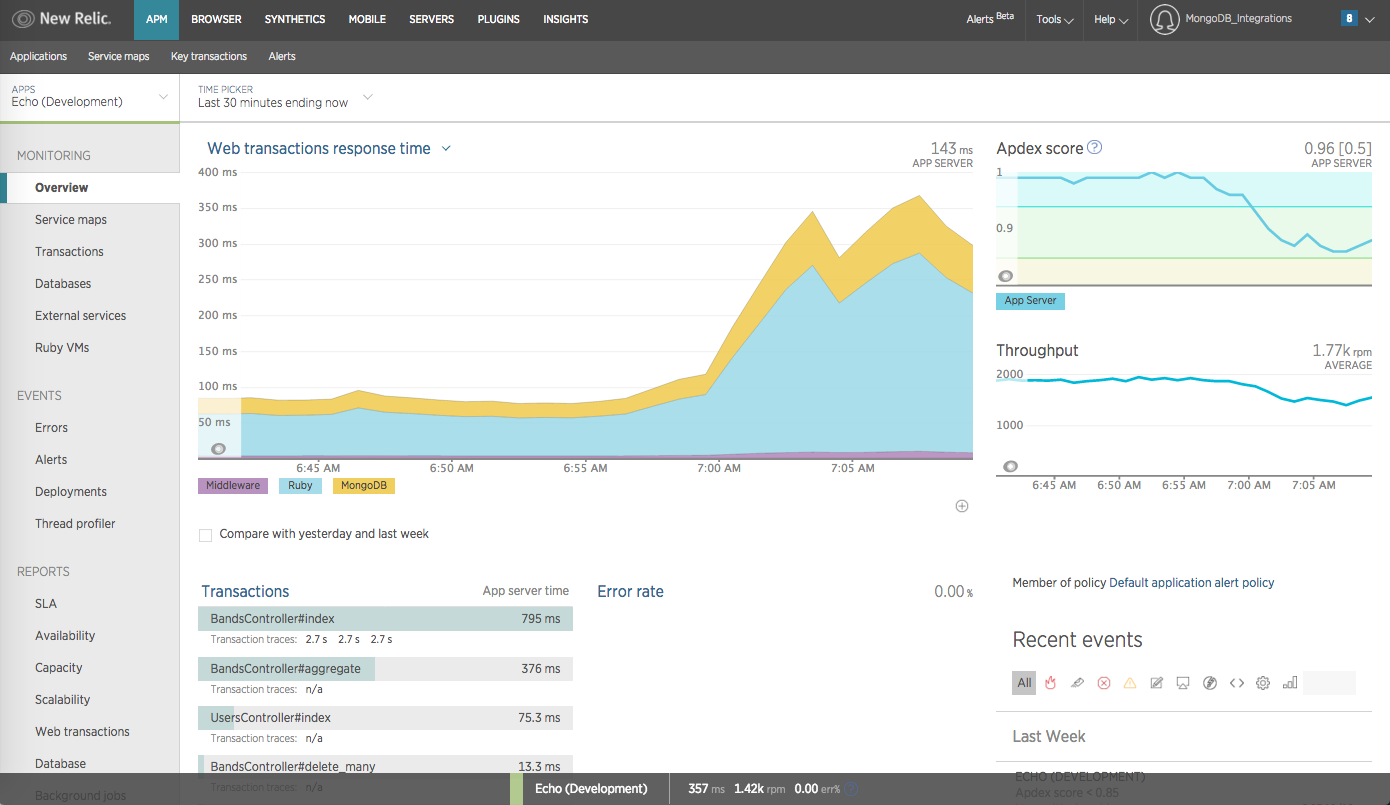 |