MSPs
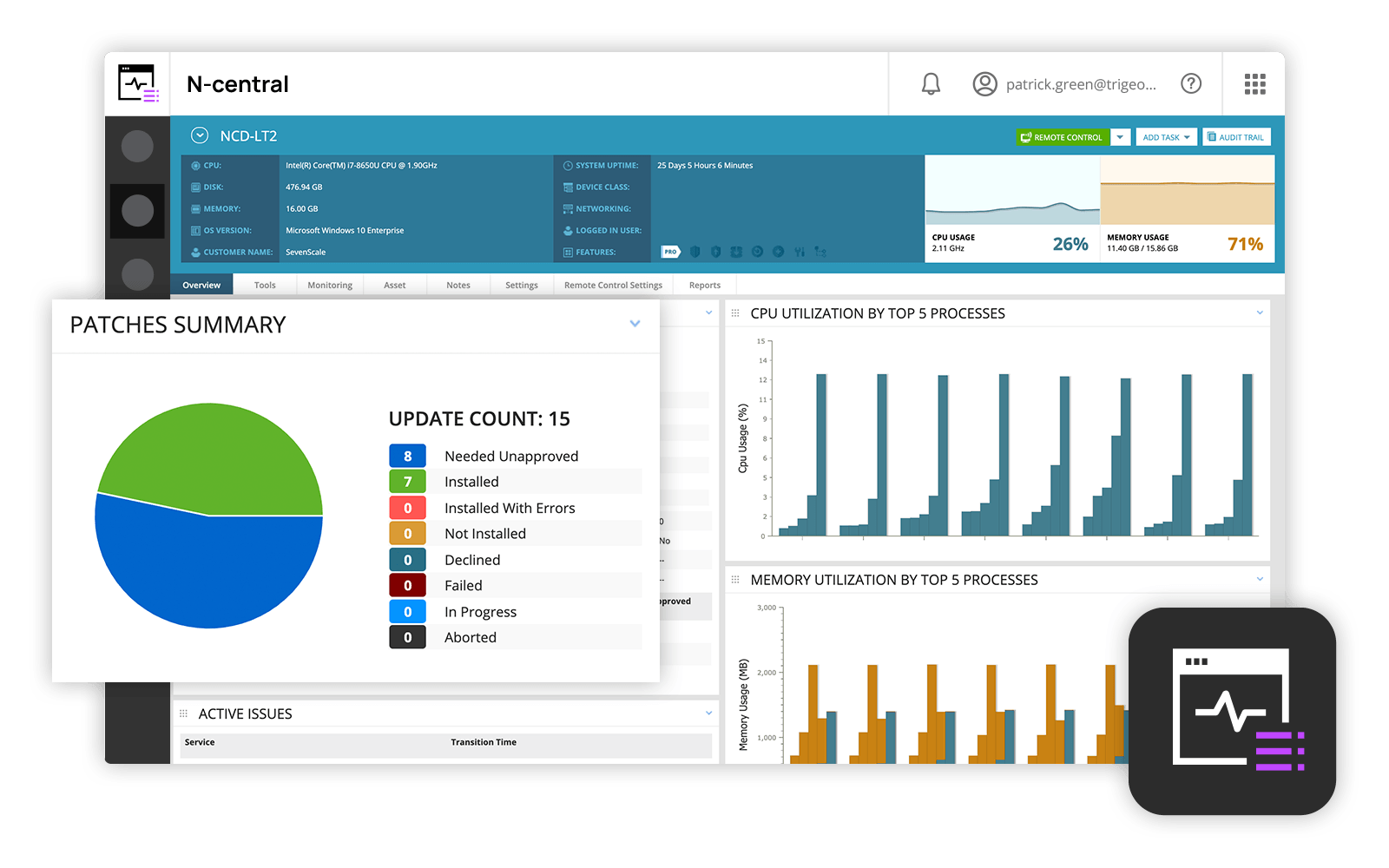
and IT professionals use N-able™ N-central® to monitor and manage devices and complex
networks remotely. N-central provides
visibility and efficiency as the user's needs scale. N-central can help users:
1. Proactively monitor everything on a customer network—not just servers
and workstations—and troubleshoot.
2. Stay on top of threats with features like MFA, antivirus, integrated endpoint
detection and response, data backup, disk encryption, email protection,…
N/A
Veeam Data Platform
Score 9.0 out of 10
Mid-Size Companies (51-1,000 employees)
Veeam’s® premier product, Veeam Backup & Replication™, delivers availability for all cloud, virtual, Kubernetes and physical workloads. Through a management console, the software provides backup, archival, recovery and replication capabilities.
$428
per year per 5 instances
Pricing
N-able N-central
Veeam Data Platform
Editions & Modules
No answers on this topic
Veeam Data Platform Essentials
$428
per year per 5 instances
Veeam Data Platform
Contact sales team
Offerings
Pricing Offerings
N-able N-central
Veeam Data Platform
Free Trial
No
Yes
Free/Freemium Version
No
Yes
Premium Consulting/Integration Services
No
Yes
Entry-level Setup Fee
No setup fee
No setup fee
Additional Details
—
Veeam sells through channel partners. Contact a partner for detailed pricing and quotes. Resellers or sales personnel are available for assistance.
Overall, for the Average MSP, none of the RMM solutions is going to be perfect, they will all have their strengths and weaknesses and N-Able is no exception. It is a great solution if you are looking for something that is not super cryptic to use and want something relatively …
N-Able is perfect for an MSP environment. It gives all the standard functionality an IT professional needs out of the box and can be configured to show almost anything required. For example, we have configured a dashboard to show when our backups need attention for each customer. This is achieved by running a small script on repeat via N-Central everyday/evening, and the result gives us information on the dashboard to help us identify exactly what is working and what needs looking into.
Mixed on‑prem VMware/Hyper‑V environments running AD, file servers, CI, and line‑of‑business VMs.You need fast, predictable recovery (including instant restore to Azure when hardware or ransomware takes out primary hosts) and hardened, immutable backups managed through a consistent appliance model. Example: Your domain controllers, CI VMs, and PDM server are all backed up nightly with short backup windows and regular test restores, and you can fail critical services into Azure in minutes if the cluster dies.
Remote tasks - entry-level techs can run basic tasks without physically touching a piece of equipment.
Remote support - remote controlling user devices is easy and saves a lot of time with having to initiate a remote session.
Management of devices, particularly patch management and anti-virus management - you can automatically approve and deploy patches and schedule automatic AV scans.
The ease of use in creating jobs and adding clients enables our new and less skilled administrators to work efficiently, quickly, and accurately.
The same ease of use is essential for junior admins as well. Backups are quickly and accurately restored, allowing our networking team to bring clients back to production within expected times.
The ability to create a restore for testing and to remove it quickly has proven to be an excellent asset for our production and DB teams.
Customer support just points to online guides and I feel they aren't helpful.
During the trial they turn on a lot of features. In my experience, if you play around with the features, they charge you for them. Keep this in mind if you move forward with N-Able - they will charge for "trialed" services.
In my experience, some services that you're being charged for can't be disabled or monitored by you or your team. You only see them on the monthly invoice.
In my opinion, the "Scripting Automation" doesn't provide value. You're either going to be writing your own batch or Powershell to make scripting work.
In my opinion, monitoring software deployments is painful.
The default monitoring template can't be duplicated, edited, or referenced. You'll find that the default monitors in an unusual way and will throw needless recurring alerts into your ticketing system. To avoid this, you need to create a template from scratch which takes many hours to set up.
In my opinion, they're more concerned about a quick buck than customer service. "Buyer beware" company.
Overall we have liked our solar winds experience, however, as our company has grown to support larger enterprises, this product does not have the functionality that our teams need in order to fully support them. The lack of granularity with backups and lack of ability to support nutanix environments is slowly drawing us into the use of other tools.
I really have no complaints about Veeam Backup & Replication. Their service has been excellent and the cost is minimal in comparison to other services I checked out. Implementation wasn't simple and the Veeam Support team was there to help each step of the way.
The user interface is fairly straight forward, with logic groupings for objects. I did not deploy this software, but am one of the daily administrators. Once you get the correct agent package (Which can be a challenge) the integration into AD is not bad. The UI could be more customized, but that may have been a design choice.
It is a very robust solution that has never failed. It also has perfect integration with Windows server volume shadow copies. The processing load is moved from the backup server to the backup proxy. Increased fault tolerance: you can store data on a separate machine, the backup repository. Can perform a bare metal restore.
I give Veeam Data Platform a rating of 9 for availability because it consistently performs reliably in critical data protection and recovery tasks. The platform is designed to minimize downtime, ensuring that backup and recovery processes are accessible when needed.While there may be rare instances of maintenance or minor application errors, these do not significantly affect the overall reliability of the system. Veeam’s strong architecture and features like high availability configurations further enhance its performance, allowing us to trust it in crucial situations. Overall, it has proven to be a dependable solution that meets our organization's needs effectively.
Veeam does a good job with backing up our servers in a timely manner. We are still at the beginning of our Veeam use and are pleased with the speed at which we can access the system as well as the backups and restore points. Veeam is definitely superior to our previous backup system in terms of speed and accessibility
Every time we have reached out to SolarWinds they are quick to respond, even offering support chat 24/7. Their support team is great and works with you to find solutions to issues. They have taken items we had issues with before and used those to create updates so that the issue is handled better in the future.
The support team has never asked me to jump through silly hoops or waste time on pointless exercises. They seem to truly have a handle on what may be wrong. In fact, when we were having trouble getting our license renewal setup (because of yet another license migration at Veeam) a support incident got us connected to the right people to get our renewal done in time.
I rated the in-person training an 8 because it was generally effective and provided a solid foundation for understanding the Veeam Data Platform. The instructors were knowledgeable and engaged, making the sessions interactive. However, I felt that some topics could have been covered in more depth, and additional hands-on exercises would have further reinforced the learning experience. Overall, it was a positive training session that adequately prepared attendees for using the product, but there's room for improvement.
I gave it a rating of 7 because, although the online training offered valuable content and covered the essential aspects of the Veeam Data Platform, it lacked interactivity and opportunities for direct engagement with instructors. This made it challenging to ask questions or delve deeper into specific topics. Additionally, some sections felt a bit rushed, which could hinder a comprehensive understanding of more complex features. Overall, while the training was useful, improvements in interactivity and pacing could elevate the experience significantly.
Plan the process and then work through your plan, i know this should go without saying but its easy to get sidetracked. You tend to want to just get up and running so you can have that sigh of relief, spend the time to talk to your business stakeholder to see what goals they are trying to accomplish and how that may impact your plans first.
Our version of SolarWinds was old and running on old hardware, but it was way easier to setup and do things with. It did not do everything N-able does such as patch management, or at least we didn't have a module to do so if one existed. However it definitely seemed easier to use and possibly more stable.
We didn't get to use the tool ourselves, but we studied it. We spent three days with the team studying, we had several presentations from the tool's representatives, but it seemed very confusing, a lot of information and little action. It wasn't what we were looking for. We also spoke with the contract manager, and he informed us that the tool was too expensive for what it seemed to be delivering, so we ultimately opted for Veeam.
In terms of scalability for our company, Veeam was able to cover our backup needs with ease. They have options for even more individualized backup if we were to need them; i.e. if a specific workstation needs its own independent backup. We have not used these resources yet, but I am confident they will be beneficial to our company in the near future.