Newforma Project Center is web-based construction project information management software for collaboration. Users can access a drag and drop interface, relate emails to documents, markup and review designs, track meeting minutes and action items, and search across projects. It has mobile accessibility.
N/A
Trimble SysQue
Score 7.0 out of 10
N/A
Trimble SysQue is a software design software which enables designers and contractors to design in Autodesk Revit with real-world, manufacturing-specific MEP content that is ready for fabrication.
N/A
ProContractor
Score 3.5 out of 10
N/A
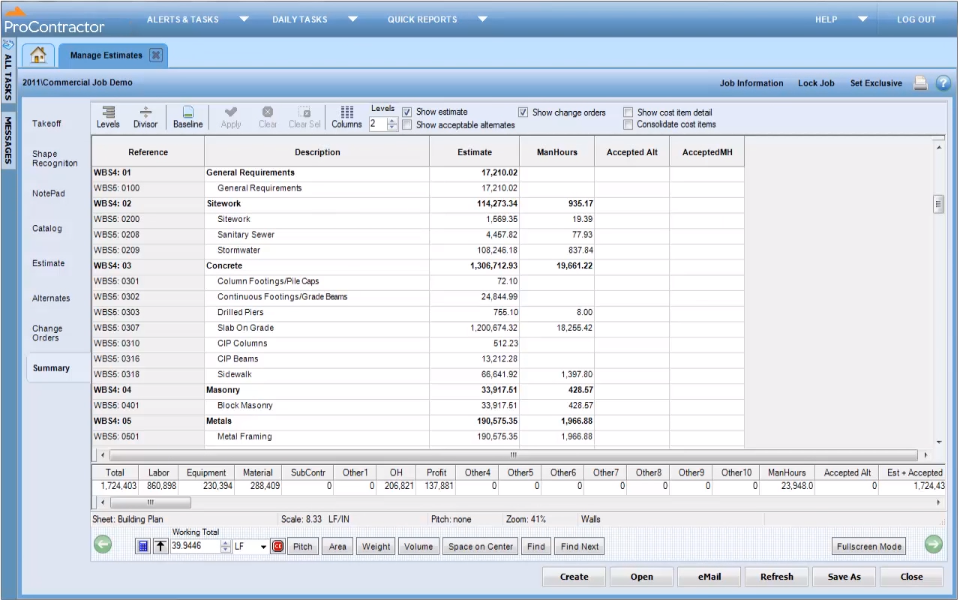
ProContractor is a Cloud-Based Solution for Estimating, Project Management, and Accounting. Designed to improve visibility and profitability across construction businesses, ProContractor™ by Viewpoint is a cloud-based software solution for estimating, project management, and accounting. The user can manage the entire project lifecycle from bid to cash in a single solution. Built to be flexible and scalable, ProContractor allows users to go all-in-one, or build a complete solution…
N/A
Pricing
Newforma Project Center
Trimble SysQue
Viewpoint ProContractor
Editions & Modules
No answers on this topic
No answers on this topic
No answers on this topic
Offerings
Pricing Offerings
Newforma Project Center
Trimble SysQue
ProContractor
Free Trial
No
No
No
Free/Freemium Version
No
No
No
Premium Consulting/Integration Services
No
No
No
Entry-level Setup Fee
No setup fee
No setup fee
No setup fee
Additional Details
—
—
—
More Pricing Information
Community Pulse
Newforma Project Center
Trimble SysQue
Viewpoint ProContractor
Features
Newforma Project Center
Trimble SysQue
Viewpoint ProContractor
Human Resource Management
Comparison of Human Resource Management features of Product A and Product B
Newforma Project Center
6.0
1 Ratings
16% below category average
Trimble SysQue
-
Ratings
Viewpoint ProContractor
9.1
5 Ratings
25% above category average
Employment history
6.01 Ratings
00 Ratings
10.04 Ratings
Employee demographic data
00 Ratings
00 Ratings
10.04 Ratings
Job profiles and administration
00 Ratings
00 Ratings
10.04 Ratings
Workflow for transfers, promotions, pay raises, etc.
00 Ratings
00 Ratings
7.83 Ratings
Organizational charting
00 Ratings
00 Ratings
9.12 Ratings
Organization and location management
00 Ratings
00 Ratings
7.84 Ratings
Compliance data (COBRA, OSHA, etc.)
00 Ratings
00 Ratings
9.12 Ratings
Asset Management
Comparison of Asset Management features of Product A and Product B
Newforma Project Center
6.0
1 Ratings
14% below category average
Trimble SysQue
-
Ratings
Viewpoint ProContractor
5.0
5 Ratings
32% below category average
Tracking of all physical assets
6.01 Ratings
00 Ratings
5.05 Ratings
Reporting & Analytics
Comparison of Reporting & Analytics features of Product A and Product B
Newforma Project Center
7.5
1 Ratings
3% below category average
Trimble SysQue
10.0
1 Ratings
26% above category average
Viewpoint ProContractor
6.8
5 Ratings
12% below category average
Dashboards
8.01 Ratings
00 Ratings
9.14 Ratings
Custom reports
7.01 Ratings
00 Ratings
5.04 Ratings
Data exportability
00 Ratings
10.01 Ratings
6.15 Ratings
Standard reports
00 Ratings
00 Ratings
7.04 Ratings
Construction Project & Field Management
Comparison of Construction Project & Field Management features of Product A and Product B
Newforma Project Center
7.8
5 Ratings
5% above category average
Trimble SysQue
9.4
3 Ratings
24% above category average
Viewpoint ProContractor
7.2
6 Ratings
3% below category average
Plan distribution & viewing
9.05 Ratings
9.01 Ratings
6.53 Ratings
Plan markups & sharing
6.05 Ratings
9.02 Ratings
6.53 Ratings
Issue tracking & punchlists
8.05 Ratings
00 Ratings
7.85 Ratings
Photo documentation
9.04 Ratings
00 Ratings
7.85 Ratings
Jobsite reports
6.03 Ratings
00 Ratings
5.05 Ratings
Document sharing
10.05 Ratings
00 Ratings
2.16 Ratings
RFI tools
9.03 Ratings
00 Ratings
7.84 Ratings
Collaboration & approvals
10.04 Ratings
9.52 Ratings
7.44 Ratings
As-built drawings
7.04 Ratings
9.73 Ratings
9.12 Ratings
Mobile app
3.01 Ratings
00 Ratings
7.84 Ratings
Submittal design and management
9.01 Ratings
10.01 Ratings
9.13 Ratings
Checklists
7.01 Ratings
00 Ratings
7.82 Ratings
Meeting Minutes
9.01 Ratings
00 Ratings
7.82 Ratings
Specifications
00 Ratings
00 Ratings
9.12 Ratings
Change orders
00 Ratings
00 Ratings
7.05 Ratings
Estimating
Comparison of Estimating features of Product A and Product B
Newforma Project Center
8.0
1 Ratings
5% above category average
Trimble SysQue
9.3
3 Ratings
20% above category average
Viewpoint ProContractor
7.3
6 Ratings
4% below category average
Job costing
7.01 Ratings
9.02 Ratings
6.16 Ratings
Bid creation
9.01 Ratings
00 Ratings
9.03 Ratings
Takeoff tools
00 Ratings
10.03 Ratings
7.23 Ratings
Cost databases
00 Ratings
9.01 Ratings
7.05 Ratings
Cost calculator
00 Ratings
9.01 Ratings
7.04 Ratings
Payroll Management
Comparison of Payroll Management features of Product A and Product B
Newforma is a great tool to collaborate with large teams and between firms. It allows for great documentation of transfers, activities, and other procedural aspects of projects that require collaboration between disciplines, for example, MEP, electrical, architectural and technology. For internal use, Newforma has been great for communications tracking and archival, as well as for record-keeping of all the users in a team or number of teams. Many great options are features are unused due to a lack of training or exposure to them, for example, the graphical viewers that can preview CAD, Revit, and other formats, or the markup tool available with the desktop client.
For drawing plumbing where you are usually not needing any kind of taps it does really well. Once you become familiar with it, you can draw underground really quickly. Their water closet carrier families are great! Being able to draw a restroom skid with such a high level of detail is a definite plus. Also, being able to create point files easily since their hangers, floor drains, and cleanouts have the points embedded in them. For a small BIM department I think Trimble SysQue is a good option. They manage the database and you can send a request in for more content if it is needed. For larger BIM departments or people that are doing cloud spooling with Stratus or MSuite it becomes more problematic especially on the mechanical side with needing to use taps and the functionality of them being less than stellar. Larger BIM departments are usually able to have a person manage their database internally and that helps keep the content parameters consistent. Most MEP Fabrication content that I have used does very well with taps and the piping is able to be run quickly and does not need to be processed.
It is appropriate for the size and scale of my company - 150 projects a year that has a lot going on a multiple lines with each project. However there are many features and things that go unused with the software, because of how tinkery it can be. For example - our company needs a positive pay file, however we had to employ an outside service provide to create the file within the system. Same with a Backlog - the system kind of has a report but then again it has to be manipulated in order for it be of use. It gets the job done and has the reports needed to submit for certified payroll to the state, which was why we purchased Viewpoint ProContractor, however its ease of use is one of its biggest downfalls.
Newforma sits on top of our previous filing system (Windows Explorer). This was very important to us because we didn't have to change the project numbering system in order to fit Newforma's design. Also, if we were to decide we didn't like it, we could easily revert back to our previous methods.
Newforma does a great job of indexing information, making searches much easier by being able to use keywords instead of knowing the exact file location. No more traversing through countless folders before finding what you need.
Newforma keeps a read receipt for everything that you submit through it for issue tracking, and keeps an easy to read record of your workflow.
I give Viewpoint ProContractor a 10 out of 10. This system is user friendly to help keep me organized on a daily basis. I can find everything I need daily with this system. I am able to look up our subcontactors, vendors and clients I need to find quickly. I am able to see bills that I need to pay as well as invoices that I need to send out.
While I have never asked for support myself, a Newforma representative has been in the office annually to give training seminars and info sessions on how to fully use the product. I find this essential to keep the product relevant and make sure everyone knows its full capabilities and an important part of customer support.
When something isn't working, you can contact support who will gladly remote into your system and try and work out a solution. Though several of the issues we encountered, they were not able to fix and had to submit for further review. While some were eventually rectified in updates, it takes time for these to be addressed and implemented.
Procore beats Viewpoint hands down but can integrate well with Viewpoint Vista accounting software. I think that if the Viewpoint software was more flexible if they were more interested in patches, updates, and hearing customer feedback in the way the Procore does, that they would actually have the opportunity to corner the market.
Overall it allowed us to go electronic for certified payroll allowing us to be more accurate in reporting which was a giant win for the company
It's viewable pay estimates with dates and records of payment are crucial to a company like ours that relies on a general contractor and the state for payment of EADA quantites
Negatively training is not the easiest for the company and therefore onboarding new employees with no experience with the software is time consuming and difficult.