TrustRadius: an HG Insights company

Save this comparison

Save this comparison

Add Product

Recommended Comparisons

    Overview
    ProductRatingMost Used ByProduct SummaryStarting Price

    Notion

    Score8.7 out of 10
    N/ANotion aims to present users with an all-in-one workspace — for notes, tasks, wikis, and databases, from Notion Labs in San Francisco.

    $5

    per month per user

    UiPath Task Capture

    Score9.9 out of 10
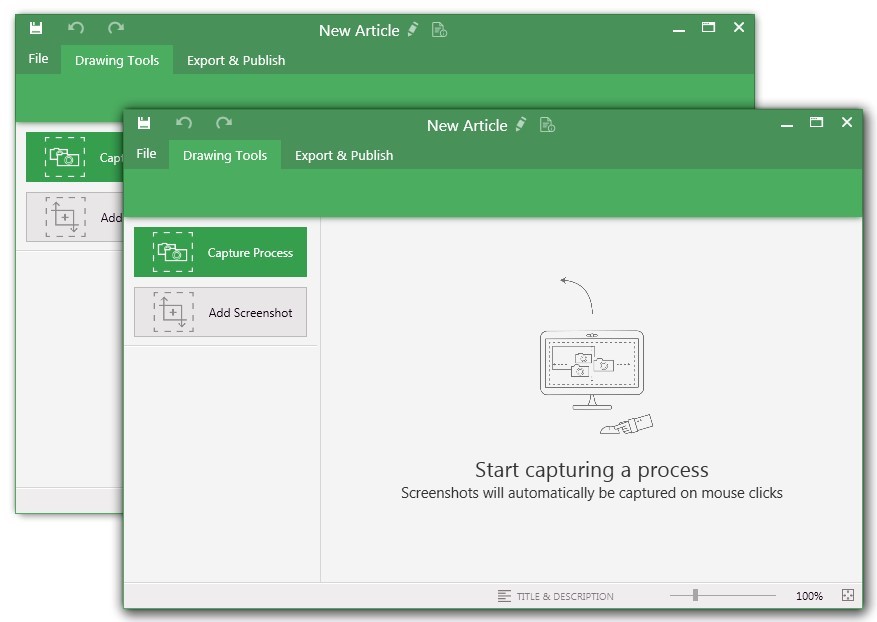
    N/AUiPath Task Capture (formerly StepShot, acquired October 2019) is a tool designed for quick and easy step-by-step documentation. During a recording mode, the software creates a separate screenshot on every click, groups them into a manual with automatically added metadata. Users can annotate captured images and structure documents in the way they want them to look.N/A
    Pricing
    NotionUiPath Task Capture
    Editions & Modules
    Free
    $0
    Plus
    $12
    per month per user
    Business
    $24
    per month per user
    Enterprise
    Custom Pricing
    No answers on this topic
    Offerings
    Pricing Offerings
    NotionUiPath Task Capture
    Free Trial
    YesYes
    Free/Freemium Version
    YesYes
    Premium Consulting/Integration Services
    NoYes
    Entry-level Setup FeeNo setup feeNo setup fee
    Additional DetailsA discount is offered for annual billing.We have some discounts available all the time depending on the amount of ordered licenses.
    More Pricing Information
    Community Pulse
    NotionUiPath Task Capture
    Considered Both Products
    Notion Labs, Inc
    No answer on this topic
    UiPath
    No answer on this topic
    Key User Insights
    Would buy again
    93%
    Would buy again
    75 Answers
    No answers on this topic
    Delivers good value for the price
    97%
    Delivers good value for the price
    60 Answers
    No answers on this topic
    Happy with the feature set
    98%
    Happy with the feature set
    79 Answers
    No answers on this topic
    Lived up to sales and marketing promises
    96%
    Lived up to sales and marketing promises
    45 Answers
    No answers on this topic
    Implementation went as expected
    93%
    Implementation went as expected
    53 Answers
    No answers on this topic
    Features
    NotionUiPath Task Capture
    Project Management
    Comparison of Project Management features of Notion and UiPath Task Capture
    Feature
    Notion
    7.3
    79 Ratings
    6% below category average
    UiPath Task Capture
    -
    Ratings
    Task Management8.174 Ratings00 Ratings
    Gantt Charts6.846 Ratings00 Ratings
    Scheduling6.957 Ratings00 Ratings
    Workflow Automation6.355 Ratings00 Ratings
    Mobile Access7.272 Ratings00 Ratings
    Search7.975 Ratings00 Ratings
    Visual planning tools7.868 Ratings00 Ratings
    Communication
    Comparison of Communication features of Notion and UiPath Task Capture
    Feature
    Notion
    7.7
    76 Ratings
    4% below category average
    UiPath Task Capture
    -
    Ratings
    Chat6.129 Ratings00 Ratings
    Notifications7.568 Ratings00 Ratings
    Discussions7.249 Ratings00 Ratings
    Surveys6.820 Ratings00 Ratings
    Internal knowledgebase8.769 Ratings00 Ratings
    Integrates with Gmail and Google Hangouts8.98 Ratings00 Ratings
    Integrates with Outlook9.02 Ratings00 Ratings
    File Sharing & Management
    Comparison of File Sharing & Management features of Notion and UiPath Task Capture
    Feature
    Notion
    8.1
    76 Ratings
    1% above category average
    UiPath Task Capture
    -
    Ratings
    Versioning7.657 Ratings00 Ratings
    Video files7.649 Ratings00 Ratings
    Audio files7.343 Ratings00 Ratings
    Document collaboration8.571 Ratings00 Ratings
    Access control8.271 Ratings00 Ratings
    Advanced security features7.251 Ratings00 Ratings
    Integrates with Google Drive9.213 Ratings00 Ratings
    Device sync9.253 Ratings00 Ratings
    Best Alternatives
    NotionUiPath Task Capture
    Small Businesses
    Flock
    Score9.5 out of 10
    Sendspark
    Score10 out of 10
    Medium-sized Companies
    Troop Messenger
    Score9.8 out of 10
    Snagit
    Score9.7 out of 10
    Enterprises
    Cisco Business Edition 7000 (discontinued)
    Score9 out of 10
    Snagit
    Score9.7 out of 10
    All AlternativesView all alternativesView all alternatives
    User Ratings
    NotionUiPath Task Capture
    Likelihood to Recommend
    8.6
    (85 ratings)
    8.0
    (6 ratings)
    Likelihood to Renew
    10.0
    (1 ratings)
    -
    (0 ratings)
    Usability
    8.4
    (55 ratings)
    -
    (0 ratings)
    Support Rating
    -
    (0 ratings)
    10.0
    (1 ratings)
    Data Sharing and Collaboration
    8.4
    (4 ratings)
    -
    (0 ratings)
    Data Sources
    4.7
    (4 ratings)
    -
    (0 ratings)
    User Testimonials
    NotionUiPath Task Capture
    Likelihood to Recommend
    Notion Labs, Inc
    If you want a customizable solution that can be adapted for just about any scenario, I recommend using Notion. If you need a solution that's easy to share with people outside your organization, Notion is great and allows individual or team permission-setting. If you want a turnkey solution, Notion might not be the best since it requires a fair bit of set-up. There are templates that can be purchased to handle this, but I haven't found them very helpful.
    Incentivized
    Read full review
    UiPath
    StepShot is perfect for showing your audience how they are supposed to navigate a new system you have implemented. You can take them from a login screen all the way through any technical process you want them to follow. The product is not ideal, however, for documenting a process that does not have tangible steps. For example, a process we have created includes some reflective thinking about alignment or outcomes in order to work, this can be articulated in the text area of the screen captures but doesn't really capture our message.
    Incentivized
    Read full review
    Pros
    Notion Labs, Inc
    • I love that you can create nested pages, allowing for separate sections to organize information as needed.
    • I appreciate the convenience of effortlessly uploading images to any section.
    • I appreciate that when adding links, you can embed them so the website displays directly on the page.
    Incentivized
    Read full review
    UiPath
    • Easily capture process as you're going through it
    • Easily edit the captured process
    • Add new steps/slides into the process as needed after it's captured
    Incentivized
    Read full review
    Cons
    Notion Labs, Inc
    • I use Notion on my personal tablet, and unlike on the computer, I have a lot of difficulty editing backgrounds, GIFs, and page dividers. It's not as user-friendly, and often the elements end up cut off or misaligned, which is frustrating.
    • While the current calendar feature is helpful, I'd love to see more customization options. The Google Calendar style isn't always ideal, especially for tasks without specific times or for ongoing projects that require daily maintenance.
    • It would be fantastic to have more flexibility in customizing Notion pages. For example, I'd love to create planners with the freedom to add illustration boxes, stickers, or GIFs without being restricted to a fixed layout.
    Incentivized
    Read full review
    UiPath
    • The "export & publish" button is kind of tiny and tucked away. It should be more prominent. After not using it for a couple weeks, I always forget where it is.
    • Updates aren't as frequent. Which is fine, since I haven't come across many bugs, it would just be cool to see some added features/functionality a bit more often.
    • The blur looks fine in the preview mode, but when exported, it's not the best.
    Incentivized
    Read full review
    Likelihood to Renew
    Notion Labs, Inc
    We're too settled in the ecosystem and we have no major complaints with it. No reason to move unless you have a burning pain point
    Incentivized
    Read full review
    UiPath
    No answers on this topic
    Usability
    Notion Labs, Inc
    Very easy to use (I learned how to use everything on my own) and I was able to set up an entire ecosystem without any courses or other tools. I often say that Notion is like Lego for adults, because there we can use all the available tools to create a multitude of things, from funnels to projects with calculated deadlines and tags.
    Incentivized
    Read full review
    UiPath
    No answers on this topic
    Support Rating
    Notion Labs, Inc
    No answers on this topic
    UiPath
    I have only run into an issue once, which I believe was due to a newly released feature (cloud storage). I was running into issues with the functionality on my Mac. The team was incredibly helpful in both troubleshooting the issue by jumping on screen sharing sessions, as well as providing multiple releases for me to test to fix the problem!
    Incentivized
    Read full review
    Alternatives Considered
    Notion Labs, Inc
    The company uses both Notion and Trello within the company. Notion is more for North America employees while Trello is used between Operation team overseas and in North America. Sometimes it's a preference of how the tools look like for project management. I would say both Notion and Trello are nice tools and serves our needs.
    Incentivized
    Read full review
    UiPath
    • UiPath Task capture helped me in my requirement gathering in a project.
    • Helped to record the process
    • Capture the Screen
    • Process recording for future reference while developing the tasks
    Incentivized
    Read full review
    Return on Investment
    Notion Labs, Inc
    • It has streamlined our processes across various teams to all work from a signle source of truth
    • Maintaining this source of truth is a full time job
    • It has reduced our overall tool set by completely eliminating two other softwares we were paying for
    Incentivized
    Read full review
    UiPath
    • This has saved us MANY HOURS in either walking clients through processes in person or having to create a one-off guide through taking screenshots and creating our own documents with the screenshots hand placed.
    • Client satisfaction is high when they receive these guides. It is documentation that they can refer to at anytime that is personalized to their use or individual needs.
    Incentivized
    Read full review
    ScreenShots

    UiPath Task Capture Screenshots

    Screenshot of You may record the needed area of take a separate screenshotScreenshot of Open menu (1) to be able to save this document to another location, share or publish it somewhere on your computer or remote service.
To create your documentation, use recording buttons (2) (discussed in "Recording" article later). All recorded steps and single screenshots are displayed in the outline panel (3). To group steps into sections, right click on empty space inside the outline panel and click on "Add section" option.
Annotate the selected step image (5) with drawings (7). Then update step title and description (6) to tell the user what he/she needs to do.Screenshot of Create manuals that contain guidesScreenshot of Exporting options. Choose the template (1) and set export settings such as quality and image size (2). Then export the document (3) to a specific location. 
Export settings are the same for all export formats.