Oracle Discoverer (discontinued) vs. SAS 360 Plan vs. Webtrends Analytics

Overview
ProductRatingMost Used ByProduct SummaryStarting Price
Oracle Discoverer (discontinued)
Score 7.9 out of 10
N/A
Oracle's Business Intelligence Discoverer is an ad- hoc query and analysis reporting tool oriented for end users to have easy access to relational and multi-dimensional data. The product is now end of life. The vendor has stated that Discoverer 11g release 11.1.1.7.0 is the terminal release of Discoverer.N/A
SAS 360 Plan
Score 8.9 out of 10
N/A
Formerly SAS Marketing Operations Management, a solution to integrate and manage all marketing processes for greater consistency, efficiency and effectiveness – from marketing strategy development and planning to content creation, campaign execution and post-campaign analysis.N/A
Webtrends Analytics
Score 4.4 out of 10
N/A
WebTrends provides an enterprise web analytics platform and, according to Forrester, has a strong focus on support for mobile and social channels and a very open platform. Webtrends competes directly with Adobe Site Catalyst, IBM Coremetrics. and comScore DigitalAnalytix.N/A
Pricing
Oracle Discoverer (discontinued)SAS 360 PlanWebtrends Analytics
Editions & Modules
No answers on this topic
Offerings
Pricing Offerings
Oracle Discoverer (discontinued)SAS 360 PlanWebtrends Analytics
Free Trial
NoNoNo
Free/Freemium Version
NoNoNo
Premium Consulting/Integration Services
NoNoNo
Entry-level Setup FeeNo setup feeNo setup feeNo setup fee
Additional Details
More Pricing Information
Community Pulse
Oracle Discoverer (discontinued)SAS 360 PlanWebtrends Analytics
Considered Multiple Products
Oracle Discoverer (discontinued)
Chose Oracle Discoverer (discontinued)
We prefer Oracle BI because it continues to support and is more user-friendly.
Chose Oracle Discoverer (discontinued)
We have chosen for particular tasks or according to requirements of clients, we are also use this because we are well familiar about this tactics and features too.
Chose Oracle Discoverer (discontinued)
Oracle BI publisher
Oracle analytics cloud
Chose Oracle Discoverer (discontinued)
Very easy to use and understanding the technology could work well for your organization. Sometimes the majority of the business unit's key stakeholders don't utilize the data for the needs of the business.
Chose Oracle Discoverer (discontinued)
BI Discoverer is simpler and lighter. It offers a much lighter option for data access when compared to most other business intelligence tools. However, the features on BI Discoverer are limited and cannot solve deeper analytics requirements. For such use cases, it might be …
Chose Oracle Discoverer (discontinued)
Oracle BID was a better alternative than AER for our department. Since we are an Oracle-heavy department, using Oracle software for all tasks, from data storage to reporting was the way to go. BID has proven to be a cheaper, more efficient alternative to AER. It has served its …
Chose Oracle Discoverer (discontinued)
Power BI is mostly for visualization and dashboards whereas Discoverer is for lifting heavy reports outputs. Oracle Apex can be used for building reports but not very complex ones. Pivot functionality in apex reports is not all good when it involves multiple nested groupings …
Chose Oracle Discoverer (discontinued)
Regarding to Power BI and Business Intelligence Discovery I think the principal difference is Business Intelligence Discovery allow discoverer data from web services and there are a lot of tools for only one purpose, manage data! Regarding to SAP BusinessObjects and Business …
Chose Oracle Discoverer (discontinued)
Both produce the same end results for creating reports used by higher management for decision making. The way they are designed and featured, the process is what makes them different.
Chose Oracle Discoverer (discontinued)
Microsoft Power BI and Tableau Desktop
Chose Oracle Discoverer (discontinued)
We selected this tool because it is easy to create an end-user layer which is the repository in the database. The data that is being used is from the datamart which we have built on a daily basis. This tool was selected because it is a web-based and available 24/7.
Chose Oracle Discoverer (discontinued)
They offer completely different functions. OBIEE is better for detailed data and Tableau is for visualization and summary of data.
Chose Oracle Discoverer (discontinued)
We have used several products over the years, including Sisense and Tableau. They both stack up well against Business Intelligence Discoverer, however, the costs for us are what split them apart. Feature-wise, there isn't much to separate the products.
Chose Oracle Discoverer (discontinued)
Discoverer is more of a departmental BI tool. OBIEE is much more expensive compared to Discoverer. OBIEE needs an ETL and Reporting team to develop reports. OBIEE involves complex modelling of RPD whereas it is much simpler with Discoverer. With Discoverer, it is as simple as …
Chose Oracle Discoverer (discontinued)
I did not select Discoverer.....however, I do prefer it to the other tools that I have used for report creation. I do like the mix of GUI and SQL direct code avail. I have mostly used the desktop version, but migrating over to the web based version and starting to build reports …
Chose Oracle Discoverer (discontinued)
Tibco Spotfire or SaaS BI are much more flexible and comprehensive, being compared with Business Intelligence Discoverer, they support many ways of scripting and has rich data visualization options, and furthermore, they can be linked with recent popular ML/DL frameworks.
Chose Oracle Discoverer (discontinued)
Before our team grew to incorporate more database savvy members, Discoverer was an easy and efficient tool for reporting and analyzing data. As our team added more database members, though, we quickly outgrew the need for a simpler program and expanded into one where we could …
Chose Oracle Discoverer (discontinued)
Both Tableau and Argos are newer products and have much improved features. Argos in operation is closer to how Discoverer is. Tableau is a top rated analytics product.
Chose Oracle Discoverer (discontinued)
Discoverer was already in place when I joined the company so I was not involved in the selection process. However, I have been involved in the review of Discoverer as compared to alternatives including Business Objects, OBIEE, and SSRS. On a cost benefit analysis Discoverer …
SAS 360 Plan

No answer on this topic

Webtrends Analytics
Chose Webtrends Analytics
Webtrends has its work cut out for itself considering you have the behemoth Google Analytics and Google Analytics premium having a strong offering and brand recognition for the price of free. After reviewing the paid service I'd suggest you start off with GA as a cheaper …
Chose Webtrends Analytics

Compared to WebTrends, Google Analytics has a slicker interface, provides live site usage data, and is easier to jump into with basic usage. These days users expect to be able to create their own reports as needed, rather than have an "expert" do it for them. They are used to …

Chose Webtrends Analytics
Using Omniture at my current place of employment and using google analytics as a backup at both, Webtrends is the clear superior product. I go back to how easy the UI is to navigate and how simple it is to get user level data that isn't duplicated or doesn't try to pigeon hold …
Chose Webtrends Analytics
We currently use WebTrends, Google Analytics, Kissmetrics and ClickTale. I would like us to consolidate our activities to be focused on just Webtrends as it covers all of the requirements we have very well.
Chose Webtrends Analytics
We've used Google Analytics - and Webtrends really wipes the floor with them. The data we get from Mixpanel can be mirrored in Webtrends - which is something we're working on at the moment with the Webtrends team. As for competitors to Webtrends, we did consider Adobe and …
Chose Webtrends Analytics
Google Analytics,IBM Digital Analytics,Localytics,ForeSee
Chose Webtrends Analytics
I have only had significant experience with Google Analytics (GA) and WebTrends in this space. Overall - it is easier to learn and modify GA reports as a casual user - I always struggled with the fact that GA only offered partial data (sampling based).
Chose Webtrends Analytics
Webtrends was selected because of the price for Google Analytics Premium ($110k per year) and Adobe Omniture Analytics (twice the price). Clearly, it needed the Visitor Data Mart to get additional capability that you would expect as part of a Web Analytics suite. In our case, …
Chose Webtrends Analytics
Have not use Webtrends competitors
Chose Webtrends Analytics
We have moved away from Webtrends.
Chose Webtrends Analytics
Omniture and Google Analytics - the client chose Webtrends over due to data privacy.

Chose Webtrends Analytics
Webtrends as the pioneer WA tool from the early 90s stands tall among its competitors paid and free. Choose it when you need good product support from the vendor and you need flexibility for data collection methods.
Chose Webtrends Analytics
N/A
Chose Webtrends Analytics
I actually did not personally select Webtrends, but rather fell into an organization already using the tool. In general, the reasons for staying with Webtrends vs another tool involve the price point issue and the types of users and support needed. You may be able to get all …
Chose Webtrends Analytics
I find Google Analytics to be very limiting. This may also be the way that the reports have been structured by our organization. It is viewed as an older way to obtain the metrics we are after and no new projects are implemented through Google Analytics.
Chose Webtrends Analytics
Webtrends is just an option, depending on client budget. It's a simple analytics tool that does the job but we always recommend Omniture whenever possible.
Chose Webtrends Analytics
We evaluated Google Analytics, but we picked Webtrends as it offered better value for the price.
Chose Webtrends Analytics
Google Analytics
Omniture Site Catalyst
HitBox
Chose Webtrends Analytics
Google Analytics. We had a free trial to test out the system.
Features
Oracle Discoverer (discontinued)SAS 360 PlanWebtrends Analytics
BI Standard Reporting
Comparison of BI Standard Reporting features of Product A and Product B
Oracle Discoverer (discontinued)
7.9
Ratings
3% below category average
SAS 360 Plan
-
Ratings
Webtrends Analytics
-
Ratings
Pixel Perfect reports8.00 Ratings00 Ratings00 Ratings
Customizable dashboards7.70 Ratings00 Ratings00 Ratings
Report Formatting Templates8.00 Ratings00 Ratings00 Ratings
Ad-hoc Reporting
Comparison of Ad-hoc Reporting features of Product A and Product B
Oracle Discoverer (discontinued)
7.9
Ratings
1% below category average
SAS 360 Plan
-
Ratings
Webtrends Analytics
-
Ratings
Drill-down analysis7.00 Ratings00 Ratings00 Ratings
Formatting capabilities8.00 Ratings00 Ratings00 Ratings
Integration with R or other statistical packages7.50 Ratings00 Ratings00 Ratings
Report sharing and collaboration9.00 Ratings00 Ratings00 Ratings
Report Output and Scheduling
Comparison of Report Output and Scheduling features of Product A and Product B
Oracle Discoverer (discontinued)
8.3
Ratings
2% above category average
SAS 360 Plan
-
Ratings
Webtrends Analytics
-
Ratings
Publish to Web8.00 Ratings00 Ratings00 Ratings
Publish to PDF9.00 Ratings00 Ratings00 Ratings
Report Versioning9.00 Ratings00 Ratings00 Ratings
Report Delivery Scheduling8.00 Ratings00 Ratings00 Ratings
Delivery to Remote Servers7.70 Ratings00 Ratings00 Ratings
Data Discovery and Visualization
Comparison of Data Discovery and Visualization features of Product A and Product B
Oracle Discoverer (discontinued)
8.0
Ratings
0% above category average
SAS 360 Plan
-
Ratings
Webtrends Analytics
-
Ratings
Pre-built visualization formats (heatmaps, scatter plots etc.)8.40 Ratings00 Ratings00 Ratings
Location Analytics / Geographic Visualization7.80 Ratings00 Ratings00 Ratings
Predictive Analytics7.80 Ratings00 Ratings00 Ratings
Access Control and Security
Comparison of Access Control and Security features of Product A and Product B
Oracle Discoverer (discontinued)
9.7
Ratings
13% above category average
SAS 360 Plan
-
Ratings
Webtrends Analytics
-
Ratings
Multi-User Support (named login)10.00 Ratings00 Ratings00 Ratings
Role-Based Security Model10.00 Ratings00 Ratings00 Ratings
Multiple Access Permission Levels (Create, Read, Delete)9.00 Ratings00 Ratings00 Ratings
Single Sign-On (SSO)10.00 Ratings00 Ratings00 Ratings
Mobile Capabilities
Comparison of Mobile Capabilities features of Product A and Product B
Oracle Discoverer (discontinued)
8.0
Ratings
3% above category average
SAS 360 Plan
-
Ratings
Webtrends Analytics
-
Ratings
Responsive Design for Web Access7.90 Ratings00 Ratings00 Ratings
Mobile Application7.80 Ratings00 Ratings00 Ratings
Dashboard / Report / Visualization Interactivity on Mobile7.80 Ratings00 Ratings00 Ratings
Application Program Interfaces (APIs) / Embedding
Comparison of Application Program Interfaces (APIs) / Embedding features of Product A and Product B
Oracle Discoverer (discontinued)
7.5
Ratings
3% below category average
SAS 360 Plan
-
Ratings
Webtrends Analytics
-
Ratings
REST API8.00 Ratings00 Ratings00 Ratings
Javascript API8.00 Ratings00 Ratings00 Ratings
iFrames8.00 Ratings00 Ratings00 Ratings
Java API7.00 Ratings00 Ratings00 Ratings
Themeable User Interface (UI)8.00 Ratings00 Ratings00 Ratings
Customizable Platform (Open Source)6.00 Ratings00 Ratings00 Ratings
Best Alternatives
Oracle Discoverer (discontinued)SAS 360 PlanWebtrends Analytics
Small Businesses
Yellowfin
Yellowfin
Score 8.6 out of 10
Adobe Marketing Cloud
Score 9.3 out of 10
StatCounter
StatCounter
Score 9.0 out of 10
Medium-sized Companies
Reveal
Reveal
Score 10.0 out of 10
Brandfolder
Brandfolder
Score 7.2 out of 10
Siteimprove
Siteimprove
Score 9.1 out of 10
Enterprises
Kyvos Semantic Layer
Score 9.5 out of 10
Adobe Marketing Cloud
Score 9.3 out of 10
Optimal
Optimal
Score 9.0 out of 10
All AlternativesView all alternativesView all alternativesView all alternatives
User Ratings
Oracle Discoverer (discontinued)SAS 360 PlanWebtrends Analytics
Likelihood to Recommend
8.0
(0 ratings)
8.0
(0 ratings)
7.1
(0 ratings)
Likelihood to Renew
-
(0 ratings)
-
(0 ratings)
5.4
(0 ratings)
Usability
-
(0 ratings)
-
(0 ratings)
5.4
(0 ratings)
Availability
-
(0 ratings)
-
(0 ratings)
9.0
(0 ratings)
Performance
-
(0 ratings)
-
(0 ratings)
8.2
(0 ratings)
Support Rating
-
(0 ratings)
-
(0 ratings)
8.8
(0 ratings)
In-Person Training
-
(0 ratings)
-
(0 ratings)
9.7
(0 ratings)
Online Training
-
(0 ratings)
-
(0 ratings)
9.0
(0 ratings)
Implementation Rating
-
(0 ratings)
-
(0 ratings)
9.9
(0 ratings)
Configurability
-
(0 ratings)
-
(0 ratings)
7.1
(0 ratings)
Vendor post-sale
-
(0 ratings)
-
(0 ratings)
9.0
(0 ratings)
Vendor pre-sale
-
(0 ratings)
-
(0 ratings)
9.0
(0 ratings)
User Testimonials
Oracle Discoverer (discontinued)SAS 360 PlanWebtrends Analytics
Likelihood to Recommend
Discoverer is definitely well suited for a company that is working with a lot of data but does not have a large database knowledgeable team. It allows for basic database management while permitting users to access the data in a simple and efficient way. Reporting is easy to do and, again, does not require a lot of database know-how. If you are looking for more in-depth customization and multiple data sources from various vendors, though, you may want to look into a more robust platform.
Read full review
No answers on this topic
Scenarios 1. If you want to use web server log files as input to your web analytics, then Webtrends will provides a good product, with great ease of implementation. Don't even think about being cheap on hardware, and make sure Webtrends runs on real servers, not in a VM environment. 2. If you want to use Data Tagging, similar to Google Analytics or Site Catalyst, Webtrends has a powerful product, just be prepared to pay. 3. If you are new to Web Analytics, but it is the strategic direction, start with Webtrends on Premises. Questions to Ask 1. What are you trying to accomplish? 2. Can you place a dollar value on the benefit that you expect/need from Webtrends? 3.Can you live with Webtrends running SaaS?
Read full review
Pros
  • Business Intelligence Discoverer helps with our Reporting team. We are able to run reports needed immediately using this tool.
  • Business Intelligence Discoverer helps with getting analysis of monthly and yearly medical data from across the state.
  • Business Intelligence Discoverer helps with web publishing and sending information to the trading partners.
Read full review
  • Create and manage a detailed plan for a marketing campaign: when you create detailed project plans and then task and role levels, SAS Marketing Operations Management (SAS MOM) makes it easier to coordinate between projects with very little, if any, issues.
  • Share, reuse and leverage existing marketing assets: Like some marketing tools, SAS MOM allows you to create and reuse assets across various channels.
  • Manage project collaboration and execution: You are allowed to set up a workflow that helps move processes along without having to manage each step of the project.
Read full review
  • Webtrends Analytics makes complex situations understandable to a non-technical audience. The vast capabilities and ways to slice data is both a great tool, but can also cause a user/users many hours of frustration.
  • Visual data display is clean, to the point, and not overly convoluted with unneeded variables and standard (defualt) settings. Everything the end user sees is customizeable.
  • Exports of raw data collections was easy and accurate. Once the parameters of data collection are finally set up and working, its easy to get what you want from the UI and is delievered in a variety of options.
Read full review
Cons
  • It would be useful if users could be allowed to write subqueries.
  • It would be helpful if there was a way for users to download the reports on their PC.
  • Most of the functionality is awesome and I would like to see more graphics in the reports.
Read full review
  • It would be good to have a Storyboard feature to summarize and tie together some of the dashboard metrics.
  • Missing feature: Hubspot CRM integration.
Read full review
  • Webtrends is not great at providing statistical data for analysis. You need to enable Log File Delivery or create an analysis export to perform this. This could theoretically be done with Streams.
  • Webtrends has difficulty identifying multi-visit users due to the inherent fragility of cookie-based tracking.
  • Webtrends Analytics does not provide Pathing capabilities for segments, only for the aggregate. However, this can be worked around with Scenario functionality selectively fired by a tag management system.
  • Segmentation by high-cardinality parameters tends to cause issues with table limits. Even after scrubbing and scrutinizing data, we commonly see up of 10K rows per dimension. Due to this, we use Webtrends Analytics to roll up data into larger segments and export all of our log data into our database for heavy duty number crunching.
Read full review
Likelihood to Renew
No answers on this topic
The obstacles to renewing are 1) finding people to manage it who know it well and 2) frustration because of the lack of on-the-fly analysis. Usually, renewal prices are reasonable and the cost of switching to something else when you have a somewhat complicated setup far outweigh the renewal costs, especially if your implementation is sound and your reports are humming along. A lot of renewal decisions are going to hinge on the new product that will start to roll out this month.
Read full review
Usability
No answers on this topic
If I could give it a 0, I would. Not having an intuitive user interface made it impossible to convince non-analytic business users to use the tool on their own. Even as a seasoned analyst, frequent calls were needed to get what should be simple tasks done. Account managers don't understand the tool either, and have to refer you to technical support
Read full review
Reliability and Availability
No answers on this topic
It is much better than average. Down time usually occurs because of a need to refresh the server on our end.
Read full review
Performance
No answers on this topic
The v9 admin interface and v10 reporting interface work as well as expected, but have a tendency to be pokey, especially for bulky reports and whenever you're connected to wifi. I much prefer using the REST API for all reporting for this reason, which simply dumps out the data and doesn't bother with the user interface.
Read full review
Support Rating
No answers on this topic
The Webtrends Support Engineers are expert at what they do, and we get to speak to someone on the support team quickly. They provide great solutions when available, and when there is no solution, which can happen, they describe work-arounds.
Read full review
In-Person Training
No answers on this topic
The in-person training was comprehensive enough to get you started, but I strongly recommend having a more experienced person when beginning with the tool.
Read full review
Online Training
No answers on this topic
Webtrends provides several free webinars over the course of the year, many of which I would expect to pay for. The people providing the webinars seem to have a good feel for real-world application of the product.
Read full review
Implementation Rating
No answers on this topic
Careful planning and patience. Use a non-public test site to fine tune tags and reporting. Despite best laid plans, there will be surprises when you collect the data, run the analysis and begin generating reports using the tool. Perform a tag audit to ensure tags fire as desired.
Read full review
Alternatives Considered
Discoverer is more of a departmental BI tool. OBIEE is much more expensive compared to Discoverer. OBIEE needs an ETL and Reporting team to develop reports. OBIEE involves complex modelling of RPD whereas it is much simpler with Discoverer. With Discoverer, it is as simple as importing database tables, defining joins and running the queries. Discoverer stacks very well on top of ERP systems directly. Users can run reports on ERP tables using Discoverer. To perform similar jobs through OBIEE, one has to either use Noetix or another transactional model.
Read full review
No answers on this topic
Webtrends has its work cut out for itself considering you have the behemoth Google Analytics and Google Analytics Premium having a strong offering and brand recognition for the price of free. After reviewing the paid service I'd suggest you start off with GA as a cheaper alternative that is just as robust, if not much more flexible in regards to the reporting and goal tracking needs for our company.
Read full review
Return on Investment
  • We have used Discoverer to respond to state sales and use tax audits and saved the company more than the cost of the product. Discoverer has thus assisted in our objective of managing costs.
  • Discoverer is used to provide reports for EEOC reporting assisting our goal of complying with all government requirements.
Read full review
No answers on this topic
  • Webtrends has had a positive impact on site visitation because it allowed us to understand the sources by domain for site traffic and find out ways to increase visits from those domains.
  • Webtrends has also allowed us to understand areas of optimization on the site, which has had a positive impact on the overall user journey on the site, likely leading to longer site duration and engagement.
Read full review
ScreenShots

Webtrends Analytics Screenshots

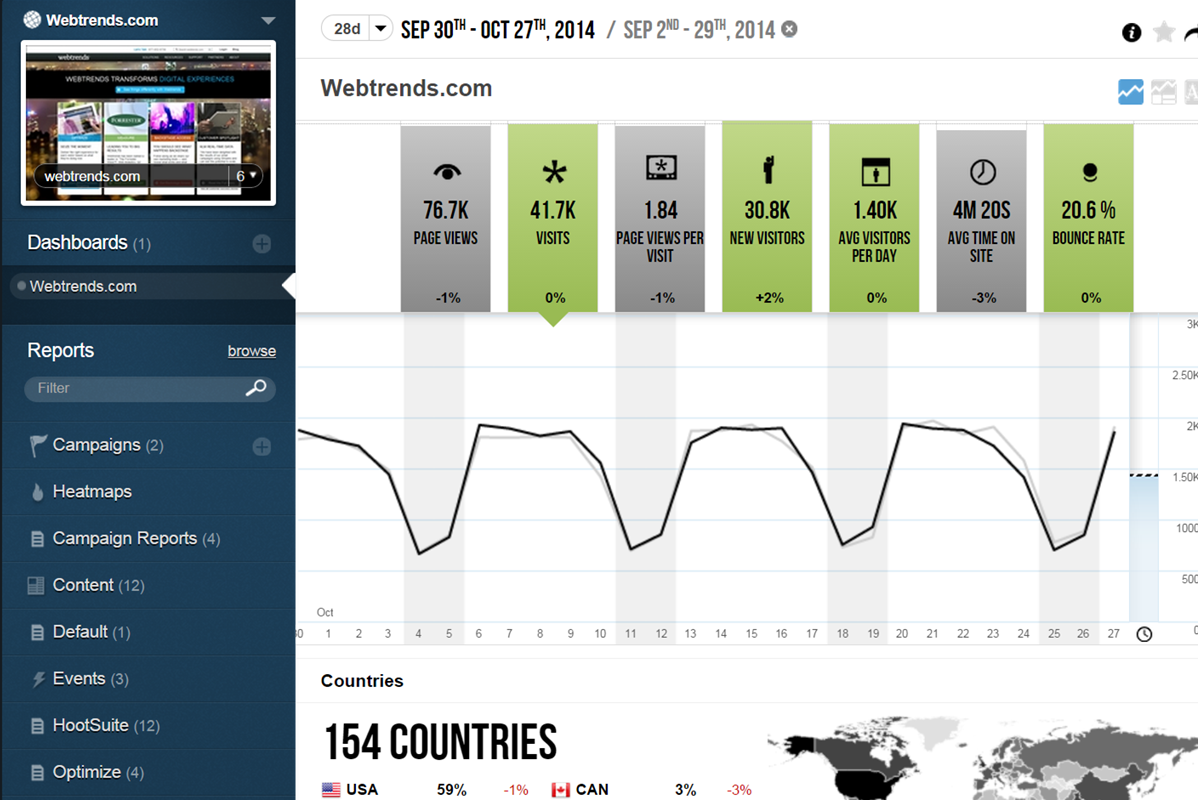
Screenshot of 450+ out-of-box reports
Unlimited custom reports
Roll-up reports across domains
Out-of-box channel and market-specific reportsScreenshot of Unlimited dimensions
No processing time
Dynamic, on-the-fly segmentation
Create, save and share custom views, measures and segmentsScreenshot of Unlimited custom dashboards
Key metrics, trends, demographics, geo maps, word clouds and more
Drill-throughs to connected reports