Patch My PC Patch Management vs. RealVNC Connect

Overview
ProductRatingMost Used ByProduct SummaryStarting Price
Patch My PC Patch Management
Score 7.1 out of 10
Enterprise companies (1,001+ employees)
Software that extends Microsoft Configuration Manager to deploy and patch third-party applications. It is designed to handle the tedious task of packaging, testing, troubleshooting, and deploying applications in the environment. The software automates the creation and patching of third-party applications. Optionally, users can configure automatic deployment rules for complete automation and control over third-party patch management in the enterprise.
$1
per year per seat
RealVNC Connect
Score 7.6 out of 10
N/A
RealVNC® Connect is a secure remote access solution from RealVNC. It can be used to connect to a remote device anywhere in the world to view its desktop in real-time and take control as though sitting in front of it.
$99
per year (one concurrent session)
Pricing
Patch My PC Patch ManagementRealVNC Connect
Editions & Modules
Basic
$1
per year per seat
Enterprise
$2
per year per seat
Intune Essentials
$3.25
per year per seat
Enterprise Plus
$3.50
per year per seat
Essentials
$8.25
per month (billed annually) per concurrent session
Plus
$16.50
per month (billed annually) per concurrent session (add up to 3)
Premium
$29.75
per month (billed annually) per concurrent session (add up to 5)
Enterprise
Custom Pricing
per year
Enterprise
Custom Pricing
Offerings
Pricing Offerings
Patch My PC Patch ManagementRealVNC Connect
Free Trial
YesYes
Free/Freemium Version
NoYes
Premium Consulting/Integration Services
NoNo
Entry-level Setup FeeNo setup feeNo setup fee
Additional DetailsPlans work on a Per Concurrent Session basis. Each plan gives access to a bundled number of devices, but limits apply to the amount of devices that can be connected at any given time. The Premium plan includes On-Demand Assist, a useful tool for providing just-in-time remote support to end-users without them needing RealVNC Connect installed on their device.
More Pricing Information
Community Pulse
Patch My PC Patch ManagementRealVNC Connect
Features
Patch My PC Patch ManagementRealVNC Connect
Threat Intelligence
Comparison of Threat Intelligence features of Product A and Product B
Patch My PC Patch Management
10.0
1 Ratings
22% above category average
RealVNC Connect
-
Ratings
Vulnerability Classification10.01 Ratings00 Ratings
Vulnerability Management Tools
Comparison of Vulnerability Management Tools features of Product A and Product B
Patch My PC Patch Management
10.0
1 Ratings
19% above category average
RealVNC Connect
-
Ratings
Vulnerability Intelligence10.01 Ratings00 Ratings
Remote Administration
Comparison of Remote Administration features of Product A and Product B
Patch My PC Patch Management
-
Ratings
RealVNC Connect
7.3
32 Ratings
8% below category average
Screen sharing00 Ratings9.128 Ratings
File transfer00 Ratings8.015 Ratings
Instant message00 Ratings6.119 Ratings
Secure remote access with Smart Card authentication00 Ratings7.05 Ratings
Access to sleeping/powered-off computers00 Ratings6.09 Ratings
Over-the-Internet remote session00 Ratings9.030 Ratings
Initiate remote control from mobile00 Ratings8.919 Ratings
Remote management of servers & workstations00 Ratings4.76 Ratings
Centralized management dashboard00 Ratings7.116 Ratings
Session record00 Ratings8.02 Ratings
Annotations00 Ratings5.36 Ratings
Monitoring and Alerts00 Ratings7.03 Ratings
Multi-platform remote control00 Ratings9.011 Ratings
Best Alternatives
Patch My PC Patch ManagementRealVNC Connect
Small Businesses
Action1
Action1
Score 9.5 out of 10
Getscreen.me
Getscreen.me
Score 9.6 out of 10
Medium-sized Companies
Action1
Action1
Score 9.5 out of 10
Remote Desktop Manager
Score 9.5 out of 10
Enterprises
CrowdStrike Falcon
CrowdStrike Falcon
Score 9.1 out of 10
Remote Desktop Manager
Score 9.5 out of 10
All AlternativesView all alternativesView all alternatives
User Ratings
Patch My PC Patch ManagementRealVNC Connect
Likelihood to Recommend
10.0
(1 ratings)
8.1
(38 ratings)
Likelihood to Renew
10.0
(1 ratings)
8.0
(8 ratings)
Usability
-
(0 ratings)
8.0
(4 ratings)
Support Rating
-
(0 ratings)
8.0
(2 ratings)
Online Training
-
(0 ratings)
7.0
(2 ratings)
Implementation Rating
10.0
(1 ratings)
8.0
(2 ratings)
User Testimonials
Patch My PC Patch ManagementRealVNC Connect
Likelihood to Recommend
Patch My PC
I highly recommend Patch My PC to businesses of all types and sizes. The tool is highly customizable and can meet the needs of any organization. It is easy to implement with Configuration Manager (SCCM) and Intune and can be set up within a matter of minutes.
Read full review
RealVNC
It is very easy to use if the remote device is already set up to receive connections, so if you are setting up devices before deploying them, it is a great tool to have. It is well-suited to use when shadowing users or using it as a teaching tool. There are other products that are better if you are trying to help someone on a one-use basis.
Read full review
Pros
Patch My PC
  • Great customer support
  • Automation of application creation and updates
  • Easy to integrate and manage
Read full review
RealVNC
  • VNC Connect does an excellent job in remotely connecting to a computer through either your local area network or even another computer on the internet. As long as the VNC Connect services is installed and the client is running in the background.
  • VNC Connect provides password protection to prevent unauthorized users from attempting to remotely access your computer. There's an option to have a separate password to remotely view vs view & access a computer. You can even add an additional level of security by turning on the feature to require Windows login credentials.
  • VNC Connect provides an additional set of controls after a remote connection has been established with another computer. You can have special keystrokes like Ctrl+Alt+Del sent as a command sequence to the other computer as well as access more than a single screen when in use at the remote computer location.
Read full review
Cons
Patch My PC
  • SAS solution
  • Be able to select a specific application version for deployment
Read full review
RealVNC
  • Its a pretty straight forward product - I would like to see more tools with a "wow" factor.
  • Panel colors are blah - I would like more eye-catching colors.
  • A more consistent look with all platforms - like Mac & PC.
Read full review
Likelihood to Renew
Patch My PC
I consider Patch My PC a necessary tool for any environment I manage. I cannot imagine managing an environment without it, as the time and effort it saves is invaluable.
Read full review
RealVNC
VNC is a solid product for the price. It simply works and its reliable across different platforms. Some products state they work well in the Mac environment but don't deliver. This one does what it says. Connections are reliable, but of course, this depends on internet connections. The product works well over wireless connections as well. It delivers on what a remote tool should deliver on. My technicians are happy with the product and customers appreciate the ease of use when letting us connect to their systems. Some also appreciate the remote support while they are multi-task.
Read full review
Usability
Patch My PC
No answers on this topic
RealVNC
It's a niche product and in that niche they try to cater to as many use cases as they can. Other as a TCO aspect i don't see many use cases where you can't use this product as the one tool for all remote session use cases in your company
Read full review
Support Rating
Patch My PC
No answers on this topic
RealVNC
VNC Connect is a reliable product that has been around for a long time. It is reasonably priced and works well in the Mac & PC environment. When you have a small team that supports many users we need tools that we can rely upon and that will get the job done on the first try. Many customers appreciate the quick assistance and can multi-task while our team works on their computer issues remotely. From a customer service point of view, this tool gives us transparency and efficient effectiveness.
Read full review
Online Training
Patch My PC
No answers on this topic
RealVNC
The training is very informative, quick and to the point. All of the details one would need are present so the user doesn't have to go searching for additional information just to use the application. The layout of the training was also neat and concise, some of the other training sessions for other companies I've done in the past were confusing and not well thought out, this one is much more superior
Read full review
Implementation Rating
Patch My PC
The implementation is super easy, specially if you're just Integrating it with Intune.
Read full review
RealVNC
No problem at all, love the product.
Read full review
Alternatives Considered
Patch My PC
Patch My PC is a tool developed and maintained by experienced systems administrators, who have a deep understanding of the workings of Configuration Manager (SCCM) and Intune. They know what it takes to successfully deploy applications to end-users, making the tool an ideal choice for managing software updates and deployments.
Read full review
RealVNC
VNC is light and sleek with the quick setup, was impressed with the quick setup despite poor Internet connection outdoor. TeamViewer is good, but the pricing is not as good as VNC. Both do the basic job, but VNC still outperform TeamViewer in terms of performance and ease of use.
Read full review
Return on Investment
Patch My PC
  • Saves countless hours on manually packaging applications
  • Saves countless hours on investigating what applications in your environment needs updated
  • saves you 1-3 headcounts in your department
Read full review
RealVNC
  • I have just used the software for about 1 month and so far so god. I am saving time whenever I can access my client's computers from my desk as opposed to having to leave my office to go to their offices. Saves me time and the client money.
Read full review
ScreenShots

Patch My PC Patch Management Screenshots

Screenshot of The general tab is where you can configure the license key and other general settings including the WSUS Code Signing certificate for third-party software updates.Screenshot of You can enable different third-party products to publish to WSUS and sync into Configuration Manager in the updates tab. You can also right-click on all products, vendors, or specific products to enable custom right-click actions.Screenshot of Enable products for application creation and management using the ConfigMgr Apps tab in the Publisher. This feature will automatically package third-party applications and keep them up to date. You can deploy these applications using task sequences or collection deployments in Configuration Manager.Screenshot of The CVE import wizard in the Patch My PC Publisher can evaluate CVE in a file and let you know which ones are either in the Patch My PC catalog or already published to WSUS.Screenshot of The sync schedule controls how often the Publisher will download the catalog and publish new third-party updates and applications to ConfigMgr or Intune.Screenshot of The alerts tab will automatically send you email, Microsoft Teams, or Slack alerts when new updates or applications are created. These alerts will also include details like severity level, classification level, and CVE's.

RealVNC Connect Screenshots

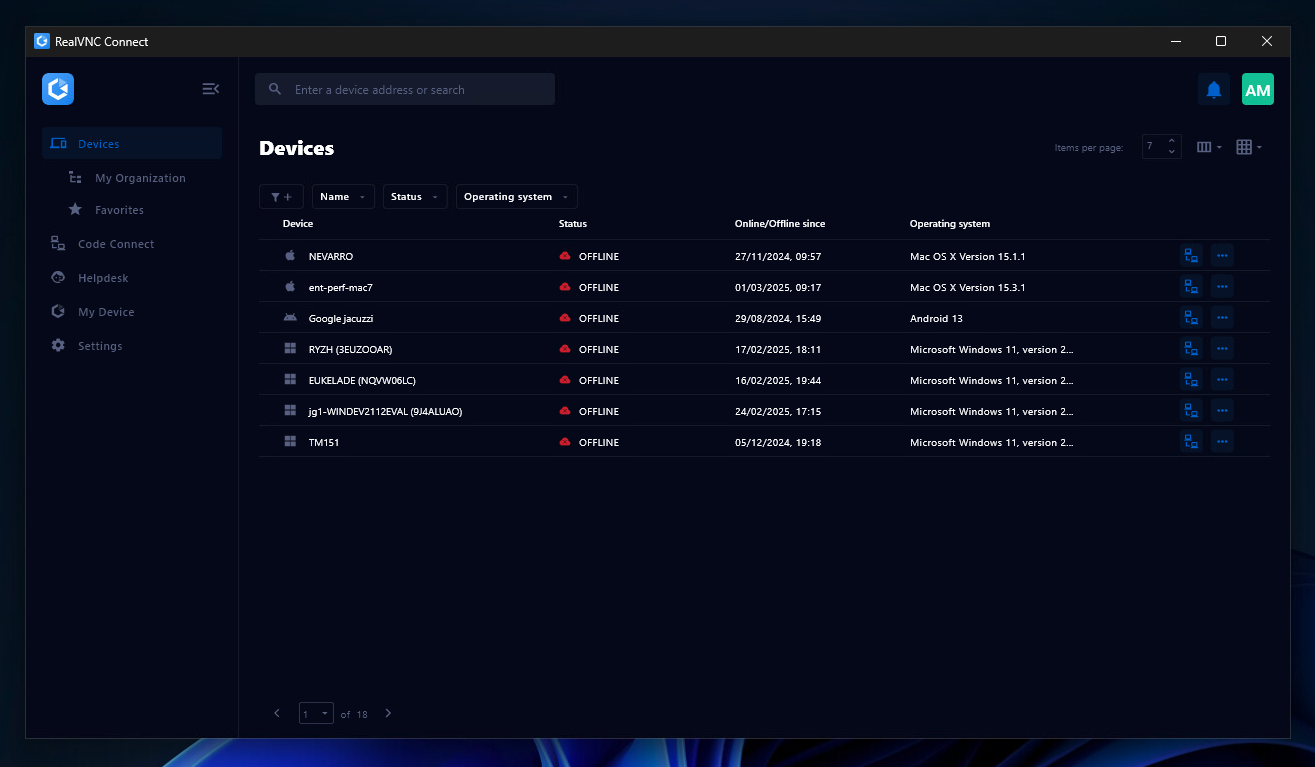
Screenshot of the Device List in the Connect v8 desktop appScreenshot of On-Demand Assist, which can be used to start a remote support session using a single-use code.