Wondershare PDFelement vs. Redwood Reporting : Report2Web vs. Salesforce Experience Cloud

Overview
ProductRatingMost Used ByProduct SummaryStarting Price
Wondershare PDFelement
Score 5.0 out of 10
N/A
PDFelement is a document management solution from Wondershare Software headquartered in China.
$79.99
per year per user
Redwood Reporting : Report2Web
Score 9.0 out of 10
N/A
Redwood Reporting automatically delivers critical report output, when, where and how it is needed most. This is to eliminate the frustration, wasted time, and errors associated with manually accessing, calculating and mapping pieces of information from disparate systems and data sources. Redwood Reporting provides: Browser-based access to reports from virtually any application Push and pull options so that users have instant access to new and historical report…N/A
Salesforce Experience Cloud
Score 8.2 out of 10
N/A
Salesforce Marketing Cloud Engagement (formerly Salesforce Experience Cloud or Salesforce Community Cloud) is an online forum powered by Salesforce that enables businesses to connect with their employees, customers, partner organizations, and prospects. Designed to help facilitate communication and information sharing, customers can ask questions and request help, administrators can integrate data from third-party apps, and employees can collaborate across projects and…N/A
Pricing
Wondershare PDFelementRedwood Reporting : Report2WebSalesforce Experience Cloud
Editions & Modules
PDFelement
79.99USD
per year per user
PDFelement
129.99USD
one-time fee per user
No answers on this topic
Offerings
Pricing Offerings
Wondershare PDFelementRedwood Reporting : Report2WebSalesforce Experience Cloud
Free Trial
YesNoNo
Free/Freemium Version
NoNoNo
Premium Consulting/Integration Services
NoYesNo
Entry-level Setup FeeNo setup feeNo setup feeNo setup fee
Additional DetailsFor Individuals: Yearly Plan: $79.99/user; 2-Year Plan: $109.99/user Perpetual Plan(one-time): $129.99/user For Teams: Yearly plan starts at $109/year for 1 user For Education: Yearly Plan: $47.99/user; Perpetual Plan(one-time): $99.99/userContact Redwood Software for pricing details.
More Pricing Information
Community Pulse
Wondershare PDFelementRedwood Reporting : Report2WebSalesforce Experience Cloud
Features
Wondershare PDFelementRedwood Reporting : Report2WebSalesforce Experience Cloud
Enterprise Content Management
Comparison of Enterprise Content Management features of Product A and Product B
Wondershare PDFelement
-
Ratings
Redwood Reporting : Report2Web
9.1
1 Ratings
12% above category average
Salesforce Experience Cloud
-
Ratings
File sync, storage & archiving00 Ratings9.11 Ratings00 Ratings
Document management00 Ratings9.11 Ratings00 Ratings
Records management00 Ratings9.11 Ratings00 Ratings
Content search & retrieval00 Ratings9.11 Ratings00 Ratings
Enterprise content collaboration00 Ratings9.11 Ratings00 Ratings
Content publishing & creation00 Ratings9.11 Ratings00 Ratings
Security, risk management & information governance00 Ratings9.11 Ratings00 Ratings
Contract lifecycle management00 Ratings9.11 Ratings00 Ratings
Automated workflows00 Ratings9.11 Ratings00 Ratings
Mobile support00 Ratings9.11 Ratings00 Ratings
Integration00 Ratings9.11 Ratings00 Ratings
Best Alternatives
Wondershare PDFelementRedwood Reporting : Report2WebSalesforce Experience Cloud
Small Businesses
Square 9 Softworks
Square 9 Softworks
Score 9.7 out of 10
Square 9 Softworks
Square 9 Softworks
Score 9.7 out of 10
Square 9 Softworks
Square 9 Softworks
Score 9.7 out of 10
Medium-sized Companies
MSB Docs
MSB Docs
Score 9.4 out of 10
MediaValet
MediaValet
Score 9.0 out of 10
MediaValet
MediaValet
Score 9.0 out of 10
Enterprises
M‑Files
M‑Files
Score 8.9 out of 10
MediaValet
MediaValet
Score 9.0 out of 10
MediaValet
MediaValet
Score 9.0 out of 10
All AlternativesView all alternativesView all alternativesView all alternatives
User Ratings
Wondershare PDFelementRedwood Reporting : Report2WebSalesforce Experience Cloud
Likelihood to Recommend
9.1
(55 ratings)
8.2
(1 ratings)
8.8
(71 ratings)
Likelihood to Renew
10.0
(1 ratings)
-
(0 ratings)
9.0
(1 ratings)
Usability
8.6
(5 ratings)
-
(0 ratings)
8.1
(15 ratings)
Availability
10.0
(1 ratings)
-
(0 ratings)
-
(0 ratings)
Performance
7.5
(2 ratings)
-
(0 ratings)
9.1
(5 ratings)
Support Rating
8.4
(8 ratings)
-
(0 ratings)
8.0
(18 ratings)
Implementation Rating
10.0
(1 ratings)
-
(0 ratings)
-
(0 ratings)
Configurability
10.0
(1 ratings)
-
(0 ratings)
-
(0 ratings)
Ease of integration
7.5
(2 ratings)
-
(0 ratings)
9.4
(4 ratings)
Product Scalability
10.0
(1 ratings)
-
(0 ratings)
-
(0 ratings)
Vendor post-sale
10.0
(1 ratings)
-
(0 ratings)
-
(0 ratings)
Vendor pre-sale
10.0
(1 ratings)
-
(0 ratings)
-
(0 ratings)
User Testimonials
Wondershare PDFelementRedwood Reporting : Report2WebSalesforce Experience Cloud
Likelihood to Recommend
Wondershare Technology
It's a wonderful asset to have when you lose your original Word doc, etc. so you can still edit a document (and not have to start from ground zero). That feature alone is why I bought this product and why I will continue to recommend.
Read full review
Redwood Software
The tool is very powerful for obtaining and scheduling reports; however, I believe that if the cost were lower, more companies could obtain it
Read full review
Salesforce
For well-suited, this product is great for your external clientele groups that you would not necessarily want to have a high user fee rate for. So basically general public or a group that will be authorized to come in and just do a few things here and there, but you don't necessarily want them access to all of your systems and your data points for groups that it would not be a great use for. I'd say probably your high level internal staff, they're going to be using a lot of the backend functionality automations, evaluating data, managing data, and doing custom inputs. That's just not what's intended for.
Read full review
Pros
Wondershare Technology
  • PDFelement provides the same powerful features as Adobe Acrobat, but the interface is easy to learn and use. The product is extremely intuitive, which saves our clients from becoming frustrated as they learn the product.
  • PDFelement Pro's ability to create fillable forms with the click of one button is one of our clients favorite features. I was impressed at how accurately PDFelement performed this task and the ease with which these fields can be edited, if needed.
  • Security is more important than ever these days and PDFelement provides the encryption and permissions to protect documents quickly and easily. I especially like the batch encrypt feature, this makes it easy to protect multiple files with the same password.
  • PDFelement makes it easy to extract the data from form fields. This is a huge plus for our clients.
Read full review
Redwood Software
  • [It] has [a] default report.
  • [It] has a section where you can create reports by making queries in SQL.
  • It has a Dashboard window where you can schedule reports in real time of the executions of the jobs or chains.
Read full review
Salesforce
  • Easy to use, just like Salesforce's other products. Many users can sit down and figure it out in no time, and with a little training become power users.
  • Fast and secure - Salesforce is a leader in the cloud world so you get consistently fast results and security that is top notch in the industry.
  • Accessible from anywhere - if you use cloud CMS already this is a no-brainer, but for those that do in-house CMS still, this is a major difference. Mobile access from anywhere on the planet without a VPN is something you just can't do without the cloud.
Read full review
Cons
Wondershare Technology
  • I wish there was a lighter program for just reviewing a document and then to transition seamlessly to an editing mode. It takes a few seconds longer to load than Preview on my Mac, and based on that frustration, I use Preview to view documents.
  • A lower price for upgrades.
Read full review
Redwood Software
  • It has a positive impact for the different managements since they can obtain their reports on a daily basis and in case any job fails on a recurring basis they can make decisions.
Read full review
Salesforce
  • Unlike other CMS platforms like Wordpress and Adobe Experience Manager, Salesforce does not provide a fully featured editor with a drag-and-drop design tool.
  • Our content creators and marketing team often struggle with permissions and how to distribute content across different experience cloud sites.
  • Also, there is no side-to-side comparison view for content editors to update the content easily.
Read full review
Likelihood to Renew
Wondershare Technology
Excellent, easy to use product
Read full review
Redwood Software
No answers on this topic
Salesforce
Renewal exercise is already underway. Platform is to ubiquitous to not leverage, especially at a Fortune 50 firm
Read full review
Usability
Wondershare Technology
I am a novice and I am using it like a pro because it is so easy to work with
Read full review
Redwood Software
No answers on this topic
Salesforce
Strengths: - Intuitive for Salesforce Users – If you’re already working within the Salesforce ecosystem, the Salesforce CMS is easy to navigate, with a clean UI, drag-and-drop content management, and reusable assets for quick updates. - Seamless Integration – Since it connects natively with Experience Cloud, Marketing Cloud, and CRM, it allows for efficient multi-channel content distribution without needing extra third-party tools. - AI-Powered Personalization – The ability to deliver dynamic content based on user profiles and engagement data is a huge plus, making content delivery more relevant and impactful. Challenges: - Learning Curve for New Users – If you're not already familiar with Salesforce, the interface can feel overwhelming, requiring training to fully leverage all features. - Limited Customization & Workflow Automation – While it works well for structured content, advanced approval workflows and deep editorial customization are limited compared to enterprise CMS platforms like Adobe Experience Manager. - Media & Design Limitations – Salesforce CMS is not as robust for managing rich media-heavy content, which can be frustrating for teams needing more flexibility in multimedia presentation.
Read full review
Reliability and Availability
Wondershare Technology
No issues. Works perfect
Read full review
Redwood Software
No answers on this topic
Salesforce
No answers on this topic
Performance
Wondershare Technology
There is a lot of learning. Although some of the functions you can probably pick up relatively quickly, some of them, including compressing the size or using a different language, remains a myth to me.
Read full review
Redwood Software
No answers on this topic
Salesforce
Again, since we provide and recommend solutions, I can't speak to every client's individual experience, but can offer general reflections as to keep their collaborations private, that they are satisfied with the experience. We hear a lot about how this system helps to encourage collaborations between their own business partners, customers, and internal members, and enables quality integrations with other products that help drive revenue.
Read full review
Support Rating
Wondershare Technology
PDFelement is always in contact with me, by email and by giving constant tips and recommendations. But what makes me give you a 10, was the outstanding support service received on July 9th by one of your support professionals Amanda, who helped me with a tariff issue, and makes me [rate] your product.
Read full review
Redwood Software
No answers on this topic
Salesforce
Although support from Salesforce itself can be quite unresponsive sometimes, the community hub is incredibly helpful. The large user base of Salesforce products contribute to troubleshooting and the forums are a powerful tool for finding solutions and possible bugs and response times can be quite fast compared to your regular support channels.
Read full review
Implementation Rating
Wondershare Technology
Just pay, download, activate and start using it
Read full review
Redwood Software
No answers on this topic
Salesforce
No answers on this topic
Alternatives Considered
Wondershare Technology
I didn't try or buy other programs, but did a good bit of research on them. I went with PDFelement because of the lower pricing, and because of the rich features I learned it had. I also appreciated the great customer service I received from reps in the community forums, which showed me they have an aim in keeping their customers happy - which is always good to have when using fairly complex technical apps.
Read full review
Redwood Software
No answers on this topic
Salesforce
Salesforce Experience Cloud was selected due to its tight integration with our existing Salesforce CRM platform. Customization of the portal was much, much simpler compared to Sharepoint - especially with role-based security parameters that are ultimately inherited based on attributes within the Salesforce CRM platform. Salesforce Experience Cloud was a natural fit for this customer-facing purpose.
Read full review
Scalability
Wondershare Technology
Super easy Word style layout and format.
Read full review
Redwood Software
No answers on this topic
Salesforce
No answers on this topic
Return on Investment
Wondershare Technology
  • For me, it's been very important to me that my business as a pet sitter and dog walker not leave a negative footprint on the environment. To that end, it's been very important that i'm able to do as much paperwork as possible without using paper. PDFelement is wonderful at helping me meet those goals.
Read full review
Redwood Software
  • The Redwood system by itself is a very good tool that can pay off the investment in a very short time.
  • It has a positive impact for the different managements since they can obtain their reports on a daily basis and in case any job fails on a recurring basis they can make decisions.
Read full review
Salesforce
  • Time savings for our customer success team - no need to continually follow up on tickets as customers have access to see status themselves
  • In the future, it will also allow us to create more impactful knowledge articles that will increase self-service over ticket creation
Read full review
ScreenShots

Wondershare PDFelement Screenshots

Screenshot of AI-powered support for chatting with PDFs/summaring/proofreading/rewriting/explaining/translating the PDF file content.Screenshot of file conversion to and from PDF format in high quality.Screenshot of PDF generation, which can be done from images, Word documents, and various formats, including batch create.Screenshot of certificate-based legal signatures, and documents can be sent to bulk signers, and signatures collected and tracked from anywhere, on any device.Screenshot of text recognition, from scanned PDFs and images.Screenshot of the PDF text editor, with images, forms, and pages.

Redwood Reporting : Report2Web Screenshots
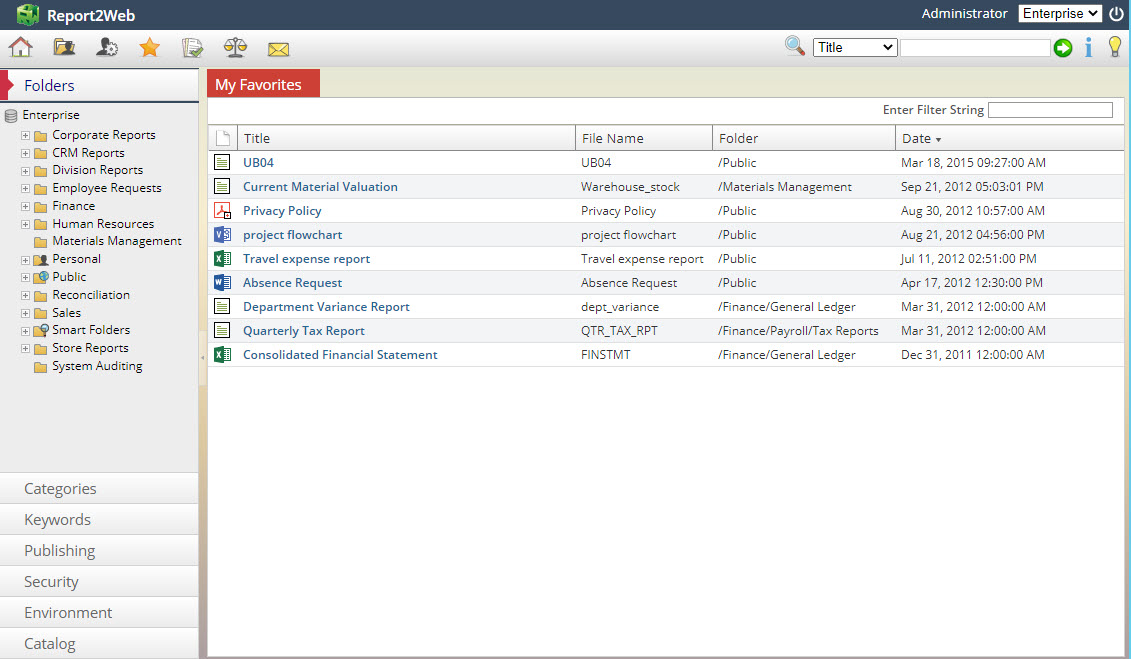
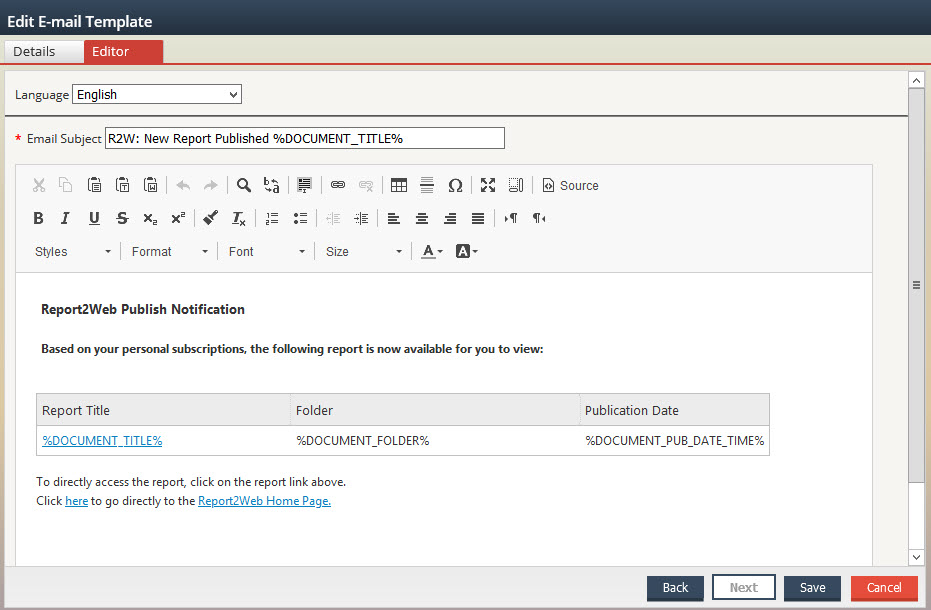
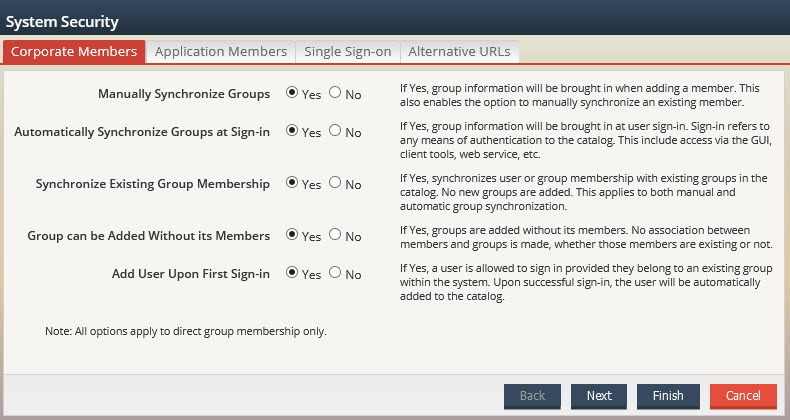
Screenshot of Report2Web PageMart Viewer with Content Driven FiltersScreenshot of Report2Web PageMart User FavoritesScreenshot of Customizable Report2Web Email TemplatesScreenshot of Report2Web Keyword Index and SearchScreenshot of Report2Web Authentication Options