TrustRadius: an HG Insights company

Save this comparison

Save this comparison

Add Product

Recommended Comparisons

    Overview
    ProductRatingMost Used ByProduct SummaryStarting Price

    Planable

    Score8.5 out of 10
    N/APlanable is a social media management tool built around content collaboration and approvals. It covers planning, creation, feedback, approval, scheduling, publishing, community management, analytics, competitor benchmarking, and social listening in one workspace. Drafts render as exact previews of the finished post, feedback is left on the content itself rather than in a separate thread, and approval requirements are set per workspace. Planable was founded in 2016 and is used…

    $39

    per month per workspace

    Wrike

    Score8.5 out of 10
    Mid-Size Companies (51-1,000 employees)
    Wrike is a collaborative work and project management platform designed for enterprise organizations, built on the vendor's Wrike Work Intelligence® Graph data model. The platform provides a shared system for teams to plan, execute, and monitor projects across the enterprise, offering specialized modules for marketing, creative, product development, and professional services teams. Wrike Strategic Portfolio Management powered by Shibumi® (Wrike SPM) is an add-on module to the Wrike platform that…

    $240

    per year 2 users (minimum)

    Pricing
    PlanableWrike
    Editions & Modules
    Basic
    $39
    per month per workspace
    Pro
    $59
    per month per workspace
    Enterprise
    Custom
    Wrike Free
    $0
    per month per user
    Wrike Team
    $10
    per month (billed annually) per user (2-15 users)
    Wrike Business
    $25
    per month (billed annually) per user (5-200 users)
    Apex
    Request a quote
    per month per user
    Pinnacle
    Request a quote
    per month per user
    Offerings
    Pricing Offerings
    PlanableWrike
    Free Trial
    YesYes
    Free/Freemium Version
    YesYes
    Premium Consulting/Integration Services
    YesYes
    Entry-level Setup FeeNo setup feeNo setup fee
    Additional DetailsPlanable is priced per workspace, not per seat. Each workspace holds one brand or client, and every plan includes unlimited users: collaborators, reviewers, and clients can be added without increasing cost. Organizations scale by adding workspaces rather than licenses. Annual billing includes two months free on all plans and add-ons. Free trial 50 posts, with no time limit and no credit card required. The allowance is a total, not a monthly reset, so the trial ends when the 50th post is created rather than on a fixed date. X (Twitter) publishing is not available during the trial. The Analytics, Social Inbox, and Social Listening add-ons carry separate 30-day free trials on paid plans. Basic — $39 per workspace per month Entry plan for small teams with straightforward review needs. 60 posts per workspace per month 4 social pages per workspace Unlimited users 2 approval types: none and optional Feed and Calendar views 3 campaigns per workspace 10GB media storage 13 months of published post storage MCP connector included Optional approval means a post can be approved but does not have to be before it publishes. Teams that need publishing blocked until sign-off require Pro. Pro — $59 per workspace per month Most common plan for agencies and in-house teams running client or stakeholder approval. Everything in Basic, plus: 150 posts per workspace per month 10 social pages per workspace Required approval, in addition to none and optional — content cannot be scheduled or published until at least one approver signs off Grid view, in addition to Feed and Calendar 10 campaigns per workspace 50GB media storage Public API access Chat support Enterprise — custom pricing For organizations with formal review chains, multiple brands, or procurement and security requirements. Everything in Pro, plus: Unlimited posts Multi-level approvals: sequential stages with designated approvers at each one List view, in addition to Feed, Calendar, and Grid Unlimited campaigns 100GB media storage 24 months of published post storage SSO Dedicated account manager and priority support Payment by bank or wire transfer Add-Ons Add-ons are priced per workspace and available on any plan, including Basic. They are enabled per workspace rather than account-wide, so an agency can run Analytics on client workspaces that pay for reporting without buying it across the board. Analytics — $14 per workspace per month, or $140 per year. Cross-channel performance data, audience insights, custom reports, and Competitor Analytics. 30-day free trial. Social Inbox — $9 per workspace per month, or $90 per year. Comments and direct messages from connected channels in one inbox, with AI reply drafting. 30-day free trial. Social Listening — $99 per workspace per month, or $990 per year. Brand, competitor, and topic monitoring across eight sources with sentiment analysis and alerts. Includes 1 brand keyword, 3 topic keywords, and 3 competitor keywords per workspace. 30-day free trial. What drives cost Three variables determine spend: the number of workspaces, the monthly post volume per workspace, and which add-ons are enabled per workspace. Team size does not affect price on any plan. Planable also offers bundled discounts with SE Ranking for SEO and SE Visible for AI search visibility.Every premium plan begins with a 14-day trial period.
    More Pricing Information
    Community Pulse
    PlanableWrike
    Considered Both Products
    Planable
    No answer on this topic
    Wrike
    No answer on this topic
    Key User Insights
    Would buy again
    No answers on this topic
    92%
    Would buy again
    826 Answers
    Delivers good value for the price
    No answers on this topic
    96%
    Delivers good value for the price
    572 Answers
    Happy with the feature set
    No answers on this topic
    94%
    Happy with the feature set
    844 Answers
    Lived up to sales and marketing promises
    No answers on this topic
    96%
    Lived up to sales and marketing promises
    394 Answers
    Implementation went as expected
    No answers on this topic
    90%
    Implementation went as expected
    454 Answers
    Features
    PlanableWrike
    Publishing
    Comparison of Publishing features of Planable and Wrike
    Feature
    Planable
    10.0
    1 Ratings
    20% above category average
    Wrike
    -
    Ratings
    Content planning and scheduling10.01 Ratings00 Ratings
    Content optimization10.01 Ratings00 Ratings
    Workflow management10.01 Ratings00 Ratings
    Channel coverage/integration
    Comparison of Channel coverage/integration features of Planable and Wrike
    Feature
    Planable
    10.0
    1 Ratings
    18% above category average
    Wrike
    -
    Ratings
    Twitter10.01 Ratings00 Ratings
    Facebook10.01 Ratings00 Ratings
    LinkedIn10.01 Ratings00 Ratings
    Google+10.01 Ratings00 Ratings
    Instagram10.01 Ratings00 Ratings
    Pinterest10.01 Ratings00 Ratings
    Account management
    Comparison of Account management features of Planable and Wrike
    Feature
    Planable
    10.0
    1 Ratings
    23% above category average
    Wrike
    -
    Ratings
    Mobile access10.01 Ratings00 Ratings
    Project Management
    Comparison of Project Management features of Planable and Wrike
    Feature
    Planable
    -
    Ratings
    Wrike
    7.9
    977 Ratings
    3% above category average
    Task Management00 Ratings9.1971 Ratings
    Resource Management00 Ratings7.6840 Ratings
    Gantt Charts00 Ratings7.3687 Ratings
    Scheduling00 Ratings8.3852 Ratings
    Workflow Automation00 Ratings8.1843 Ratings
    Team Collaboration00 Ratings8.8970 Ratings
    Support for Agile Methodology00 Ratings7.9549 Ratings
    Support for Waterfall Methodology00 Ratings8.0497 Ratings
    Document Management00 Ratings7.5822 Ratings
    Email integration00 Ratings7.9735 Ratings
    Mobile Access00 Ratings7.5711 Ratings
    Timesheet Tracking00 Ratings7.5461 Ratings
    Change request and Case Management00 Ratings7.723 Ratings
    Budget and Expense Management00 Ratings6.7356 Ratings
    Professional Services Automation
    Comparison of Professional Services Automation features of Planable and Wrike
    Feature
    Planable
    -
    Ratings
    Wrike
    7.3
    365 Ratings
    6% below category average
    Quotes/estimates00 Ratings8.21 Ratings
    Invoicing00 Ratings6.629 Ratings
    Project & financial reporting00 Ratings7.4360 Ratings
    Integration with accounting software00 Ratings6.9221 Ratings
    Best Alternatives
    PlanableWrike
    Small Businesses
    Sendible
    Score6.8 out of 10
    Any.do
    Score8 out of 10
    Medium-sized Companies
    CoSchedule
    Score10 out of 10
    KanbanFlow
    Score7.3 out of 10
    Enterprises
    Salesforce Marketing Cloud Social Studio (discontinued)
    Score8.2 out of 10
    Microsoft To Do
    Score7.8 out of 10
    All AlternativesView all alternativesView all alternatives
    User Ratings
    PlanableWrike
    Likelihood to Recommend
    8.0
    (1 ratings)
    8.4
    (1012 ratings)
    Likelihood to Renew
    -
    (0 ratings)
    8.5
    (109 ratings)
    Usability
    8.0
    (1 ratings)
    8.4
    (348 ratings)
    Availability
    -
    (0 ratings)
    8.4
    (24 ratings)
    Performance
    -
    (0 ratings)
    6.6
    (21 ratings)
    Support Rating
    1.0
    (1 ratings)
    9.5
    (93 ratings)
    In-Person Training
    -
    (0 ratings)
    8.2
    (5 ratings)
    Online Training
    -
    (0 ratings)
    8.4
    (13 ratings)
    Implementation Rating
    -
    (0 ratings)
    9.9
    (37 ratings)
    Configurability
    -
    (0 ratings)
    8.0
    (16 ratings)
    Contract Terms and Pricing Model
    -
    (0 ratings)
    8.5
    (5 ratings)
    Ease of integration
    -
    (0 ratings)
    7.0
    (7 ratings)
    Product Scalability
    -
    (0 ratings)
    8.2
    (15 ratings)
    Professional Services
    -
    (0 ratings)
    9.1
    (4 ratings)
    Vendor post-sale
    -
    (0 ratings)
    9.1
    (8 ratings)
    Vendor pre-sale
    -
    (0 ratings)
    7.8
    (9 ratings)
    User Testimonials
    PlanableWrike
    Likelihood to Recommend
    Planable
    It needs the ability to save hashtags. Some of the other tools offer this, so I emailed Planable and asked them to consider adding it.
    Read full review
    Wrike
    Wrike helped us stitch PMO-related activities under one umbrella. The easy collaboration with multiple access types, combined with security access definitions, helped users across the organization contribute according to their roles. This helped provide the organization with multiple items to be reviewed in a single tool. This saved time in weekly review meetings by avoiding switching between multiple tools & files.
    Incentivized
    Read full review
    Pros
    Planable
    • Plan posts on multiple platforms at once
    • Approval workflow
    Read full review
    Wrike
    • Excellent dashboards that are easy to use and give amazing insights.
    • User friendly interface that is also easy to interact with.
    • Lot of integrations.
    • Robust project and task management features.
    • Facilitate seamless team collaboration and communication.
    • Highly customizable and multiple project views.
    Read full review
    Cons
    Planable
    • Add hashtags in the tool so you can save them for future use
    Read full review
    Wrike
    • Email alerts sometimes send too slowly.
    • If you put a project on hold, it can be hard to find it once you are ready to return to it.
    • Sometimes there are too many steps/tasks and the main page can get cluttered.
    Incentivized
    Read full review
    Likelihood to Renew
    Planable
    No answers on this topic
    Wrike
    I wish that Wrike had more drag and drop functionality that would be connected to assignee and also I wish that the finish date of a task would update to the date where you checked completed. It does not do that. Also finishing a task doesn't move the start date of the next task it "protects your time in that way", but our management team wants us to quickly see what we have down the pipeline rather than having to scroll down the list of upcoming tasks.
    Incentivized
    Read full review
    Usability
    Planable
    It does what you need, but could have a bit more features for the price. $30 a month just to post things on Facebook or Instagram is a bit steep, given that that's all you can do.
    Read full review
    Wrike
    We have project templates set up based on what job type is selected in our work request form. This helps save time by having specific tasks already on each job as it is opened. Then it's just a matter of scheduling the tasks based on the job request and current workload. As long as a due date is flexible, it's easy to shift specific due dates as needed.
    Incentivized
    Read full review
    Reliability and Availability
    Planable
    No answers on this topic
    Wrike
    Over two years of (almost) daily usage without outages. Don't remember any errors. I give it 9 only because some Wrike plugins (for online document edit) are based on NPAPI architecture. These types of plugins are being phased out in new browsers, and NPAPI plugins are disabled by default in recent versions of Chrome so you have to do some browser adjustments when you switch browsers or move to another computer.
    Read full review
    Performance
    Planable
    No answers on this topic
    Wrike
    Wrike tasks loads fine, but I hate clicking files and wait for a bit of time since it is powerpoint or word, Wrike assumes I want to open those on Wrike. My suggestion is to link it to office 365 so we do not need Wrike based decoder for PPTX and DOCX
    Incentivized
    Read full review
    Support Rating
    Planable
    Emailed them a month ago to add hashtags, but they didn't add the functionality yet. Given that the product has stayed exactly the same since, I'm guessing the developers don't want to add this feature so I give the support a rating of 1.
    Read full review
    Wrike
    During my learning phase with Wrike, I initially struggled with setting up automation rules and request forms. However, Wrike support was always my go-to, resolving issues within seconds or minutes. Their assistance made the learning process much easier. My best experience was receiving step-by-step screenshots to follow, with the support team on standby until I was completely satisfied.
    Incentivized
    Read full review
    In-Person Training
    Planable
    No answers on this topic
    Wrike
    We had staff in person provide some training
    Incentivized
    Read full review
    Online Training
    Planable
    No answers on this topic
    Wrike
    I love the Wrike training options. Wrike Discover has tons of courses, learning plans, certifications, etc. This is an area where Wrike definitely shines! I wish these resources were more in your face for new people, because it seems like a lot of coworkers didn't know all of this training was available to them.
    Incentivized
    Read full review
    Implementation Rating
    Planable
    No answers on this topic
    Wrike
    There are a lot of bells and whistles in Wrike, and not all of it is easy or intuitive to understand once it's plopped in your lap. It's easier when there are a few choice people who understand Wrike as a platform and articulate it in such a way where it makes it easy to pass it along to others in the group
    Read full review
    Alternatives Considered
    Planable
    Cheaper, however, Kontentino does have the ability to save hashtags.
    Read full review
    Wrike
    Jira did not at all help us get our work done as content creators. I think that was because Jira wasn't quite right for our uses. Wrike fits our needs so much better. I can't tell you enough the relief I felt when we adopted Wrike and I never had to use Jira again.
    Incentivized
    Read full review
    Contract Terms and Pricing Model
    Planable
    No answers on this topic
    Wrike
    company purchase
    Incentivized
    Read full review
    Scalability
    Planable
    No answers on this topic
    Wrike
    The sky is the limit for what can be done in Wrike. We started with 1 use case and within 5 months we migrated several key business practices over to Wrike because they were easier to manage. Use cases so far: process improvement, management review, corrective actions, maintenance requests, month-end financial closing, and document management. As we grow, it's easy to imagine putting even more into Wrike where it becomes a cornerstone for how we do business
    Read full review
    Professional Services
    Planable
    No answers on this topic
    Wrike
    I do not use professional services.
    Incentivized
    Read full review
    Return on Investment
    Planable
    • Ability to post on any social media platform with 1 click. It adjusts the layout for you, pictures, adding action buttons, etc.
    Read full review
    Wrike
    • Different teams (e.g., contracting, compliance, provider relations) can view updates in real time, comment directly on tasks, and escalate items when needed.
    • Wrike allows us to template the contracting process (from intake to signature) to ensure consistency across payers and reduce administrative overhead.
    • Leadership can see the status of negotiations at a glance, identify bottlenecks, and prioritize resources accordingly.
    Incentivized
    Read full review
    ScreenShots

    Planable Screenshots

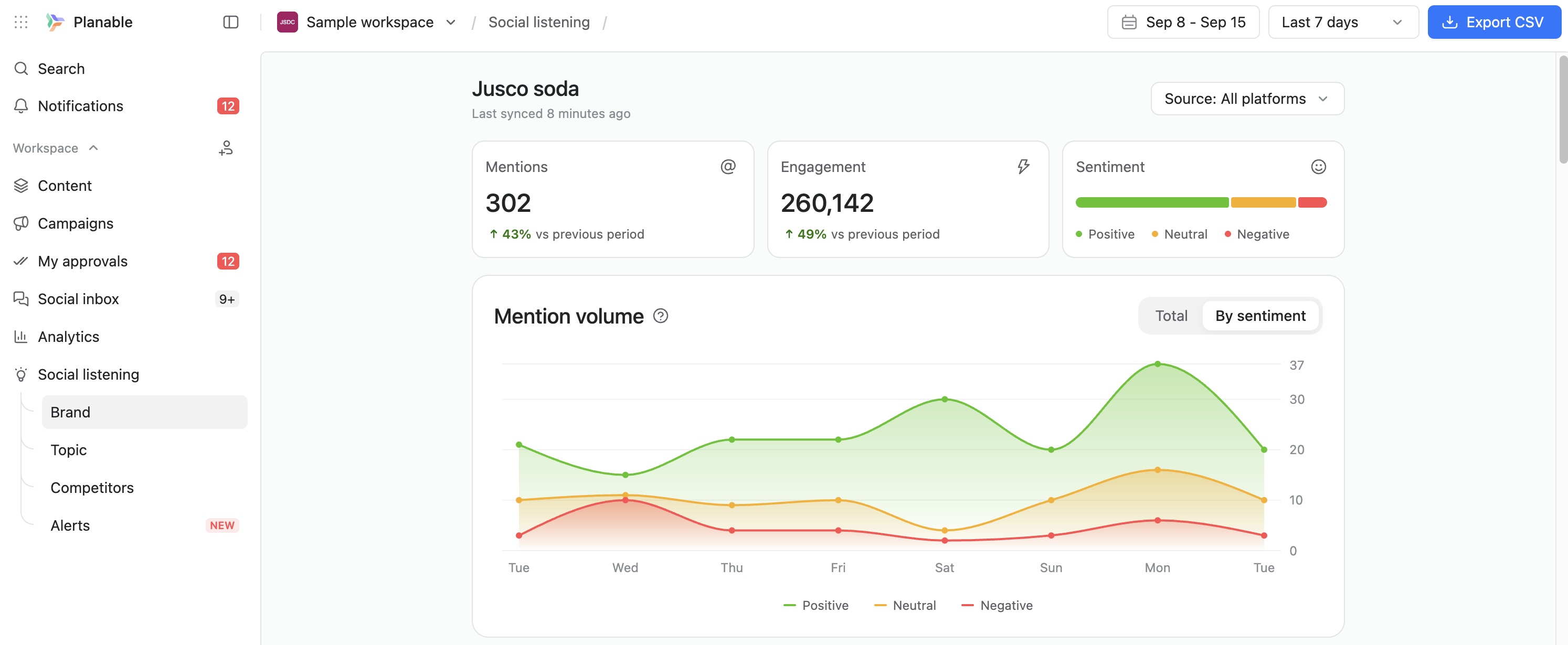
    Screenshot of Planable weekly content calendar in grid view showing scheduled posts with images, times, and platforms.Screenshot of Facebook analytics dashboard in Planable with follower growth, post count, impressions, and engagement trends.Screenshot of Planable interface showing comment thread with suggestions on a social media post draft for team collaboration.Screenshot of Approval settings panel in Planable showing user roles, toggle switches, and auto-scheduling option.Screenshot of Planable workspace permissions view showing team and client roles with customizable access for content collaboration.Screenshot of Track brand mentions and sentiment in one social listening dashboard.

    Wrike Screenshots

    Screenshot of DashboardsScreenshot of DashboardsScreenshot of DashboardsScreenshot of DashboardsScreenshot of Space workflowsScreenshot of Space workflows