TrustRadius: an HG Insights company

SolarWinds Engineer's Toolset vs. SolarWinds Pingdom

Save this comparison

Save this comparison

Add Product

Recommended Comparisons

    Overview
    ProductRatingMost Used ByProduct SummaryStarting Price

    SolarWinds Engineer's Toolset

    Score7.6 out of 10
    N/ASolarWinds® Engineer’s Toolset (ETS) helps users monitor and troubleshoot a network with over 60 tools for network management. ETS allows users to monitor and receive alerts in real time on network availability and health, and perform network diagnostics for faster troubleshooting and resolution of complex network issues. With ETS users can deploy an array of network discovery tools including Port Scanner, Switch Port Mapper or advanced Subnet Calculator, manage Cisco® devices with specialized…

    $1,585

    Per Instance

    SolarWinds Pingdom

    Score7.8 out of 10
    N/ASolarWinds Pingdom is a website uptime monitoring and alert tool, with additional reporting and Real User Monitoring capabilities. Pingdom is part of SolarWinds’s DevOps package, enabling full-stack monitoring as a service.

    $14.95

    per month

    Pricing
    SolarWinds Engineer's ToolsetSolarWinds Pingdom
    Editions & Modules
    One Time Price
    $1,585
    Per Instance
    Synthetic Monitoring
    $10
    per month
    Real User Monitoring
    $10
    per month
    Enterprise
    Custom Pricing
    Offerings
    Pricing Offerings
    SolarWinds Engineer's ToolsetSolarWinds Pingdom
    Free Trial
    YesYes
    Free/Freemium Version
    NoNo
    Premium Consulting/Integration Services
    NoNo
    Entry-level Setup FeeNo setup feeNo setup fee
    Additional Details——
    More Pricing Information
    Community Pulse
    SolarWinds Engineer's ToolsetSolarWinds Pingdom
    Considered Both Products
    SolarWinds
    No answer on this topic
    SolarWinds
    No answer on this topic
    Key User Insights
    Would buy again
    100%
    Would buy again
    11 Answers
    98%
    Would buy again
    52 Answers
    Delivers good value for the price
    90%
    Delivers good value for the price
    9 Answers
    98%
    Delivers good value for the price
    52 Answers
    Happy with the feature set
    100%
    Happy with the feature set
    11 Answers
    98%
    Happy with the feature set
    52 Answers
    Lived up to sales and marketing promises
    100%
    Lived up to sales and marketing promises
    10 Answers
    96%
    Lived up to sales and marketing promises
    43 Answers
    Implementation went as expected
    100%
    Implementation went as expected
    10 Answers
    100%
    Implementation went as expected
    49 Answers
    Best Alternatives
    SolarWinds Engineer's ToolsetSolarWinds Pingdom
    Small Businesses
    No answers on this topic
    No answers on this topic
    Medium-sized Companies
    No answers on this topic
    SolarWinds Web Performance Monitor (WPM)
    Score8 out of 10
    Enterprises
    No answers on this topic
    No answers on this topic
    All AlternativesView all alternativesView all alternatives
    User Ratings
    SolarWinds Engineer's ToolsetSolarWinds Pingdom
    Likelihood to Recommend
    8.6
    (11 ratings)
    4.5
    (64 ratings)
    Likelihood to Renew
    -
    (0 ratings)
    10.0
    (4 ratings)
    Usability
    8.2
    (1 ratings)
    10.0
    (7 ratings)
    Performance
    -
    (0 ratings)
    6.0
    (1 ratings)
    Support Rating
    8.2
    (1 ratings)
    4.1
    (54 ratings)
    User Testimonials
    SolarWinds Engineer's ToolsetSolarWinds Pingdom
    Likelihood to Recommend
    SolarWinds
    I have found the toolset especially useful for scanning subnets to discover devices, and for setting up temporary real-time monitors when we are troubleshooting or setting up new connections. The most useful aspect has been the ability to apply the tools to help troubleshoot and pinpoint intermittent issues. More general tools like Orion often do not have the granularity to detect issues like intermittent packet loss which are especially impactful to applications like Voice. The toolset gives us another level of capability to dig into issues.
    Incentivized
    Read full review
    SolarWinds
    I believe the scenarios we used it for were quite well covered, from the executive perspective. The downtime alarms worked very well and were easy to setup, uptime monitoring tools were clear and easy to use, even for non-technical people (C-level) and the SLA management tools allowed us to spend less time, and have less friction, with our clients
    Incentivized
    Read full review
    Pros
    SolarWinds
    • Various monitoring
    • Stores history
    • Suggests indices
    • Helps to find the SQL query text
    • Helps to see what machines/users the bad queries are coming from
    • Shows current blocking session
    Incentivized
    Read full review
    SolarWinds
    • The alerts are very responsive offering quite detailed timing information
    • The UI for reports is very clear and set up of reports is very intuitive
    • Customer service was good when there were problems - e.g. lapsing billing causing reporting to go down
    Incentivized
    Read full review
    Cons
    SolarWinds
    • The unifying component that is intended to be the initial interface to the tools seems clunky. I prefer to start the tools individually rather than using it.
    • The port scanner could use some improvements to make it easier to use.
    Incentivized
    Read full review
    SolarWinds
    • The PagerDuty integration could be a lot better. When you use the PagerDuty integration, it doesn't send any information about which check failed! It just sends a message like "Timeout (> 30s)" -- this isn't very helpful when we have hundreds of checks. We've worked around this by using both the PagerDuty and Slack integrations and having them both post to the same Slack channel. But this means that when an engineer is paged from PagerDuty, they have to go to Slack (or Pingdom) to find the details about the page; it's not available on the page itself.
    Incentivized
    Read full review
    Likelihood to Renew
    SolarWinds
    No answers on this topic
    SolarWinds
    Recently added features have made Pingdom less intuitive for our requirements. While Pingdom has a broad offering and remains a good value, it is becoming more than we need. Our customer base is becoming more and more global and Pingdom still lacks Asia-Pacific monitoring, which we will need within a year.
    Read full review
    Usability
    SolarWinds
    Very easy to use and intuitive. Just be careful with the WAN Killer...it does what it says.
    Incentivized
    Read full review
    SolarWinds
    Pingdom is easy to use, very intuitive and has a very short learning curve. From the onset, we've been able to jump in and leverage the tool to accomplish our goals for page speed performance and discover the insights we need to make improvements. Its a well-designed tool and makes for a good user experience.
    Incentivized
    Read full review
    Performance
    SolarWinds
    No answers on this topic
    SolarWinds
    Interface is unnecessarily complicated and frequently responds slowly.
    Read full review
    Support Rating
    SolarWinds
    Our organization uses it regularly. It is reliable, and we keep finding new uses for it
    Incentivized
    Read full review
    SolarWinds
    Support responded the same day to my query, as I was setting the product up but couldn't find the setting I needed. This was successfully resolved in a short time frame, so I was pleased with how quickly we were able to get this resolved. I haven't needed to contact support since.
    Incentivized
    Read full review
    Alternatives Considered
    SolarWinds
    I haven't compared any tools similar to SolarWinds Engineer's Toolset. This might be because I'm pretty biased when it comes to monitoring, and reporting solutions. I've found that SolarWinds provides the biggest bang for the buck in my opinion. I'm sure there are other solutions on the market that compete, but I haven't tried any of them because I've been very satisfied with SolarWinds.
    Incentivized
    Read full review
    SolarWinds
    1. PRTG Network Monitor was a far more complicated tool to use and set up albeit it does both Internal and External monitoring. The setup wasn't intuitive and there are too many configuration options to complete to form an alert
    2. Amazon CloudWatch is specific to AWS resources and cannot be easily use outside of the AWS Ecosystem
    Incentivized
    Read full review
    Return on Investment
    SolarWinds
    • Spend less time downloading free buggy tools
    • All the tools in one spot, so you don't have to look around for tools
    • Get to the solution sooner
    Incentivized
    Read full review
    SolarWinds
    • Honestly, we have 4 other products that overlap this functionality whose organizations provide far superior support. At this point it is an unnecessary expense.
    • In my opinion, their lack of support responsiveness and commitment has impacted our IT agility.
    • Its time to explore other alternatives.
    Read full review
    ScreenShots

    SolarWinds Engineer's Toolset Screenshots

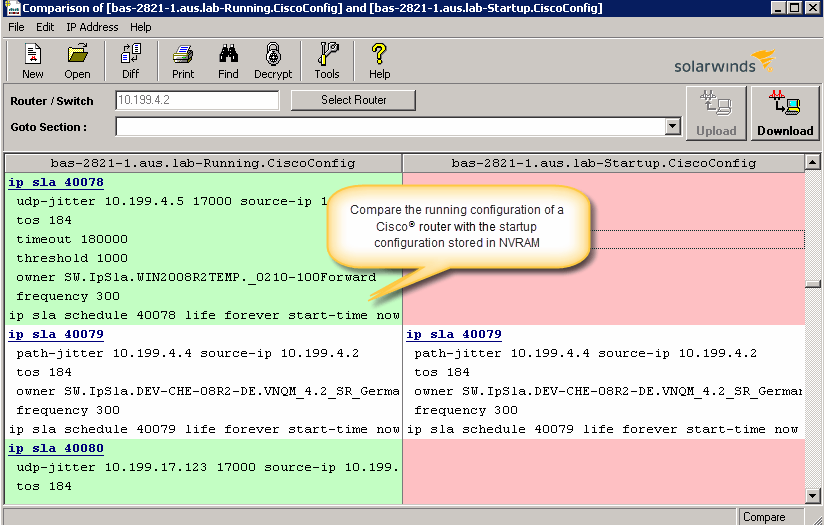
    Screenshot of Perform network stress tests with Engineer's Toolset WAN Killer. You don’t need to use real traffic for studying network activities, like testing traffic and load balancing. Instead, deploy Engineer's Toolset WAN Killer to help interactively test connections and adjust the IP traffic generated to achieve the desired network load based on your requirements.Screenshot of Quickly troubleshoot your network with enhanced ping capabilities and packet route tracing, among other network bandwidth usage and monitoring tools included in ETS.Screenshot of Using ETS, you can run scans to gain insight into how routers, hubs switches, and other devices are configured by analyzing SNMP queries and viewing MIB attributes. ETS is designed to help you more easily understand whether your network and ports are using appropriate settings.Screenshot of Config Compare, a part of ETS, is built to compare the running configuration of a Cisco router with the startup configuration. With the Cisco configuration compare tool, you can easily detect the changes made to the network, switch, and router configurations that are not committed to non-volatile memory (NVRAM).Screenshot of Manage your IP network from discovery to address tracking. Discover subnets on a seed router and scan the subnet or a range of IP addresses, generate a list of subnets along with their mask, size, range, and broadcast address and actively monitor subnets to identify and track which IP addresses are in use on your network.

    SolarWinds Pingdom Screenshots

    Product screenshotProduct screenshotProduct screenshotProduct screenshot