Splunk is software for searching, monitoring, and analyzing machine-generated big data, via a web-style interface. It captures, indexes and correlates real-time data in a searchable repository from which it can generate graphs, reports, alerts, dashboards and visualizations.
N/A
Webtrends Analytics
Score3 out of 10
N/A
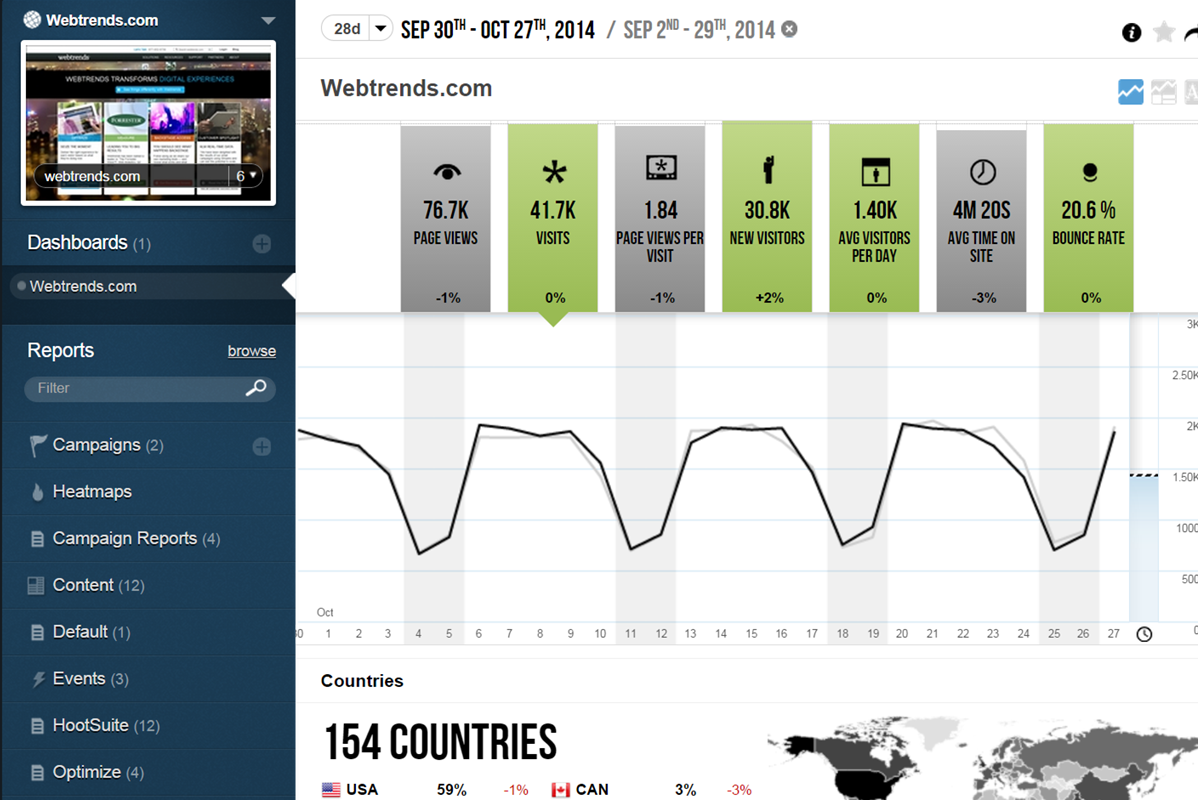
WebTrends provides an enterprise web analytics platform and, according to Forrester, has a strong focus on support for mobile and social channels and a very open platform. Webtrends competes directly with Adobe Site Catalyst, IBM Coremetrics. and comScore DigitalAnalytix.
I'm liking the newer products, and I'm looking forward to how they integrate with the overall product when they come together. Just log in and be able to query a large number of systems for similar issues or a unique one. That is a great fit for Splunk Enterprise, looking for a simple case or a simple String or something of that nature across multiple machines. It's a great fit for that to identify issues or particular software, whatever your scenario is, String, to find it across any particular server or group of servers, so that you can update or do a deployment or whatever it is you're looking to do.
A de minimis incentive was given to thank the reviewer for their time. The incentive was not used to bias or drive a particular response, nor was the incentive contingent on a positive endorsement. More Info
Scenarios 1. If you want to use web server log files as input to your web analytics, then Webtrends will provides a good product, with great ease of implementation. Don't even think about being cheap on hardware, and make sure Webtrends runs on real servers, not in a VM environment. 2. If you want to use Data Tagging, similar to Google Analytics or Site Catalyst, Webtrends has a powerful product, just be prepared to pay. 3. If you are new to Web Analytics, but it is the strategic direction, start with Webtrends on Premises. Questions to Ask 1. What are you trying to accomplish? 2. Can you place a dollar value on the benefit that you expect/need from Webtrends? 3.Can you live with Webtrends running SaaS?
A de minimis incentive was given to thank the reviewer for their time. The incentive was not used to bias or drive a particular response, nor was the incentive contingent on a positive endorsement. More Info
Control privacy, data sharing and competitive industrial knowledge using Webtrends on premises
Great control over custom reports, custom dimensions and metrics
Flexible tool which allows multiple methods of data capture. To my knowledge it was the first tool with a Tag Builder / Tag Management function built in via a supporting website.
A de minimis incentive was given to thank the reviewer for their time. The incentive was not used to bias or drive a particular response, nor was the incentive contingent on a positive endorsement. More Info
The big downside, the elephant in the room, is that it does not (as of right now) have on-demand segmenting, drilldowns, etc. You have to think of what you want in advance and create those reports then analyze some data. This is huge. You can, of course, re-analyze old data after creating new reports but you still have to wait. (This deficiency may become obsolete with the release of Webtrends Explore later this month (May 2014).)
It has fewer mature integrations with other products and databases than competitors do, although I'm told it works with SharePoint better than anything else does.
Its attribution modeling capability is behind Google Analytics'. In my humble opinion, this could be changed quickly if Webtrends would make some tweaks to its standard visitor history files (i.e. preserve the order in which past visits were sourced beyond the single most recent one, rather than storing all those past sources as a randomized list).
It doesn't incorporate statistical tests, confidence intervals, or statistical associations. However, this same criticism can be applied to its competitors (other than A/B Testing products). It's a tabulation program, as they all are. In this respect, web analytics tools as a group are relatively primitive. Sorry to bring this up as a criticism of Webtrends but it's my pet peeve about the whole industry and I just have to say it. (p.s. take advantage of the heavy-duty Webtrends Scheduled Export functionality to get really granular data that you can feed to a stats program to get significances.)
Although the documentation, help screens, phone support and the knowledge base have improved tremendously in recent years, there is still a pretty steep learning curve because it is different from the tools that entry-level users may have already been exposed to. This can be a shock and many users are alienated at first because they just don't get some of the fundamentals at first. I'd like to see much better help screens that are thoroughly interlinked with the KB and documentation. Having superb online support would make a world of difference with the adoption of this basically powerful tool.
We are using Splunk extensively in our projects and we have recently upgraded to Splunk version 6.0 which is quite efficient and giving expected results. We keep track of updates and new features Splunk introduces periodically and try to introduce those features in our day to day activities for improvement in our reporting system and other tasks.
I would be willing to try Webtrends again AFTER some research from other users. I would need to see that users mention better and faster customer support on questions and issues that arise while using the software. The software is capable of vast and incredible things, but if it isnt properly set up and supported during use, it is just a big hassel and waste of everyones time and money.
You can literally throw in a single word into Splunk and it will pull back all instances of that word across all of your logs for the time span you select (provided you have permission to see that data). We have several users who have taken a few of the free courses from Splunk that are able to pull data out of it everyday with little help at all.
A de minimis incentive was given to thank the reviewer for their time. The incentive was not used to bias or drive a particular response, nor was the incentive contingent on a positive endorsement. More Info
If I could give it a 0, I would. Not having an intuitive user interface made it impossible to convince non-analytic business users to use the tool on their own. Even as a seasoned analyst, frequent calls were needed to get what should be simple tasks done. Account managers don't understand the tool either, and have to refer you to technical support
A de minimis incentive was given to thank the reviewer for their time. The incentive was not used to bias or drive a particular response, nor was the incentive contingent on a positive endorsement. More Info
The v9 admin interface and v10 reporting interface work as well as expected, but have a tendency to be pokey, especially for bulky reports and whenever you're connected to wifi. I much prefer using the REST API for all reporting for this reason, which simply dumps out the data and doesn't bother with the user interface.
Splunk maintains a well resourced support system that has been consistent since we purchased the product. They help out in a timely manner and provide expert level information as needed. We typically open cases online and communicate when possible via e-mail and are able to resolve most issues with that method.
A de minimis incentive was given to thank the reviewer for their time. The incentive was not used to bias or drive a particular response, nor was the incentive contingent on a positive endorsement. More Info
I once went on to Twitter to ask for help from my network of analytics people, and Webtrends themselves responded. They have been an excellent partner in making sure that their product is being used to the best of it's ability and I greatly appreciate that. Both Omniture and Google Analytics, do not have that level of support over social media
The in-person training was comprehensive enough to get you started, but I strongly recommend having a more experienced person when beginning with the tool.
The online course was simple clear and described the main capabilities of the solution. There is also an initial module that can be done for free so anyone can familiarize themselves with the functionality of this solution. On the other hand, however, there could be more free online courses. Maybe even with a certificate, this would broaden the group of people who are familiar with the platform while increasing familiarity with the solution itself.
Webtrends provides several free webinars over the course of the year, many of which I would expect to pay for. The people providing the webinars seem to have a good feel for real-world application of the product.
A de minimis incentive was given to thank the reviewer for their time. The incentive was not used to bias or drive a particular response, nor was the incentive contingent on a positive endorsement. More Info
Careful planning and patience. Use a non-public test site to fine tune tags and reporting. Despite best laid plans, there will be surprises when you collect the data, run the analysis and begin generating reports using the tool. Perform a tag audit to ensure tags fire as desired.
A lot of products have natively inside their own dashboards and or their own logging repositories. And each one is difficult to learn or they're too complex or they're not verbose in the sense that they're not easy to mine the data that you're looking for. So that could be anything from the native logging that you find in other Cisco products. It's easier to use Splunk to draw the data that you're looking for as opposed to going to the individual's products themselves to get the logs that you're looking for.
A de minimis incentive was given to thank the reviewer for their time. The incentive was not used to bias or drive a particular response, nor was the incentive contingent on a positive endorsement. TR verified that a representative sample of customers was invited. More Info
Webtrends has its work cut out for itself considering you have the behemoth Google Analytics and Google Analytics Premium having a strong offering and brand recognition for the price of free. After reviewing the paid service I'd suggest you start off with GA as a cheaper alternative that is just as robust, if not much more flexible in regards to the reporting and goal tracking needs for our company.
A de minimis incentive was given to thank the reviewer for their time. The incentive was not used to bias or drive a particular response, nor was the incentive contingent on a positive endorsement. More Info
Splunk has allowed developers to diagnose production issues when access of control was taken away from them to be allowed to view items in production environments and I believe that is invaluable.
At times some developers weren't super happy about using it, but it was more of the fact that they were used to having production access and not creating their splunk queries to get information.
Going one place to view logs was very beneficial to have.
A de minimis incentive was given to thank the reviewer for their time. The incentive was not used to bias or drive a particular response, nor was the incentive contingent on a positive endorsement. More Info
Webtrends has had a positive impact on site visitation because it allowed us to understand the sources by domain for site traffic and find out ways to increase visits from those domains.
Webtrends has also allowed us to understand areas of optimization on the site, which has had a positive impact on the overall user journey on the site, likely leading to longer site duration and engagement.