
Mate Kovacs
CEO (Chief Executive Officer)
Chose Teamwork.com
Teamwork was the choice for us during the first few years, as it was accessible and affordable. Later on, Asana and Monday.com delivered superior features and functionality.

| Product | Rating | Most Used By | Product Summary | Starting Price |
|---|---|---|---|---|
 Teamwork.com | N/A | Teamwork.com is a project management platform built specifically for client work. The platform helps users deliver work on time and on budget, eliminate client chaos, and understand profitability. Teamwork.com’s customers track and manage their projects with a suite of integrated solutions such as helpdesk, collaboration, knowledge sharing and customer relationship management add-ons, enabling Teamwork.com to be the ‘one-stop shop’ solution for business owners. Teamwork.com… | $13.99 per month per user | |
 WorkOtter PPM | Mid-Size Companies (51-1,000 employees) | WorkOtter is presented by the vendor as a simple, flexible, and scalable project portfolio management (PPM) solution for IT, Engineering, and Professional Service PMOs. The software manages the lifecycle of work from ideas through project planning, control, lessons learned, and close. Projects can then be rolled up to Programs (multi project efforts) or Portfolios (Roadmaps with What If Scenarios). All features were designed to support Project Teams with simplicity and usability in mind.… | $10 per user per month |
| Teamwork.com | WorkOtter PPM | |||||||||||||||
|---|---|---|---|---|---|---|---|---|---|---|---|---|---|---|---|---|
| Editions & Modules |
|
| ||||||||||||||
| Offerings |
| |||||||||||||||
| Entry-level Setup Fee | Optional | No setup fee | ||||||||||||||
| Additional Details | A discount is offered for annual billing. | Time/Status Tier is BEST FOR: Contractors, Consultants, Limited Team Members FUNCTIONALITY AVAILABLE:Timesheets, Adjust Estimate To Complete, Create Notes for PM and Team Members Team Tier is BEST FOR: Customers, Suppliers, Contractors, Consultants, Team Members FUNCTIONALITY INCLUDES TIME/STATUS PLUS: My Home Dashboards, Support Log Updates, Issue Updates, Changes, Timesheet & Expenses, Risks, Action Items Limited, Reporting, E-Mail Updates, Chat & Collaboration Manager Tier is BEST FOR: Project Managers, Program Managers, Executives, PMO Department Managers, Administrators FUNCTIONALITY INCLUDES TEAM PLUS: Project Management, Microsoft Project -Way Sync, Dashboard Reporting, Program Management, Resource Management, Portfolio Management, Workflow Management, Estimating and Templates | ||||||||||||||
| More Pricing Information | ||||||||||||||||
| Teamwork.com | WorkOtter PPM | |
|---|---|---|
| Considered Both Products |  Teamwork.com Mate Kovacs CEO (Chief Executive Officer) Chose Teamwork.com Teamwork was the choice for us during the first few years, as it was accessible and affordable. Later on, Asana and Monday.com delivered superior features and functionality.  Suzi Bustamante Director of Product Marketing Chose Teamwork.com Teamwork Enterprise IT Product has each and every module which is more advanced features. Impressively, it accepts documents created by other softwares. It works well in smaller devices like android phones. The teamwork Software suite, help you to analyze your projects.  Mudssar Adrees Asst. Manager Porcurement Quality Control Chose Teamwork.com Recommended by consultant, while also tested it so decide to implement it in a project.  Maria Bereziuk Account Manager Chose Teamwork.com Teamwork Projects gives us the communication flow between team members, which allows us to complete projects efficiently while keeping in touch. This is important because it shows you the essential aspects to get good results.  Blake Calson Technical Leader Chose Teamwork.com The tools that Teamwork Projects offer are advanced yet not as confusing when compared to other platforms used in project management. It is compatible with the web and all mobile devices to enable users to go mobile when organizing projects, teams, and resources.  Jahanzeb Hashmi - L.I.O.N Deputy Manager HR Chose Teamwork.com Every application has its own Pros &Cons but Basecamp pricing is not much flexible either they had flat per month rate for businesses. Teamwork Graphical user interface is better and their free version is also a plus point. Basecamp only offers 30 days free trial.  Sergey Gvozdetskiy Sales Manager Chose Teamwork.com We chose it because it gives us an excellent experience and quality in each internal work process; we perform all our activities in one place and together.  Brian Chung Co-Founder Chose Teamwork.com I prefer Teamwork over monday.com and google drive, but it could still use more functionality. We primarily use the Gantt chart, but I wish there was more functionality. There aren't as many features as I would like and I wish we didn't need to pay per user. I like things like …  Matthew Gardner Director of Customer Success Chose Teamwork.com Before this, we used Trello, which is just not as suited for the case. Trello boards are not made to duplicate process steps, etc. Teamwork is superior in that regard.  Nick Marsh IT Manager Chose Teamwork.com Teamwork is everything Project Online should be. It's not straddled with legacy bloat like Microsoft Project, and it is designed from the group up to be a cloud SaaS platform, where MS Project has bolted on the web support and it doesn't offer the same streamlined experience …  Luciano Gardesani Marques Account Executive Chose Teamwork.com We have tested other products but according to our context of use, Teamwork suited as the best option due to functionality (complete and easy-to-use) and fair pricing. We found and tested other tools that had the same features but they were not so intuitive. Basically, Teamwork …  Aquinov Mathappan Systems Administrator (Business Intelligence) Chose Teamwork.com Teamwork is designed for collaboration and project management. This application does exactly what it is designed to do without any unwanted/complication features that would confuse a normal (non-technical) user. Very easy to the user interface when compared to other …  Sarah Prom Senior Meeting & Event Planner Chose Teamwork.com Teamwork was our first choice.  Matt Graf Assistant Director of Production Chose Teamwork.com Teamwork stacks up very well with other project management products. I think it really just depends on what the company and team's needs are to determine which option is right for you. Some people and places will benefit greatly from something as robust and high quality as …  Kyle Moloo Director Of Client Services Chose Teamwork.com Teamwork is way better than ProWorkflow in every way, especially design (UI). PWF was hard to use and that resulted in people not using it and logging time--which caused a whole bunch of business problems. Compared to Basecamp, TW Proejcts is way more organized and easy to … |  WorkOtter PPM No answer on this topic |
| Teamwork.com | WorkOtter PPM | |||||||||||||||||||||||||||||||||||||||||||||
|---|---|---|---|---|---|---|---|---|---|---|---|---|---|---|---|---|---|---|---|---|---|---|---|---|---|---|---|---|---|---|---|---|---|---|---|---|---|---|---|---|---|---|---|---|---|---|
| Project Management |
| |||||||||||||||||||||||||||||||||||||||||||||
| Professional Services Automation |
|
| Teamwork.com | WorkOtter PPM | |
|---|---|---|
| Small Businesses |  Stackby Score 8.9 out of 10 | Stackby Score 8.9 out of 10 |
| Medium-sized Companies |  InEight Score 8.2 out of 10 | InEight Score 8.2 out of 10 |
| Enterprises | InEight Score 8.2 out of 10 | InEight Score 8.2 out of 10 |
| All Alternatives | View all alternatives | View all alternatives |
| Teamwork.com | WorkOtter PPM | |
|---|---|---|
| Likelihood to Recommend | 10.0 (0 ratings) | 10.0 (0 ratings) |
| Likelihood to Renew | 10.0 (0 ratings) | - (0 ratings) |
| Usability | 10.0 (0 ratings) | - (0 ratings) |
| Support Rating | 8.8 (0 ratings) | - (0 ratings) |
| Teamwork.com | WorkOtter PPM | |
|---|---|---|
| Likelihood to Recommend |
|
 Adam Gordon IT Project Manager |
| Pros |
Maria Bereziuk Account Manager |
Adam Gordon IT Project Manager |
| Cons |
Mudssar Adrees Asst. Manager Porcurement Quality Control |
|
| Likelihood to Renew |
 Jose Quintero IT Support Manager | No answers on this topic |
| Usability |
 Miles Baltrusaitis Marketing Operations Manager | No answers on this topic |
| Support Rating |
| No answers on this topic |
| Alternatives Considered |
| No answers on this topic |
| Return on Investment |
 Amber Callan Inbound Marketing Strategist |
|
| ScreenShots | Teamwork.com Screenshots     | WorkOtter PPM Screenshots 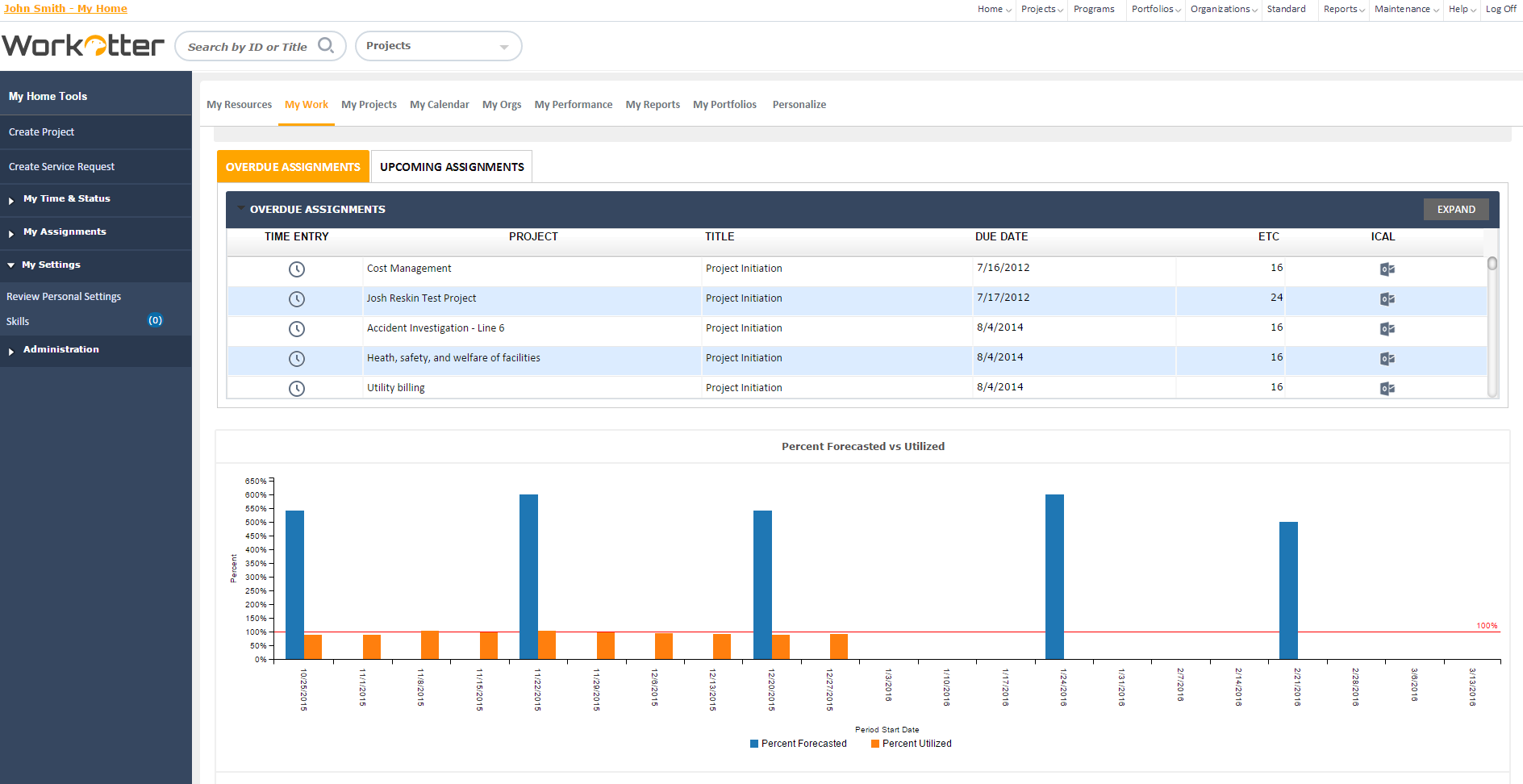 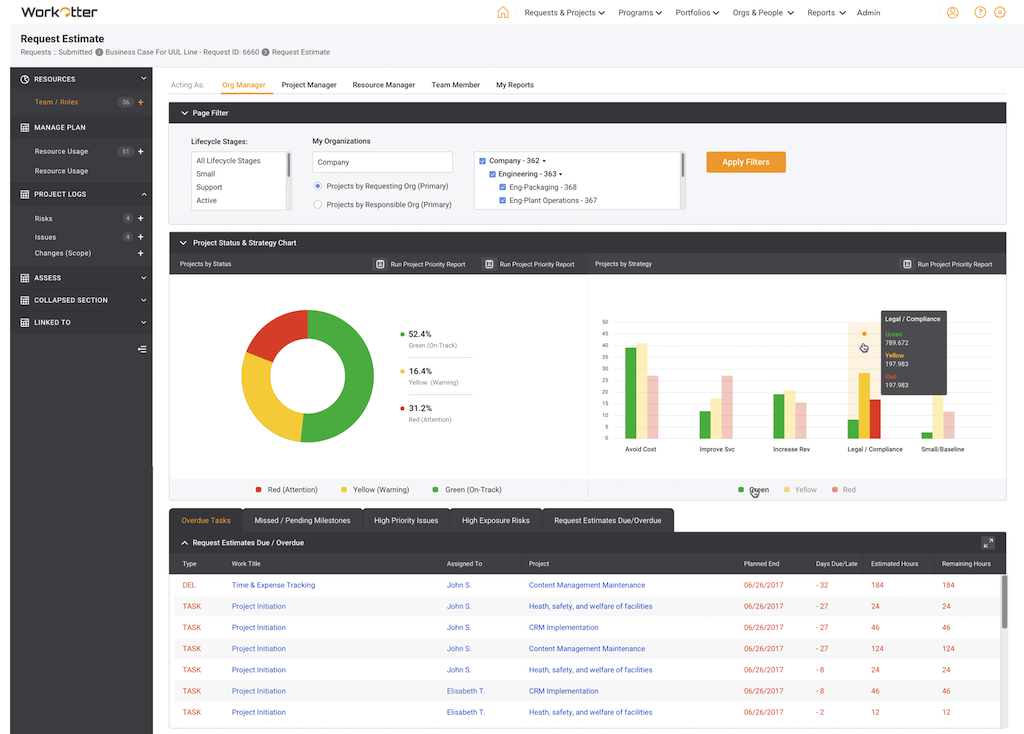    |