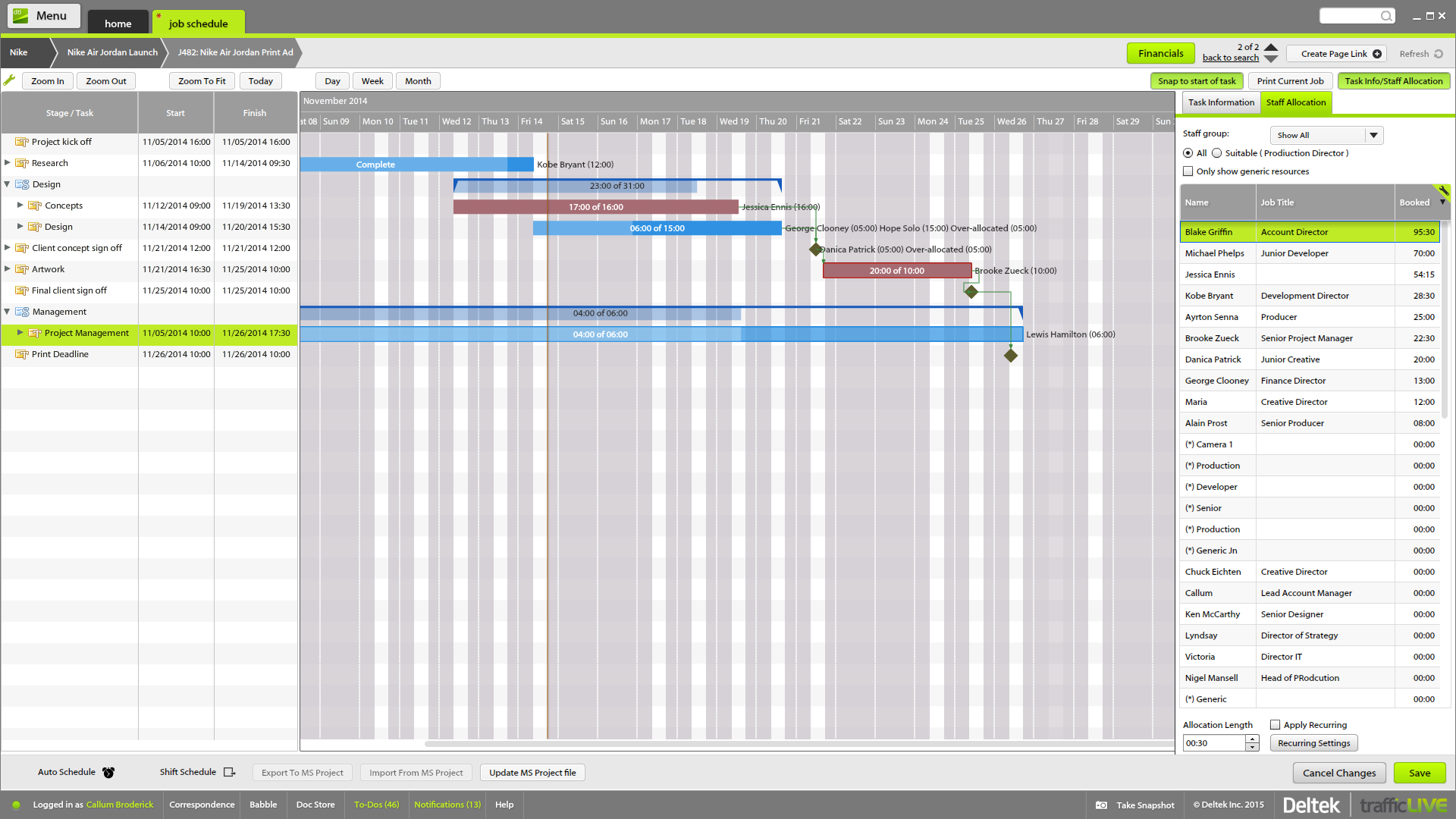
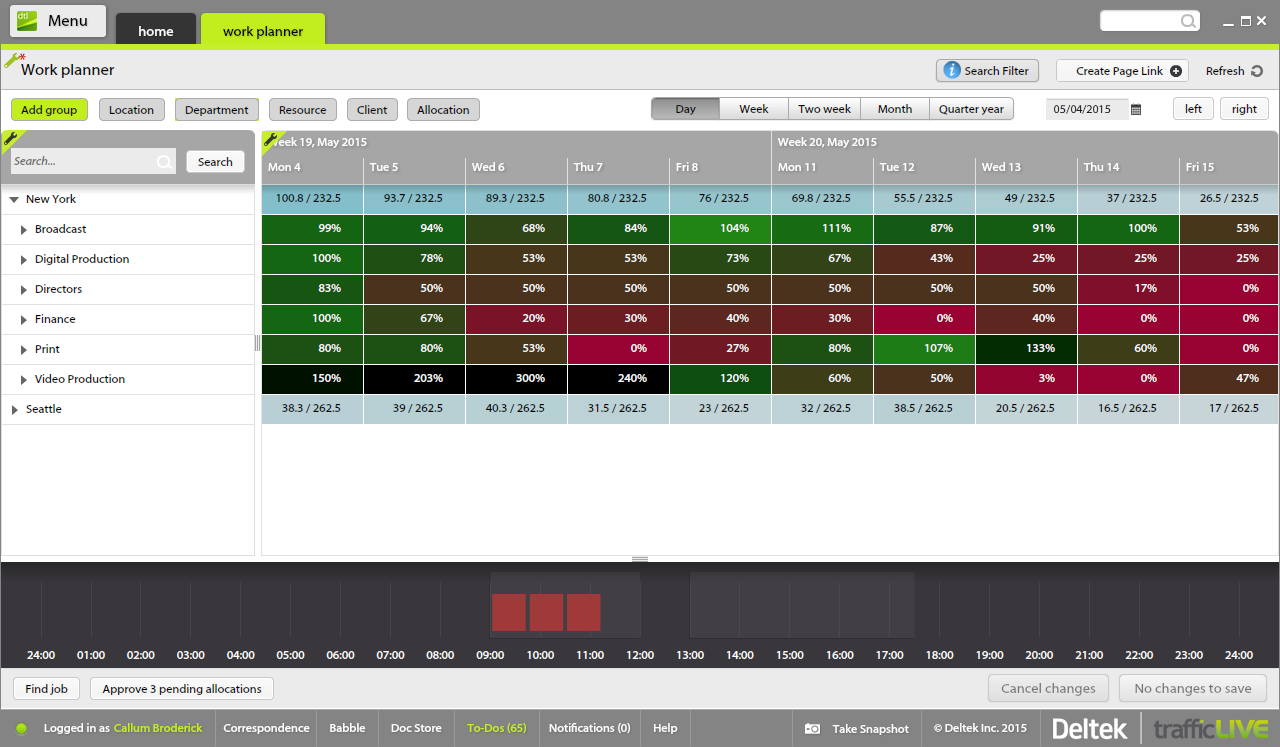
Deltek’s TrafficLIVE is a cloud-based agency management
software solution. The vendor says that the solution provides unmatched
visibility into an agency’s entire business; improves business processes and
drives efficiency that sets an agency up for success and increased
profitability. TrafficLIVE is designed to help agencies to be more connected,
productive and profitable. The vendor says that with TrafficLIVE agencies can start:
Attacking
Over…
N/A
Wrike
Score8.5 out of 10
Mid-Size Companies (51-1,000 employees)
Wrike is a project management and collaboration software. This solution connects tasks, discussions, and emails to the user’s project plan. Wrike is optimized for agile workflows and aims to help resolve data silos, poor visibility into work status, and missed deadlines and project failures.
$240
per year 2 users (minimum)
Pricing
Deltek TrafficLIVE
Wrike
Editions & Modules
No answers on this topic
Wrike Free
$0
per month per user
Wrike Team
$10
per month (billed annually) per user (2-15 users)
Wrike Business
$25
per month (billed annually) per user (5-200 users)
Apex
Request a quote
per month per user
Pinnacle
Request a quote
per month per user
Offerings
Pricing Offerings
Deltek TrafficLIVE
Wrike
Free Trial
No
Yes
Free/Freemium Version
No
Yes
Premium Consulting/Integration Services
Yes
Yes
Entry-level Setup Fee
Required
No setup fee
Additional Details
TrafficLIVE offers solutions for small to large agencies. Our prices range based on number of users and requirements.
Every premium plan begins with a 14-day trial period.
Traffic is suitable for most agencies, regardless of size. You don't need to use all of the features in order to get good results. And it can be linked to Maconomy which is useful for larger agencies. We have around 80 employees and it works great.
Wrike helped us stitch PMO-related activities under one umbrella. The easy collaboration with multiple access types, combined with security access definitions, helped users across the organization contribute according to their roles. This helped provide the organization with multiple items to be reviewed in a single tool. This saved time in weekly review meetings by avoiding switching between multiple tools & files.
A de minimis incentive was given to thank the reviewer for their time. The incentive was not used to bias or drive a particular response, nor was the incentive contingent on a positive endorsement. More Info
The time sheet area is really good - it's easy to drag and drop and fill in time sheets with allocated tasks quickly, which makes it more likely that people will actually do it!
It's invaluable to be able to see the time spent on different tasks across a job - both for keeping track of ongoing projects, but also to plan resourcing and costs for the next time.
It's useful to be able to mark parts of a job as 'complete' before the full job is finished - this makes it easier to track which tasks still have to be finished, and makes sure that people are tracking time to the correct task within the job.
Job templates are very useful to make sure the same set of tasks is added to each job automatically.
A de minimis incentive was given to thank the reviewer for their time. The incentive was not used to bias or drive a particular response, nor was the incentive contingent on a positive endorsement. More Info
A de minimis incentive was given to thank the reviewer for their time. The incentive was not used to bias or drive a particular response, nor was the incentive contingent on a positive endorsement. More Info
A de minimis incentive was given to thank the reviewer for their time. The incentive was not used to bias or drive a particular response, nor was the incentive contingent on a positive endorsement. More Info
I wish that Wrike had more drag and drop functionality that would be connected to assignee and also I wish that the finish date of a task would update to the date where you checked completed. It does not do that. Also finishing a task doesn't move the start date of the next task it "protects your time in that way", but our management team wants us to quickly see what we have down the pipeline rather than having to scroll down the list of upcoming tasks.
A de minimis incentive was given to thank the reviewer for their time. The incentive was not used to bias or drive a particular response, nor was the incentive contingent on a positive endorsement. More Info
We have project templates set up based on what job type is selected in our work request form. This helps save time by having specific tasks already on each job as it is opened. Then it's just a matter of scheduling the tasks based on the job request and current workload. As long as a due date is flexible, it's easy to shift specific due dates as needed.
A de minimis incentive was given to thank the reviewer for their time. The incentive was not used to bias or drive a particular response, nor was the incentive contingent on a positive endorsement. TR verified that a representative sample of customers was invited. More Info
Over two years of (almost) daily usage without outages. Don't remember any errors. I give it 9 only because some Wrike plugins (for online document edit) are based on NPAPI architecture. These types of plugins are being phased out in new browsers, and NPAPI plugins are disabled by default in recent versions of Chrome so you have to do some browser adjustments when you switch browsers or move to another computer.
Wrike tasks loads fine, but I hate clicking files and wait for a bit of time since it is powerpoint or word, Wrike assumes I want to open those on Wrike. My suggestion is to link it to office 365 so we do not need Wrike based decoder for PPTX and DOCX
A de minimis incentive was given to thank the reviewer for their time. The incentive was not used to bias or drive a particular response, nor was the incentive contingent on a positive endorsement. More Info
During my learning phase with Wrike, I initially struggled with setting up automation rules and request forms. However, Wrike support was always my go-to, resolving issues within seconds or minutes. Their assistance made the learning process much easier. My best experience was receiving step-by-step screenshots to follow, with the support team on standby until I was completely satisfied.
A de minimis incentive was given to thank the reviewer for their time. The incentive was not used to bias or drive a particular response, nor was the incentive contingent on a positive endorsement. More Info
A de minimis incentive was given to thank the reviewer for their time. The incentive was not used to bias or drive a particular response, nor was the incentive contingent on a positive endorsement. More Info
I love the Wrike training options. Wrike Discover has tons of courses, learning plans, certifications, etc. This is an area where Wrike definitely shines! I wish these resources were more in your face for new people, because it seems like a lot of coworkers didn't know all of this training was available to them.
A de minimis incentive was given to thank the reviewer for their time. The incentive was not used to bias or drive a particular response, nor was the incentive contingent on a positive endorsement. More Info
There are a lot of bells and whistles in Wrike, and not all of it is easy or intuitive to understand once it's plopped in your lap. It's easier when there are a few choice people who understand Wrike as a platform and articulate it in such a way where it makes it easy to pass it along to others in the group
Deltek TrafficLIVE was the pre-existing system when I joined the company. When we decided to purchase a new system, we considered a number of options such as Kimble PSA, Oracle NetSuite & Mavenlink. We decided to go ahead with Kimble PSA because we felt that as a package, it provided all the functionality we need against its competitors. It had far more functionality than TrafficLIVE and was more suited to the scale of our business.
A de minimis incentive was given to thank the reviewer for their time. The incentive was not used to bias or drive a particular response, nor was the incentive contingent on a positive endorsement. More Info
Jira did not at all help us get our work done as content creators. I think that was because Jira wasn't quite right for our uses. Wrike fits our needs so much better. I can't tell you enough the relief I felt when we adopted Wrike and I never had to use Jira again.
A de minimis incentive was given to thank the reviewer for their time. The incentive was not used to bias or drive a particular response, nor was the incentive contingent on a positive endorsement. More Info
A de minimis incentive was given to thank the reviewer for their time. The incentive was not used to bias or drive a particular response, nor was the incentive contingent on a positive endorsement. More Info
The sky is the limit for what can be done in Wrike. We started with 1 use case and within 5 months we migrated several key business practices over to Wrike because they were easier to manage. Use cases so far: process improvement, management review, corrective actions, maintenance requests, month-end financial closing, and document management. As we grow, it's easy to imagine putting even more into Wrike where it becomes a cornerstone for how we do business
A de minimis incentive was given to thank the reviewer for their time. The incentive was not used to bias or drive a particular response, nor was the incentive contingent on a positive endorsement. More Info
Much more clarity as to how much time each different type of brief should take to complete as we can back reference as to how long it took last season.
It has lead to better customer service. We can visibly demonstrate where we are with jobs and who has been assigned. In the past verbally confirming the different stages did not always convince the project leaders that they were being given the actual real time.
From the Studio users point of view it has empowered them to manage their time more efficiently. If they receive a request to move onto another job their calendars can be reviewed to see if they are available or not.
Different teams (e.g., contracting, compliance, provider relations) can view updates in real time, comment directly on tasks, and escalate items when needed.
Wrike allows us to template the contracting process (from intake to signature) to ensure consistency across payers and reduce administrative overhead.
Leadership can see the status of negotiations at a glance, identify bottlenecks, and prioritize resources accordingly.
A de minimis incentive was given to thank the reviewer for their time. The incentive was not used to bias or drive a particular response, nor was the incentive contingent on a positive endorsement. More Info