TrustRadius: an HG Insights company

Save this comparison

Save this comparison

Add Product

Recommended Comparisons

    Overview
    ProductRatingMost Used ByProduct SummaryStarting Price

    Trakstar Learn

    Score9 out of 10
    Mid-Size Companies (51-1,000 employees)
    Trakstar Learn (formerly Mindflash) is an online training platform. Users can create courses, add quizzes and track results. Users can upload external content and access the platform via mobile devices. It also provides user management and reporting for internal and external training and scaling purposes.

    $149

    per month

    WorkBright

    Score10 out of 10
    Mid-Size Companies (51-1,000 employees)
    WorkBright is a purpose-built I-9 compliance and E-Verify platform designed to help organizations maintain audit readiness, improve accuracy and efficiency, and confidently manage employment eligibility across complex, high-volume, and distributed workforces. The platform performs more than 150 automated compliance checks to identify and resolve errors before submission, supports all three Section 2 completion workflows, and features industry-first document verification…N/A
    Pricing
    Trakstar LearnWorkBright
    Editions & Modules
    Basic
    249/mo
    Advanced
    599/mo
    500 trainees
    Pro
    1,199/mo
    1000 trainees
    Enterprise
    Call for details
    Unlimited
    No answers on this topic
    Offerings
    Pricing Offerings
    Trakstar LearnWorkBright
    Free Trial
    YesNo
    Free/Freemium Version
    NoNo
    Premium Consulting/Integration Services
    NoNo
    Entry-level Setup FeeNo setup feeRequired
    Additional Details—Our pricing is based off the number of hires in a given contract year. All contracts are annual but can be billed on a monthly basis.
    More Pricing Information
    Community Pulse
    Trakstar LearnWorkBright
    Considered Both Products
    Mitratech
    No answer on this topic
    WorkBright
    No answer on this topic
    Key User Insights
    Would buy again
    No answers on this topic
    100%
    Would buy again
    6 Answers
    Delivers good value for the price
    No answers on this topic
    100%
    Delivers good value for the price
    6 Answers
    Happy with the feature set
    No answers on this topic
    100%
    Happy with the feature set
    6 Answers
    Lived up to sales and marketing promises
    No answers on this topic
    No answers on this topic
    Implementation went as expected
    No answers on this topic
    No answers on this topic
    Features
    Trakstar LearnWorkBright
    Learning Management
    Comparison of Learning Management features of Trakstar Learn and WorkBright
    Feature
    Trakstar Learn
    9.3
    4 Ratings
    12% above category average
    WorkBright
    -
    Ratings
    Course authoring10.04 Ratings00 Ratings
    Course catalog or library10.04 Ratings00 Ratings
    Player/Portal9.04 Ratings00 Ratings
    Learning content9.03 Ratings00 Ratings
    Mobile friendly5.03 Ratings00 Ratings
    Progress tracking & certifications10.04 Ratings00 Ratings
    Assignments10.04 Ratings00 Ratings
    Compliance management10.02 Ratings00 Ratings
    Learning administration10.04 Ratings00 Ratings
    Learning reporting & analytics10.04 Ratings00 Ratings
    Best Alternatives
    Trakstar LearnWorkBright
    Small Businesses
    Tovuti LMS
    Score6.7 out of 10
    No answers on this topic
    Medium-sized Companies
    iSpring LMS
    Score9.6 out of 10
    No answers on this topic
    Enterprises
    Bridge LMS, Skills & Performance Management
    Score7.4 out of 10
    No answers on this topic
    All AlternativesView all alternativesView all alternatives
    User Ratings
    Trakstar LearnWorkBright
    Likelihood to Recommend
    10.0
    (13 ratings)
    9.7
    (6 ratings)
    Likelihood to Renew
    10.0
    (5 ratings)
    -
    (0 ratings)
    Usability
    9.0
    (1 ratings)
    -
    (0 ratings)
    Support Rating
    10.0
    (2 ratings)
    -
    (0 ratings)
    Implementation Rating
    9.0
    (1 ratings)
    -
    (0 ratings)
    User Testimonials
    Trakstar LearnWorkBright
    Likelihood to Recommend
    Mitratech
    We use Mindflash for a lot of our internal training needs, and it is very versatile to accomplish your needs in training employees in a variety of different areas. I've never tried to use it for external needs, but I feel like the software at the advanced level wouldn't suit that need very well at all. At the Pro level, you get a lot more flexibility, but the cost is prohibitive for the size of our company.
    Incentivized
    Read full review
    WorkBright
    Workbright is well suited because of the following reasons: 1. Data transmission between browser and application is highly encrypted 2. Bank grade data encryption for maximum security 3. Data is backed up at various locations 4. Database security is maintained to the highest standards with Engineers 5. Automated reminders and user correction error flow system
    Incentivized
    Read full review
    Pros
    Mitratech
    • Mindflash is very clean and user-friendly. Very easy for learners to navigate and understand.
    • Mindflash’s reporting tool is unmatched. You can pull any type of report you could want or need.
    • Customer service is top-notch. From our Sales Executive to our CSM, all the way up to the VP, our experience has been amazing.
    Incentivized
    Read full review
    WorkBright
    • Being able to share candidate information with other supervisors or team members and others involved in the hiring process.
    • The convenience of filling in new employee hiring forms.
    • Create groups, organize all paperwork and send to employees with just one click.
    Incentivized
    Read full review
    Cons
    Mitratech
    • Integration with Salesforce using professional level software. Mindflash's limited integration to only work with the higher level of Salesforce product.
    • More brand customization for multiple product line trainings.
    • Communication of trainers using Mindflash and sales team. We have multiple trainers sending invitations for training with no way for them to communicate with our sales team when a person has completed training.
    Read full review
    WorkBright
    • Onboarding Paperwork - It would be great if there was only one website we had to log into. For example, I have to log into one to send paperwork, and then log into another domain to check the paperwork sent.
    • Note Timeline - Anytime any application is touched, viewed, etc. a note is made. We also utilize the note feature to communicate about each applicant. However, it gets quite messy when their are over 40 notes and you are not able to sort or organize them.
    • Attachments - Can't attach items in notes, would be nice feature for attaching images, snippets, pdfs, etc.
    Incentivized
    Read full review
    Likelihood to Renew
    Mitratech
    The number of people using Mindflash is only going to rise and we need a system that remains easy to use for everyone involved. [update] This is especially vital now that we've lost head count in critical departments. Getting all of our training and Safety objectives met would be impossible without Mindflash.
    Read full review
    WorkBright
    No answers on this topic
    Usability
    Mitratech
    The interface is just so simple to understand. It's clean and efficient. We showed Mindflash off to the Safety group, who are not computer gurus and they were beyong excited to use it.
    Read full review
    WorkBright
    No answers on this topic
    Support Rating
    Mitratech
    Any problems or questions we have had with Mindflash have been handled promptly and effectively. I normally use the online chat option but have had to correspond with them through email and phone as well. We have never had an issue languish for weeks or months with Mindflash. They either fix the problem or let you know that the software isn't capable to handle the need at that point.
    Incentivized
    Read full review
    WorkBright
    No answers on this topic
    Implementation Rating
    Mitratech
    If you're going to develop a short course to demo the product internally, don't bother avoiding your own topics. Mindflash rolls whatever content you create during the trial into your production environment when you decide to buy. The time taken to go from not having a system to being live with Mindflash is virtually instant. What you'll be wanting for is time to develop content and people to test it out.
    Read full review
    WorkBright
    No answers on this topic
    Alternatives Considered
    Mitratech
    This is an alternate software that we have looked into, right now we don't have the need for the increased flexibility that Lesson.ly provides with learning from your mobile or tablet. We haven't seen a lot of those things as particularly useful for our current training methods, but we see the quality to be similar.
    Incentivized
    Read full review
    WorkBright
    WorkBright was selected as the primary HR software within our company. One of the main reasons it was selected is the intuitive user interface and dashboard. Additionally, the software had excellent features for the cost such as custom reporting, notifications, enhanced security, and training. WorkBright offered many features that other HR software in the same price range did not.
    Incentivized
    Read full review
    Return on Investment
    Mitratech
    • Mindflash has had a positive impact on our business because it allows us to train more new users with less effort, and ensure that trainees have access to the course materials for a period of time after they have started using our software to do their daily jobs. Review of the course materials allows them to get answers to common questions without having to submit requests to our support team, thereby reducing the administrative burden on our resources.
    Incentivized
    Read full review
    WorkBright
    • Huge return on investment in terms of time needed to circulate new openings nationally.
    • Very positive impact on speed with which interviewer can contact prospective employees.
    • Outstanding onboarding for new employees. Tick 5 boxes and all info is emailed directly to the new employee.
    • Very challenging build process that took many weeks to fully integrate.
    Incentivized
    Read full review
    ScreenShots

    Trakstar Learn Screenshots

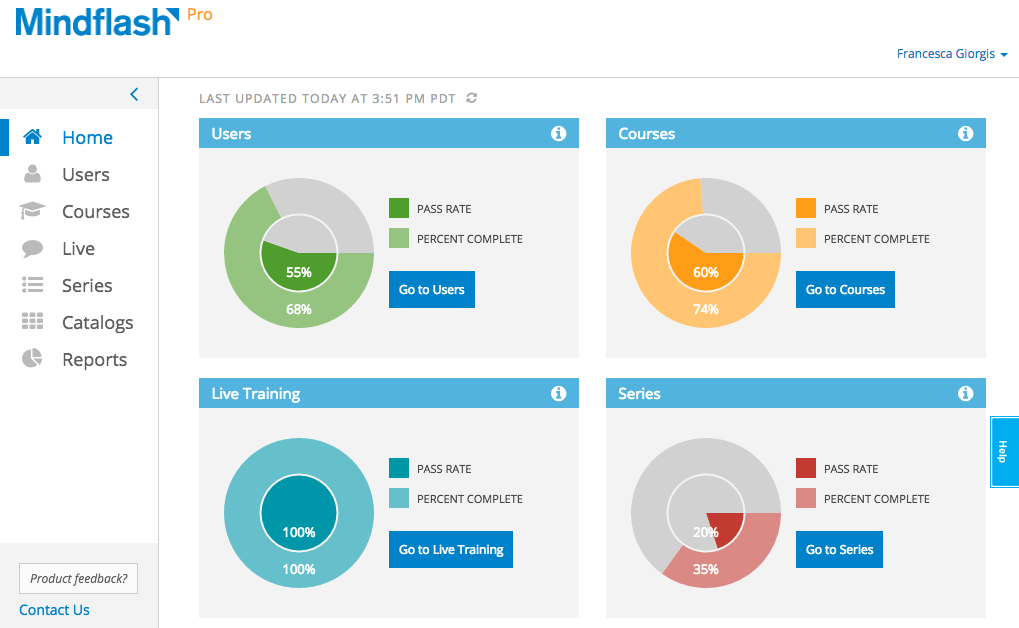
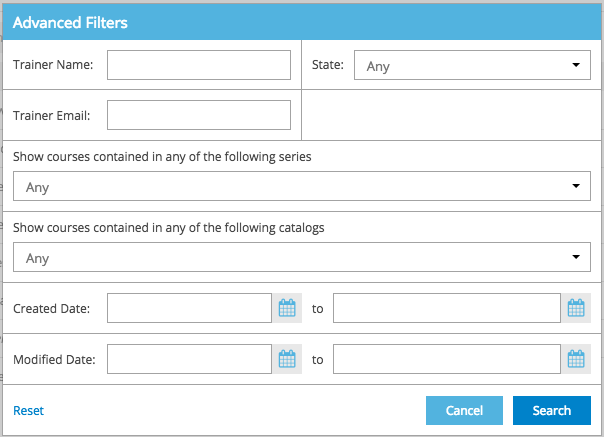
    Screenshot of Trainer home - Get key information on how a program is doing with real-time graphs on the new Trainer Home. From here, viewers can dive into the details on users, courses and series using the convenient and persistent left navigation bar.Screenshot of Personalize the view - On every grid, the settings cog can be used to select the columns to view. This will be the new view even when logging in from a different computer. To maximize the content, collapse the left navigation bar to reveal just the icons.Screenshot of Filters - Advanced filters on users, courses, series and catalogs help get to just the list of items to focus on.Change, reset or keep these filters while moving across items.Screenshot of Bulk Actions - Once the list is filtered down to just the trainees to focus on, a couple of clicks a couple of clicks are required to take actions like setting a new deadline, reminding or dropping users.Screenshot of Export - Extract the whole list or the filtered list of trainees to Excel for further analysis.Screenshot of Trainer Photo - Take a photo in Mindflash and use it as a trainer photo.

    WorkBright Screenshots

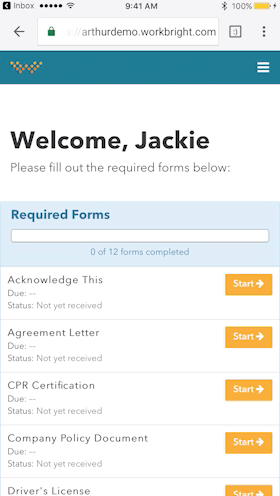
    Screenshot of Works on any Device - Not just ‘mobile friendly’ but mobile FIRST! Designed to complete all forms quickly and efficiently from any smart enabled device.Screenshot of Automatic Reminders - Reminders are automatically sent out to employees who have not completed their forms with increasing urgency and frequency.Screenshot of Fingertip Signature - Best in class eSignatures allows employees to sign forms with their fingers on mobile devices including timestamp and IP address.